
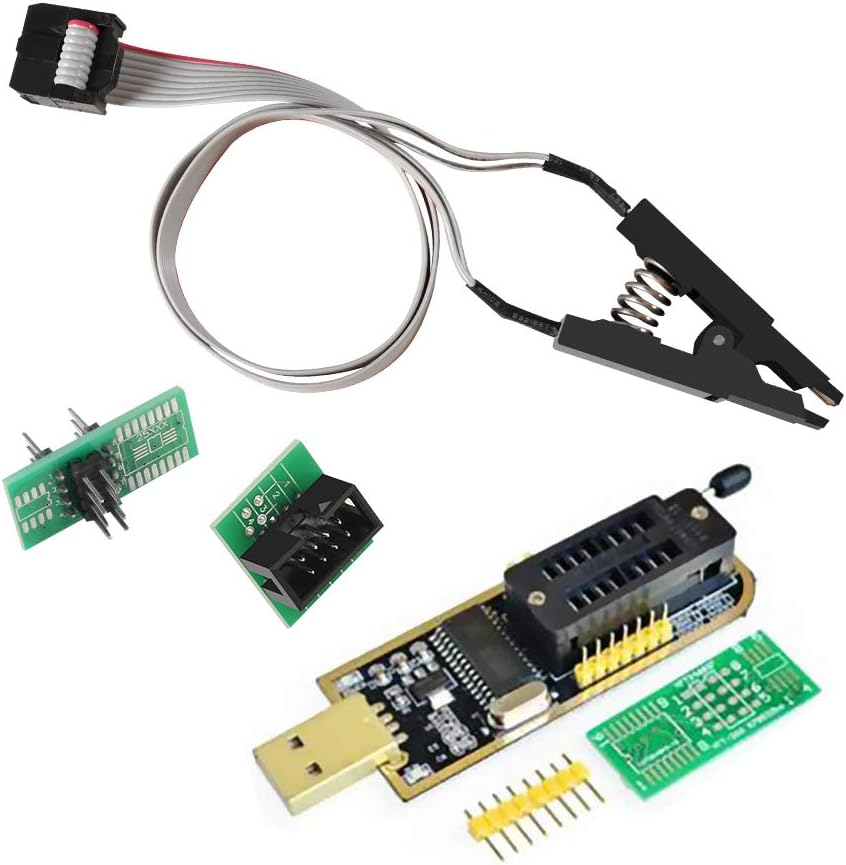
WWZMDiB CH341A EEPROM BIOS Programmer
4.1Editor score
Supports 24 25 series chips
Includes SOIC8 SOP8 clip
No welding required for use
This guide compares the top ten bios flash tools for programmers and technicians, focusing on speed compatibility and ease of use for various chip types.
Choosing the right bios flash tool is essential for technicians and hobbyists who need to update firmware on motherboards and electronic devices. A reliable programmer ensures that you can read, write, and erase chips without damaging the hardware during the process.
We evaluated ten popular options based on their compatibility with common chip series, ease of use, and reported reliability by users. This list includes hardware programmers and bootable recovery kits that assist with system access and firmware management tasks.
Each pick highlights key capabilities and limitations so you can find a solution that matches your specific repair or development needs. Please note that product availability and pricing may change over time as manufacturers update their offerings.
4.1Editor score
4.4Editor score

4.3Editor score
The following table provides a side-by-side overview of the top ten products selected for their functionality and user feedback regarding bios flashing tasks.





This programmer offers a solid entry point for users needing to backup or program EEPROM chips without breaking the bank. It supports common 24 and 25 series chips and comes with clips to avoid soldering during basic tasks.
We may earn a commission when you buy through this link, at no additional cost to you.
The device uses the CH341A chip which is widely supported by open-source software for flashing BIOS or firmware data. Users appreciate the included SOP8 and SOP16 plates which help connect to various chip layouts securely.
While effective for simple tasks, you must confirm voltage levels before applying power to avoid damaging sensitive components. Some users note that peripheral circuits on motherboards can interfere with in-circuit programming in certain scenarios.
It is a suitable choice for hobbyists or beginners who need a basic tool for reading and writing standard flash chips. With proper precautions regarding voltage and chip placement, it delivers reliable performance for the price.
The included test clip allows direct clamping on chips making it easier to perform in-circuit programming without removing components from the board.
Supports most 24 and 25 series SOP8 and SOP16 chips which covers a large portion of common BIOS and memory chips found in consumer electronics.
We may earn a commission when you buy through this link, at no additional cost to you.
This kit stands out by including both the programmer and necessary clips to facilitate efficient BIOS flashing directly on the circuit board. It supports a wide range of EEPROM series and simplifies the workflow for technicians.
We may earn a commission when you buy through this link, at no additional cost to you.
The SOP8 clip allows users to program chips without disassembling them which saves time during repair jobs. The included CH341A programmer is capable of backing up erasing and programming various software on supported chips.
Users should be aware that some chips like ESMT SST class 25 may only be readable with this hardware setup. Additionally checking chip locations is crucial as peripheral circuits can sometimes interfere with direct clipping.
Ideal for repair shops or enthusiasts needing a complete solution for common flash chips this package balances cost and functionality well. It remains a top contender for those prioritizing speed and ease of use in standard repairs.
You receive the programmer module along with test clips so there is no need to source additional adapters for basic 24 and 25 series chip work.
The test clip design enables you to clamp directly onto the chip pins reducing the risk of damage during removal and reinstallation processes.
We may earn a commission when you buy through this link, at no additional cost to you.
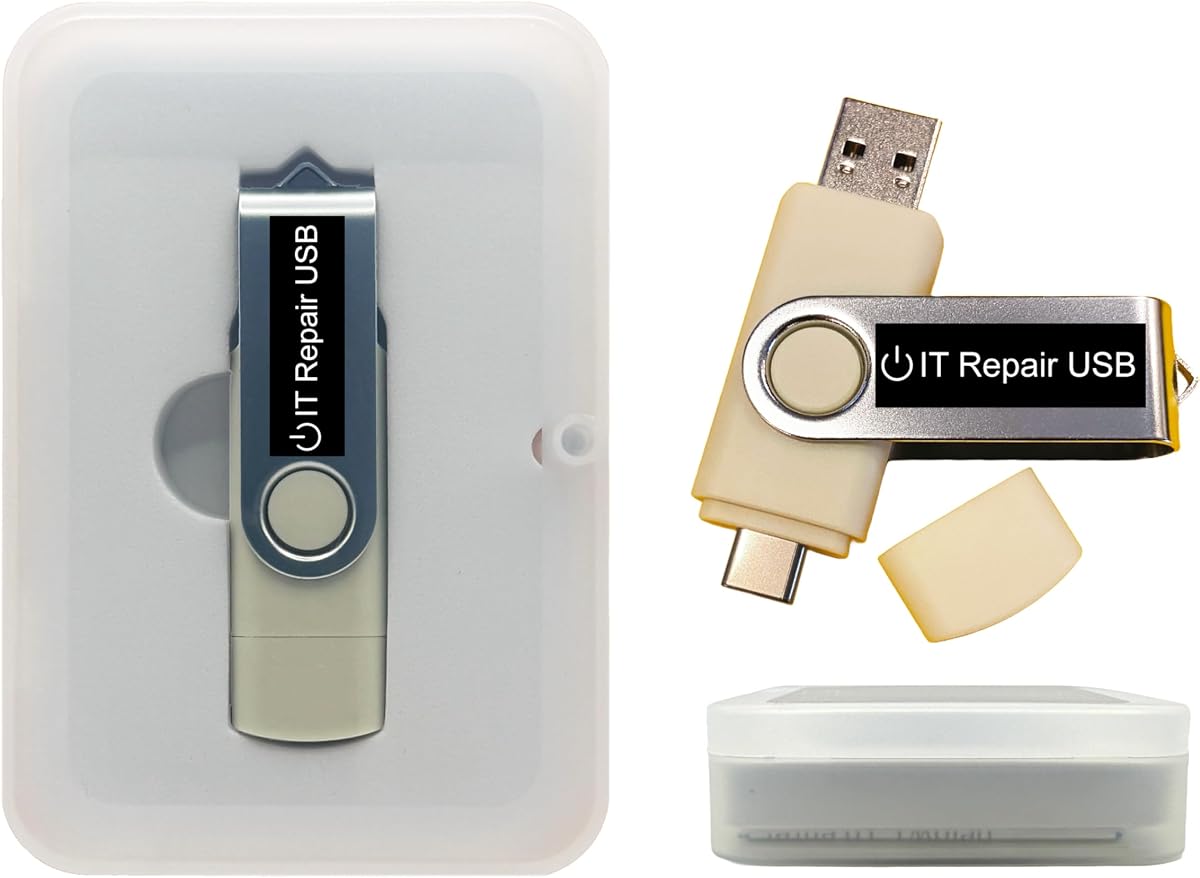
This bootable drive helps administrators and users regain access to locked systems by resetting passwords without reinstalling the operating system. It supports a broad range of Windows and Linux distributions for flexible recovery options.
We may earn a commission when you buy through this link, at no additional cost to you.
The drive features dual USB-A and USB-C connectors making it compatible with nearly all laptops desktops and servers. Its interface provides step-by-step guidance so even those with limited technical knowledge can use it safely.
While excellent for account recovery it does not fix hardware failures or BIOS corruption directly. Users should verify their computer can boot from USB before relying on it for critical access restoration tasks.
Best suited for IT professionals or home users dealing with locked accounts this tool offers a straightforward way to restore system access quickly. It is a valuable addition to any repair toolkit focused on software recovery.
Compatible with versions from Windows 2000 to 11 and most Linux distributions ensuring it works on older machines as well as modern ones.
The tool operates offline with clear on-screen instructions reducing the risk of user error during the password reset process.
We may earn a commission when you buy through this link, at no additional cost to you.
This USB drive simplifies Windows installation by removing TPM requirements and supporting both UEFI and Legacy boot modes. It is designed for users who need to install or repair the operating system on compatible PCs.
We may earn a commission when you buy through this link, at no additional cost to you.
The product is hand-tested and focuses on providing a reliable installer that boots easily on systems that might struggle with official media. It avoids the hassle of creating your own bootable media from scratch.
Please note that this tool only reinstalls the operating system and cannot fix failing hardware like bad RAM or dead motherboards. Users must ensure their PC can power on and enter the boot menu to use this effectively.
Ideal for rebuilding systems or upgrading to Windows 11 without TPM constraints this drive offers a convenient path for OS recovery. It serves well for those who have a license but lack a proper installation medium.
Removes the requirement for a Trusted Platform Module allowing installation on older hardware that otherwise would not support the latest Windows versions.
Compatible with both UEFI and Legacy BIOS modes ensuring it works across a wide range of desktop and laptop configurations.
We may earn a commission when you buy through this link, at no additional cost to you.
This kit enhances basic CH341A functionality by adding an adapter for 1.8V chips and a converter for DIP8 sockets. It is tailored for amateurs and hobbyists working with a variety of flash memory packages.
We may earn a commission when you buy through this link, at no additional cost to you.
Programming speed is reported to be faster than standard ATMega tools allowing quicker read and write cycles for common chips. The package includes multiple adapters to handle different physical chip layouts and voltage requirements.
While versatile users must be cautious about peripheral circuits that can affect in-circuit programming. It often works best when chips are removed from the board for reliable results in complex setups.
A strong choice for those needing to handle 1.8V or DIP8 variants without buying separate components this kit provides good value. It expands the usability of the basic programmer significantly for diverse repair tasks.
The included adapter allows safe programming of lower voltage chips which are common in modern mobile devices and laptops.
Reports indicate erasing speeds up to 2-3 Mbit per minute which improves efficiency during bulk operations.
We may earn a commission when you buy through this link, at no additional cost to you.
This tool is marketed as the fastest BIOS chip programmer available featuring quick read and write times for 25 series chips. It automates several steps like chip model identification and voltage selection to reduce user error.
We may earn a commission when you buy through this link, at no additional cost to you.
The package includes a full set of adapters covering most common chip types and pinouts. This reduces the need to buy additional hardware for different device types and simplifies the repair workflow.
While 25 series chips benefit from auto detection users may need to manually select settings for 24 93 and 95 series. Despite this minor step the speed and convenience make it a strong premium option.
Recommended for professionals who need reliable performance and speed for frequent flashing tasks this unit balances automation with broad compatibility. It is a robust choice for those demanding efficiency in a workshop environment.
The device automatically identifies the chip model and selects supply voltage saving time and reducing the risk of incorrect settings.
Includes 15 adapters to support a wide range of packages ensuring you can handle most devices without extra purchases.
We may earn a commission when you buy through this link, at no additional cost to you.
This toolkit provides a customizable recovery drive that can run diagnostics remove malware and recover files without modifying the main installation. It supports both Legacy and UEFI modes for broad compatibility with older and newer machines.
We may earn a commission when you buy through this link, at no additional cost to you.
The drive allows users to add or replace ISO apps and utilities making it adaptable for specific repair needs. Its user-friendly interface guides technicians and power users through common system restoration steps.
While powerful for software issues it cannot resolve hardware failures directly. Users should verify that their systems support booting from USB to utilize the full range of tools provided in the package.
Best for IT resellers or repair professionals needing a versatile rescue environment this drive offers flexibility and convenience. It serves as a comprehensive base for troubleshooting unbootable Windows systems effectively.
Easily add or replace bootable applications and utilities to tailor the toolkit to your specific repair requirements.
Run diagnostics or use the tools directly from the USB without installing anything on the host computer for safe testing.
We may earn a commission when you buy through this link, at no additional cost to you.
This clip facilitates easier access to SOP16 chips which are common in certain BIOS and controller configurations. It includes an adapter to convert SOP16 to DIP16 for use with standard programming sockets.
We may earn a commission when you buy through this link, at no additional cost to you.
The clip is hardened with a thick gold-plated layer to ensure stable electrical contact during programming. A 40cm connection line provides flexibility in positioning the clip away from the programmer unit.
Users should note that in-circuit programming may fail if peripheral circuits interfere with the chip signals. In such cases removing the chip for offline programming becomes the necessary alternative.
Useful for technicians dealing with devices that use 16-pin packages this clip adds a simple but effective accessory to a programmer kit. It helps expand the range of devices you can service without desoldering.
Thick gold plating on pins ensures a durable and stable connection reducing the risk of data corruption during transfers.
The longer cable offers better reach and flexibility allowing you to position the clip comfortably during complex repairs.
We may earn a commission when you buy through this link, at no additional cost to you.
This recovery tool stands out by supporting Secure Boot out of the box eliminating the need to change BIOS settings. It downloads genuine Windows files directly from Microsoft to ensure you get the latest official versions.
We may earn a commission when you buy through this link, at no additional cost to you.
The service offers US-based human support which can be reassuring for users facing complex system issues. Its on-screen instructions simplify the installation process so you can reinstall or recover your system with confidence.
It is important to note that this tool only supports UEFI BIOS and 64-bit systems so it may not work on older machines. You will need your own valid Windows product key to activate the installed operating system.
Ideal for modern PCs that need a reliable recovery method without dealing with Secure Boot restrictions this tool provides peace of mind. It is a clean and official way to reinstall Windows without relying on unofficial images.
Unlike many recovery drives this one works even when Secure Boot is enabled so you do not need to disable it in BIOS.
Windows files are downloaded directly from Microsoft ensuring you receive an authentic and up-to-date installation without piracy risks.
We may earn a commission when you buy through this link, at no additional cost to you.
This drive provides a ready-to-run security platform with over 600 pre-installed tools for penetration testing and forensic analysis. It supports both Legacy and UEFI boot modes and offers builds for Intel AMD and ARM systems.
We may earn a commission when you buy through this link, at no additional cost to you.
Users can run Kali directly from the USB or install it for better performance depending on their needs. The drive is fully customizable allowing you to add or replace utilities to suit specific security scenarios.
While powerful this tool is specialized for ethical hacking and security research rather than general repair tasks. It requires a level of technical knowledge to interpret the tools outputs effectively.
Best for security researchers or IT professionals needing a portable security audit solution this USB offers immediate access to professional-grade software. It serves as a comprehensive toolkit for network and wireless auditing.
Includes hundreds of tools for network web and wireless auditing so you have everything needed for thorough security analysis.
Available in amd64 and arm64 builds ensuring compatibility with standard PCs and some ARM-based hardware configurations.
We may earn a commission when you buy through this link, at no additional cost to you.
Selecting the right tool depends on the types of chips you work with and the level of automation you need.
Ensure the programmer supports the specific series of chips you encounter most such as 24 25 or 93. Some tools focus on 25 series while others include 24 or 93 for broader use.
Check the product specs for supported series before purchasing to avoid needing additional hardware later.
In-circuit programming allows you to flash chips without removing them from the board. This requires clips that fit your chip type and may need to account for peripheral circuit interference.
If you often work with installed chips verify that the tool supports direct clamping and has good clip quality.
Chips operate at different voltages such as 1.8V 3.3V or 5V. Using the wrong voltage can damage components so ensure the programmer offers voltage switching or adapters.
Look for models that include adapters for 1.8V chips if you work with modern laptops or mobile devices.
A complete kit often includes clips and adapter plates for various pin counts and packages. This reduces the need for extra purchases and makes the tool ready for diverse tasks.
Confirm that the package includes the clips and plates you need for the physical chip layouts you handle.
Some higher-end tools offer automatic chip detection and voltage selection which simplifies the workflow. This reduces the chance of user error during complex operations.
If you prefer a streamlined process consider models that identify chips automatically to speed up setup.
Most programmers require PC software to run. Check that the tool works with your operating system and that the software is accessible and well-documented.
Open-source support can be a plus for users who want flexibility in their tooling.
The physical build of clips and connectors matters for reliable contact. Look for gold-plated pins and hardened clips that can withstand repeated use without loosening.
A sturdy build ensures consistent performance and reduces the risk of intermittent connection issues.
Consider whether you need a basic programmer for hobbyist projects or a professional tool for frequent repairs. Basic models are affordable while premium tools offer speed and automation.
Align your choice with your workflow frequency to ensure you get the best value for your needs.
Before connecting any chip always verify the voltage level required by the component. Set the programmer accordingly and double-check that the chip matches the supported series in your tool's manual.
Use clips carefully to ensure all pins connect securely without bending them. For in-circuit work ensure there are no power conflicts on the board that could interfere with the programming signals.
Store your clips and adapters in a dry place to prevent oxidation on contacts. Regularly inspect the connection cables for wear to maintain stable data transfers during operations.
A bios flash tool allows you to read write or erase firmware stored on chips. It is used to update system firmware repair corrupted data or backup existing configurations before changes.
Not always. Many tools support in-circuit programming which lets you flash the chip while it is still on the board. However some setups may require removal if peripheral circuits interfere.
Most tools cover common 24 and 25 series chips found in many laptops but compatibility depends on the specific chip model. Check your board's chip type before selecting a tool to ensure support.
Yes typically you need to connect the programmer to a PC and use compatible software to send commands. Some models support open-source tools while others come with proprietary utilities.
Try reinstalling the drivers or checking the USB port. Ensure the chip is properly seated in the clip and that the correct voltage is selected for the component.
Always power off the device before connecting clips and verify voltage settings to prevent damage. Use anti-static measures when handling sensitive chips to avoid electrical discharge.
This guide covered ten tools ranging from budget programmers to specialized recovery kits. Each offers distinct advantages depending on your focus on speed compatibility or specific system recovery needs.
Prioritize models that support the chip series you encounter most often and include necessary clips. For professionals speed and automation can save significant time over manual operations.
Prices and availability may change so check current listings before purchasing to ensure you get the best deal for your workflow. A well-chosen tool can make your repair and update tasks smoother.