
LG 24U411A-B
4.5Editor score
120Hz refresh rate
Full HD IPS panel
Slim bezel design
Finding a display that remains clear under direct sun is essential for outdoor work. Bright sunlight PC monitors offer high brightness levels to combat glare effectively. These screens ensure visibility even in harsh lighting conditions.
We compared ten top models based on brightness, color accuracy, and connectivity. Each product was evaluated for its ability to perform in sunlit environments. Our analysis helps you choose the right screen for your needs.
Each pick highlights specific strengths like portability, resolution, and build quality. Prices vary depending on features and size so check current deals. This list covers options for photographers and travelers alike.
4.5Editor score
4.8Editor score

4.2Editor score
As an Amazon Associate we earn from qualifying purchases.
This side-by-side comparison highlights key specs for each model. Look at brightness, resolution, and refresh rates to find your match.




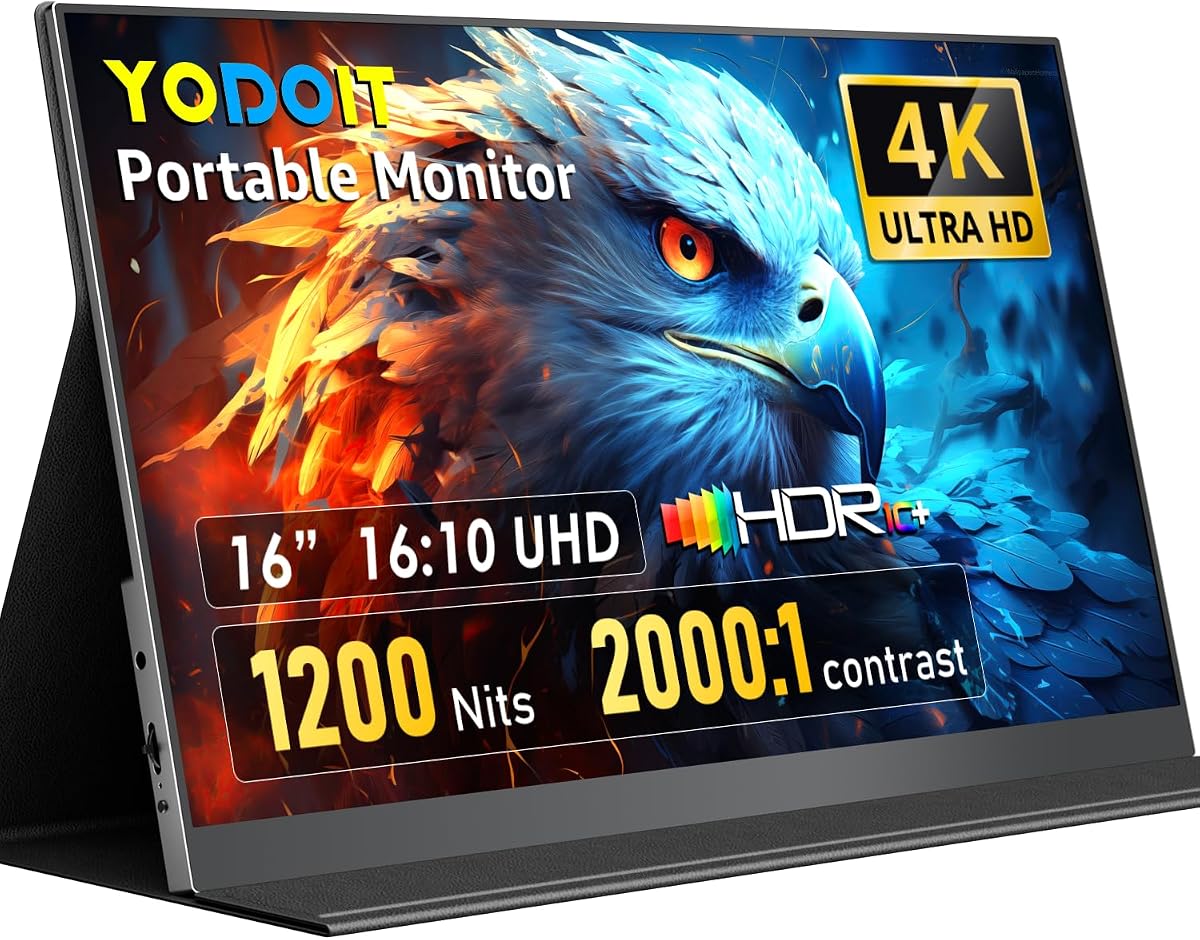
This portable monitor stands out with 1200 nits brightness making it ideal for outdoor work. It features 4K resolution and excellent color accuracy for professionals on the go.
We may earn a commission when you buy through this link, at no additional cost to you.
The IPS panel provides wide viewing angles while the matte finish eliminates glare. Connectivity includes USB-C and mini HDMI for versatile device support.
You may need to connect an external power adapter for full brightness. The mini HDMI port also requires a separate power cable to function properly.
Photographers and digital nomads will appreciate the true 4K canvas and compact size. It is a top choice for those needing a bright portable screen.
With 1200 nits brightness it handles direct sunlight much better than standard portable monitors.
The 145% sRGB coverage ensures accurate colors for photo editing and color grading tasks.
We may earn a commission when you buy through this link, at no additional cost to you.
This Dell monitor offers smooth motion with a 144Hz refresh rate and 1ms response time. It is designed for eye comfort with TUV certification.
We may earn a commission when you buy through this link, at no additional cost to you.
The IPS panel delivers consistent colors across wide viewing angles. Its slim bezels enhance the viewing experience for multitasking setups.
It may not be bright enough for direct sunlight use. The FHD resolution is standard for office work but not for high detail tasks.
Ideal for office workers or casual gamers who need reliability and comfort. It fits well in a professional desk setup.
TUV Rheinland 3-star certification helps reduce blue light while keeping colors accurate.
The 144Hz refresh rate ensures fluid motion for work and gaming.
We may earn a commission when you buy through this link, at no additional cost to you.
This 27 inch 4K monitor delivers vibrant visuals and smooth motion up to 120Hz. ComfortView Plus reduces blue light for all-day comfort.
We may earn a commission when you buy through this link, at no additional cost to you.
The HDR readiness and deep contrast provide great depth for media. Re-engineered audio adds to the immersive experience.
Its brightness is optimized for indoor use rather than direct sunlight. The design focuses on a clean look for modern workspaces.
Great for home entertainment and professional work needing screen real estate. A solid pick for those wanting crisp 4K clarity.
The 27 inch 4K canvas gives you more space for multitasking windows.
HDR readiness and high contrast make movies look more vivid.
We may earn a commission when you buy through this link, at no additional cost to you.
This model offers extensive adjustability with height tilt pivot and swivel options. It includes dual speakers for audio without extra devices.
We may earn a commission when you buy through this link, at no additional cost to you.
TUV eye comfort certification and AMD FreeSync enhance user experience. The design supports long work hours with minimal strain.
It lacks high brightness needed for outdoor or sunlight scenarios. The FHD resolution is suitable for general tasks but not for creative work.
Best for office users who need a flexible setup and good ergonomics. It is a reliable monitor for daily productivity tasks.
Height and pivot adjustments let you find a comfortable viewing position.
Integrated speakers save desk space by removing the need for external units.
We may earn a commission when you buy through this link, at no additional cost to you.
This LG monitor features a 120Hz refresh rate and slim bezels for a seamless look. HDR10 support adds depth to compatible content.
We may earn a commission when you buy through this link, at no additional cost to you.
The IPS panel delivers rich colors with up to 99% sRGB coverage. Reader mode and flicker safe features help reduce eye strain.
It is not designed for high brightness outdoor conditions. The FHD resolution is a limitation for tasks needing extreme detail.
A great option for budget conscious buyers needing a modern home office monitor. It balances performance and cost effectively.
With 99% sRGB you get accurate colors for daily tasks.
The 120Hz refresh rate keeps action scenes and gameplay smooth.
We may earn a commission when you buy through this link, at no additional cost to you.
This 27 inch monitor offers a zero-frame design for a modern look. Adaptive-Sync support ensures smooth visuals during gaming or playback.
We may earn a commission when you buy through this link, at no additional cost to you.
The 1ms response time reduces motion blur for clear action. Its size provides ample space for spreadsheets and documents.
It is not suitable for bright sunlight environments due to lower brightness. The resolution is standard which limits detail for design work.
Ideal for office users needing a large screen for multitasking. It delivers solid performance at an affordable price point.
The bezel-free look maximizes screen area for a cleaner setup.
FreeSync compatible ensures smooth playback for video and games.
We may earn a commission when you buy through this link, at no additional cost to you.
This 32 inch QHD monitor offers vibrant colors and a sleek bezel less design. USB-C allows simple device connection and charging.
We may earn a commission when you buy through this link, at no additional cost to you.
Dynamic Action Sync helps reduce input lag for responsiveness. The 99% sRGB coverage ensures accurate color reproduction for tasks.
It is not intended for use in direct sunlight conditions. The size and resolution may require scaling for some applications.
Perfect for creators and professionals needing a large workspace. It combines high resolution with modern connectivity options.
One cable handles video and power for a cleaner desktop.
99% sRGB coverage delivers true to life images.
We may earn a commission when you buy through this link, at no additional cost to you.
This monitor delivers depth with QHD resolution and smooth motion. It includes dual speakers for immersive audio and full stand adjustments.
We may earn a commission when you buy through this link, at no additional cost to you.
The TUV certification reduces blue light for long sessions. Its design matches well with modern workspaces and aesthetics.
It is not bright enough for outdoor environments or sunlight. The price reflects its high-end features and build quality.
Best for professionals who need detailed visuals and ergonomic comfort. It supports a high quality desk setup effectively.
The 2560×1440 resolution provides sharp detail for text and images.
Height pivot and tilt help you find a comfortable position.
We may earn a commission when you buy through this link, at no additional cost to you.
This 23.8 inch monitor offers a zero-frame design for a clean look. Adaptive-Sync support ensures smooth visuals during gaming and work.
We may earn a commission when you buy through this link, at no additional cost to you.
The 1ms response time reduces motion blur effectively. It fits well in smaller workspaces or home desks.
It is not suitable for outdoor use due to lower brightness. The size is compact which may limit multitasking space.
Ideal for users needing a simple and reliable compact monitor. It delivers good performance for daily tasks and gaming.
The small size saves desk space while keeping visuals sharp.
120Hz refresh rate makes movement look fluid on screen.
We may earn a commission when you buy through this link, at no additional cost to you.
This portable monitor offers 1200 nits brightness for clear outdoor visibility. It features 4K resolution and a matte screen to reduce glare.
We may earn a commission when you buy through this link, at no additional cost to you.
The aluminum shell ensures durability and better heat dissipation. VESA mounting lets you attach it to arms or walls easily.
You must connect external power to achieve peak brightness levels. Input options are limited compared to larger stationary monitors.
Perfect for travelers needing a bright screen for field work. It is a strong choice for portable 4K productivity.
With 1200 nits you can see clearly even in bright sunlight.
The VESA holes allow for flexible mounting beyond the built-in stand.
We may earn a commission when you buy through this link, at no additional cost to you.
Selecting the right monitor for sunlight environments requires focus on brightness and display technology.
For outdoor or sunlit environments look for monitors with at least 1000 nits of brightness. Standard monitors typically max at 300 to 400 nits which is often unreadable in direct light.
Aim for models labeled as sunlight readable or high brightness to ensure clarity.
Matte anti-glare coatings are essential to reduce reflections and glare in bright conditions. Glossy screens can act like mirrors under strong light which degrades visibility.
Choose a matte finish to maintain consistent visibility throughout the day.
Higher resolutions such as 4K provide sharper text and images for detailed work. This is especially important for photographers or editors who need to see fine details clearly.
Prioritize 4K resolution if your work requires high precision and clarity.
Wide color gamuts like 145% sRGB ensure that colors remain true to life. This is critical for creative work where color fidelity directly impacts the final output quality.
Select a monitor with broad color coverage for professional editing tasks.
Lightweight and slim designs are vital for travel and on site work. Look for units under 2.5 lbs that fit into standard camera bags or laptop sleeves easily.
A compact form factor makes transport easy without sacrificing screen quality.
Ensure the monitor supports your devices with USB-C or HDMI ports. Multiple options allow you to connect laptops or consoles without needing extra adapters constantly.
Check that your device supports the monitor video standards before buying.
High brightness monitors often require external power to maintain peak levels. USB power alone may not sustain full brightness for 4K portable models.
Verify the power needs to avoid interruptions during critical work.
Sturdy construction like aluminum alloy helps protect against travel wear and tear. VESA mount options also allow for flexible setups in different environments.
Invest in a build that withstands frequent use and transport.
Position your monitor so that direct sunlight hits the matte surface evenly to avoid hotspots. Adjust the tilt angle slightly upward to reflect overhead light away from the glass.
Use the supplied protective case when transporting the monitor to prevent scratches on the screen. Avoid stacking heavy items on top of it during travel to protect the chassis.
Clean the screen gently with a microfiber cloth to remove dust and fingerprints. Do not use chemical cleaners directly on the matte coating to avoid damaging the finish.
High brightness ensures visibility in well lit rooms or outdoors. Standard screens become washed out in sunlight making content unreadable. Bright panels overcome glare for clear viewing.
Only those rated above 1000 nits handle direct sunlight effectively. Most portable monitors max at 400 nits which is not enough for outdoor clarity. Look for specific sunlight readable labels.
A matte finish scatters light to reduce reflections and glare. This helps maintain contrast and clarity in bright environments. Glossy screens often create distracting mirror-like effects.
Yes many portable monitors support USB-C for phone output. Ensure your phone supports video out and has enough power to drive the display. Some models need external power adapters.
These monitors often need more power than a standard USB port can provide. Use the included power adapter or a high wattage USB charger. Avoid using only low power USB cables.
Yes 4K provides sharp detail for photos and documents at any distance. It helps when you need to zoom into images without losing clarity. Higher resolution improves overall visibility.
Most include a protective case USB-C cables and power adapters. Some also have HDMI cables or stands depending on the model. Always check the box contents before purchasing.
Many high refresh models work well for gaming but some portable ones have limited rates. Look for 120Hz or higher for smooth motion. Check latency for your specific needs.
The Yodoit and Newsoul portable options lead for outdoor visibility with 1200 nits brightness. They are ideal for photographers and travelers who need clarity anywhere.
For indoor work choose the Dell or LG models for reliable comfort and ergonomics. They offer solid color performance and adjustable stands for daily use.
Remember to check current pricing and stock as deals change frequently. Select the option that best matches your workflow and environment needs.