
Cooler Master Q300L V1 Micro-ATX PC Case
4.5Editor score
Affordable Price Point
Modular I/O Panel
Transparent Side Panel
This guide compares the top 10 compact E ATX cases for 2026, focusing on airflow, compatibility, build quality, and portability for high-performance desktop
Finding the right compact E ATX case can be challenging when you need space for high-end components without sacrificing desk real estate. These cases balance size with performance, ensuring your hardware stays cool while fitting into tight spaces.
We evaluated ten top models based on airflow efficiency, motherboard support, cable management, and overall build quality. Each entry was selected to represent a different approach to compact design, from budget-friendly options to premium chassis with advanced features.
Each review highlights key specifications, pros, cons, and ideal use cases to help you make an informed decision. Please note that availability and pricing can change frequently, so always check the latest details before purchasing.
4.5Editor score

4.4Editor score

3.9Editor score
This side-by-side comparison highlights the key specifications and unique features of each selected case to help you quickly identify the best fit for your build requirements.



The Cooler Master QUBE 540 stands out as a versatile option for builders who need E-ATX support without committing to a full tower footprint. Its unique design allows for both horizontal and vertical orientations, giving users the freedom to adapt the case to their specific workspace needs. With a high airflow rating and support for large GPUs like the RTX 5090, it balances performance and form factor effectively.
We may earn a commission when you buy through this link, at no additional cost to you.
Key strengths include the flexible orientation design which features a reversible I/O panel and movable handles. This makes accessing ports easier regardless of how the case is positioned. The mesh-optimized airflow ensures that internal components stay cool even under heavy loads, while the USB Type-C port provides modern connectivity options for peripherals.
One trade-off is that optimal GPU clearance requires removing the front fan, which might reduce airflow slightly in vertical setups. However, this is a minor inconvenience compared to the build flexibility offered. The case does not come with pre-installed fans beyond a single SickleFlow unit, so additional purchases may be necessary for a fully optimized cooling setup.
This case is ideal for enthusiasts who want to showcase large motherboards and GPUs in a compact footprint. Whether you prefer a traditional tower look or a desktop-style horizontal build, the QUBE 540 delivers. It is a strong recommendation for those prioritizing compatibility and airflow in a compact E ATX form factor.
The reversible I/O panel and movable handles allow you to customize the layout for better accessibility and aesthetics in any room.
Full front mesh panel maximizes ventilation, ensuring superior cooling performance under load with the help of pre-installed fans.
We may earn a commission when you buy through this link, at no additional cost to you.
The Lian Li O11D Mini V2 is a compact ATX case that excels in both thermal performance and visual appeal. Its 10-degree slanted bottom design is not just an aesthetic choice but a functional one, enhancing direct cold air intake for better GPU cooling. The case is optimized for modern ATX Back-Connect motherboards, making it future-proof for new hardware standards.
We may earn a commission when you buy through this link, at no additional cost to you.
A major advantage of this chassis is the pillar-less tempered glass front and side panels. This design provides an unobstructed view of your internal components, allowing you to showcase your build with style. Additionally, it includes horizontal and vertical GPU anti-sag brackets to reduce strain on the motherboard, which is crucial for heavy graphics cards.
While the airflow and design are excellent, the lack of included fans means you will need to budget for additional cooling components. The price is also on the higher side compared to budget options, but the build quality and specific features justify the cost for enthusiasts. The tidy cable management brackets help maintain a clean look inside the case.
If you value aesthetics and thermal performance in a smaller footprint, the O11D Mini V2 is a top contender. It is best suited for builders who want to highlight their hardware and prioritize cooling efficiency. The support for back-connect boards adds significant value for those planning upcoming upgrades.
The 10-degree slanted bottom design enhances direct cold air intake which significantly improves GPU cooling performance.
Special brackets for the 24-pin motherboard cable help maintain a tidy layout ensuring your build looks as good as it performs.
We may earn a commission when you buy through this link, at no additional cost to you.
The Mechanic Master C34Pro is designed for users who need a portable yet powerful solution for their desktop PC. Its integrated carry handle allows for easy transportation between workstations or LAN events, making it a standout choice for mobile gaming setups. The case supports ATX and E-ATX motherboards while maintaining a compact form factor that fits high-end hardware comfortably.
We may earn a commission when you buy through this link, at no additional cost to you.
Key features include a robust 2mm aluminum shell with a 1mm steel frame, ensuring durability without adding excessive weight. The internal layout supports 360mm radiators and 420mm GPUs, providing ample space for cooling and graphics cards. Multiple PSU mounting positions including front, bottom, and side configurations allow for flexible build preferences and optimized airflow routing.
The price is higher than standard options, reflecting the premium materials and portability features. Some users might find the aluminum exterior prone to showing scratches, but this is a minor cosmetic issue for a functional device. The magnetic screwdriver kit and 18mm cable management space add to the build experience, making assembly straightforward.
This case is perfect for enthusiasts who need mobility without sacrificing performance. If you frequently move your PC or want a unique design with high compatibility, the C34Pro is a strong choice. It balances compactness with flagship component support better than most rivals in its class.
Integrated carry handle allows for easy transportation and mobility of your desktop PC setup to events or different rooms.
Multiple power supply mounting positions including front, bottom, and side configurations accommodate various build preferences.
We may earn a commission when you buy through this link, at no additional cost to you.
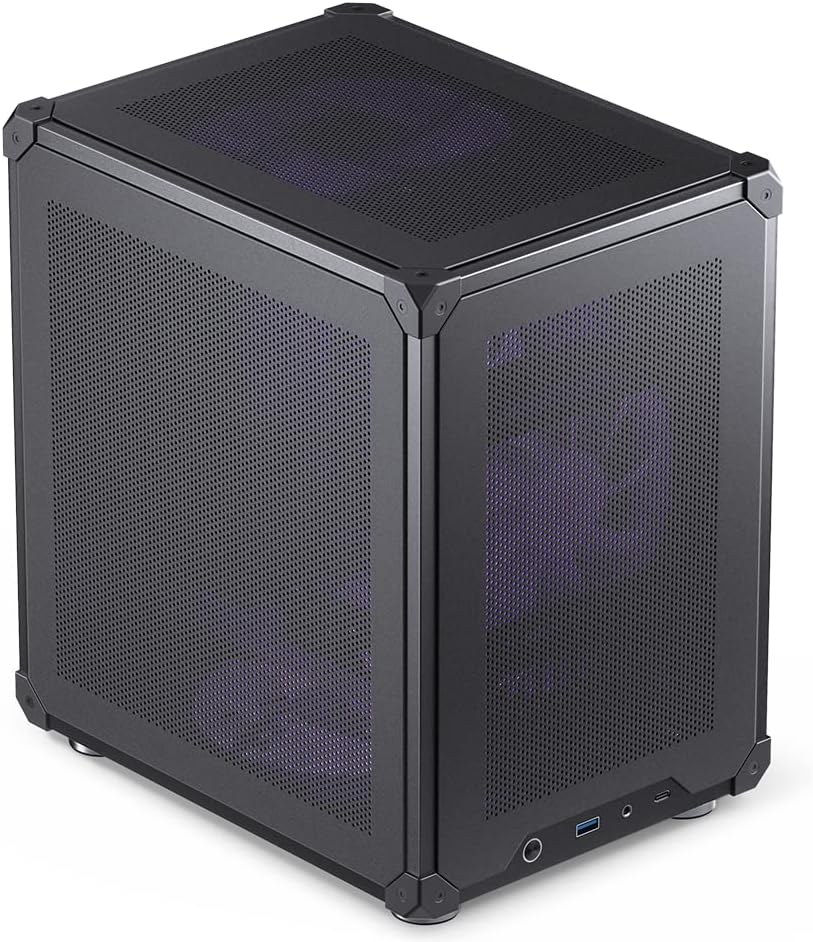
The Cooler Master Q300L V1 offers an excellent entry point for builders looking for a compact case with solid airflow and visibility. It is designed for Micro-ATX and Mini-ITX motherboards, ensuring ample interior space for future expansion. The transparent side panel lets you showcase your build with pride, while the open thermal design promotes optimal airflow and heat dissipation.
We may earn a commission when you buy through this link, at no additional cost to you.
A unique feature is the modular I/O panel which can be adjusted to the front, top, or bottom on both sides. This flexibility allows you to customize the layout based on your desk setup and cable routing needs. The case supports a 240mm liquid cooler and up to five fans, providing versatile cooling options for different hardware configurations.
While it lacks some premium features found in higher-end cases, the value proposition is strong. The magnetic dust filters add a distinctive appearance and practicality by preventing debris from entering the system. It is a reliable choice for budget-conscious users who still want a clean look and decent cooling capabilities.
If you are building a smaller system and want visibility and airflow without breaking the bank, this case is a great fit. The ability to position the I/O panel as needed is a standout feature for small form factor builds. It is highly recommended for those prioritizing cost-effectiveness and flexibility.
You have the flexibility to adjust its position at the front, top, or bottom on both sides for better cable management.
Maximize cooling performance with a 240mm liquid cooler and 5 fans to keep components running cool under load.
We may earn a commission when you buy through this link, at no additional cost to you.
The Mechanic Master C34 Ultra-Compact ATX PC Case saves space without sacrificing performance. It supports standard ATX motherboards and power supplies, making it a viable option for those who want full-size hardware in a smaller footprint. The built-in carry handle enhances portability, allowing easy transport to LAN events or between workstations.
We may earn a commission when you buy through this link, at no additional cost to you.
Key features include support for high-performance air and liquid cooling, accommodating a 240mm radiator or air coolers up to 162mm tall. The internal layout is designed to simplify installation, particularly if you use an SFX/L power supply for the cleanest cable management. Attention to detail is evident in the metal front I/O panel with USB Type-C and USB 3.0 ports.
While it supports ATX PSUs, using an SFX unit is recommended for the best build experience and cable management. The GPU length limit of 335mm may be a constraint for the absolute largest graphics cards available. However, for most mainstream builds, this is more than sufficient. The compact design appeals to users with limited desk space.
This case is ideal for gamers or professionals needing a portable workstation that doesn't compromise on core hardware. The integration of modern ports and carry handle makes it user-friendly. It is a strong contender for anyone seeking a balanced mix of size and capability.
The integrated handle makes it easy to transport your powerful desktop PC to LAN events, between workstations, or simply to rearrange your space with ease.
The internal layout is designed to simplify the installation process, especially with an SFX/L power supply for cleanest cable management.
We may earn a commission when you buy through this link, at no additional cost to you.
The ASUS Prime AP201 is a compact Micro-ATX case that maximizes internal volume within a small footprint. Its quasi-filter mesh panels with over 57,000 precision-machined holes increase airflow and provide a compelling view of components. Despite the 33L footprint, it supports ATX PSUs up to 180 mm long, offering industry-leading spatial efficiency.
We may earn a commission when you buy through this link, at no additional cost to you.
Tool-free side panels allow for easy removal and secure fit, simplifying the build and maintenance process. The case is primed for thermal management with support for 280 and 360mm radiators and up to six fans. An extended motherboard tray with strategically placed cutouts and a 32 mm gap makes cable management significantly easier.
While it is limited to Micro-ATX boards, the performance and build quality are high for the size. The dust filters are integrated into the mesh design, helping maintain airflow over time. The design is straightforward and focused on utility rather than flashy aesthetics, which suits many professional and gaming setups.
If you need a compact case that supports high-end cooling and components without taking up much space, this is a top pick. The ease of access and cable management features make it builder-friendly. It is a practical choice for those prioritizing airflow and efficiency.
A mesh design comprised of over 57,000 precision-machined holes increases airflow and provides a compelling view of the components within your build.
A simple yet secure clip mechanism allows chassis side panels to be easily removed and resistant to accidental dislodging.
We may earn a commission when you buy through this link, at no additional cost to you.
The Cooler Master Q300L V3 is a feature-rich Micro ATX case designed for builders who want high-airflow cooling without sacrificing quality. It supports graphics cards up to 366mm, making it easy to build with today's gaming graphics cards. The design delivers premium performance without compromising on space, fitting ATX power supplies up to 200mm.
We may earn a commission when you buy through this link, at no additional cost to you.
High airflow cooling is facilitated by the ability to fit 6x 120mm or 140mm fans, along with 240mm AIO radiators. This flexibility ensures that gaming and productivity builds stay cool. The movable I/O panel, magnetic dust filters, and tempered glass enhance the user experience and aesthetic appeal of the chassis.
While the case is robust, it is limited to Micro-ATX and Mini-ITX motherboards. However, for most small form factor builds, this is sufficient. The clean cable management and removable filters make maintenance easy. It is a reliable choice for those who prioritize thermal performance in a compact package.
If you want a balance of airflow, visibility, and build flexibility, the Q300L V3 delivers. The support for long GPUs and multiple fans makes it versatile. It is highly recommended for gamers looking for a compact yet powerful case.
Supports graphics cards up to 366mm, making it easy to build with today's NVIDIA GeForce RTX and AMD Radeon gaming graphics cards.
Fit 6x 120mm or 140mm fans, 240mm AIO radiators, and 178mm CPU air coolers for flexible cooling for gaming and productivity.
We may earn a commission when you buy through this link, at no additional cost to you.
The Zalman CUBIX M-ATX is a compact desktop case with a sleek design and durable construction. Built with sturdy 0.8T steel, it offers robust protection for internal components while maintaining a small 17.1-liter volume. It supports standard ATX PSUs, 260mm length GPUs, and 137mm height CPU coolers, covering most standard hardware needs.
We may earn a commission when you buy through this link, at no additional cost to you.
High airflow design is supported by a perforated front panel and a pre-installed 80mm fan for optimal cooling. Despite its charming appearance, the build quality ensures it can withstand daily use. The connectivity options include USB 3.0, USB 2.0, and audio jacks for easy device connections.
While the airflow is good, it lacks the extensive mesh of premium cases. The GPU length limit may be a constraint for larger cards. However, for basic builds and office setups, it is a reliable and sturdy option. The price makes it accessible for budget-conscious buyers.
If you need a simple and sturdy Micro-ATX case for everyday tasks, this is a solid choice. The inclusion of a fan adds value and simplifies assembly. It is best suited for non-gaming or light gaming builds where cost and durability are priorities.
Sleek design with sturdy 0.8T steel construction and a 17.1-liter total volume ensure robust and sturdy structure.
Perforated front panel and pre-installed 80mm fan for optimal cooling to maintain system temperatures during operation.
We may earn a commission when you buy through this link, at no additional cost to you.
The JONSBO C6 is a simple compact desktop Micro ATX PC case with a mesh chassis design. All sides are in mesh with Front, Upper, and Lower fan positions for heat-free operation. The upper cover and side panel allow for tool-free opening, making it easier to build and maintain your PC without hassle.
We may earn a commission when you buy through this link, at no additional cost to you.
Compatibility includes ITX and M-ATX motherboards with drive bays for HDD or SSDs. The front interface features Type-C and USB 3.0 for modern connectivity. The dimensions are compact at 202mm width, allowing it to fit in tight spaces while still accommodating ATX PSUs up to 185mm.
The low CPU cooler support of 75mm may limit cooling options for high-end processors. Similarly, the GPU range of 200-255mm restricts the use of longer cards. However, for a small office or media setup, these constraints are manageable. The ease of access is a significant benefit for quick upgrades.
If you want a tiny case that is easy to open and has mesh for airflow, this is a great pick. The tool-free design simplifies assembly and maintenance. It is best for users who prioritize accessibility and compactness over maximum component support.
Upper Cover/Side Panel Tool-free Open allows easier to build your PC and provides more convenient access for maintenance.
Heat free with all sides in mesh design allowing Front/Upper/Lower 3 fan positions for efficient heat dissipation.
We may earn a commission when you buy through this link, at no additional cost to you.
The NZXT H5 Flow is a compact ATX mid-tower case that delivers exceptional GPU cooling through its perforated PSU shroud. It enables optimal air intake from two 120mm fans which are pre-installed for solid out-of-the-box performance. The ultra-fine mesh on the top, front, and side panels creates maximum airflow while filtering dust effectively.
We may earn a commission when you buy through this link, at no additional cost to you.
Large radiator support is possible with up to a 360mm radiator in front and a 240mm radiator up top. This makes it suitable for powerful liquid cooling setups. Seamless cable management is achieved through wide channels, hooks, and straps allowing you to route and conceal cables effortlessly.
While the size is slightly larger than the smallest compact cases, it offers a balance of airflow and capacity. The pre-installed fans save time and cost for the user. The design is sleek and modern, fitting well in both home and office environments. It is a reliable choice for those who want ready-to-go cooling.
If you want a case that works well out of the box with great airflow, the H5 Flow is excellent. The PSU shroud design is a standout feature for thermal performance. It is a top pick for builders who want simplicity and strong cooling capabilities.
The PSU shroud is perforated on the side and bottom, enabling optimal air intake from two 120mm fans not included.
Ultra-fine mesh on the top, front, and side panels creates maximum airflow and filters dust to keep components cool.
We may earn a commission when you buy through this link, at no additional cost to you.
Selecting the right compact case requires balancing several factors to ensure your build is both functional and aesthetically pleasing.
Check the case supports your motherboard size. Some compact cases support E-ATX while others are limited to Micro-ATX. Ensure the clearance for the board fits without obstruction.
Always verify the maximum width and height supported by the case manufacturer.
Measure your graphics card length and height to ensure it fits inside the chassis. Some compact cases require removing front fans for maximum GPU clearance.
Confirm that your CPU cooler and power supply dimensions are within the supported limits.
Look for mesh panels and multiple fan mounts to maintain good airflow. High performance hardware generates heat which requires effective ventilation to prevent throttling.
Prioritize cases with open designs and adequate fan placement for optimal cooling performance.
If you plan to move your PC frequently consider cases with built-in handles and lightweight materials. Aluminum shells can reduce weight without compromising durability significantly.
Evaluate the overall volume and weight to ensure it fits your transport needs.
Good cable management keeps your build tidy and improves airflow. Look for extended trays and wide gaps for routing cables behind the motherboard.
Check for tools-free panels to simplify cable routing during assembly.
The material affects durability and weight. Steel is sturdy while aluminum is lighter. Evaluate the thickness and finish for long term durability.
Ensure that the case feels robust and panels fit securely without flexing.
Consider how many PCIe slots are available for your needs. Compact cases may limit expansion options so check slot placement before buying.
Verify that the I/O panel and internal connectors are accessible for your setup.
Determine your budget range and compare features across models. Higher price often means better materials and features like tool-free access.
Select a case that offers the best balance of price and performance for your specific use.
To ensure optimal performance install your components securely and verify all cables are connected properly. Use cable management tools to route wires neatly for better airflow and aesthetics.
Regular cleaning is essential to maintain airflow. Remove dust filters and clean them with compressed air every few months to prevent overheating and ensure longevity.
When transporting the case use any built-in handles and secure components to prevent movement. Avoid placing heavy items on top of the case to protect the panels from cracking.
Some compact cases specifically designed for E-ATX support larger boards but you must verify the exact width and height clearance. Check the manufacturer specs before purchase.
Use mesh panels and ensure all fans are positioned correctly. Avoid blocking vents with cables and keep the case clean to maintain airflow.
Most compact cases support standard ATX PSUs but verify the length limit. Some models may require smaller SFX units for better cable management.
It varies by model. Some include pre-installed fans while others require separate purchases. Check the product details for included components.
Remove the filters according to the manual and clean with compressed air. Regular cleaning prevents clogs and maintains system performance.
Many compact cases support small radiators like 240mm. Confirm the mounting points and clearance for pumps and hoses before installation.
Choosing the right case depends on your specific hardware and space needs. Whether you prioritize portability or cooling performance there is a case tailored to your requirements.
Focus on compatibility and airflow to ensure your system runs efficiently. A good case protects your investment and enhances the build experience.
Check the latest availability and features before buying. Prices and stock can change so stay updated with current listings for the best deal.