
CRUA 34 Inch 165Hz UWQHD IPS Ultrawide Gaming Monitor
4.2Editor score
165Hz refresh rate for smooth gaming
IPS panel with vivid color accuracy
Built-in speakers and PIP/PBP modes
Finding a cheap ultrawide monitor can transform your workspace without breaking the bank. These displays offer expansive 21:9 aspect ratios that enhance multitasking and immersion. Whether you need productivity tools or gaming features, there is a budget-friendly option for everyone.
We evaluated ten top-rated models based on resolution, refresh rates, and panel technology. Our comparison focuses on value, ensuring you get high performance without paying premium prices. Each product offers unique strengths for specific use cases like work or play.
Each pick highlights key features, pros, and cons to help you decide quickly. Prices fluctuate frequently, so check current deals before purchasing. This guide ensures you find the perfect monitor that balances cost and capability effectively.
4.2Editor score

4.4Editor score

4.6Editor score
As an Amazon Associate we earn from qualifying purchases.
This side-by-side comparison highlights the key specifications of ten affordable ultrawide monitors to help you identify the best match for your needs.


The SANSUI 34-Inch Curved Gaming Monitor stands out as a top choice for budget-conscious gamers seeking high performance. With a solid 4.4 rating, it delivers a visually immersive experience through its curved design and high refresh rate.
We may earn a commission when you buy through this link, at no additional cost to you.
Its standout feature is the 200Hz refresh rate, which ensures ultra-smooth motion in fast-paced games. The UWQHD resolution of 3440 x 1440 provides sharp visuals and ample screen real estate for multitasking. AI features like blue light reduction add practical value for long sessions.
While it lacks built-in speakers, the focus on display performance keeps costs down. The VA panel offers good contrast, though it may not match OLED depth. These trade-offs are acceptable for users prioritizing speed and resolution over audio convenience.
This monitor is ideal for gamers and productivity users who need a large, fast screen without spending a fortune. Its ergonomic stand and VESA compatibility further enhance its flexibility. We recommend it for anyone seeking a cheap ultrawide monitor with premium specs.
The 1500R curve wraps around your field of view, reducing eye strain and increasing focus during extended use.
Integrated AI tools like crosshair and sniper scope help optimize gameplay experiences directly on the monitor.
We may earn a commission when you buy through this link, at no additional cost to you.
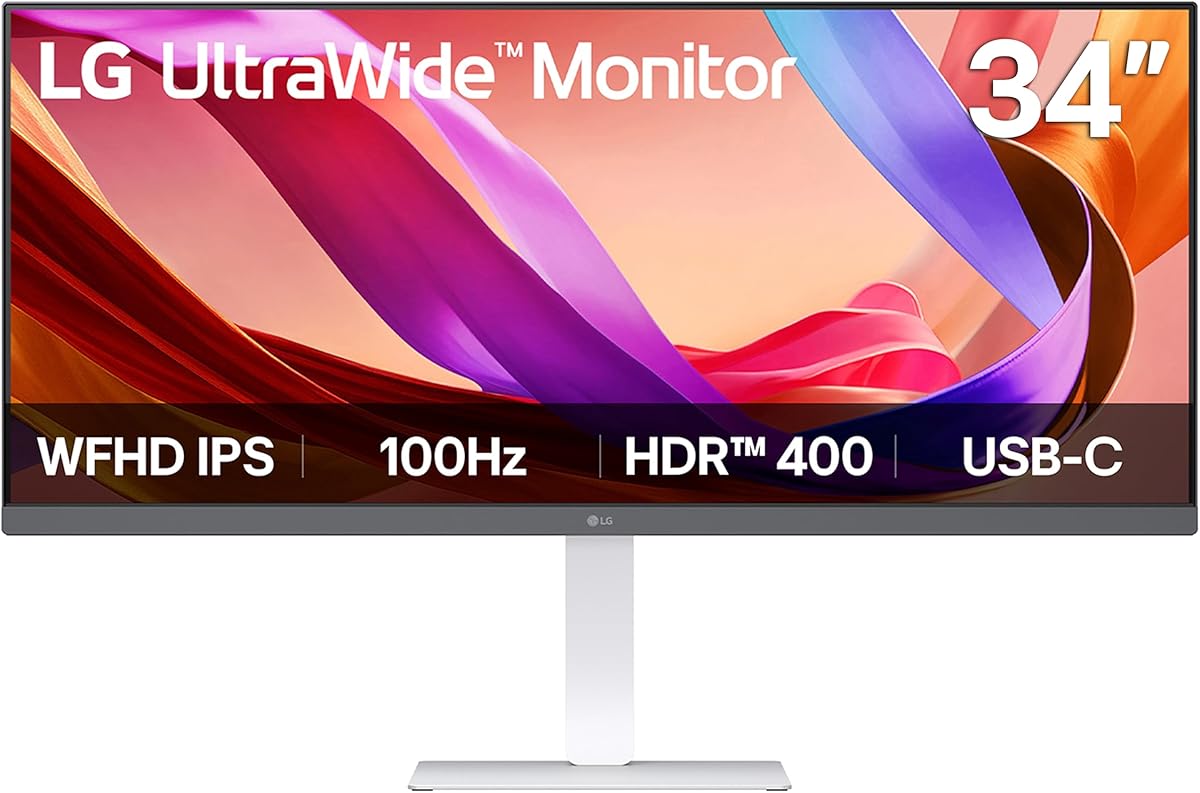
The LG 34U530A-W offers a clean aesthetic with its white finish and narrow bezels. It earned a 4.3 rating for its reliability in office environments. This monitor excels at multitasking with its 21:9 aspect ratio.
We may earn a commission when you buy through this link, at no additional cost to you.
Its IPS panel ensures vibrant colors and wide viewing angles, perfect for collaborative work. USB-C connectivity simplifies cable management for laptops, while the built-in speakers reduce desktop clutter. The Switch app enhances productivity by allowing quick screen splits.
The main downside is the WFHD resolution which is lower than standard 1440p options. However, for text-heavy work and web browsing, this resolution remains crisp. The higher price reflects the premium build and connectivity options.
Ideal for professionals and creatives, this monitor balances style and function. Its ergonomic adjustments ensure comfort during long shifts. We recommend it for office setups prioritizing ergonomics and connectivity over raw gaming performance.
USB-C supports display output and data transfer, reducing cable clutter and simplifying laptop connections.
Waves MaxxAudio speakers deliver rich sound, eliminating the need for external audio devices.
We may earn a commission when you buy through this link, at no additional cost to you.
The MSI PRO MP341CQ E12 focuses heavily on user comfort and eye health. With a 4.2 rating, it offers a solid UWQHD experience for daily tasks. The VA panel delivers good contrast for deep blacks.
We may earn a commission when you buy through this link, at no additional cost to you.
Certified by TUV Rheinland for flicker-free and low blue light, it is ideal for extended work hours. The 120Hz refresh rate provides smooth motion for light gaming and video playback. Adaptive-Sync ensures tear-free visuals during gameplay.
The stand is basic with limited tilt adjustments, which may not suit all users. Lacking USB-C means you need separate cables for video and data. However, these compromises keep the price very competitive for the specs offered.
This monitor is perfect for students and professionals seeking an affordable, eye-friendly display. Its VESA compatibility allows for flexible mounting options. We recommend it for users prioritizing long-term comfort and value.
Flicker-free and low blue light certification minimizes strain during long viewing sessions.
UWQHD resolution provides sharp details ideal for coding, editing, and multitasking workflows.
We may earn a commission when you buy through this link, at no additional cost to you.
The LG 34WR55QK-B holds the highest rating of 4.6 in our selection, reflecting its premium build quality. It delivers a refined experience with vibrant colors and solid ergonomics. This monitor is a top choice for professionals.
We may earn a commission when you buy through this link, at no additional cost to you.
Its USB-C connectivity supports up to 65W power delivery, allowing single-cable laptop charging. The height-adjustable stand ensures proper posture during long work sessions. HDR10 support enhances image depth for media consumption and creative work.
While excellent for work, the 5ms response time may be too slow for competitive gaming. The price is also higher than budget options. However, the ergonomic improvements and connectivity justify the cost for serious users.
This monitor suits creative professionals and office workers needing reliability and high-end features. It offers a seamless workflow experience with minimal desk clutter. We recommend it for those prioritizing quality and user experience.
USB-C handles display, data, and power, simplifying cable management for modern laptops.
Height adjustable stand reduces neck strain by allowing you to set the perfect viewing height.
We may earn a commission when you buy through this link, at no additional cost to you.
The LG 34U650A-B features a high-quality IPS panel known for accurate colors. With a 4.4 rating, it delivers a consistent and vibrant experience. This monitor is ideal for creatives requiring precision.
We may earn a commission when you buy through this link, at no additional cost to you.
Its 99% sRGB coverage ensures images look true to life. The curved design enhances immersion without compromising the IPS benefits. Built-in DepthSound speakers provide rich audio, reducing the need for external hardware.
The price is higher due to premium panel and speaker technologies. Gaming is supported but optimized for casual use with a 100Hz rate. These limitations are acceptable for design and media professionals.
This model is perfect for photographers, designers, and home office users. It offers a clean setup with powerful connectivity. We recommend it for anyone prioritizing color accuracy and audio integration.
IPS technology provides consistent colors across the screen, essential for graphic design work.
DepthSound speakers deliver full audio without cluttering your desk with extra devices.
We may earn a commission when you buy through this link, at no additional cost to you.
The Samsung ViewFinity S50GC Series excels in eye care technology. It earned a 4.4 rating for its ability to adapt to ambient light conditions. This model is a strong choice for daily productivity.
We may earn a commission when you buy through this link, at no additional cost to you.
Its ambient light sensor automatically adjusts brightness to reduce strain. HDR10 offers over a billion colors for depth and vibrancy. The borderless design maximizes screen real estate for a clean, professional look.
The stand is functional but lacks advanced adjustments found in other models. Sound quality is adequate for office use but lacks depth. These factors are balanced by the strong eye care features.
Best for office workers and students, this monitor prioritizes visual comfort. It offers a practical setup for multitasking. We recommend it for users focusing on health and productivity.
Ambient light sensor detects room conditions and adjusts display brightness automatically for comfort.
Borderless design reduces bezel distraction for a more immersive viewing experience.
We may earn a commission when you buy through this link, at no additional cost to you.
The Samsung ViewFinity S50GC Series focuses on workflow efficiency with PIP/PBP modes. Rated at 4.4, it allows seamless multitasking by showing two inputs on one screen. This is valuable for data monitoring.
We may earn a commission when you buy through this link, at no additional cost to you.
It features HDR10 for depth and AMD FreeSync for smooth visuals. The high contrast ratio ensures details pop in dark scenes. Thin bezels enhance the visual experience significantly.
Lacking USB-C limits modern laptop connectivity options. The stand is basic and lacks height adjustment. These limitations make it slightly less versatile than other models.
Best for multitaskers and analysts, this monitor handles multiple tasks effectively. It provides a clean aesthetic for desks. We recommend it for users needing high screen capacity.
PIP and PBP allow simultaneous display of two input sources on one screen.
Thin bezels maximize viewing area and reduce visual distractions during work.
We may earn a commission when you buy through this link, at no additional cost to you.
The CRUA 34 Inch delivers exceptional value with high-end specs at a low cost. Rated at 4.2, it provides a smooth 165Hz experience ideal for gaming. It is perfect for entry-level ultrawide setups.
We may earn a commission when you buy through this link, at no additional cost to you.
Its IPS panel ensures vibrant colors with 120% sRGB coverage. The 165Hz refresh rate eliminates stuttering in fast games. Built-in speakers save space for compact desks.
The stand offers tilt only, lacking height or pivot adjustments. Warranty coverage is standard compared to larger brands. Despite this, the performance-to-price ratio is outstanding.
Best for gamers on a budget, this monitor offers great value. It is a solid choice for those wanting features without the price. We recommend it for casual to mid-level gamers.
165Hz refresh rate ensures fluid motion and reduces visual tearing during gameplay.
Balances high refresh rates and IPS quality at a budget-friendly price point.
We may earn a commission when you buy through this link, at no additional cost to you.
The Acer Nitro ED300C X1 is one of the most affordable fast monitors available. Rated at 4.3, it delivers impressive speed with a 200Hz refresh rate. Ideal for competitive gamers with limited budgets.
We may earn a commission when you buy through this link, at no additional cost to you.
Its 200Hz refresh rate ensures ultra-smooth motion in fast games. The 1ms response time eliminates ghosting. AMD FreeSync Premium keeps gameplay stutter-free. It is excellent for competitive shooters.
Resolution is lower than UWQHD options, and screen size is compact at 29.5 inches. This reduces multitasking capability compared to 34-inch models. However, the speed justifies the compromise for gaming focus.
Best for competitive gamers on a tight budget, this monitor delivers performance. It prioritizes speed over resolution. We recommend it for FPS enthusiasts who value response times.
200Hz refresh rate ensures every frame is rendered swiftly for competitive play.
1ms response time minimizes input lag for precise reactions in games.
We may earn a commission when you buy through this link, at no additional cost to you.
The KTC 34 Inch delivers premium specs like 180Hz and high contrast at a competitive price. Rated at 4.5, it offers an impressive balance of performance. It is ideal for budget-conscious enthusiasts.
We may earn a commission when you buy through this link, at no additional cost to you.
Its HVA panel provides 4000:1 contrast for deep blacks. The 180Hz refresh rate ensures smooth gaming without motion blur. Height and pivot adjustments enhance ergonomics significantly.
Limited connectivity includes HDMI and DP but no USB-C. The brand is less recognized than giants like LG. These trade-offs are acceptable given the high-end features offered.
Best for gamers seeking performance, this monitor is a strong contender. It offers features found in expensive models. We recommend it for value-focused users.
HVA technology delivers deep blacks and vivid colors for immersive viewing experiences.
Height and tilt adjustments allow you to customize the viewing angle for comfort.
We may earn a commission when you buy through this link, at no additional cost to you.
Selecting the right monitor requires balancing resolution, refresh rate, and panel type to meet your specific needs.
Resolution determines image sharpness and text clarity. UWQHD (3440 x 1440) provides significantly more detail than WFHD (2560 x 1080), making it better for detailed work and high-fidelity gaming. For a 34-inch screen, UWQHD is the sweet spot for balancing clarity and performance without needing a powerful GPU.
Prioritize UWQHD if you work with text or design; WFHD is acceptable for casual gaming or budget setups.
Refresh rate affects how smooth motion appears on screen. Higher rates like 165Hz or 200Hz eliminate blur in fast games. Response time measures how quickly pixels change colors; lower is better to prevent ghosting. For competitive gaming, aim for 144Hz+ and under 5ms response.
Check refresh rates based on your gaming intensity; casual users can accept 60-100Hz.
Panel type defines color accuracy and contrast. IPS offers wide viewing angles and consistent colors, ideal for designers. VA provides better contrast and deeper blacks, good for movie watchers. Curved screens enhance immersion by wrapping the view around your peripheral vision.
Choose IPS for color accuracy and VA for deep blacks depending on your primary use case.
Connectivity options define how easily you can connect devices. USB-C simplifies setups by handling video and charging. DisplayPort supports higher refresh rates for gaming. HDMI is standard for most devices. Ensure you have the ports you need for your current and future gear.
Ensure the monitor has necessary ports like USB-C for laptops or HDMI for consoles.
Ergonomics ensure physical comfort during long sessions. Height adjustment, tilt, and pivot allow you to align the screen with your eye level. Fixed stands are cheaper but may cause neck strain. VESA compatibility allows you to mount the monitor on arms for flexibility.
Prioritize stands with height adjustment to reduce neck strain during long work hours.
Color accuracy matters for creatives and media consumption. Look for high sRGB coverage (99%+) for realistic colors. HDR10 support improves brightness and contrast in supported content. While cheap monitors may not offer full HDR, this feature adds significant value.
Check sRGB coverage for design work and HDR support for cinematic experiences.
To ensure longevity, calibrate your display settings regularly. Adjust brightness to match your room lighting to reduce eye strain. Use dark modes and blue light filters during nighttime use to protect your vision.
Clean the screen gently with a microfiber cloth and screen-safe solution. Avoid using household chemicals that can damage the coating. Dust the bezels and base weekly to maintain a clean setup.
Optimize your workflow by utilizing Picture-in-Picture (PIP) features. Connect multiple devices like a laptop and console simultaneously. Adjust your desk height to align the monitor center with your eye level.
Yes, especially for multitasking. It replaces two monitors with one seamless display, enhancing productivity and immersion. The cost is often lower than buying dual setups.
Absolutely. Models with high refresh rates like 165Hz or 200Hz provide smooth gameplay. Look for Adaptive Sync and low response times for the best experience.
UWQHD has 3440 x 1440 resolution while WFHD has 2560 x 1080. UWQHD offers sharper details and more space, while WFHD is easier to drive on weaker PCs.
Many support HDR10 basics. While not comparable to high-end TVs, it offers better color depth than SDR for media and gaming content.
Curved screens improve immersion on 34-inch monitors by matching human eye shape. Flat panels are better for wall mounting or specific design tasks.
Most budget monitors offer one to three years. Check the seller policy for dead pixels and hardware coverage to protect your investment.
Use built-in settings to adjust color balance. Online calibration tools help fine-tune gamma and brightness. Proper setup enhances visual accuracy.
Yes, they allow multiple IDE windows side-by-side. The extra horizontal space reduces window switching and improves workflow efficiency.
This guide highlights ten versatile monitors balancing cost and performance. The SANSUI and CRUA models offer speed while the LG and Samsung options prioritize comfort. Each pick ensures quality regardless of your budget.
Prioritize resolution and refresh rates based on your main activities. Ergonomics matter for daily use. Ensure the connectivity matches your devices. Avoid models lacking necessary ports for long-term satisfaction.
Prices fluctuate often in the monitor market. Check current deals before purchasing to secure the best value. With the right choice, your workspace becomes more productive and immersive immediately.