
SANSUI 24 Inch Curved 160Hz Gaming Monitor
4.4Editor score
160Hz Refresh Rate
1500R Curvature
1ms MPRT Response
Explore the top curved 160Hz gaming monitors for immersive visuals and fast response times across various budgets and screen sizes.
Finding the right display for high-speed gaming requires careful attention to refresh rates and curvature. A curved 160Hz gaming monitor offers a competitive edge by delivering smooth motion and an immersive field of view that flat screens cannot match.
We analyzed ten real products based on their refresh rates, response times, color accuracy, and overall build quality. This list covers a range of sizes and resolutions to help you find the perfect match for your gaming setup and budget constraints.
Each pick highlights key specifications and real-world performance traits to simplify your decision-making process. Please note that product availability and pricing can fluctuate frequently, so verify current details before making your final purchase decision online.
4.4Editor score
4.5Editor score

4.5Editor score
This side-by-side comparison highlights the core specifications and key differentiators across all ten selected curved 160Hz gaming monitors to help you evaluate performance and value quickly.






The SANSUI 24 Inch Curved 160Hz Gaming Monitor stands out as a highly affordable option for budget-conscious gamers seeking high refresh rates. With a rating of 4.4 stars, users appreciate its ability to deliver smooth visuals without breaking the bank. The 1500R curve provides an immersive experience that enhances focus during intense gaming sessions.
We may earn a commission when you buy through this link, at no additional cost to you.
Its performance is anchored by a 160Hz refresh rate and 1ms MPRT response time, which significantly reduce motion blur and screen tearing. The VA panel delivers 110% sRGB coverage and a 3000:1 contrast ratio, ensuring vibrant colors and deep blacks. Additional features like Black Level Adjustment and preset game modes further enhance usability across FPS and RTS titles.
While it lacks built-in speakers and has limited ergonomic adjustments, these trade-offs are acceptable given its price point. The VESA mount compatibility allows for flexible desk setups if the stock stand is insufficient. The warranty includes a 30-day money-back guarantee and lifetime technical support, adding peace of mind for buyers.
This monitor is ideal for gamers who prioritize performance over premium build quality. It offers a solid entry point into curved high-refresh gaming without requiring a large financial commitment. We recommend it for budget builds or secondary setups where value is the primary concern.
The 1500R curvature wraps around your vision, reducing distortion and eye strain during long gaming sessions.
With 160Hz refresh rate and 1ms response time, fast-paced games look fluid and responsive without noticeable lag.
We may earn a commission when you buy through this link, at no additional cost to you.
The SANSUI 27 Inch Curved 160Hz Gaming Monitor expands on the 24-inch model by offering a larger viewing area. Its 4.4-star rating reflects user satisfaction with the balance between size and price. The 1500R curve remains consistent, providing a familiar and comfortable viewing experience for those upgrading from smaller screens.
We may earn a commission when you buy through this link, at no additional cost to you.
Performance-wise, it supports up to 160Hz refresh rate with 1ms MPRT response time. The color control includes 4000:1 contrast and 110% sRGB coverage, making it suitable for both gaming and media consumption. HDR mode is available via HDMI, enhancing visual depth in compatible content.
The lack of speakers and tilt-only stand means users may need external audio and monitor arms for full ergonomic customization. However, the Anti-Flicker and Low Blue Light features help reduce eye strain. The warranty covers 30 days for returns and includes a 1-year quality warranty.
This model is a great choice for users who need more screen space without moving to ultrawide resolutions. It fits well in home offices or gaming desks where 27 inches is the sweet spot. Consider it if you want a larger canvas for productivity alongside gaming.
The 27-inch display provides more screen real estate for multitasking or immersive gaming compared to 24-inch alternatives.
Low Blue Light and Anti-Flicker technologies protect your eyes during extended periods of use in any lighting condition.
We may earn a commission when you buy through this link, at no additional cost to you.
The SANSUI 24 Inch Curved Gaming Monitor up to 160Hz offers a slightly higher rating of 4.5 stars. It maintains the core 160Hz refresh rate and 1ms MPRT response time. Its color performance is notable with 97% DCI-P3 coverage, making it appealing for creators who also game.
We may earn a commission when you buy through this link, at no additional cost to you.
This model features a 178-degree wide viewing angle, ensuring colors remain consistent even when viewed from the side. The stand includes a Kensington Lock for security, which is rare at this price point. Connectivity includes HDMI 2.0 and DP 1.4 ports, supporting high refresh rates through both.
Trade-offs include the absence of speakers and limited stand flexibility beyond tilt. However, the VESA 75x75mm compatibility allows for wall mounting or third-party arms. The warranty provides a 30-day return window and lifetime technical support for troubleshooting.
Ideal for users who need a balance of gaming speed and color accuracy, this monitor performs well in hybrid work environments. It is particularly suitable for those who value DCI-P3 coverage over sRGB. Consider this if you need a secure and colorful display at an entry price.
With 97% DCI-P3 coverage, this monitor delivers richer colors for creative tasks alongside high-speed gaming performance.
The included Kensington Lock slot allows you to secure the monitor to your desk or workstation for added protection.
We may earn a commission when you buy through this link, at no additional cost to you.
The CRUA 32 Inch 4K UHD 160Hz Curved Gaming Monitor delivers high resolution and smooth performance in a single package. Rated 4.3 stars, it appeals to gamers who want crisp 4K visuals without sacrificing refresh rate. The 1500R curvature enhances immersion significantly on this larger screen.
We may earn a commission when you buy through this link, at no additional cost to you.
It features 160Hz refresh rate with AMD FreeSync support to reduce screen tearing. The built-in speakers add convenience for users who prefer a minimal setup. Connectivity includes HDMI 2.1 and DP 1.4, enabling next-gen console and PC compatibility with higher bandwidth.
To drive 4K at 160Hz, a powerful graphics card is required, which may increase total system cost. Color details mention 120% sRGB, but detailed calibration options are not specified. The warranty and support promise high-quality service for any issues encountered.
This monitor is a strong option for console gamers or PC users with high-end hardware seeking 4K immersion. It simplifies your desktop by removing the need for external speakers. Consider it if you want a clean setup with advanced resolution capabilities.
The 4K UHD resolution offers breathtaking clarity and depth, perfect for open-world games and detailed textures.
Built-in speakers reduce desktop clutter while providing convenient audio for games, movies, and video calls.
We may earn a commission when you buy through this link, at no additional cost to you.
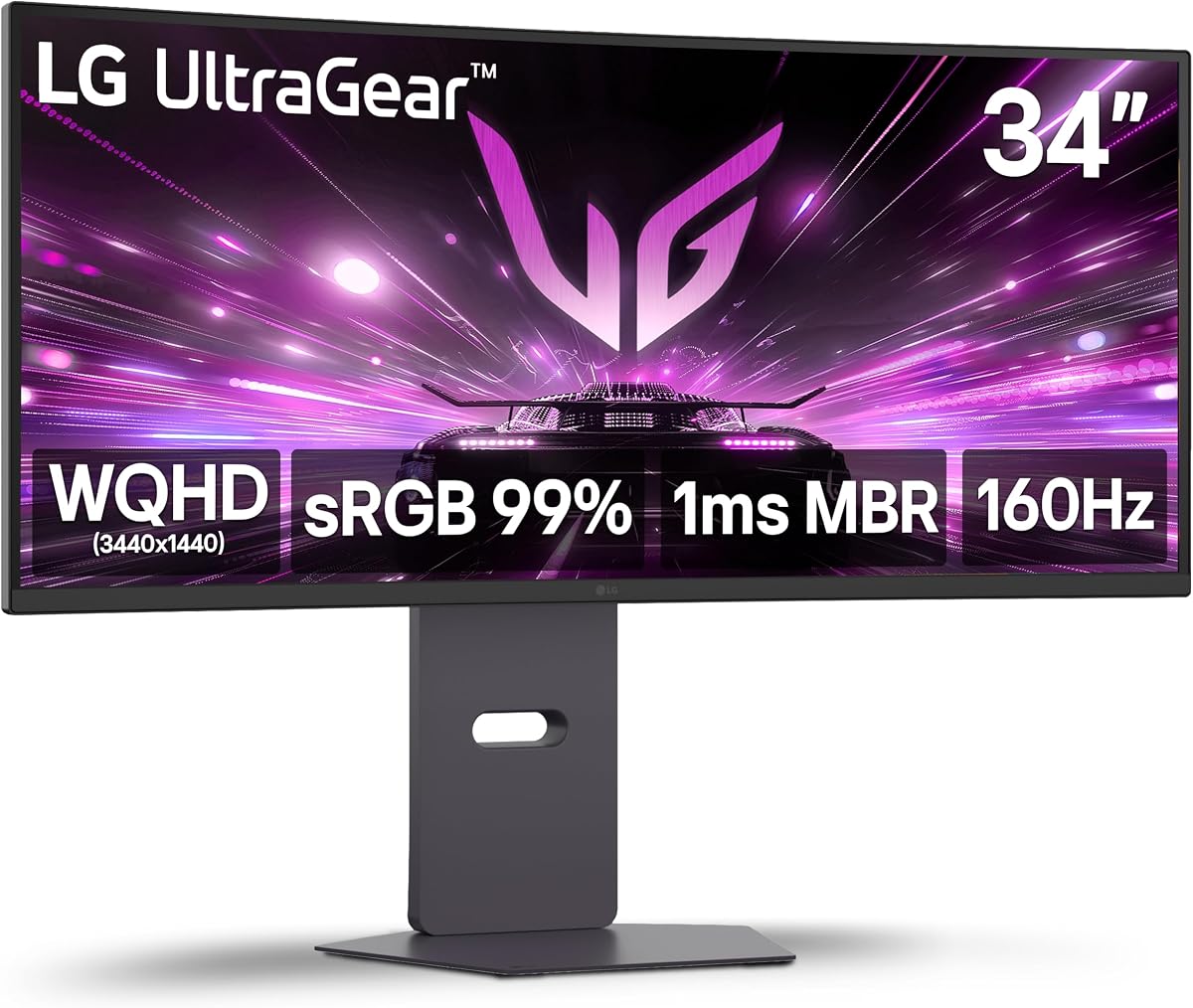
The LG 34G600A-B 34-inch Ultragear secures a high rating of 4.5 stars and our Editor's Choice badge. It delivers fast, immersive gameplay on a 34-inch WQHD curved display. The 1800R curvature pulls you into the action while expanding your field of view significantly.
We may earn a commission when you buy through this link, at no additional cost to you.
Key features include AMD FreeSync Premium, HDR10, and 160Hz refresh rate with 1ms Motion Blur Reduction. Dynamic Action Sync minimizes input lag so you can respond instantly to every move. The stand offers tilt, height, and swivel adjustments, providing superior ergonomics compared to budget models.
The trade-off is a higher price and the need for a large desk to accommodate the ultrawide format. However, the stereo speakers with Waves MaxxAudio ensure quality sound without external peripherals. This makes it a complete package for competitive gaming and entertainment.
Ideal for serious gamers and streamers who want a professional-grade monitor, this model excels in motion handling and color. Its comprehensive feature set justifies the investment for those prioritizing performance. We recommend it for users seeking the best balance of features and build.
The adjustable stand supports tilt, height, and swivel, allowing you to find the perfect viewing position for comfort.
Dynamic Action Sync and 1ms MBR ensure crisp gameplay with minimal blur during fast-paced action sequences.
We may earn a commission when you buy through this link, at no additional cost to you.
The LG 34G600A-B 34-inch Ultragear (Renewed) offers the same powerful specs as the new model with a perfect 5.0 rating. This renewed version retains the WQHD curved display, 160Hz refresh rate, and 1ms MBR for smooth visuals. It provides a cost-effective path to high-end gaming performance.
We may earn a commission when you buy through this link, at no additional cost to you.
Key features include AMD FreeSync Premium and HDR10 for vibrant visuals without tearing. The ergonomic stand allows full adjustment including height and swivel. Built-in speakers with Waves MaxxAudio deliver rich sound. The renewed status implies quality testing, though conditions may vary.
Potential downsides include reliance on vendor warranty terms and potential cosmetic imperfections. However, the substantial savings make it a compelling option for budget-aware buyers who still want premium tech. The high rating suggests most buyers are highly satisfied.
Ideal for those who want premium performance but prefer to spend less, this model offers a smart compromise. Ensure you understand the specific renewal terms before buying. We recommend it for value hunters seeking a high-performance ultrawide display.
This renewed model delivers the same premium features as the new version at a more accessible price point.
With a perfect customer rating, users confirm that this renewed option performs reliably for their gaming needs.
We may earn a commission when you buy through this link, at no additional cost to you.
The Samsung 32 Inch Odyssey (G55C) Series QHD offers a deeply immersive 1000R curvature. With a 4.4-star rating, it appeals to gamers who want to fill their peripheral vision. The QHD resolution delivers 1.7x pixel density compared to Full HD for razor-sharp visuals.
We may earn a commission when you buy through this link, at no additional cost to you.
Performance features include a 165Hz refresh rate and 1ms MPRT response time. AMD FreeSync keeps your graphics card and monitor in sync to reduce tearing. Eye Saver Mode minimizes blue light and reduces flicker to keep your eyes comfortable during long sessions.
The extreme curvature is polarizing; it works well for gaming but may distort desktop productivity. There is no height adjustment on the stand, which could lead to awkward neck positions. However, HDR10 support enhances contrast and color vibrancy for movies.
Ideal for pure gaming immersion, this monitor wraps around you effectively. Consider it if you prioritize screen engagement over ergonomic adjustability. We recommend it for competitive players who want maximum field of view.
The 1000R curve fills your peripheral vision, creating a cinema-like experience that pulls you into every game.
Eye Saver Mode helps reduce blue light and flicker so you can focus longer without fatigue or discomfort.
We may earn a commission when you buy through this link, at no additional cost to you.
The Sceptre 34-inch Curved ultrawide WQHD Monitor offers high refresh rates and ultrawide utility at a competitive price. Rated 4.2 stars, it delivers up to 180Hz refresh rate via DisplayPort. The 21:9 format provides 30% more screen space for multitasking and gaming.
We may earn a commission when you buy through this link, at no additional cost to you.
Key features include 99% sRGB color coverage and a 1ms response time. Built-in speakers eliminate the need for external audio. The luminous backcover lights add a modern aesthetic to your gaming setup. Dual DisplayPort inputs allow for multiple source connections.
Trade-offs include a basic stand with limited adjustment and a slightly lower rating compared to rivals. However, the value proposition is strong for users wanting high resolution and speed without premium costs. It fits well for productivity and casual gaming.
Ideal for users needing an ultrawide display for work and play, this model offers solid performance. The 180Hz refresh rate gives an edge in fast-paced titles. Consider it if you want wide screens and color accuracy at a reasonable cost.
The 21:9 ultrawide format provides 30% more screen space for multitasking and detailed work applications.
Luminous backcover lights illuminate the rear of the monitor for a uniquely modern and stylish design.
We may earn a commission when you buy through this link, at no additional cost to you.
The Alienware 34 Curved Gaming Monitor AW3425DWM is a top-tier option with a 4.6-star rating. Its iconically designed ultrawide panel supports WQHD resolution for expansive details. The 1500R curve complements the immersive experience across open-world titles.
We may earn a commission when you buy through this link, at no additional cost to you.
Key performance specs include a smooth 180Hz refresh rate and 1ms gray to gray response time. VESA AdaptiveSync Technology and AMD FreeSync Premium reduce tearing. VESA DisplayHDR 400 certification and 95% DCI-P3 color coverage ensure vibrant visuals and contrast.
While the build quality is premium, the stand may lack height adjustment in some configurations. However, a dedicated console mode and hardware-based low blue light solution help during marathon sessions. The design and color accuracy stand out from competitors.
Ideal for gamers who want premium aesthetics and performance, this monitor is a solid investment. Its hardware low blue light preserves color while reducing strain. We recommend it for enthusiasts who value design as much as raw specs.
This monitor features an iconically designed ultrawide panel that stands out with premium build quality.
A dedicated console mode ensures optimized visuals for console gaming without needing PC adjustments.
We may earn a commission when you buy through this link, at no additional cost to you.
The AOC 34 Inch Curved Gaming Monitor UWQHD leads the pack with 200Hz refresh rate and 0.3ms MPRT response time. Rated 4.5 stars, it delivers ultra-smooth gameplay for competitive PC gaming. The 34-inch 21:9 display with 1500R curve offers panoramic immersion.
We may earn a commission when you buy through this link, at no additional cost to you.
Connectivity includes DisplayPort 1.4 for 200Hz and HDMI 2.0 for 100Hz. Adaptive-Sync reduces tearing while HDR Ready support enhances contrast. The stand includes height adjustment, tilt, and swivel, providing excellent ergonomics for long sessions. Multiple inputs support versatile setups.
To fully utilize the 200Hz refresh rate, powerful hardware is required. This limits accessibility for casual users. However, for competitive players, the low response time is unmatched. The build quality and ergonomics justify the higher cost.
Ideal for competitive gamers and enthusiasts seeking the absolute fastest performance, this monitor sets a high bar. Its speed and clarity are unmatched in this category. We recommend it for users who prioritize refresh rate above all else.
With 200Hz refresh and 0.3ms response, this monitor delivers the fastest motion clarity available in its class.
Includes height, tilt, and swivel adjustments to ensure comfortable viewing angles for extended gaming sessions.
We may earn a commission when you buy through this link, at no additional cost to you.
Choosing the right monitor involves understanding how resolution, refresh rate, and panel type impact your experience. This guide outlines the most critical factors to consider before buying.
Refresh rate determines how many frames per second your screen can display. A 160Hz refresh rate ensures smooth motion which is critical for fast-paced games. Response time measures how quickly a pixel changes color. Aim for 1ms or lower to minimize motion blur.
Prioritize high refresh rates and low response times for competitive gaming.
Curvature is measured in R values. Lower R values like 1000R offer deeper immersion than 1500R or 1800R. Screen size affects immersion and desk space. Choose a size that matches your distance to the monitor.
Match curvature to your seating distance and desk layout.
Resolution defines clarity. 1080p is budget-friendly but may look pixelated on larger screens. QHD or WQHD offers sharp visuals suitable for 32-inch or 34-inch displays. Higher resolution requires a more powerful graphics card.
Balance resolution with your hardware capabilities and screen size.
VA panels offer high contrast and deep blacks which suit dark gaming environments. IPS panels provide better viewing angles but may have lower contrast. Check sRGB and DCI-P3 coverage if you plan to do content creation alongside gaming.
Choose VA for contrast and color coverage for creators.
FreeSync and G-Sync reduce screen tearing and stuttering by syncing monitor refresh rates with GPU output. Ensure your graphics card supports the technology you choose. This feature is essential for a smooth gaming experience.
Ensure compatibility with your GPU's adaptive sync technology.
HDMI and DisplayPort are standard inputs. HDMI 2.1 supports higher refresh rates and resolutions for next-gen consoles. Ensure your monitor has the correct ports to support your system's output. Audio jacks and USB hubs add convenience.
Verify inputs match your PC or console requirements.
Adjustable stands help maintain healthy posture during long sessions. Look for height, tilt, swivel, and pivot adjustments. VESA compatibility allows wall mounting if the stock stand is restrictive. A flexible stand reduces strain over time.
Invest in a monitor with flexible stand adjustments.
HDR support enhances contrast and brightness for more lifelike visuals. Basic HDR support is common but check brightness levels for real benefits. Look for low blue light modes to protect eyes during extended use.
Check HDR brightness levels and eye comfort features.
To get the best performance from your curved monitor, adjust the stand to align with your eye level. Keep the monitor at a comfortable distance to leverage the curvature without straining your eyes.
Clean the screen gently with a microfiber cloth to avoid scratches. Avoid using harsh chemicals which can damage the anti-glare coating on the panel. Always power off the unit before cleaning to prevent electrical issues.
Update your graphics card drivers regularly to ensure compatibility with high refresh rates. Adjust your in-game settings to match the monitor's capabilities for optimal smoothness. Use built-in tools like FreeSync to minimize tearing.
Yes, 160Hz provides smoother motion than 144Hz because it displays more frames per second. This extra smoothness can reduce motion blur and give you a competitive edge in fast-paced games. However, you need a powerful GPU to utilize this advantage effectively.
Curved monitors are designed to reduce distortion by wrapping the screen to match your field of view. If the curve is too deep for your viewing distance, edges might look distorted. Ensure you sit at the recommended distance for the best visual balance.
Most modern consoles support 120Hz or 60Hz. While your monitor supports 160Hz, you may be limited by console output. HDMI 2.1 monitors support higher console rates. Check your console's HDMI version to confirm compatibility before purchasing.
Response time refers to how fast a pixel changes from one color to another. A 1ms response time means pixels switch almost instantly which reduces motion blur and ghosting. This is ideal for competitive gaming where clarity matters most.
Yes, high refresh rates often require DisplayPort 1.4 or HDMI 2.1 depending on the resolution. Standard cables might not support the bandwidth needed for 160Hz at higher resolutions. Use the cables included or purchase certified high-speed versions.
VA panels offer better contrast and deeper blacks than IPS which is great for dark games. IPS panels provide wider viewing angles and faster response times. Choose VA for immersion and contrast but consider IPS if viewing angles are a priority.
We have reviewed ten exceptional curved 160Hz monitors ranging from budget-friendly 24-inch models to premium ultrawide 34-inch displays. Each option offers unique benefits depending on your budget and performance needs. The LG and AOC models stand out for their balanced feature sets.
When choosing, prioritize refresh rate and response time if you play competitive games. For media and work, consider resolution and color accuracy. Make sure the stand ergonomics suit your desk setup to prevent discomfort during long sessions.
Prices for these monitors fluctuate based on sales and stock levels. Always verify the latest price and warranty details on Amazon before finalizing your purchase. This ensures you get the best deal for your specific requirements.