
Inwa Computer Speakers
4.2Editor score
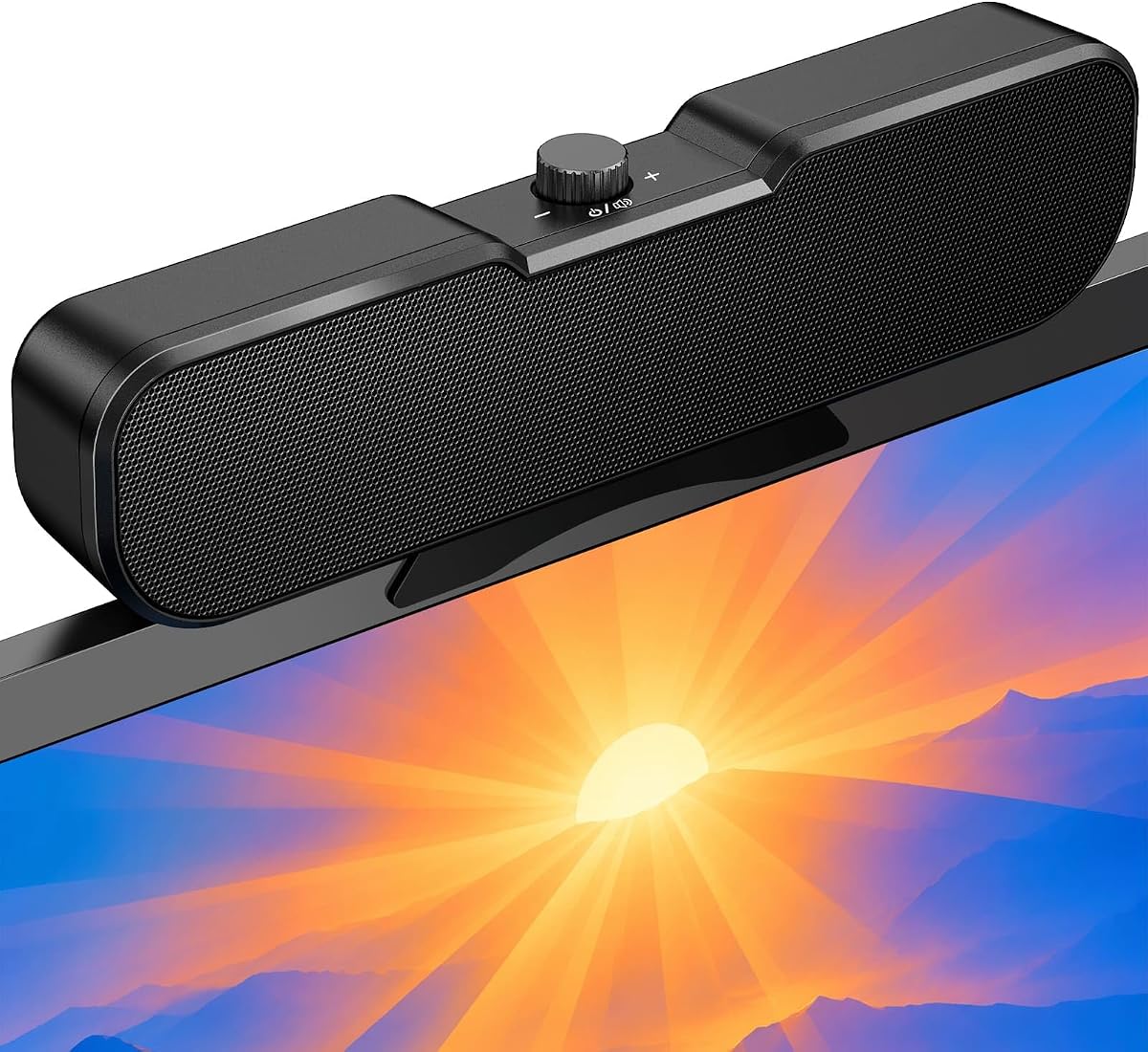
10 watts power output
Simple clip-on mounting
Three-button control panel
Discover the top clip on speakers for laptop in October 2026. We compare audio quality, mounting options, and compatibility to help you find the perfect
Enhancing your laptop audio is essential for productivity and entertainment. Clip on speakers offer a space-saving solution that attaches directly to your monitor or laptop screen. They deliver rich sound without cluttering your desk with bulky external units.
We evaluated ten top models based on sound clarity, ease of installation, and build quality. Our analysis focuses on USB connectivity, bass performance, and compatibility with various operating systems. This list ensures you find a reliable upgrade for your daily computing needs.
Each pick highlights key features like adaptive channel switching, touch controls, and RGB lighting. Prices and availability change frequently, so verify details before purchasing. Read on to discover which speaker best fits your workspace and listening preferences today.
4.2Editor score

4.5Editor score

4.2Editor score
This table provides a side-by-side overview of all ten models. Compare key specifications like connectivity, power, and unique features to quickly identify the right speaker for your specific laptop setup and audio preferences.


This speaker delivers impressive adaptive audio technology for any laptop setup. With a 4.2 rating, it stands out for its ability to switch channels automatically based on mounting position. It ensures correct stereo imaging whether you clip it top or bottom.
We may earn a commission when you buy through this link, at no additional cost to you.
The dual ultra-magnetic drivers provide loud sound with deep bass. USB-C compatibility makes it ideal for modern MacBooks or laptops lacking standard USB-A ports. Touch controls allow quick volume adjustments without navigating system menus.
While the touch buttons are convenient, they may be sensitive to accidental presses. Users should check audio settings to ensure proper playback device selection. The clamp design is sturdy but requires a monitor thickness between 0.1 and 1 inch.
Buyers seeking automatic stereo correction and deep bass will love this model. It is perfect for multimedia consumption and video calls. For those who value sound quality and ease of setup, this speaker offers excellent value.
The G-Sensor technology automatically flips left and right channels when repositioned. This ensures immersive stereo sound regardless of how you mount the speaker.
Included USB-C adapter expands compatibility to newer devices. You can power and transmit audio through a single cable for a clean workspace.
We may earn a commission when you buy through this link, at no additional cost to you.
OHAYO speakers offer smart features like Bluetooth 5.3 and RGB lighting. With a 4.5 rating, users praise its versatile connectivity and clear microphone for calls. It bridges wired and wireless needs seamlessly.
We may earn a commission when you buy through this link, at no additional cost to you.
The G-Sensor ensures accurate stereo imaging without manual tweaking. Volume roller provides precise control from 0 to 100 percent. RGB modes sync with audio rhythm for a dynamic visual experience.
Bluetooth mode still requires USB power, which might limit placement flexibility. The RGB lighting can be distracting during focused work. Ensure monitor thickness is under 1 inch for stable clamping.
Ideal for gamers or streamers wanting visual flair and wireless freedom. It suits those who need a built-in mic for meetings. For users wanting advanced features beyond basic audio, this is a top pick.
Switch to wireless mode for seamless gaming or streaming. Low energy audio technology ensures stable transmission up to 20 meters.
Five customizable RGB modes sync with audio rhythm. You can adjust brightness or turn off lights to suit your mood.
We may earn a commission when you buy through this link, at no additional cost to you.
Cirqon speakers focus on simplicity with a single volume knob. Rated 4.2, they offer clear loud sound without complicated buttons. The design is ideal for users who prefer straightforward controls.
We may earn a commission when you buy through this link, at no additional cost to you.
The upgraded clamp fits screens from 0.1 to 0.98 inches thick. USB-C adapter ensures compatibility with Mac and modern PCs. The 51-inch cable helps manage clutter across larger desks.
Lack of a mute button may require system adjustments for quick silence. The knob might feel less precise than wheels. It lacks advanced features like RGB or wireless connectivity.
Perfect for office workers needing a no-fuss audio upgrade. It suits those who prioritize clear sound and easy setup. For budget-conscious buyers wanting reliable performance, this speaker is highly recommended.
Power on and adjust volume with one touch. Access is easy from any mounted position for quick tweaks.
The 51-inch cable reaches across most desks. Includes cable tie to keep your workspace neat and organized.
We may earn a commission when you buy through this link, at no additional cost to you.
These speakers deliver impressive audio quality for their price point. With a 4.3 rating, they provide deep bass and loud sound. The plug-and-play design makes setup instant for any user.
We may earn a commission when you buy through this link, at no additional cost to you.
Dual super-magnetic drivers ensure powerful volume without distortion. USB-C adapter supports modern laptops and MacBooks. The clamp secures easily to monitor tops or sides up to 1 inch thick.
Absence of physical volume buttons means relying on system controls. This simplifies the device but reduces immediate tactile feedback. Verify USB port functionality before purchase to avoid issues.
Ideal for users wanting robust bass and simple installation. It suits home offices needing extra volume for calls. For those prioritizing audio quality and easy setup, this model is a strong contender.
Passive radiator enhances low frequencies for rich sound. Compact size hides powerful output capabilities effectively.
Adjust volume directly through computer settings. This reduces button clutter and simplifies user interface interactions.
We may earn a commission when you buy through this link, at no additional cost to you.
Inwa speakers offer 10 watts of power for impressive loud sound. Rated 4.2, they feature a three-button top panel for easy use. The spring clip design ensures secure mounting without scratching surfaces.
We may earn a commission when you buy through this link, at no additional cost to you.
HD stereo sound enhances media consumption significantly. Includes USB-A to USB-C adapter for broad compatibility. Lifetime technical support provides peace of mind for new buyers.
Top buttons can feel less precise than wheels. Lack of advanced bass tuning limits customization options. Verify monitor thickness stays under 1.18 inches for best results.
Great for users needing reliable sound at a low cost. It suits those wanting extra power without complexity. For budget shoppers wanting quality sound, this speaker is an excellent choice.
Delivers ample volume for small to medium rooms. Passive radiator enhances depth for a fuller listening experience.
Customer service resolves issues within 24 hours. Lifetime product technical support ensures long-term satisfaction.
We may earn a commission when you buy through this link, at no additional cost to you.
These speakers excel with tactile controls like a volume wheel. Rated 4.2, they offer one-touch mute for quick silence. Universal dual USB Type-C cables ensure broad device compatibility.
We may earn a commission when you buy through this link, at no additional cost to you.
M-Button allows instant muting for professional settings. Dual high-performance drivers deliver clear audio. Passive bass radiator enhances low frequencies for immersive gaming.
Requires USB power for operation limiting battery-free placement. The design might add slight bulk compared to slimmer models. Ensure cables are manageable for clean desk aesthetics.
Ideal for professionals needing fast mute and precise volume. It suits gamers wanting enhanced bass response. For users prioritizing control convenience, this speaker offers superior functionality.
One-touch mute is perfect for quick call silences. Stand out from basic USB speakers with this unique control.
Intuitive tactile wheel provides smooth precise adjustments. Easier and faster than button-based volume control options.
We may earn a commission when you buy through this link, at no additional cost to you.
Inwa speakers provide clear audio with 5W high-sensitive drivers. Rated 4.3, they feature an adjustable clip angle for optimal sound direction. Universal compatibility supports Windows, macOS, and Linux easily.
We may earn a commission when you buy through this link, at no additional cost to you.
Simple one-touch controls for power and volume are convenient. Plug-and-play setup requires no drivers or extra software. USB-A to USB-C adapter covers modern device needs.
Lack of wireless options limits flexibility for mobile devices. Audio customization is minimal compared to high-end models. Verify USB port functionality to ensure consistent performance.
Perfect for office environments needing reliable sound. It suits users wanting easy setup and clear audio. For those prioritizing compatibility and simplicity, this model is a solid choice.
Direct sound exactly where you need it. Ultra-narrow clip stays out of the screen's way visually.
Dual 5W drivers deliver balanced sound quality. Upgrades your computer's built-in audio noticeably.
We may earn a commission when you buy through this link, at no additional cost to you.
These speakers feature adaptive-channel-switching G-Sensor for perfect stereo. With a 4.2 rating, they provide loud sound and deep bass. Dual USB connectivity ensures compatibility with modern and older laptops.
We may earn a commission when you buy through this link, at no additional cost to you.
Touch control buttons allow easy volume and mute access. Clamps securely to monitor tops or sides. Ensures left and right channels remain correct regardless of placement.
Touch buttons might be sensitive to accidental changes. USB power limits placement options compared to battery models. Check audio settings to avoid playback device switching issues.
Ideal for multimedia consumers needing accurate sound positioning. It suits users wanting deep bass without space usage. For those prioritizing stereo quality, this speaker delivers consistent results.
Ensures accurate audio channels whether clamped top or bottom. Provides consistent immersion without manual adjustments.
USB and USB-C support cover all laptop types. Adapter ensures seamless connection for modern devices.
We may earn a commission when you buy through this link, at no additional cost to you.
OHAYO speakers combine audio with visual flair through RGB. Rated 4.5, they sync lights with audio rhythm for impact. Built-in microphone ensures clear pickup during video conferences.
We may earn a commission when you buy through this link, at no additional cost to you.
G-Sensor maintains accurate stereo imaging. Bluetooth 5.3 offers stable transmission for streaming. Volume roller supports 0 to 100 percent precise control.
RGB lighting might distract during dark focused tasks. Bluetooth requires USB power limiting true wireless use. Ensure monitor fits thickness specs before mounting.
Perfect for gamers or streamers wanting visual immersion. It suits users needing a reliable mic for calls. For those wanting style and smart audio features, this is ideal.
Light bar syncs with audio rhythm in real-time. Visualizes your music with 16 million RGB colors.
Clear pickup range of up to 1.5 meters. Helps you communicate clearly during meetings.
We may earn a commission when you buy through this link, at no additional cost to you.
Cirqon speakers focus on compact simplicity. With a 4.2 rating, they offer clear loud sound and easy access. The one-knob design simplifies volume control for all users.
We may earn a commission when you buy through this link, at no additional cost to you.
Sturdy clamp fits screens from 0.1 to 0.98 inches. USB-C adapter supports wide compatibility. 51-inch cable helps manage clutter across desks effectively.
Lack of mute button requires system adjustments. Limited advanced features compared to high-end models. Best for basic audio needs rather than complex setups.
Ideal for users wanting a simple space-saving speaker. It suits office desks needing minimal setup. For those prioritizing ease and size, this speaker is practical.
Slim lightweight design saves valuable desk space. Easy to carry or move if needed.
Non-slip clamp fits most monitor thicknesses securely. Supports stand independently or mounted on screen.
We may earn a commission when you buy through this link, at no additional cost to you.
Selecting the right clip on speaker depends on several factors like connectivity and sound quality. This guide breaks down key considerations to help you make an informed decision for your workspace.
Most clip on speakers use USB or USB-C for both power and audio. Ensure your laptop has a compatible port before purchasing. Some models offer Bluetooth for wireless flexibility but still require USB power.
Check if the speaker includes adapters like USB-C to USB-A. This ensures compatibility across older and newer laptops seamlessly.
Look for non-slip clamps that fit your monitor thickness. Most models support thicknesses between 0.1 and 1 inch. A sturdy clamp prevents wobbling and screen damage during use.
Ensure the clamp design includes silicone pads. This protects your monitor surface from scratches or pressure points.
Prioritize speakers with passive radiators for deep bass. Dual drivers provide better stereo separation than single units. Wattage output like 10W ensures sufficient volume for small offices.
Avoid models lacking bass enhancement if you listen to music. Balanced audio is essential for both calls and media consumption.
Volume wheels offer precise control compared to buttons. Look for mute functions if you join frequent video calls. Touch controls are convenient but may be sensitive to accidental presses.
Simpler one-knob designs reduce clutter but lack extra features. Choose based on how often you adjust settings daily.
Weight should be under 300 grams to avoid stressing laptop screens. Compact designs make it easy to carry between workspaces. Check cable length to ensure it reaches your USB port comfortably.
Lightweight models are better for thin monitors. Heavier units might cause instability on ultra-thin laptop screens.
Verify support for your operating system like Windows or macOS. Some speakers have specific incompatibilities like Xbox or TV boxes. Check if the audio drivers need updating for proper playback.
Universal compatibility with ChromeOS and Linux is a plus. This ensures the speaker works across different devices without issues.
Built-in microphones improve call quality significantly. RGB lighting adds visual appeal but might distract during focus work. Auto channel switching ensures stereo accuracy without manual settings.
Consider what features truly add value to your workflow. Avoid paying for extras you won't use regularly.
Look for models offering lifetime technical support. Quick response times ensure issues are resolved promptly. Check warranty terms before finalizing your purchase.
Strong support networks provide peace of mind. They are crucial for troubleshooting setup or hardware issues.
Begin by measuring your monitor thickness to ensure clamp compatibility. Attach the speaker to the top or side of your screen using the provided silicone pads. Make sure the clamp is secure but not over-tightened to avoid damage.
Connect the USB cable to your laptop's port. If using USB-C, insert the adapter as needed. Wait for the system to recognize the device and select it in your audio settings. Adjust volume using the provided wheel or buttons.
Regularly clean the speaker and clamp with a soft dry cloth. Avoid using harsh chemicals that might damage the finish or electronics. Store the speaker in a dry place if not using it for extended periods.
Most models are designed for standard monitors but may not suit ultra-thin screens. Excess weight can cause instability or damage thin panels. Check specific thickness limits like 1 inch before attaching to laptops.
Yes, most models include USB-C adapters specifically for MacBooks. Ensure your laptop's USB port supports audio output. Some models explicitly mention compatibility with macOS and iMac devices.
No, these are plug-and-play devices requiring no drivers. Just connect the USB cable and select the speaker in audio settings. This ensures instant sound without complex installation steps.
Models with G-Sensors auto-correct channel orientation. For others, ensure the speaker is mounted securely to avoid shifting. Check system audio settings to select the correct playback device.
Yes, speakers with bass radiators provide immersive sound for games. Look for Bluetooth mode to reduce latency during streaming. Ensure volume is high enough for competitive audio cues.
Many models support tablets if the clip thickness fits. Use USB-C adapters for compatibility with iPad or Android tablets. Verify that the tablet's USB port supports audio output.
Some monitor USB ports only provide power. Use a direct laptop USB port instead for audio transmission. Ensure your system settings recognize the speaker as the output device.
Regularly wipe the silicone pads to prevent dust buildup. Ensure the clamp is not overstretched during attachment. Check for wear after months of use to maintain stability.
We have reviewed ten top clip on speakers for laptop in November 2026. Models like OHAYO offer smart features while Inwa provides budget-friendly power.
Prioritize connectivity and mounting stability for your specific setup. Ensure compatibility with your monitor thickness and laptop ports for reliable performance.
Remember to check current prices and availability before purchasing. Regular maintenance keeps your speaker in top condition for years of use.