
MSR90 USB Swipe Magnetic Credit Card Reader
4.2Editor score
USB plug and play interface
Reads up to 3 tracks
Bi-directional swipe reading
This guide compares the top credit card swipers for businesses, covering USB readers, mobile terminals, and secure POS systems to help you choose the right
Credit card swipers are essential tools for modern businesses looking to accept payments securely and efficiently. Whether you run a small shop or a mobile service, finding the right reader ensures smooth transactions and happy customers.
We evaluated ten top-rated devices based on compatibility, ease of use, security features, and customer feedback. Our comparison covers everything from basic USB magnetic stripe readers to advanced mobile terminals with chip and NFC support.
Each pick highlights key strengths and ideal use cases to help you decide quickly. Keep in mind that pricing and availability can change frequently, so verify current details before making your final purchase decision.
4.2Editor score

4.5Editor score

3.9Editor score
Here is a side-by-side look at all ten credit card swipers to help you compare features, compatibility, and design at a glance.



The MSR90 is a simple USB magnetic stripe reader that works with most standard credit and ID cards. It holds a solid 4.2 star rating for its reliability and ease of setup.
We may earn a commission when you buy through this link, at no additional cost to you.
It reads all three tracks of data and handles high or low coercivity cards well. The bi-directional swipe feature helps with scratched or worn magstripe cards effectively.
You will not get chip or contactless payments with this device. It is designed strictly for magnetic stripe transactions which might limit future proofing.
Small businesses or developers needing a basic input tool will find this useful. It is a cost effective choice for simple POS setups.
This device uses a USB emulation keyboard interface so no software installation is required. You can start using it immediately after connecting to a computer.
With a rated life of over one million card swipes the MSR90 is built for heavy use. Threaded inserts allow secure mounting at a counter or desk.
We may earn a commission when you buy through this link, at no additional cost to you.
This reader is similar to the MSR90 but offers slightly different LED indicators. It rates 4.2 stars and works across Windows Mac and other USB capable systems.
We may earn a commission when you buy through this link, at no additional cost to you.
You can use it with word processors or spreadsheet apps as well as POS systems. The configuration software allows you to adjust settings as needed.
It does not support chip cards or encrypted transactions which limits security options. This is best for legacy systems that rely on magstripe data.
Ideal for users who need a basic data entry tool for IDs or loyalty cards. It provides reliable performance at a very affordable price point.
The device works seamlessly with popular applications like Word Excel and Notepad. This flexibility makes it easy to integrate into existing workflows.
Software tools are available to change how the reader outputs data. This customization helps match specific software requirements.
We may earn a commission when you buy through this link, at no additional cost to you.
The Square Terminal is a full point of sale device that accepts all major payment types including chip cards. It has a high 4.5 star rating for ease of use.
We may earn a commission when you buy through this link, at no additional cost to you.
You can ring up sales anywhere in your store thanks to the built-in battery. It also prints receipts and deposits money by the next business day.
It requires a Square account and processing plan which may not suit everyone. The upfront cost is higher than simple USB readers but offers much more value.
This is the top pick for merchants who want a complete solution. It removes the need for extra hardware and streamlines the checkout process.
Chip cards are processed in just two seconds which speeds up lines. This efficiency is key for busy retail environments.
The device works cordlessly so you can set it up anywhere. This mobility helps when serving customers at a table or counter.
We may earn a commission when you buy through this link, at no additional cost to you.
This ETEKJOY reader is similar to other budget USB models but includes mounting holes for a cleaner install. It rates 4.3 stars for solid basic performance.
We may earn a commission when you buy through this link, at no additional cost to you.
The longer USB cord gives you more flexibility on where to place the device. It reads all three tracks and works with common ID and credit formats.
It lacks chip capability which limits its security profile for payments. This is best for ID scanning or legacy POS systems needing magstripe input.
Good for small setups that need a fixed reader. The mounting options make it more professional than a loose device on the desk.
Two screw holes at the bottom allow you to secure the reader. This keeps it stable and prevents accidental disconnection during use.
It works with Windows Mac and other USB systems out of the box. No drivers are needed for basic typing functionality.
We may earn a commission when you buy through this link, at no additional cost to you.
This small Square Reader lets you accept swipe payments using your phone. It has a high 4.6 rating for simplicity and reliability on iOS devices.
We may earn a commission when you buy through this link, at no additional cost to you.
You can set up an account quickly without long term contracts. The free POS app handles sales tracking and digital receipts easily.
It does not support chip cards or contactless tap which limits payment options. This is best for very small or on the go transactions.
Ideal for freelancers or mobile vendors who need a simple way to get paid. It is the most affordable entry point into card acceptance.
You can download the app and start taking payments in minutes. There are no complicated terminals to configure or wire.
The reader is designed to work well with Apple devices. It connects via USB-C and supports Lightning connectors for broader use.
We may earn a commission when you buy through this link, at no additional cost to you.
This is a pack of two readers which offers value if you need multiple devices. It rates 4.1 stars and is compatible with various data formats.
We may earn a commission when you buy through this link, at no additional cost to you.
The longer 5ft cable helps reach across a desk or counter. It works with ISO standards including credit cards and driver licenses.
It is not encrypted which means you cannot use it for secure payments without extra compliance. Check if your system requires encryption before buying.
Best for non secure ID scanning or legacy systems needing multiple inputs. It is a budget option for bulk setup needs.
Buying a set of two saves money compared to single units. This is helpful if you have multiple checkout stations.
The five foot cable offers more reach than typical short USB cords. This provides better flexibility in positioning the reader.
We may earn a commission when you buy through this link, at no additional cost to you.
This SumUp reader connects via Bluetooth to your smartphone to accept payments anywhere. It has a 3.8 rating for users who value mobility.
We may earn a commission when you buy through this link, at no additional cost to you.
You can use the free app to start taking transactions quickly. The device accepts all major credit and debit cards including tap to pay.
There are processing fees per transaction which may affect profit margins. It does not require contracts but costs add up over time.
Good for businesses that move around and need contactless support. It balances mobile flexibility with reasonable processing costs.
Bluetooth connectivity removes the need for cables to your phone. This makes it easy to take payments on the go.
The NFC feature allows tap payments which are faster. This improves customer experience at the point of sale.
We may earn a commission when you buy through this link, at no additional cost to you.
This PAX terminal is built for busy retail lanes needing high security and versatility. It rates 3.9 stars for its advanced feature set.
We may earn a commission when you buy through this link, at no additional cost to you.
It offers EMV chip support and contactless NFC transactions. The large screen and memory support multimedia and custom interfaces well.
It is more complex to set up and costs more than basic readers. This is better for stores that need robust security and connectivity.
Best for multilane merchants who need a professional POS device. It provides top tier security to protect transaction data.
Encryption protects all transaction data from the point of capture. This helps meet PCI compliance standards effectively.
You can choose between USB or LAN for internet access. This flexibility helps integrate with existing store networks.
We may earn a commission when you buy through this link, at no additional cost to you.
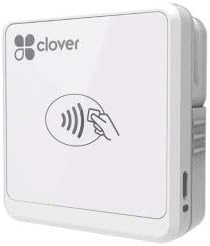
The Clover Go works with iOS and Android to accept chip and contactless payments. It has a 4.0 rating for reliability on mobile platforms.
We may earn a commission when you buy through this link, at no additional cost to you.
You do not need a dedicated merchant account to use this reader. It supports EMV cards which makes it secure for standard transactions.
This specific version may be limited in stock so orders can vary. It is a solid mobile option if you want to avoid locked hardware.
Good for mobile services needing secure payments. It balances ease of use with strong payment standards.
Support for both iOS and Android makes it widely usable. This helps businesses switch platforms without new hardware.
The reader processes chip cards for better security. This meets modern payment expectations for customers.
We may earn a commission when you buy through this link, at no additional cost to you.
This is a full wireless terminal designed for secure mobile payments anywhere. It has no rating yet as it is a newer or specific listing.
We may earn a commission when you buy through this link, at no additional cost to you.
It supports chip and NFC cards for modern transaction needs. The color LCD display with backlight is easy to read.
You need to set up a SwyftPAY account before shipping. This means there is some admin work before you can start selling.
Best for merchants wanting a complete wireless solution. It handles secure processing well once the account is ready.
This terminal accepts payments securely without wired connections. This is helpful for mobile businesses needing reliability.
The color LCD with backlight helps see amounts clearly. This ensures accurate transaction confirmation for users.
We may earn a commission when you buy through this link, at no additional cost to you.
Choosing the right card reader involves understanding your payment needs and budget.
Check if the reader accepts magstripe only chip or contactless payments. Modern customers expect tap to pay so NFC support is a plus.
Prioritize readers that support chip cards for better security and compliance.
USB readers plug into computers while Bluetooth models pair with phones. Choose based on whether you use mobile or stationary setups.
Bluetooth offers flexibility for mobile merchants while USB is simpler for fixed desks.
Look for PCI compliant and encrypted readers to protect customer data. Basic unencrypted readers might not meet legal standards.
Encryption is essential if you handle sensitive payment data regularly.
Ensure the reader works with your OS like Windows Mac iOS or Android. Some devices require specific software drivers to function.
Check compatibility with your POS software to avoid integration issues.
Plug and play readers save time compared to ones needing drivers. Simple apps help you start processing quickly without tech issues.
Look for devices that require minimal configuration to work out of the box.
Consider both hardware cost and transaction processing fees. Some devices are cheap but charge higher rates per sale.
Compare total cost of ownership to find the best value for your budget.
If you move around choose a portable device with good battery life. Look for compact designs that fit your counter or bag.
Portability is key for service providers visiting clients regularly.
Connect the reader to your device and install any needed software. Follow onscreen prompts to pair or recognize the device.
Swipe or insert the card smoothly through the reader for best results. Clean the magnetic stripe regularly to avoid reading errors.
Store the device in a dry place and avoid dropping it. Check connections often to ensure payments process without interruption.
Some USB readers act as keyboards and do not need software. However many mobile readers require specific apps to process payments.
Encrypted readers protect data better than standard magnetic ones. Check for PCI compliance to ensure your transactions are secure.
Yes many models connect via Bluetooth or USB-C to phones. Check compatibility with your iOS or Android device first.
Magstripe readers read the magnetic strip while chip readers read embedded chips. Chip is more secure and recommended for payments.
Basic readers can last years with careful use. Avoid forcing cards or exposing them to moisture to extend life.
Most full POS systems require a merchant account. Simple USB readers may not but processing still needs a payment processor.
We found the MSR90 is great for basic needs while the Square Terminal offers a full POS solution. The PAX S300 suits security focused businesses.
Prioritize what matters most such as mobile flexibility or security. Choose a device that fits your workflow and budget.
Check current prices and availability before buying as these can change. The best choice depends on your specific business needs.