
Thames & Kosmos My Robotic Pet: Coding Chameleon STEM Building & Experiment Kit
4.1Editor score
Screen-free color-sensing coding
Builds robotic reptile assembly
Three unique play modes
This guide compares the top coding toys for kids in 2026, highlighting screen-free options, robot kits, and educational tools to help you choose the best STEM
Coding toys transform playtime into powerful learning opportunities for young minds. These interactive gadgets teach logic and problem-solving through hands-on activities that captivate children. Choosing the right model ensures your child enjoys engaging educational experiences without feeling overwhelmed by complex technical concepts.
We evaluated ten standout products based on ease of use, educational value, and durability. Our analysis considered age appropriateness, coding complexity, and the ability to inspire creativity. Each selection offers unique features designed to build foundational skills while keeping playtime fun and accessible for everyone.
Every pick below showcases specific strengths tailored to different learning styles and budgets. Whether you seek screen-free solutions or app-connected robots, this list provides clear insights. Please note that product availability and pricing may fluctuate, so verify current details before making your final purchase decision.
4.1Editor score
4.6Editor score

4.6Editor score
The following table provides a side-by-side overview of our top ten selections to help you quickly compare key specifications and features across all models.




The Thames & Kosmos My Robotic Pet stands out as an accessible entry point into robotics without needing screens. With a rating of 4.1 stars, it combines assembly and coding in a fun reptile form. Kids build the model and use physical cards to program actions like tongue firing and color changes.
We may earn a commission when you buy through this link, at no additional cost to you.
Its innovative engineering features articulated joints that simulate realistic movements. The robot uses sensors to react to colored action cards, teaching logic through tangible interactions. Three play modes offer variety, from coding sequences to wild camouflage behavior. The 48-page manual ensures structured learning for ages eight and up.
While the build process requires patience and initial adult assistance, the hands-on nature reinforces STEM principles effectively. Battery requirements are standard but add minor ongoing costs. These trade-offs are minimal given the focus on unplugged learning and the educational depth provided by the kit.
This kit is ideal for families seeking affordable screen-free coding tools. It introduces engineering concepts through playful experimentation and physical manipulation. We recommend it for children who enjoy building and mechanical toys. It offers lasting value as a foundational robotics experience.
Physical cards remove screen dependency while teaching sequencing and logic effectively.
Articulated joints and sensors create lifelike movements that captivate young builders.
We may earn a commission when you buy through this link, at no additional cost to you.
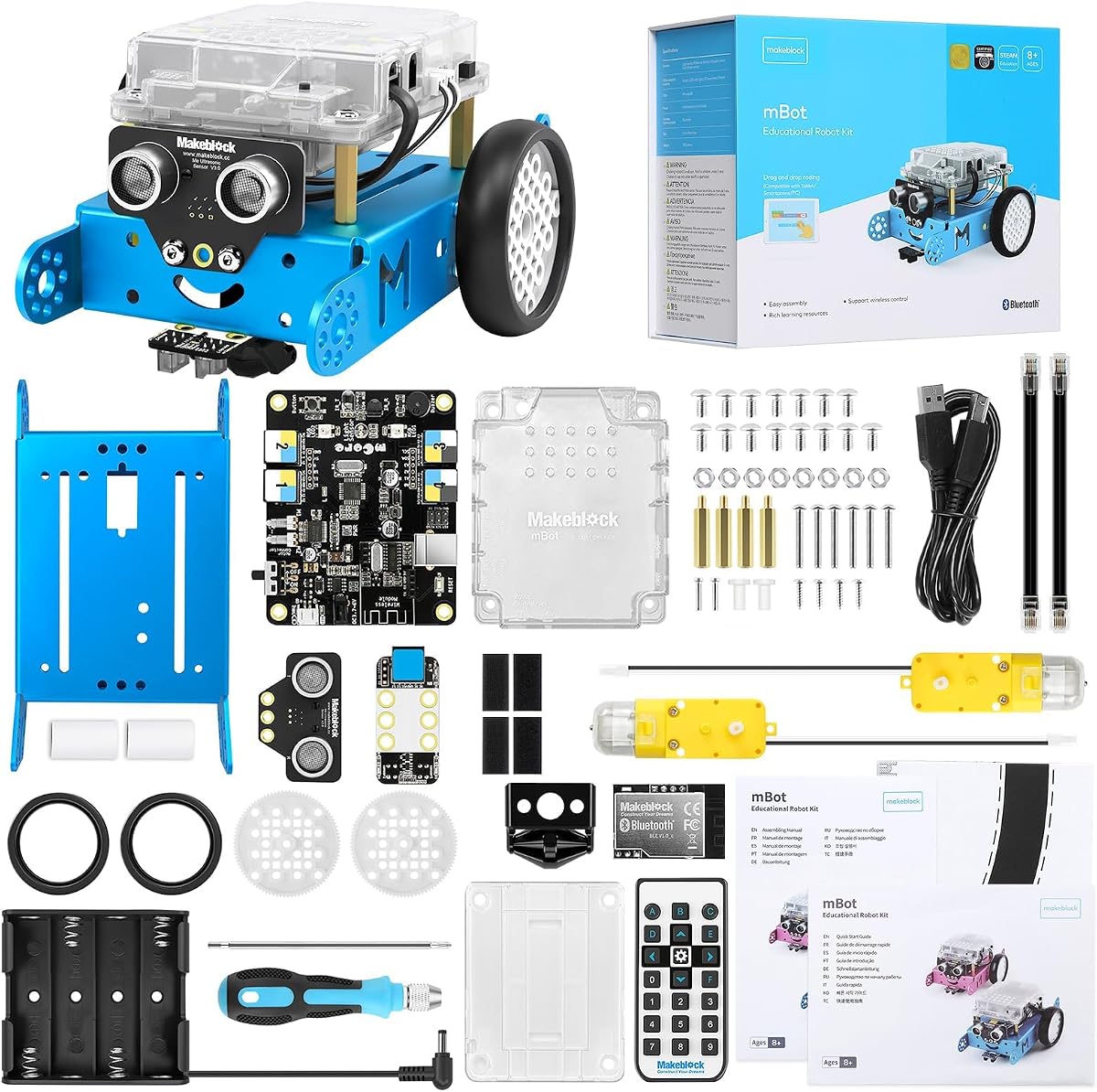
The Makeblock mBot earns its top spot by balancing simplicity with robust educational features. Rated 4.6 stars, it serves as an excellent entry-level kit for electronics and programming. Children assemble the robot quickly and progress from Scratch to Arduino through guided lessons.
We may earn a commission when you buy through this link, at no additional cost to you.
Its easy build process takes about fifteen minutes, letting kids focus on coding soon after. The system supports line-following and obstacle avoidance, making play interactive. Rich tutorials and three free apps enhance the experience, allowing for creative projects and remote control fun.
Battery needs for the remote and robot are standard but not included, adding slight prep time. This minor inconvenience does not detract from the kit's strong educational value. The open-source nature encourages expansion with add-on packs for continued learning beyond basics.
We recommend this model for children aged eight to twelve seeking structured robotics. It grows with skills through software and hardware flexibility. Parents will appreciate the clear path from assembly to independent coding. It is a versatile choice for home or classroom use.
Step-by-step software guides kids from basic blocks to advanced programming concepts easily.
Compatible with numerous modules and parts for endless creative robot configurations.
We may earn a commission when you buy through this link, at no additional cost to you.
The Ozobot Evo represents the premium tier with its comprehensive educational resources. Holding a 4.6 rating, it introduces coding through both color codes and Blockly software. The kit supports a wide age range from five to eleven years, adapting to growing abilities.
We may earn a commission when you buy through this link, at no additional cost to you.
It includes five skill levels that ensure long-term engagement without overwhelming beginners. Access to over seven hundred free lessons covers STEM and core subjects extensively. The durable robot withstands classroom use, and the hard-shell case keeps markers organized for busy environments.
The higher cost reflects the depth of content and longevity of the product. Color markers are essential for full functionality but add to initial costs. These factors are justified for those seeking a serious educational tool for home or school settings.
This kit suits educators and parents wanting a scalable learning investment. It bridges creative play with formal coding education seamlessly. The balance of screen and screen-free options makes it versatile for different learning styles. It remains a top choice for dedicated STEM exploration.
Five distinct levels allow the kit to grow with the child over years.
Combine physical color paths with digital coding for a well-rounded experience.
We may earn a commission when you buy through this link, at no additional cost to you.
The Learning Resources Code & Go Robot Mouse targets young learners with simple button coding. Rated 4.5 stars, it introduces sequencing and problem-solving through maze navigation. Designed for ages four and up, it helps emerging programmers build confidence via playful trial and error.
We may earn a commission when you buy through this link, at no additional cost to you.
The set includes maze grids and walls to build a twenty-inch board. Coding cards guide the mouse to navigate paths, reinforcing directional understanding. It is perfect for classroom STEM centers where teachers can set up repeatable activities easily for groups.
Battery reliance is necessary but standard for this type of toy. The movement is basic compared to advanced robots, which suits early development goals well. This focus on foundational logic ensures kids grasp core concepts before advancing to complex tech.
We suggest this for preschoolers and kindergarteners ready to code. It offers tactile interaction that aligns with young child learning styles. The included activity guide supports educators and parents in structuring lessons. It is a practical first step in robotics education.
Simple buttons teach sequencing without overwhelming technical jargon or screens.
Repeatable activities and clear cards support group rotations and small work.
We may earn a commission when you buy through this link, at no additional cost to you.
TEACH TECH Mech-5 challenges kids with a mechanical coding robot that throws and kicks. Rated 4.5 stars, it focuses on engineering principles through hands-on assembly. The kit requires snapping coding buttons onto a wheel, creating a unique physical interface for programming actions.
We may earn a commission when you buy through this link, at no additional cost to you.
It is designed for future engineers aged ten and up who enjoy detailed projects. The mission-based approach inspires learning about mechanical systems alongside coding basics. Watch it move after building to see code in action, reinforcing the cause-and-effect relationship clearly.
Expect multiple hours of build time which may be too long for some. The lack of pre-assembly means patience is required before play begins. However, this depth provides a true STEM experience that simple snap-together toys cannot match.
This kit fits children who love taking things apart and rebuilding. It bridges mechanical design with digital logic effectively. Parents looking for a serious build project will find it rewarding. It builds persistence and technical understanding through practical application.
Coding buttons on a wheel offer a physical way to sequence commands.
Assembly teaches mechanical structures that support the robot's movements.
We may earn a commission when you buy through this link, at no additional cost to you.
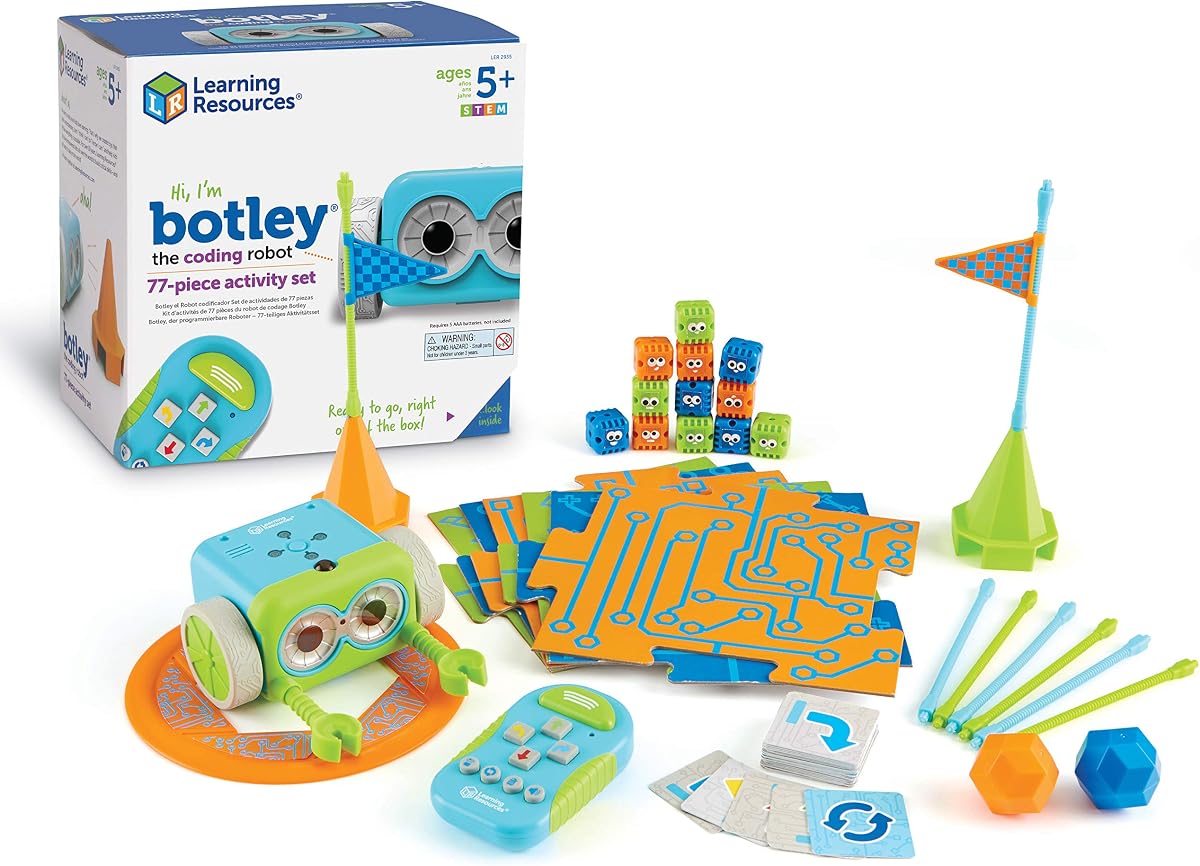
Botley is a beloved screen-free coding robot that uses a remote programmer. With a 4.6 rating, it teaches logic through cause-and-effect actions suitable for ages five and up. The robot can detect objects and follow black-line paths, adding depth to the play experience.
We may earn a commission when you buy through this link, at no additional cost to you.
The 77-piece set includes tiles and coding cards for obstacle courses. It features looping commands and hidden unlockable features to keep kids interested. The remote programmer sends commands without needing a tablet, making it accessible and focused on coding logic alone.
Setup needs a Phillips screwdriver and several AAA batteries, which adds to prep work. This minor hassle ensures the robot runs reliably without constant screen reliance. The trade-off is worth the benefit of uninterrupted screen-free educational play for young children.
We recommend Botley for those prioritizing screen-free STEM play. It builds critical thinking without digital distractions effectively. The included activities grow with skills, ensuring long-term engagement. It is a reliable tool for parents and educators seeking focused learning.
Dedicated remote removes phone dependency and keeps focus on coding logic.
Secret codes and hidden modes encourage exploration beyond basic programming.
We may earn a commission when you buy through this link, at no additional cost to you.
Sphero Mini packs fun into a tiny ball that fits in your hand. Rated 4.6 stars, it introduces coding and gaming for ages eight and up. With a gyroscope and LED lights, it offers an interactive experience powered by the free Sphero Edu app.
We may earn a commission when you buy through this link, at no additional cost to you.
You can code by drawing paths, using drag-and-drop blocks, or writing JavaScript. Drive mode lets beginners play games like obstacle courses or arcade challenges. It acts as a game controller too, providing versatility for both learning and entertainment.
The battery lasts about an hour, limiting extended play sessions. Smartphone dependency might deter those seeking screen-free options. These limits are acceptable given the compact size and broad coding methods supported for varied learning styles.
This model suits tech-savvy kids who like portable gadgets. It introduces JavaScript basics early while keeping play engaging. Parents can use it to explain coding concepts through gaming examples. It is a fun entry point into programming for teens and older kids.
Draw paths, blocks, or text code to match growing technical skills.
Play arcade games using the robot as a physical controller for engagement.
We may earn a commission when you buy through this link, at no additional cost to you.
Botley 2.0 upgrades the classic with multi-step coding and object sensing. Rated 4.5 stars, it adds depth to play with 45-degree turns and longer paths. The open-ended kit lets kids invent stories and build custom mazes easily.
We may earn a commission when you buy through this link, at no additional cost to you.
It features lights, sounds, and sixteen secret code combinations for fun. The remote programmer remains user-friendly, ensuring confidence for young future coders. Stackable obstacles allow for creative problem-solving that grows with every new challenge they create.
The price is higher than the original, reflecting added features and pieces. Setup still needs batteries and basic tools for assembly. This investment pays off through richer coding activities and more complex logic building capabilities.
Recommend this for children who outgrew the original Botley. It provides a natural next step in robotics without overwhelming complexity. Families looking for screen-free advanced play will value the new challenges. It remains a solid tool for logic development.
Multi-step paths and turns refine planning skills beyond basic sequences.
Lights and sounds give instant feedback that helps kids debug code easily.
We may earn a commission when you buy through this link, at no additional cost to you.
Wonder Workshop Dash is designed to provide a STEM advantage right out of the box. With a 4.6 rating, it is ready to teach coding concepts like sequencing and loops without assembly. It responds to voice commands and can sing or dance through apps.
We may earn a commission when you buy through this link, at no additional cost to you.
Five different apps support iOS, Android, and Fire OS for wide compatibility. It features increased memory and longer battery life for up to five hours of play. The robot is used in over forty thousand schools globally, proving its educational value.
Using it requires a tablet or phone which adds to initial requirements. The higher price reflects its robust feature set and community support. This is acceptable for those seeking an award-winning tool with reliable technical backing.
Choose Dash for families with tablets looking for immediate coding play. It offers a rich app ecosystem that encourages creativity. The longevity and school adoption make it a trusted option. It balances entertainment with serious STEM learning well.
No assembly needed means coding starts minutes after opening the box.
Apps like Blockly provide structured lessons used in thousands of classrooms.
We may earn a commission when you buy through this link, at no additional cost to you.
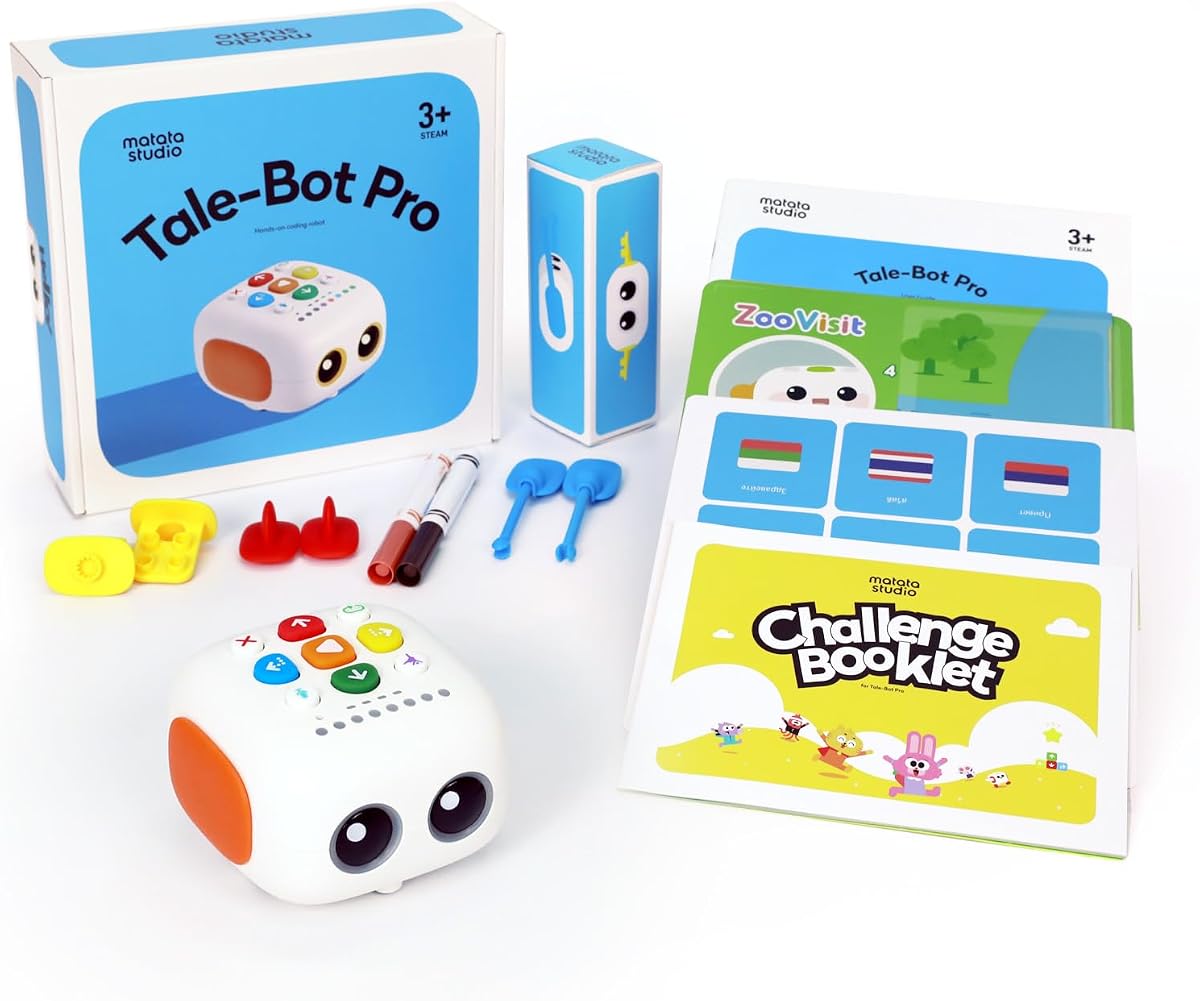
TaleBot Pro brings storytelling to coding for ages three to five. Rated 4.7 stars, it uses an interactive map and voice feedback for instructive learning. Kids press buttons to make the robot walk, draw, and record imaginative tales.
We may earn a commission when you buy through this link, at no additional cost to you.
It supports ten languages and offers up to 256 commands. Compatible with Lego blocks, it expands creative possibilities for building shapes. This screen-free robot helps develop language skills and creativity through rich interactive stories.
The robot is specific to toddlers, which may limit long-term use. Battery usage for the interactive map adds minor upkeep. These limits are acceptable for the targeted age group who needs simple, touch-based controls.
This model fits families with young children seeking early STEM exposure. It bridges creativity and coding gently without overwhelming tech. Parents valuing bilingual learning will appreciate the language options. It is a strong choice for preschoolers.
Recording and voice feedback boost communication skills alongside coding basics.
Lego compatibility lets kids build custom shapes for robot adventures.
We may earn a commission when you buy through this link, at no additional cost to you.
Selecting the right coding toy involves understanding your child's age, interests, and learning goals. This guide breaks down key factors to help you narrow the best match for your needs.
Coding toys are designed with specific age ranges to ensure safety and comprehension. Younger children benefit from screen-free, button-based robots that teach sequencing without complex interfaces. Older kids can handle app-connected models with text-based coding or complex building kits that challenge their technical skills.
Always check the manufacturer's age recommendation to avoid frustration or safety issues.
Decide whether you want your child to code on a device or physically. Screen-free options use cards and remotes to teach logic without adding extra screen time. App-connected toys offer more advanced features and real-time feedback but require a compatible smartphone or tablet.
Consider your family's screen time rules when choosing between these two types.
Some toys teach basic sequencing while others introduce loops, variables, and algorithms. Look for kits that grow with your child's skills to ensure long-term value. Beginners might start with simple drag-and-drop blocks before advancing to JavaScript or block-based platforms.
Choose a model that offers multiple skill levels to support continuous learning.
Educational coding toys should teach critical thinking alongside programming basics. Kits with manuals, challenges, or lesson plans provide structured learning for parents and teachers. Some even include STEM projects that combine robotics with science and engineering principles.
Prioritize toys with proven curriculum or lesson libraries for deeper educational impact.
Robotics kits undergo frequent handling and assembly, so durable materials matter. Metal or high-quality plastic ensures the toy withstands repeated play and classroom use. Check for replaceable parts or add-on compatibility to extend the toy's lifespan.
A well-built robot lasts longer and saves money over time.
Coding toys range from affordable entry kits to premium educational sets. Entry-level models often require additional batteries or accessories, which adds to total cost. Premium options include more components and software support but come with a higher price tag.
Weigh the initial price against long-term features to find the best value.
Some kits require hours of assembly while others are ready to code out of the box. Consider your child's patience and your available time when choosing. Pre-assembled models allow immediate learning, whereas building kits teach mechanical skills.
Look for clear instructions and tools included to simplify the setup process.
Extras like lights, sounds, or obstacle courses enhance the coding experience. Features like recording functions or compatibility with other toys add versatility. These elements keep children engaged and encourage creative problem-solving beyond basic commands.
Check for interactive elements that align with your child's interests.
Start by reading the instruction manual thoroughly to understand the coding logic and assembly steps. For screen-free toys, lay out the action cards in a logical order before pressing the start button. This helps children visualize the sequence and understand cause-and-effect relationships clearly.
Keep all components organized in the provided storage box to prevent lost parts. Labeling storage containers for screws, cards, or accessories makes future builds easier. Proper organization ensures the toy remains functional for years of educational play.
Maintain battery life by removing power sources when not in use for long periods. Clean the robot's sensors with a soft, dry cloth to ensure accurate responses. Regular care extends the lifespan of the toy and guarantees reliable performance during play.
Many of the screen-free coding toys work entirely offline without internet access. However, app-connected models often require Wi-Fi for downloading updates or additional lessons. Always check the product description to confirm connectivity needs before purchasing.
Most robot kits do not include batteries, so you will need to purchase them separately. Check the product details to see how many AAA or AA batteries are required. This is a standard industry practice to reduce packaging waste.
Yes, many of these toys are designed with classroom use in mind and offer durable materials. Some even come with lesson plans and teacher guides to facilitate group learning. They are excellent tools for STEM centers and educational rotations.
Coding toys support math, logic, and science skills by teaching problem-solving concepts. Children learn sequencing and variables which align with curriculum standards. They also foster creativity and critical thinking applicable across various academic subjects.
Start with simpler screen-free toys that offer immediate visual feedback. Encourage trial and error as part of the learning process rather than a failure. Choose models with multiple difficulty levels so they can progress at their own pace comfortably.
Use a soft, dry cloth to wipe down the exterior and sensors gently. Avoid water or liquid cleaners to prevent damage to electronic components. For detailed parts, use a small brush to remove dust from joints and tracks.
We hope this guide helped you find the perfect coding toy for your child. Our top three picks offer balanced value for budget-conscious, general, and advanced learners. Each option brings unique benefits that foster creativity and logical thinking.
Prioritize age-appropriate features and educational depth to ensure lasting interest. Choosing a toy that grows with your child maximizes its impact on learning and engagement. Remember that hands-on play is key to mastering complex coding concepts.
Always check current availability and pricing before making your final decision. These products are popular and may have varying stock levels across retailers. We wish you the best in selecting a toy that sparks a lifelong love for technology.