
Switch 2 Pro Controller Charging Station
3.5Editor score
Dual charging for Pro controllers
LED indicators show charging status
Compact design saves desk space
We compare the top 10 controller charging docks for Switch 2 to help you find the best dock for fast charging and organized storage today.
Keeping your controllers powered is essential for uninterrupted gaming. A dedicated charging dock ensures your devices are always ready when you want to play. The right dock organizes your setup while providing fast and safe charging for your controllers.
We evaluated ten top-rated charging stations based on compatibility, charging speed, and design. Our team reviewed user feedback and technical specifications to identify the most reliable options available on the market right now.
Each pick highlights unique features like RGB lighting, storage capacity, and charging ports. Prices and availability change frequently so check current listings before you decide which dock fits your gaming needs best.
3.5Editor score

4.7Editor score
4.6Editor score
This comparison table shows the key specifications and features of every dock reviewed in this guide to help you choose quickly.


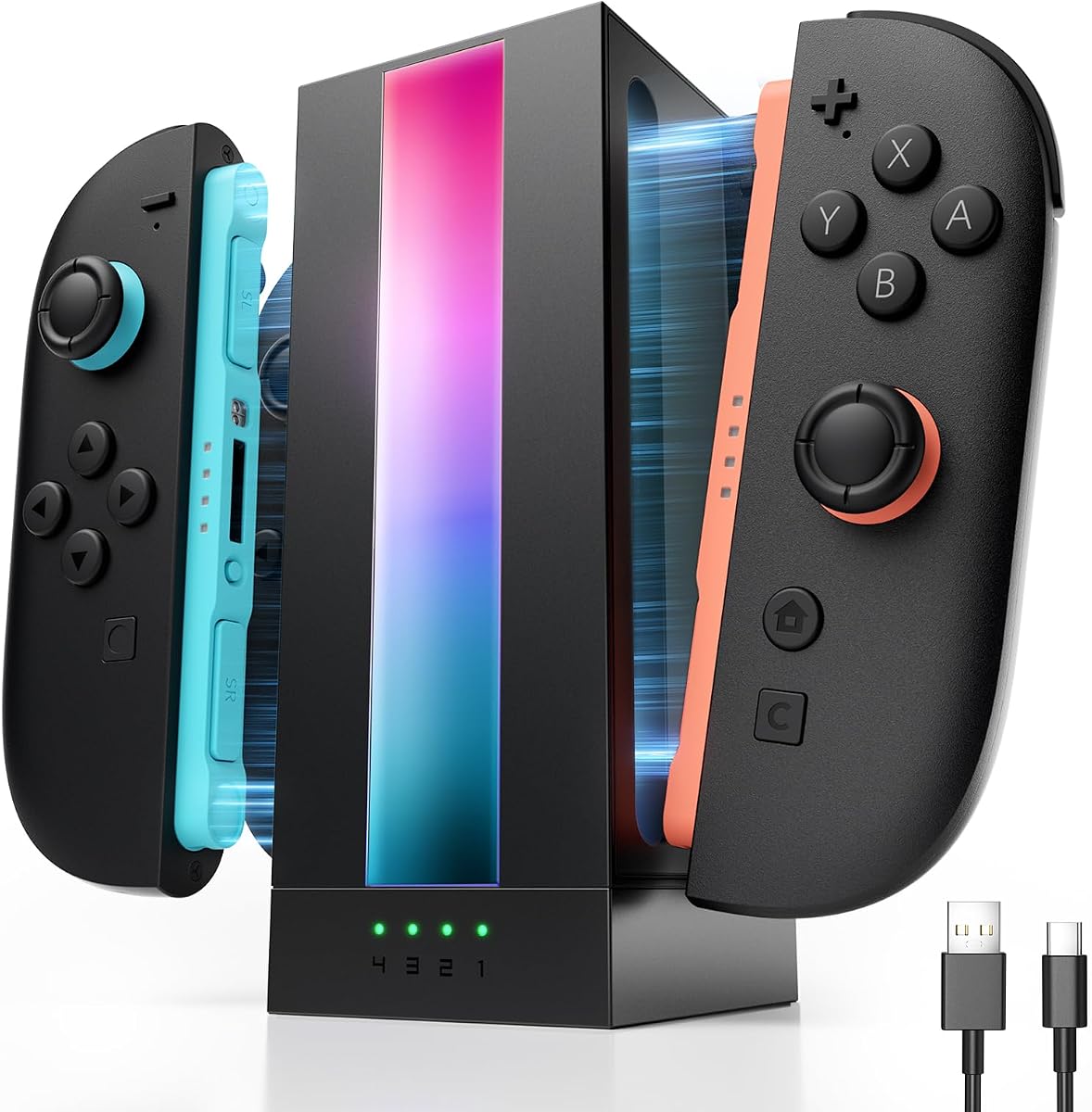
This magnetic charging dock from FASTSNAIL is our top pick for Switch 2 owners. It has a high rating of 4.7 stars and stands out for its effortless magnetic alignment feature that makes charging simple and fast.
We may earn a commission when you buy through this link, at no additional cost to you.
The dock charges up to four JoyCons simultaneously which is perfect for multiplayer nights. It features nine vivid RGB light modes and a smart memory function that remembers your preferred lighting setting when power cycles.
While it does not come with a console or JoyCons the charging efficiency is solid with full charges taking around 2.5 to 3 hours. The touch-sensitive switch lets you turn off lights for a sleep-friendly environment.
Anyone looking for a stylish and efficient way to keep their JoyCons powered should consider this dock. It combines storage and charging in one clean design that fits well on any gaming desk setup.
The magnetic alignment ensures you do not have to distinguish between plus and minus JoyCons making drop-in charging effortless.
With nine lighting modes including static colors and dynamic effects you can customize the dock to match your gaming room aesthetic.
We may earn a commission when you buy through this link, at no additional cost to you.
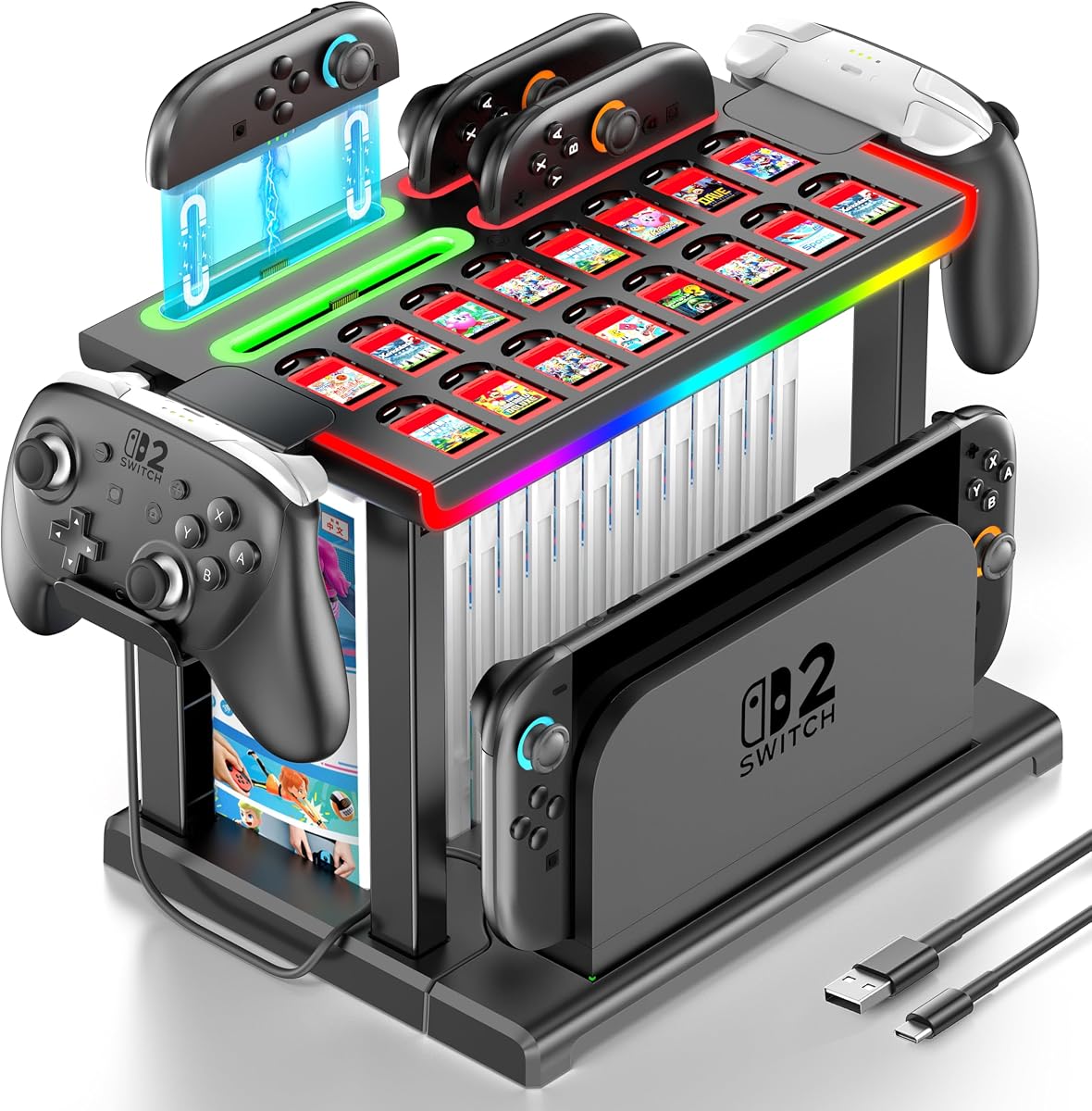
This organizer station combines storage and charging in a single premium unit. With a 4.6 star rating it is designed to keep your gaming area neat and organized while charging your controllers efficiently.
We may earn a commission when you buy through this link, at no additional cost to you.
It holds four JoyCons sixteen game cards sixteen game cases and even your Switch 2 TV dock. The RGB lighting features seven single-color modes and two multi-color breathing modes to enhance your gaming setup visually.
The charging speed is impressive allowing you to charge four JoyCons in about two hours. It is easy to install without tools and includes non-slip pads to keep it stable on your desk surface.
Perfect for serious gamers who want everything in one place this station makes a great gift. It prioritizes organization and style without sacrificing the fast charging performance you need for play.
This unit stores your TV dock game cases and controllers simultaneously freeing up shelf space and keeping your setup tidy.
The RGB lights cycle through modes that sync with your gaming rhythm creating an immersive atmosphere around your play area.
We may earn a commission when you buy through this link, at no additional cost to you.
This dual charging station offers a simple and budget-friendly way to keep your Switch 2 Pro Controllers ready. It holds two controllers and uses LED lights to show charging status at a glance easily.
We may earn a commission when you buy through this link, at no additional cost to you.
It supports 5V/2A input for efficient charging which helps reduce wait times between gaming sessions. The sleek design saves space on your desk while ensuring your controllers are organized and powered up quickly.
While the rating is lower than top picks it provides reliable basic functionality for Pro controllers. It includes smart protection features to prevent overheating and overcharging which keeps your controllers safe during use.
If you mainly use Pro Controllers and want a no-frills charging solution this station is a good choice. It is easy to set up and keeps your controllers ready for your next gaming session effectively.
This dock is designed specifically for Switch 2 Pro Controllers allowing you to charge two devices simultaneously in one unit.
Red lights indicate charging while green lights show full charge so you can monitor power levels without picking up the controller.
We may earn a commission when you buy through this link, at no additional cost to you.
This versatile dock charges Switch Pro Switch 2 Pro PS5 and Xbox Series controllers. It is rated 4.0 stars and provides a unified charging station for mixed setups without needing multiple devices.
We may earn a commission when you buy through this link, at no additional cost to you.
It includes removable Type-C adapters to reduce wear on ports and allows easy drop-in charging. The front LED indicator shows red for charging and green for full charge so you know status at a glance.
Be aware it does not support PowerA or other third-party controllers so confirm your model before buying. A 5V/2A adapter is recommended for best performance since low-power ports may cause slow charging.
Gaming fans with multiple console setups will appreciate the flexibility of this dock. It keeps your controllers organized and charged efficiently while protecting ports with included adapters and stable design.
This station supports PS5 Xbox Series and Switch Pro controllers making it a universal hub for multi-console gaming fans.
Included removable Type-C adapters help reduce wear on your controllers charging ports allowing for a longer lifespan.
We may earn a commission when you buy through this link, at no additional cost to you.
The SUPCASE dock charges up to four JoyCons simultaneously with a space-saving design. It has a strong 4.7 star rating and features magnetic alignment to secure controllers during charging effectively.
We may earn a commission when you buy through this link, at no additional cost to you.
You can place JoyCons either way thanks to Dual-Side charging support which makes usage flexible and convenient. Nine RGB lighting modes let you customize your gaming space based on your mood or preferences.
Built-in smart chips detect charging status and stop when full to prevent overheating and overcharging. This ensures safe reliable use while keeping your area neat with a dedicated charging station for all controllers.
If you want a compact but feature-rich dock this SUPCASE option is ideal. It keeps your JoyCons organized charged and protected with magnetic design and RGB lighting in one convenient spot.
Place your JoyCons in either orientation to charge reducing the need to worry about plus minus orientation when docking.
Automatic detection stops charging when full to extend battery lifespan and protect your controllers from damage.
We may earn a commission when you buy through this link, at no additional cost to you.
This dock works with Switch 2 1 and OLED models making it future-proof for your console history. Rated 4.2 stars it features 10 charging slots to support up to four JoyCons and two Pro controllers simultaneously.
We may earn a commission when you buy through this link, at no additional cost to you.
It uses a Y-Type cable to connect to the official dock for power source which ensures stable charging when fully loaded. The LED indicators show blue for standby and orange for charging to monitor status easily.
With 11 RGB modes including marquee and gradient effects you can customize lighting to match your room. It includes over-charge protection and extra USB 2.0 ports for data transfer or charging additional devices.
If you have multiple console generations this dock simplifies charging by combining all controllers in one station. Just note it requires the official dock as power and excludes third-party controllers from support.
Designed for Switch 1 2 and OLED models this dock saves money by replacing multiple chargers for your collection.
Two extra USB 2.0 ports allow data transfer or charging of other devices adding extra utility to your gaming desk.
We may earn a commission when you buy through this link, at no additional cost to you.
This dock is designed exclusively for Switch 2 JoyCon controllers and charges four units in about 2.5 hours. With a 4.3 star rating it offers high speed charging to reduce wait times during multiplayer gaming sessions effectively.
We may earn a commission when you buy through this link, at no additional cost to you.
An immersive RGB light bar enhances your environment and can be controlled with a one-touch button. Each port has an independent LED indicator showing flashing green for charging and solid green when fully charged or standby.
It is up to 30% more efficient than previous models to help keep your controllers ready without long breaks. Built-in safeguards protect against short circuits overheating and overcharging to extend your controllers lifespan safely.
If you want the fastest charging possible for Switch 2 JoyCons this JSAUX dock is a top choice. Just remember to match plus minus marks for proper alignment and buy an adapter separately since it is not included.
Up to 30% more efficient than prior models this dock reduces charging time significantly to keep you gaming longer.
Each port shows its own charging status so you can monitor each JoyCons power levels separately at a glance.
We may earn a commission when you buy through this link, at no additional cost to you.
This dual USB-C charger supports Switch Pro PS5 Xbox and Elite Series 2 controllers. It holds two controllers to reduce downtime and keep your gaming setup organized for daily play without needing multiple docks.
We may earn a commission when you buy through this link, at no additional cost to you.
USB-C adapters are included for convenient dock-and-charge use that helps reduce wear on controller ports. LED indicators show charging status at a glance while the compact low-standby design fits neatly on desks and TV stands.
Use a 5V/2A adapter for best performance as lower-power ports may cause slow charging. It is not compatible with PowerA or some third-party controllers so verify compatibility before buying to avoid issues.
For users with mixed console collections this dock simplifies charging by supporting official USB-C controllers in one spot. It is a practical budget-friendly option to keep controllers organized and powered up ready.
Designed for official USB-C controllers this dock handles Switch PS5 and Xbox series so you only need one charger.
Included adapters allow drop-in charging reducing repeated plugging and unplugging which extends your controllers charging port lifespan.
We may earn a commission when you buy through this link, at no additional cost to you.
This station supports Nintendo Switch JoyCons Pro controllers and PS5 controllers in a 6-in-1 setup. It has a 4.7 star rating and uses fireproof panel design to ensure safe charging of your controllers and devices.
We may earn a commission when you buy through this link, at no additional cost to you.
It can charge four JoyCons and two Pro or PS5 controllers simultaneously using game console hub or wall charger power. A 80cm USB-C charging cable is included along with a one year quality promise for added peace of mind.
Built-in protection chips prevent overcharging and short circuits to keep your devices safe. It is designed to mimic official track design for simple plug and play setup that is easy to set up on your desk.
If you own both Nintendo and PlayStation consoles this dock is a practical choice to consolidate charging needs. It offers safe reliable charging for multiple controller types without needing separate chargers for each system.
Supports Nintendo and PlayStation controllers in one station eliminating the need for multiple charging units on your desk.
Fireproof panel design ensures safe charging by reducing risk of overheating or electrical issues during use.
We may earn a commission when you buy through this link, at no additional cost to you.
The PowerA base supports Nintendo Switch Pro Controllers and JoyCons with a bold design. Rated 4.6 stars it is designed to look great with any gaming set-up while providing reliable wireless charging for controllers.
We may earn a commission when you buy through this link, at no additional cost to you.
It charges JoyCons and wireless controllers simultaneously using LED lights to indicate when controllers are fully charged. This allows you to keep multiple devices powered up at once so you never run out of power during play.
Fully compatible with all PowerA Wireless Nintendo Switch Controllers it simplifies charging for fans of this brand. The design is straightforward and easy to use making it accessible for casual and hardcore gamers alike.
If you want a stylish charging option that fits your gaming setup visually this PowerA base is a solid choice. It keeps your controllers organized charged and ready with clear LED status indicators and solid compatibility.
The bold design looks great with any set-up and fully supports Pro and PowerA Wireless controllers for seamless use.
LED lights indicate when controllers are charged so you can track power levels easily without checking battery stats.
We may earn a commission when you buy through this link, at no additional cost to you.
Choosing the right charging dock depends on your controller types and how much storage you need.
Ensure the dock explicitly supports Switch 2 JoyCons and Pro Controllers. Some docks do not support third-party controllers so verify your models before buying to avoid compatibility issues.
Check if the dock supports other consoles like PS5 or Xbox if you own multiple systems for a unified charging solution.
Look for docks that support 5V/2A input for faster and more stable charging. Docks that charge four JoyCons should ideally do so in under three hours to minimize downtime.
Fast charging reduces wait times between gaming sessions and keeps your controllers ready for multiplayer nights quickly.
Select a dock with enough slots for all your controllers. If you have multiple JoyCons choose a dock that charges four at once to simplify management and reduce clutter.
More ports also mean you can charge Pro Controllers alongside JoyCons so everyone has a powered device ready.
Many docks include RGB lights to enhance your gaming setup visually. Check if the dock offers multiple modes and whether you can turn off the lights for a quieter environment.
RGB modes add ambiance but if you prefer minimalism ensure the dock allows easy control or disabling of lighting effects.
Some docks double as organizers that hold game cases and TV docks. If you want to save space look for docks with slots for cases and accessories to keep your area neat.
Storage capacity helps reduce clutter on your desk by consolidating controllers and games into one central unit.
Look for smart chips that prevent overcharging and overheating. Built-in protection extends the lifespan of your controllers and ensures safe charging during extended use.
Safety features are essential to protect your valuable gaming accessories from damage due to electrical issues.
Choose a dock that fits your desk space without taking up too much room. Some are compact and low-profile while others are larger with more storage options.
Non-slip pads help keep the dock stable on surfaces and prevent scratches on your desk or TV stand.
Check if USB-C adapters or cables are included. Some docks come with adapters to reduce wear on ports which is a helpful addition for long-term use.
Included cables and adapters save you from buying extra accessories and ensure you can use the dock right away.
Connect the dock to a reliable power source like a wall adapter or your console dock. Ensure the USB-C cable is fully inserted to avoid intermittent charging.
Place your JoyCons or Pro Controllers securely on the charging slots aligning any magnetic markers or symbols for best contact.
Clean the dock regularly with a dry cloth to remove dust and wipe ports to prevent debris from affecting charging performance.
No you must use a dock specifically designed for Switch 2 JoyCons as the size and contacts differ from older models. Check compatibility details before buying to ensure it supports the 2025 release controllers.
Full charge typically takes about 2.5 to 3 hours depending on the dock. Docks with 5V/2A input generally charge faster than those with lower power inputs or shared ports.
Some docks come with a cable but not an adapter. You may need to use a separate 5V/2A wall adapter or connect via your console dock depending on the product instructions.
Some multi-platform docks support PS5 and Xbox controllers in addition to Switch. Check the compatibility list before purchasing to confirm if your specific dock supports your console controllers.
Most docks use red or orange lights to show charging and green or blue for fully charged or standby. Always check the manual for specific light meanings for your dock model.
Most modern docks include smart chips that stop charging once the battery is full to prevent overcharging. This safety feature protects your controllers and extends their battery life significantly.
Our top picks include the FASTSNAIL dock for its magnetic convenience and the Switch 2 RGB Organizer for storage lovers. Both options offer reliable charging and unique features to suit different needs.
Prioritize compatibility and charging speed when deciding which dock fits your setup. If you want style and ambiance look for RGB options while basic users can choose simpler dual port models.
Prices and availability change frequently so check current listings before you decide which dock fits your gaming needs best. Verify compatibility one last time to ensure a smooth experience.