
CyberPower ST625U
4.5Editor score
625VA 360W capacity
GreenPower high efficiency
8 outlets with USB
LED status lights
Compact footprint design
This guide compares the top ten Cyberpower UPS battery backup models for reliability, surge protection, and runtime to help you choose the right power backup
Finding reliable power protection is essential for modern homes and offices. A good Cyberpower UPS battery backup ensures your devices stay online during outages and guards against damaging surges. We reviewed ten top models to find the best options for every setup.
Our team analyzed specs, ratings, and features to compile this definitive list. We looked at capacity, outlet counts, display types, and warranty terms. This comparison highlights the strengths and weaknesses of each unit to simplify your decision process significantly.
Each pick below shows real performance data and key benefits for specific users. Prices and availability change often so always verify current details before buying. This guide helps you invest in power security that fits your budget and technical requirements perfectly.
4.5Editor score

4.5Editor score

4.6Editor score
This table provides a side-by-side view of all ten models. It summarizes key specs like capacity, outlets, and wave type so you can quickly spot differences between units.


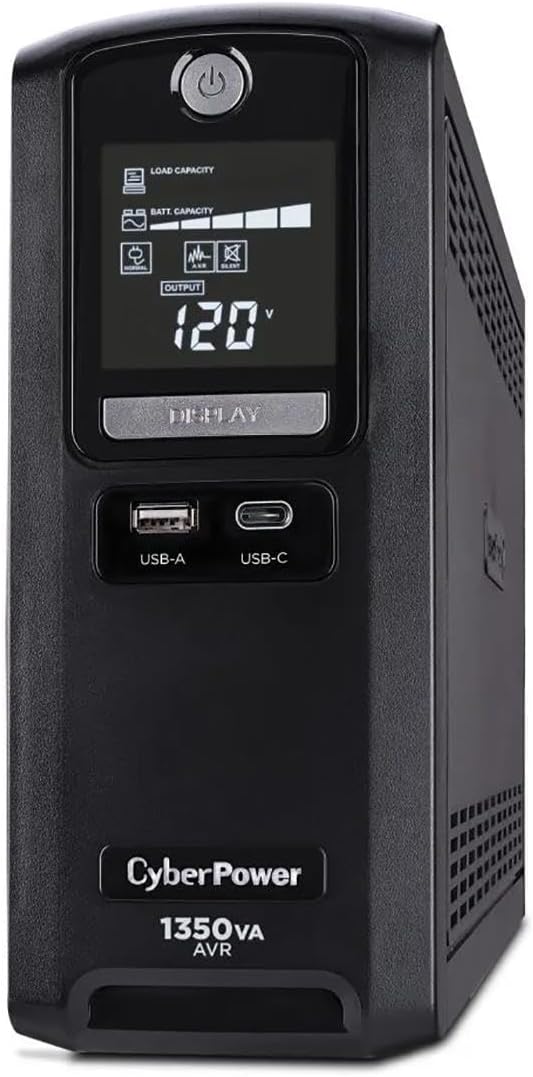


The CyberPower CP1500PFCLCD stands out as the top choice for serious users. It offers 1500VA capacity with PFC Sinewave output which protects sensitive active PFC power supplies effectively. Its 4.5 star rating reflects consistent performance and reliable protection across many setups.
We may earn a commission when you buy through this link, at no additional cost to you.
This unit delivers 1000W of real power making it ideal for workstations or gaming rigs. The color LCD panel shows detailed battery data and alerts you before issues arise. Twelve outlets give ample room for all devices while two USB ports charge phones quickly.
Some users might find the cost higher than basic models but the protection level justifies it. The surge protection is robust and the connected equipment guarantee offers peace of mind for expensive gear. Its size fits well under most desks.
Buy this model if you need pure sine wave output for modern computers. It balances power, features, and reliability perfectly for home offices or small businesses. This is the safest investment for critical electronics needing consistent clean power during outages.
PFC Sinewave output ensures compatibility with active power factor correction supplies found in high end PCs.
The color LCD displays battery health and load instantly so you know exactly how much runtime you have left.
We may earn a commission when you buy through this link, at no additional cost to you.
The EC850LCD focuses on efficiency with its unique ECO Mode feature. It detects when computers sleep and cuts power to peripherals to reduce waste. This approach helps lower electricity bills while still protecting devices from surges and outages reliably.
We may earn a commission when you buy through this link, at no additional cost to you.
It provides 510W of capacity which suits standard home office setups well. Twelve outlets offer great flexibility for routers printers and monitors. The LCD shows battery status clearly so you can monitor power health without extra tools or software.
While it lacks USB charging ports the overall value is strong. The power saving mode is a standout benefit for eco conscious users. It is not for high end gaming rigs but perfect for standard workstations and home networks.
Choose this if energy efficiency matters alongside basic protection. It saves money over time by cutting phantom load on peripherals. This model is a smart pick for budget conscious buyers who want modern features.
ECO Mode automatically switches off peripherals when your computer sleeps to cut unnecessary energy consumption significantly.
Lower cost combined with energy saving features makes this an attractive option for standard home offices.
We may earn a commission when you buy through this link, at no additional cost to you.
This model delivers strong 900W output with a clear color LCD interface. It suits workstations and home entertainment systems needing ample outlets and monitoring. The 4.5 rating confirms its stability and value for general backup needs.
We may earn a commission when you buy through this link, at no additional cost to you.
It uses simulated sine wave which works for most devices except high end power supplies. Sixteen outlets let you plug in everything at once. USB ports add convenience for phones and tablets during blackouts.
The main limitation is it is not designed for servers requiring true sine wave. However for standard PCs and home gear it performs well. AVR technology corrects voltage dips to save battery life.
Pick this for home use where color feedback is useful. It balances price and capacity better than many competitors. This is a solid everyday protector for users needing modern connectivity.
The color screen makes it easy to see battery health and alerts at a glance during power events.
Automatic Voltage Regulation fixes minor fluctuations so the battery drains only when necessary.
We may earn a commission when you buy through this link, at no additional cost to you.
The AVRG900LCD adds value with data line protection against surges traveling through phone lines. It is a smart choice for older setups using modems or faxes. The 4.6 rating suggests high user satisfaction with its reliability.
We may earn a commission when you buy through this link, at no additional cost to you.
At 480W it handles standard desktops and routers easily. Twelve outlets provide great expansion options for peripherals. The LCD keeps you informed on power conditions clearly so you act fast during outages.
It does not include USB charging which might inconvenience some modern users. But for wired setups the data protection is unique. It is compact enough to fit under most desks without hassle.
Choose this if you need network protection alongside power backup. It offers specific security for connected lines that others lack. This is a practical pick for traditional office environments.
Data Line Protection blocks voltage spikes from telephone lines that could fry sensitive communication hardware.
AVR adjusts voltage automatically to keep devices safe without wasting battery cycles unnecessarily.
We may earn a commission when you buy through this link, at no additional cost to you.
The ST625U brings backup power at an entry level price. Its 360W capacity suits single PCs or game consoles well. The 4.5 rating shows it delivers basic protection reliably for budget conscious buyers.
We may earn a commission when you buy through this link, at no additional cost to you.
It uses GreenPower technology to reduce energy use during standby. Eight outlets plus USB ports cover essential devices. LED lights show status clearly so you know if power is safe instantly.
It is not for heavy workloads but great for small setups. The design is compact and fits on shelves easily. Some might wish for more outlets or a screen but it saves money.
Buy this for secondary rooms or home entertainment centers. It offers essential safety without extra cost or bulk. This is the smart choice for simple power needs.
GreenPower design minimizes wasted electricity while the unit sits idle in standby mode.
Its light weight makes it easy to move between rooms as your setup changes.
We may earn a commission when you buy through this link, at no additional cost to you.
The PR1500LCD targets servers with full 1500W sine wave power. It supports remote management for IT teams monitoring rack mounts. Its 4.6 rating reflects trust in professional and enterprise environments.
We may earn a commission when you buy through this link, at no additional cost to you.
Pure sine wave protects sensitive server supplies best. The extendable LCD lets you read stats from distant spots. Eight outlets fit racks nicely while the business software tracks uptime over time.
The high cost reflects commercial features not needed for homes. You must buy a card separately for full remote control. But for data centers this reliability justifies the investment.
Choose this for servers or critical network gear. It brings enterprise level control and safety to power setups. This is the top tool for professional uptime needs.
Pure sine wave output matches the needs of servers and network equipment that cannot tolerate waveform distortion.
An extendable LCD panel moves away from the chassis so you can read status from any angle.
We may earn a commission when you buy through this link, at no additional cost to you.
This model delivers 900W with clear LCD readouts for easy monitoring. It suits home offices needing many outlets and stable power. The 4.5 rating shows it performs well for general electronics.
We may earn a commission when you buy through this link, at no additional cost to you.
Simulated sine wave works for most devices except top tier power supplies. Twelve outlets support printers routers and monitors easily. AVR extends battery life by correcting voltage dips automatically.
It lacks USB charging which modern users expect. But the LCD and AVR add value. It is reliable for setups needing pure backup power without smart features.
Choose this for workstations needing stable backup. It balances features and price for home offices. This is a trusted workhorse for everyday electronics.
The LCD shows runtime estimates so you know how long you have to save work during outages.
AVR corrects small voltage issues so the battery does not drain for minor power fluctuations.
We may earn a commission when you buy through this link, at no additional cost to you.
The CST135UC earns a 4.9 rating with advanced home features. It protects cable lines and offers Type-C charging for modern devices. Ten outlets cover entertainment setups with ease.
We may earn a commission when you buy through this link, at no additional cost to you.
Simulated sine wave fits most consoles and PCs. Energy Star certification ensures low idle power use. Coax protection shields against storm surges on TV cables.
It is great for living rooms needing broad protection. The Type-C port is a rare plus at this price. It balances smart features and performance for home users.
Choose this for home entertainment and coax networks. It adds specific line safety for home theater gear. This is a top modern pick for living rooms.
Coax protection stops surges on TV cables to protect consoles and modems from outside interference.
Type-C ports support faster charging for modern phones and tablets when outlets are scarce.
We may earn a commission when you buy through this link, at no additional cost to you.
The BRG1500AVRLCD2 combines 900W with color LCD and remote options. It suits workstations needing monitoring and future expandability. Its 4.7 rating indicates strong user trust and reliability.
We may earn a commission when you buy through this link, at no additional cost to you.
Ten outlets plus USB charge phones during outages. The color screen highlights alerts clearly. Remote management works with a separate card for IT teams.
You must buy the card separately for remote access. But the hardware supports it well for growth. It is a solid pick for offices planning to scale.
Choose this for scalable office setups needing color displays. It offers room for future management without new hardware. This is a flexible choice for growing offices.
The color LCD highlights critical issues immediately so you can respond before downtime occurs.
Remote management slots allow you to add control later as your needs evolve.
We may earn a commission when you buy through this link, at no additional cost to you.
This unit is designed for standard two rack slots in server rooms. It delivers 1000W for network gear and servers. Its 4.5 rating confirms consistent performance for IT use.
We may earn a commission when you buy through this link, at no additional cost to you.
The LCD screen shows runtime and battery health clearly. Business software helps track uptime and manage multiple units. It supports a remote card for central control over networks.
It is bulky and best for dedicated server closets. You need a card for full remote use. But the rack design saves floor space in IT rooms.
Choose this for server closets needing rack mount. It brings business management to smaller IT setups. This is the right tool for rack mounted gear.
The two rack unit size fits standard server cabinets without wasting precious floor space.
Management software allows teams to monitor battery health across multiple units from one place.
We may earn a commission when you buy through this link, at no additional cost to you.
Selecting the right UPS depends on your devices power needs and features. This guide covers key factors to ensure you buy a unit that protects your gear effectively.
VA measures potential power while watts show real usable energy. Calculate total wattage of devices to pick a unit with enough headroom for runtime.
Always choose a UPS with wattage higher than your total device load for safe operation.
Pure sine wave is needed for active PFC power supplies found in modern PCs. Simulated wave works for standard electronics but may cause noise in sensitive equipment.
Match the waveform to your most sensitive device to avoid power issues or damage.
More outlets let you connect all devices at once without extra strips. Ensure the UPS has enough battery backed outlets for critical gear like routers and PCs.
Count your devices and choose a model that covers critical load plus a few extras.
LCD panels show battery health runtime and alerts clearly. Color displays add detail but basic screens work for simple needs.
Pick a display that fits your monitoring needs without overpaying for unused features.
Built in USB ports charge phones during outages. Type-C is faster for newer devices. These add convenience for modern offices and homes.
Look for USB-A and USB-C if you need mobile charging during power events.
Some models protect phone or coax lines from surges. This is key for older networks or home theaters with cables.
Choose units with line protection if your gear connects to outside communication cables.
CyberPower offers warranties covering the battery and connected equipment. A longer warranty means better support for repairs or replacements.
Check warranty length to ensure long term protection for your investment and gear.
Higher units include software for monitoring and shutdown. This helps save data during outages automatically.
Ensure the included software works with your OS for safe shutdown.
Place the UPS in a dry cool area away from sunlight. Keep vents clear to avoid overheating and ensure it plugs into a grounded outlet for safety.
Run the included software to set shutdown timers. This saves your work automatically when the battery runs low during an outage.
Test the battery every three months by unplugging the unit. Check the display for health ratings and replace the battery when it reaches end of life.
Runtime depends on your connected load. A 600W unit might run a 200W PC for 20 minutes but a 1000W unit runs the same PC for 40 minutes. Check specific runtime charts in manuals for exact estimates.
If your PC has an active PFC power supply then yes. These need sine wave to work properly. Simulated wave can cause fans or power supply to fail on high end rigs.
Yes but printers often use high startup watts. Plug printers into surge only outlets if the UPS supports it. Battery backed outlets are better for routers and PCs to avoid reboot cycles.
Most models display a battery replacement alert when charge drops too low. The battery usually lasts three to five years. Test monthly to get accurate life estimates.
Yes the USB ports remain active on battery backup. You can charge phones during outages as long as the battery holds enough power to run the circuit.
Yes but check wattage limits. High end PCs may need 1000W or more. Ensure the UPS exceeds your PC wattage to handle startup spikes without overload.
Most do but versions vary. Personal Edition works for home users while Business Edition adds advanced features. Download it from the official site to match your model.
Continuous beeping means it is on battery or has a fault. Check outlets and connections. If unplugged it beeps until shutdown or battery is replaced.
Our top three picks cover different needs from budget to premium. The CP1500PFCLCD leads with sine wave while the ST625U saves cash and the PR1500LCD serves servers.
Prioritize wattage and waveform for your devices before looking at extra features. A unit that matches your load protects better than one with more outlets you do not use.
Prices change often so verify current deals before buying. This guide gives you the tools to choose the right power backup for your setup today.