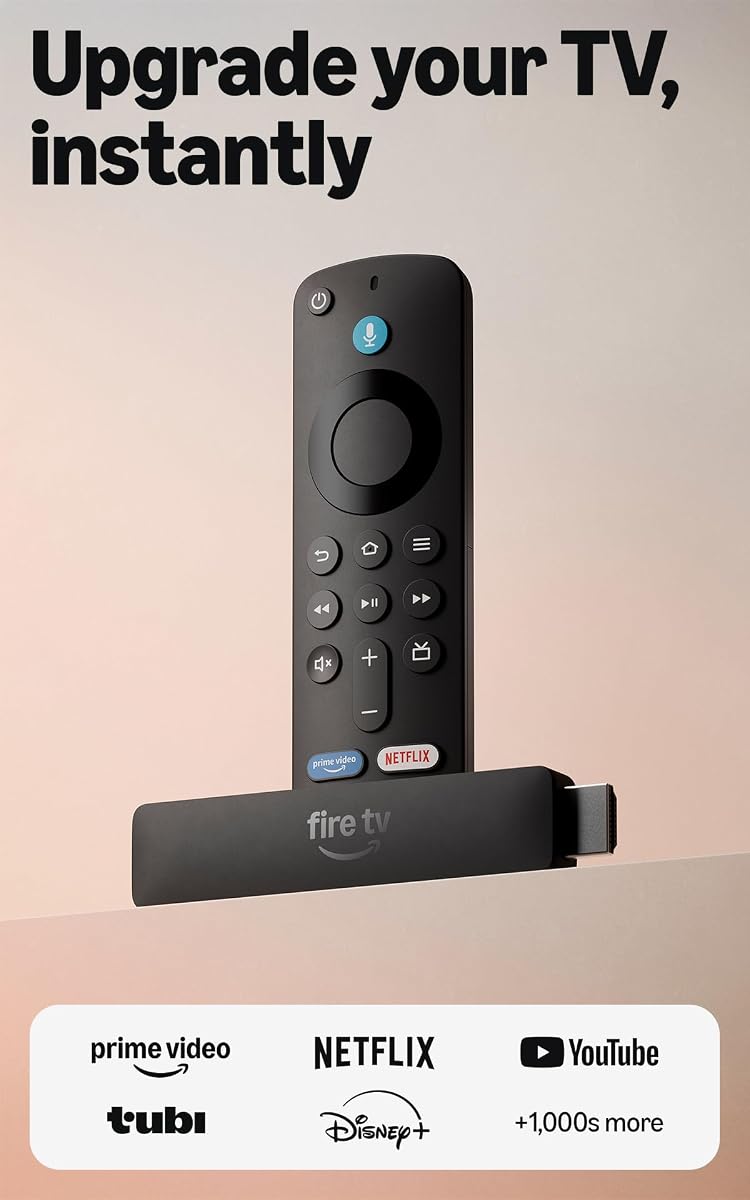
Amazon Fire TV Stick HD
4.1Editor score
Full HD streaming with Wi-Fi 6
Alexa+ voice search and control
Direct power via USB-C cable
Amazon Fall Prime Day Tech Deals offer incredible opportunities to upgrade your home entertainment and smart home ecosystem. This guide explores the latest devices that blend performance, affordability, and smart features for every budget.
We compared ten top-rated products based on streaming quality, smart home integration, display clarity, and overall user experience. Each item was selected for its reliability and value during this exclusive shopping event.
Every pick includes detailed specs, pros, cons, and real-world usage insights to help you decide. Prices fluctuate often, so check current offers before you buy to ensure you secure the best deal available today.
4.1Editor score

4.6Editor score

4.3Editor score
As an Amazon Associate we earn from qualifying purchases.
This side-by-side comparison highlights key features across all ten selected products to help you find the perfect match for your needs during Amazon Prime Day.






The Fire TV Stick 4K Plus stands out as the top performer in streaming media players this November 2026. With a 4.6 rating and advanced hardware, it delivers crisp visuals and smooth performance for any home theater setup.
We may earn a commission when you buy through this link, at no additional cost to you.
Its support for Dolby Vision and Dolby Atmos ensures immersive entertainment whether watching movies or gaming. The Wi-Fi 6 support minimizes buffering even during peak hours, while Alexa+ helps find content across apps instantly.
Though it is priced higher than basic sticks, the added features like cloud gaming and robust audio support justify the cost. Users report fewer crashes and faster load times compared to previous generations.
Ideal for tech enthusiasts who want the best possible streaming experience without a dedicated console. It simplifies your setup while delivering premium quality and smart features that adapt to your habits.
Dolby Vision HDR and Dolby Atmos create cinematic sound and picture quality that rivals high-end TVs, enhancing every scene with deep contrast and rich audio layers.
Alexa+ lets you find shows naturally across apps, while Xbox cloud gaming turns your living room into a game station without needing extra hardware or bulky consoles.
We may earn a commission when you buy through this link, at no additional cost to you.
The Fire TV Stick HD is the perfect choice for budget-conscious shoppers looking to upgrade an older TV. It brings modern streaming capabilities without breaking the bank, featuring Full HD and Wi-Fi 6 for smooth playback.
We may earn a commission when you buy through this link, at no additional cost to you.
Setup is effortless thanks to direct power from your TV, eliminating cable clutter. The new Fire TV interface loads apps quickly, and Alexa+ simplifies finding content across Prime Video, Netflix, and more.
While it lacks 4K, most casual viewers won't notice on smaller screens. The streamlined design fits behind any TV, making it discreet and easy to move between rooms or while traveling.
Buy this if you want reliable streaming performance without premium features. It offers excellent value for everyday use, balancing speed, simplicity, and cost effectively for all household members.
Direct power via the TV's USB port means no wall outlets needed, and the thin design slips behind any screen without blocking HDMI ports for other devices.
Voice commands let you search titles, control smart lights, or check weather without typing, making navigation intuitive and hands-free for everyone in the family.
We may earn a commission when you buy through this link, at no additional cost to you.
The Echo Show 11 redefines smart displays with its expansive 11-inch Full-HD screen and immersive spatial audio. Ideal for kitchens or living rooms, it turns recipes, calls, and music into engaging visual experiences.
We may earn a commission when you buy through this link, at no additional cost to you.
Powered by the AZ3 Pro chip, it handles routines and smart home controls effortlessly. Omnisense technology detects temperature or movement to trigger actions automatically, creating a truly responsive home assistant.
Though pricier, the quality justifies the investment for those wanting more than basic voice responses. Video calls feel natural with auto-framing, and the display doubles as a digital frame when idle.
Purchase this if you crave a versatile central hub for your home. It blends entertainment, communication, and automation seamlessly, making daily tasks easier and more interactive with voice or touch.
The auto-framing camera keeps you centered during video calls, while noise reduction ensures clear audio even in noisy environments like kitchens or busy living rooms.
Control thousands of devices without a separate hub; Omnisense allows routines based on presence or temperature, making your home adapt intelligently to your needs.
We may earn a commission when you buy through this link, at no additional cost to you.
The Echo Dot delivers surprising audio quality and smart capabilities in a tiny package. With a 4.7 rating, it excels in bedrooms or offices where space is tight but functionality is key.
We may earn a commission when you buy through this link, at no additional cost to you.
It doubles as a mesh WiFi extender via built-in eero, improving signal strength throughout your home. Motion sensors trigger routines like turning on lights when you enter, adding convenience without extra gadgets.
While lacking a screen, its voice-first design keeps things simple. Pair multiple units for whole-home audio, and use the mic off button for privacy when needed during calls or quiet moments.
Choose this for an entry-level smart home hub that performs beyond its size. It balances cost, quality, and features perfectly for anyone wanting to start automating their living space.
The built-in eero feature extends your mesh network up to 1,000 square feet, solving dead zones without needing additional expensive hardware or complex setup procedures.
Built-in motion sensors detect presence to automatically adjust lighting or temperature, creating a responsive environment that adapts to your daily movements seamlessly.
We may earn a commission when you buy through this link, at no additional cost to you.
The Fire TV Stick 4K Select hits the sweet spot between performance and cost. It offers true 4K streaming with HDR10+, perfect for newer TVs without the premium price tag of the Plus model.
We may earn a commission when you buy through this link, at no additional cost to you.
Access to Xbox Game Pass allows cloud gaming without a console, expanding entertainment options significantly. The updated UI is clean and fast, with Alexa+ helping navigate content easily across apps.
It lacks Ethernet support but Wi-Fi handles most home networks well. Setup takes minutes by plugging into HDMI, and the remote is simple, though it misses physical volume controls for some users.
Opt for this if you want 4K quality without overspending. It provides a robust streaming foundation with modern features that satisfy most users looking for reliable home entertainment.
Support for HDR10+ ensures vibrant colors and deep contrasts, making movies and shows look crisp and lifelike on compatible 4K televisions.
Stream popular Xbox titles directly through the cloud, turning your TV into a gaming console instantly when you have a Game Pass subscription and controller ready.
We may earn a commission when you buy through this link, at no additional cost to you.
The Fire HD 10 tablet balances entertainment and productivity with a bright 10.1-inch Full HD display. It is ideal for streaming, reading, or casual gaming, backed by a 13-hour battery for all-day use.
We may earn a commission when you buy through this link, at no additional cost to you.
Built with aluminosilicate glass, it is highly durable and survives drops better than many rivals. Expandable storage and 4 GB RAM keep performance smooth during multitasking or video calls with family.
While app selection is limited compared to Android or iOS, essential services like Netflix and Prime Video run flawlessly. Parental controls make it safe for children, adding value for families on a budget.
Buy this for a reliable media companion at an affordable price. Its durability, screen quality, and battery life make it a standout choice for everyday relaxation and light productivity tasks.
Strengthened glass construction ensures the tablet withstands daily wear and accidental drops, making it a long-lasting option for users who value ruggedness.
With up to 13 hours of battery life, you can binge-watch movies, read books, or browse the web throughout the day without hunting for a charger.
We may earn a commission when you buy through this link, at no additional cost to you.
The Echo Show 5 brings smart display convenience to nightstands or desks with its compact 5.5-inch screen. Enhanced bass delivers clearer music playback, while Alexa+ simplifies daily tasks like alarms or weather checks.
We may earn a commission when you buy through this link, at no additional cost to you.
A built-in camera shutter offers physical privacy control for video calls. It supports Ring doorbell feeds, letting you check your entryway remotely. The screen doubles as a photo frame, keeping memories visible.
Though small, the display shows enough for quick glances at schedules or timers. It fits perfectly in bedrooms or offices where a larger unit would feel overwhelming or intrusive.
Choose this for a personal assistant that respects privacy and space. It offers essential smart features in a small, unobtrusive package that enhances daily routines without cluttering your room.
A physical shutter closes the camera for absolute privacy, while the compact design allows placement anywhere without taking up much room on desks or nightstands.
See weather, news, and calendars at a glance, turning your bedside table into a useful hub that keeps you informed and connected effortlessly every day.
We may earn a commission when you buy through this link, at no additional cost to you.
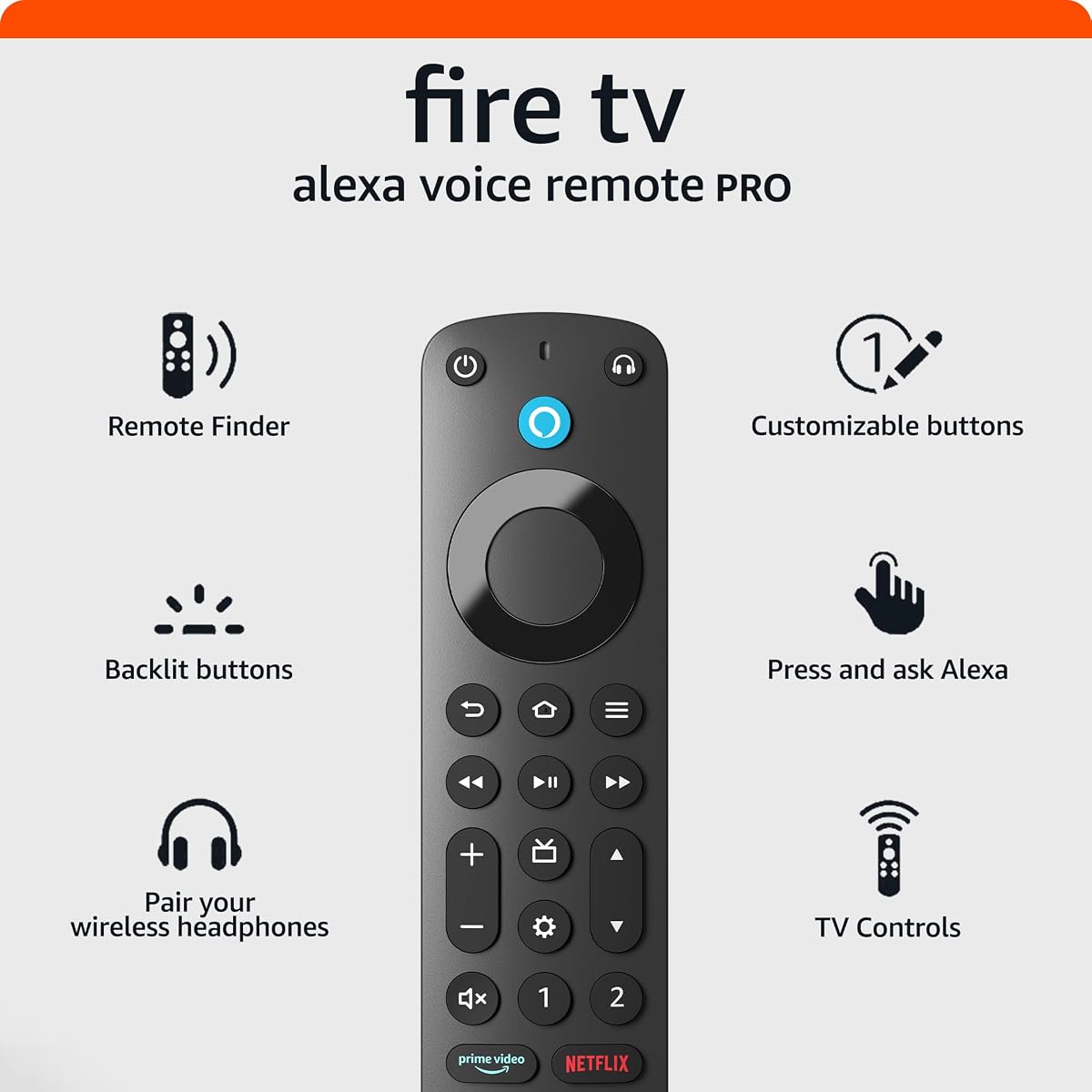
The Fire TV Alexa Voice Remote Pro upgrades your viewing experience with smart features. Its remote finder emits a ring when asked, ending the search for lost remotes under couch cushions.
We may earn a commission when you buy through this link, at no additional cost to you.
Motion-activated backlighting makes navigation easy in the dark. Dedicated buttons let you customize shortcuts to favorite apps or commands. A dedicated headphone button instantly pairs Bluetooth headphones for private listening.
Integrated TV controls mean one remote handles power and volume. While it requires a Fire TV ecosystem, users appreciate the seamless integration and intuitive layout for daily entertainment management.
Add this to your setup for convenience and control. It enhances comfort during movie nights and ensures you always find your remote, making entertainment management effortless and efficient.
Simply ask Alexa to find the remote, and it emits a sound to help you locate it quickly, saving frustration and time searching dark rooms or sofas.
The dedicated headphone button quickly opens the Bluetooth menu, allowing you to pair headphones instantly for private TV viewing without waking others.
We may earn a commission when you buy through this link, at no additional cost to you.
These Basics Smart Plugs offer an affordable entry into home automation. With a 4-pack, you can automate lamps, fans, or heaters throughout your home using only Alexa and the app.
We may earn a commission when you buy through this link, at no additional cost to you.
Schedule outlets to turn on at sunset or sunrise for convenience or security. The compact design leaves the second socket free for other devices. No hub is required, simplifying setup significantly.
While limited to Alexa, integration is seamless for existing users. Voice commands control appliances instantly, and remote access lets you manage devices from anywhere. This flexibility makes daily routines easier.
Ideal for budget-focused buyers wanting smart control. They transform ordinary appliances into connected devices, helping save energy and improve convenience without complex wiring or additional hubs needed.
Set automatic on-off times based on sunrise and sunset, ensuring lights turn on at dusk without manual intervention, enhancing home security and energy efficiency.
The slim design leaves adjacent outlets accessible, so plugging in smart plugs won't block other devices, allowing flexible placement without compromising functionality.
We may earn a commission when you buy through this link, at no additional cost to you.
Complete Protect offers comprehensive protection for past and future Amazon purchases. For a single monthly fee, it covers tech, appliances, and more with malfunctions, drops, or spills, plus cybersecurity features.
We may earn a commission when you buy through this link, at no additional cost to you.
Cybersecurity detects scams in emails and texts, adding an extra layer of defense. Claims are filed online for fast repair or reimbursement. The plan auto-renews monthly until canceled, ensuring continuous coverage.
While it costs monthly, the potential savings on repairs make it worthwhile for heavy buyers. It simplifies warranty management, consolidating coverage across various items without tracking individual policies.
Choose this for peace of mind on your purchases. It protects investments against accidents and fraud, providing a straightforward safety net for tech and home goods over time.
Coverage starts immediately for purchases from the past 90 days, so new items bought before subscribing are already protected without waiting periods.
Digital protection detects scams in emails and texts, adding an extra layer of defense alongside physical damage protection for a complete safety net.
We may earn a commission when you buy through this link, at no additional cost to you.
Selecting the right tech during Amazon Prime Day requires understanding key factors to match your needs and budget effectively.
Prioritize devices that support 4K and HDR if you own a compatible TV. This ensures vibrant colors and sharper details. Dolby Vision and Atmos enhance movies by delivering cinematic visuals and immersive sound that rival theater experiences.
If you watch mostly on smaller screens, Full HD may suffice. Balance resolution with bandwidth to avoid buffering, especially if multiple devices stream simultaneously at peak times.
Devices featuring Alexa+ allow natural language commands to find content across apps. This reduces manual scrolling. Smart home control via voice is key for lights and thermostats, making daily routines more convenient without manual app usage.
Ensure your existing ecosystem matches the device. If you rely on Alexa, choose products that integrate seamlessly to unlock full automation features and simplify home management effortlessly.
Compact sticks and small speakers are ideal for apartments or travelers. Direct power via USB reduces cable clutter and improves aesthetics. Consider dimensions to ensure devices fit behind TVs or on surfaces without overcrowding.
Durability matters for tablets and portable units. Look for reinforced materials if kids or pets are around. Lightweight designs also make moving devices between rooms effortless without damage risks.
Smart displays range from 5 to 11 inches. Larger screens suit kitchen recipes or video calls better. Touch responsiveness and brightness matter for usability under different lighting conditions throughout the day.
For streaming sticks, ensure your TV supports the output resolution. Higher resolutions offer better clarity but require strong internet. Match display size with room viewing distance for optimal comfort and detail.
Wi-Fi 6 support reduces lag during streaming and gaming. Ethernet adapters ensure stable connections for high-bitrate video. Bluetooth capabilities enable private listening with headphones, ideal for shared living spaces.
Check compatibility with existing routers. Modern standards like Wi-Fi 6 future-proof your setup. Strong connectivity ensures devices remain responsive and minimize interruptions during use.
Look for built-in hubs or multi-device support. Routines triggered by motion or temperature automate tasks. Ensure the device supports brands you already own to avoid extra hardware purchases.
Centralized control via voice or app simplifies daily life. Verify compatibility with lights, cameras, and thermostats. A unified system reduces complexity and enhances convenience around your home.
Tablets and portable displays benefit from long battery life. Devices drawing power from a TV outlet reduce clutter. Consider usage patterns when deciding between battery and corded options.
Efficient power usage extends device life and usability. Ensure outlets or batteries suit your typical usage. This impacts convenience during travel or extended use sessions without interruption.
Set a spending limit before shopping. Premium models offer features like cloud gaming or larger displays. Basic units may meet needs without extra costs. Compare pros and cons to determine true value.
Consider long-term savings on repairs or subscriptions. Protection plans might offset replacement costs. Balance initial price with features to maximize utility and satisfaction with your purchase.
When setting up streaming sticks, connect directly to HDMI and power via USB for stable operation. Use the remote to sign into accounts and enable features like Alexa+. Ensure your Wi-Fi signal is strong near the TV to minimize interruptions during streaming sessions.
For smart displays, place them on stable surfaces away from direct sunlight to avoid glare. Keep the camera shutter closed when not in video calls for privacy. Regularly clean screens with a soft cloth to maintain visibility and prevent scratches over time.
Maintain your devices by avoiding heat sources and humidity. For tablets, update software regularly and charge batteries periodically if unused. Store smart plugs away from moisture and ensure they are not overloaded to maintain safety and longevity.
Yes, these sticks add smart features to any standard TV with an HDMI port. They install apps and voice assistants, transforming a regular TV into a smart device without needing extra hardware or complex setup procedures for home use.
Most devices rely on Alexa for voice control and smart home integration, but manual controls work independently. You can still access apps and settings using physical buttons, though some advanced features may require Alexa-enabled setup.
Consider the Complete Protect plan to cover repairs or replacements for past and future purchases. It includes cybersecurity features. Proper storage and handling also minimize risks of accidental drops or spills on your tech.
Yes, they support major streaming apps like Netflix and YouTube alongside Amazon services. Smart plugs and displays work with compatible third-party smart home devices. Ensure your preferred apps are available before purchasing to confirm compatibility.
A reliable connection of at least 15 Mbps is recommended for smooth 4K streaming. Use Ethernet adapters for stability. Ensure your router supports Wi-Fi 6 to handle multiple devices simultaneously without buffering issues.
Avoid leaving tablets plugged in after full charges. Lower screen brightness during use. Disable unused background apps to reduce drain. Regular software updates also optimize power usage and performance over time.
From streaming sticks to smart displays, this guide highlights top picks for enhancing home entertainment and automation. The Fire TV Stick 4K Plus leads overall, while the Echo Show 11 excels as a premium display.
Prioritize what matters most to you, whether it is resolution, voice features, or smart home integration. Match devices with your TV size and existing ecosystem for seamless performance and convenience.
Prices change often during Prime Day, so verify current deals before checkout. Use this guide to navigate options confidently and secure the best value for your technology upgrades this October.