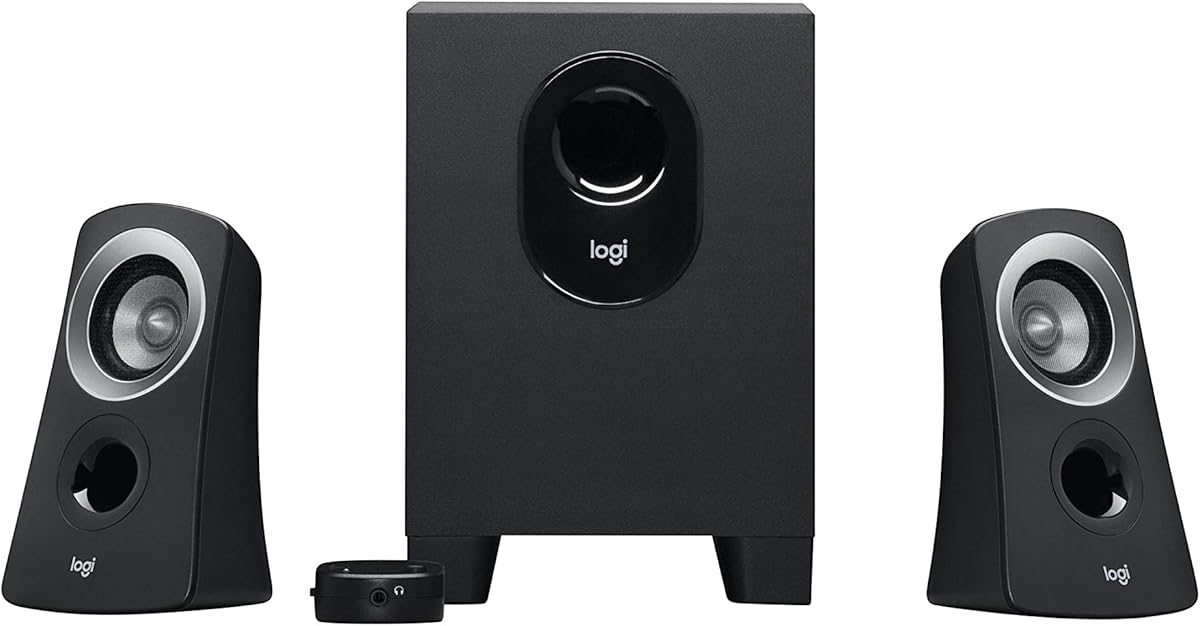
Logitech Z313 2.1 Multimedia Speaker System
4.4Editor score
25 watts RMS output
Compact subwoofer design
Convenient control pod
This guide compares the top 2.1 Channel Desktop Speakers for immersive audio, covering sound quality, bass performance, connectivity, and design to help you
Finding the right audio setup for your workspace can transform your daily computing experience. A quality 2.1 Channel Desktop Speaker system delivers rich sound and deep bass that built-in laptop speakers simply cannot match. Whether you are gaming, watching movies, or listening to music, the right speakers make a noticeable difference in immersion and clarity.
We have evaluated ten leading models based on sound performance, build quality, connectivity options, and value. Our analysis focuses on real-world usage scenarios to ensure each recommendation meets the needs of diverse users. From budget-friendly options to premium systems with advanced features, this list covers a wide range of preferences and requirements for modern desktop setups.
Each pick in this guide highlights specific strengths and ideal use cases to help you make an informed decision. We include detailed specifications and user feedback to provide a comprehensive view of what each system offers. Please note that prices and availability can change frequently, so verify current details before purchasing to ensure you get the best deal available.
4.4Editor score

4.5Editor score

4.6Editor score
This side-by-side comparison highlights key specifications and features across all ten models to help you identify the best fit for your needs.


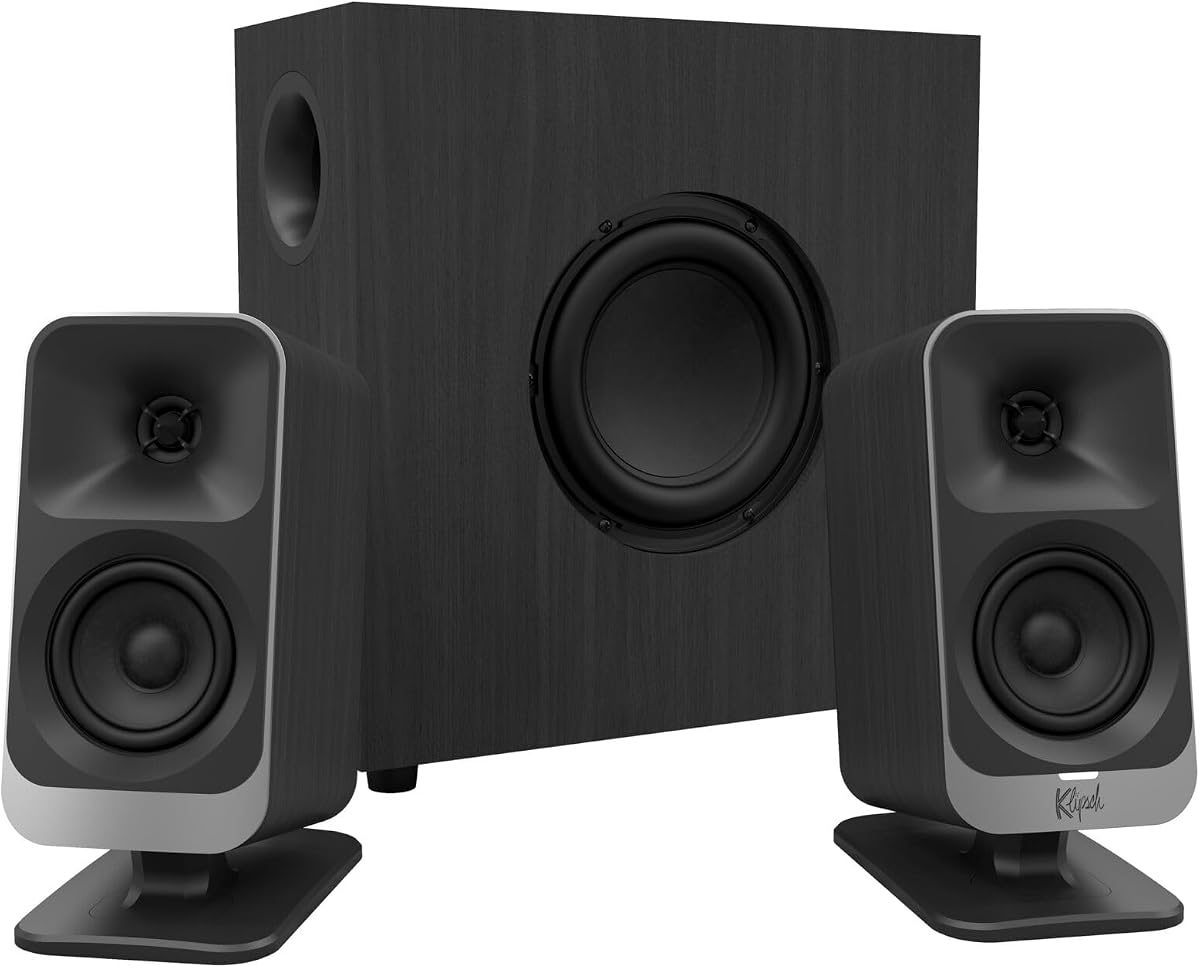
The Klipsch ProMedia 2.1 stands out as a legendary choice for desktop audio enthusiasts seeking high fidelity. With THX certification and Microtractrix horn technology, it delivers exceptional clarity and efficiency across the audio spectrum. Users consistently praise its ability to fill a room with immersive sound suitable for gaming, movies, and music.
We may earn a commission when you buy through this link, at no additional cost to you.
Its 200 watts of peak power and 6.5-inch side-firing subwoofer provide bass that you can physically feel without distortion. The control pod offers convenient volume and subwoofer gain adjustments right at your fingertips. This system blends classic audio engineering with modern usability to create a robust desktop experience.
While the dimensions are larger than compact alternatives, the sound quality justifies the space required on your desk. The plug-and-play setup ensures compatibility with various devices without complex configurations. It remains a top contender for those prioritizing audio fidelity over minimal size constraints.
If you seek a premium listening experience that bridges the gap between consumer and professional audio, this system is an excellent investment. Its enduring popularity and critical acclaim confirm its status as a benchmark for 2.1 channel desktop speakers in 2026.
The Microtractrix horn technology ensures sound reaches your ears directly with minimal loss or interference.
THX certification guarantees that the audio meets high standards for quality and immersive listening.
We may earn a commission when you buy through this link, at no additional cost to you.
The Logitech Z313 offers an accessible entry point into 2.1 channel audio without sacrificing essential quality. With 25 watts RMS output and a compact subwoofer, it provides balanced sound suitable for everyday desktop use. Its simple design ensures it fits easily into smaller workspaces without overwhelming the area.
We may earn a commission when you buy through this link, at no additional cost to you.
Users appreciate the convenient control pod that allows quick adjustments to volume without reaching for your computer. The system is straightforward to set up and works reliably with most standard audio devices. It delivers clear audio that enhances multimedia consumption at a very competitive price point.
While it lacks advanced features like Bluetooth or high power output, it excels in delivering clear value for its cost. The build quality is solid and the sound is well-tuned for speech and music in a home office setting. It is an ideal choice for those prioritizing budget and simplicity over premium specs.
For anyone needing a reliable upgrade from laptop speakers without spending much, this system is a top recommendation. It proves that effective desktop audio does not require a large investment, making it a staple in budget-friendly reviews.
The small footprint ensures it fits perfectly under monitors or on crowded desks.
Plug-and-play functionality makes setup effortless for any user without technical expertise.
We may earn a commission when you buy through this link, at no additional cost to you.
The Logitech Z623 is a powerhouse designed for those who want immersive audio capable of filling large rooms. With 400 watts of peak power and THX certification, it delivers studio-quality sound for gaming and movies. The system includes versatile inputs to connect multiple devices simultaneously for seamless switching.
We may earn a commission when you buy through this link, at no additional cost to you.
Its subwoofer provides deep, resonant bass that enhances the impact of action scenes and music. The satellite speakers maintain clarity even at higher volumes, ensuring a balanced listening experience. Users often highlight its ability to transform a standard desktop into a mini home theater setup.
The main trade-off is the physical size of the subwoofer which demands significant space on or under your desk. Additionally, the higher price reflects the premium performance and build quality. However, for serious enthusiasts, this investment yields returns in audio enjoyment and versatility.
If you prioritize power and immersion above all else, this system stands as a top-tier choice. It remains a benchmark for 2.1 systems that offer cinematic sound quality at a desktop-friendly form factor.
Connect up to three audio devices via RCA and 3.5mm inputs for maximum flexibility.
THX certification ensures the audio meets rigorous standards for high-fidelity playback.
We may earn a commission when you buy through this link, at no additional cost to you.
The Creative Pebble X Plus brings modern connectivity and aesthetics to the desktop speaker market. Featuring USB-C and Bluetooth 5.3, it integrates seamlessly with newer laptops and mobile devices. The vibrant RGB lighting adds a customizable visual element that enhances the gaming or work environment.
We may earn a commission when you buy through this link, at no additional cost to you.
With up to 30 watts of peak power when connected to a high-wattage USB-PD adapter, it delivers punchy bass and clear playback. The sleek spherical design saves space while maintaining a stylish look. Users appreciate the flexibility of switching between wired and wireless connections easily.
Performance is solid though it may lack the sheer volume of larger premium systems. The requirement for a specific USB adapter to maximize power can be a slight inconvenience for some. However, its feature set offers great value for users who prioritize aesthetics and convenience.
Ideal for those with modern setups looking for wireless capabilities and visual flair, this system is a strong contender. It balances functional audio performance with the contemporary design elements that define today's desktop gear.
Use USB-C, Bluetooth, or 3.5mm AUX to connect to various devices effortlessly.
Match lighting presets to your aesthetic preferences for a personalized workspace.
We may earn a commission when you buy through this link, at no additional cost to you.
Bluedee Computer Speakers focus on delivering clear and balanced audio through built-in DSP tuning. This technology reduces harsh highs and distortion, making the sound comfortable for long listening sessions. The system includes an independent subwoofer that keeps bass deep without muddying the mids or highs.
We may earn a commission when you buy through this link, at no additional cost to you.
With Bluetooth 5.4 support, connectivity is stable and up-to-date for modern devices. The all-in-one control knob simplifies volume adjustment and lighting effects into a single interface. Users find the design desk-friendly with stylish RGB lighting that does not distract during work.
While brand awareness is lower than legacy competitors, the specifications indicate strong value and performance. The system requires external power but offers easy plug-and-play usage for desktops and PCs. It is a compelling choice for those seeking modern features at a mid-range price.
For users who want smooth sound and simple controls without navigating complex menus, this system is ideal. Its combination of DSP tuning and latest wireless standards makes it a practical addition to any home office.
Digital signal processing ensures vocals and music remain clear without harsh peaks.
A single knob adjusts volume, mode switching, and lighting for intuitive operation.
We may earn a commission when you buy through this link, at no additional cost to you.
The Cyber Acoustics CA-3090 serves as a practical basic option for users needing a simple audio upgrade. Its flat panel design minimizes desk space usage while providing dedicated sound enhancement over internal speakers. The system includes a control pod for easy volume adjustments and power switching.
We may earn a commission when you buy through this link, at no additional cost to you.
With 18 watts of peak power, it delivers modest sound suitable for casual listening and speech. The subwoofer adds some depth though the overall output is not meant for large rooms or intense gaming. Users find it sufficient for office tasks and light media consumption.
While not the most powerful system available, it excels at providing a straightforward solution at an entry price. The build quality is functional and the warranty ensures peace of mind for basic usage. It is a practical choice for those needing clear sound without complex features.
Ideal for budget-conscious users or secondary setups, this system offers reliability in a compact package. Its simplicity ensures it works well in environments where space and cost are primary constraints.
The flat panels fit easily into tight spaces without cluttering the desktop.
Basic volume and power controls make it easy for anyone to operate.
We may earn a commission when you buy through this link, at no additional cost to you.
The Creative Pebble Plus emphasizes convenience by running entirely on USB power without a wall outlet. Its 45-degree elevated drivers direct sound toward the user for an optimized listening experience. The standalone subwoofer adds depth that standard USB speakers often lack, enhancing overall audio quality.
We may earn a commission when you buy through this link, at no additional cost to you.
With 8 watts of RMS power, it delivers clear sound suitable for laptops and desktops. The volume controls are front-facing for easy access, making adjustments seamless during use. Users appreciate the minimalist design that keeps the desk tidy while improving audio performance.
The system may not fill a large room but excels at delivering focused sound at desk level. The high gain mode can boost power if connected to a higher wattage adapter though this is optional. It remains a top choice for laptop users seeking improved audio portability.
If you value simplicity and cable management without compromising on bass presence, this system is ideal. Its USB-only operation makes it a versatile companion for laptops and portable workstations.
Drivers angled at 45 degrees focus sound directly at the listener for better clarity.
Eliminating the need for AC power reduces clutter and increases portability.
We may earn a commission when you buy through this link, at no additional cost to you.
The Cyber Acoustics CA-3610 offers a balanced mix of power and clarity suitable for various media. Dual 2-inch titanium drivers in each satellite ensure crisp highs and warm mid-tones. The 5.25-inch subwoofer delivers deep bass that complements the satellites without overwhelming them.
We may earn a commission when you buy through this link, at no additional cost to you.
With 62 watts of peak power, it is capable of filling medium-sized rooms with rich sound. The control pod allows customization of volume and bass levels to suit personal preference. Users find the headphone jack useful for private listening without disturbing others.
Design is functional and straightforward with angled satellites that look neat on any desktop. While it lacks modern wireless features, its wired reliability ensures consistent performance. It represents a dependable choice for those who prioritize sound quality and build over connectivity.
Ideal for gaming and movie enthusiasts on a budget, this system delivers impressive value for its output. The titanium drivers provide a clarity that stands out among similarly priced desktop alternatives.
Titanium driver material ensures precise sound reproduction and durability over time.
The included headphone jack allows for private audio enjoyment without removing the speakers.
We may earn a commission when you buy through this link, at no additional cost to you.
The Logitech Z407 stands out for its wireless control dial that allows volume and playback adjustments remotely. With 80 watts of peak power, it offers immersive sound suitable for movies and gaming. The system supports Bluetooth and wired connections, providing flexibility for different devices.
We may earn a commission when you buy through this link, at no additional cost to you.
Its down-firing subwoofer adds substantial low-end response that enhances media consumption significantly. Users appreciate the ability to connect multiple devices and switch between them effortlessly. The dual-position satellite speakers let you adjust the orientation to fit your aesthetic.
While the dial requires batteries, the convenience of remote control outweighs this minor maintenance issue. The sound quality is clear and powerful, making it a strong mid-range option for most users. It bridges the gap between basic speakers and premium audio systems effectively.
If you want the convenience of wireless control with reliable sound performance, this system is ideal. It suits both work and entertainment environments with its adaptable design and features.
A wireless dial allows you to manage audio settings from across the room.
Satellites can be placed vertically or horizontally to match your desk layout.
We may earn a commission when you buy through this link, at no additional cost to you.
The Klipsch ProMedia Lumina modernizes the iconic ProMedia line with sleek design and integrated RGB lighting. It connects via USB-C and Bluetooth 5.3 ensuring compatibility with the latest devices. The system is designed specifically to integrate seamlessly with gaming workstations and modern desks.
We may earn a commission when you buy through this link, at no additional cost to you.
Using the Klipsch Control app allows precision command over EQ, lighting modes, and features like night mode. The low-profile subwoofer saves space while delivering powerful bass that supports immersive gaming audio. Users praise its aesthetic integration into RGB-lit setups and clean cable management.
The price point is higher than standard models reflecting the premium design and smart features. However, for those valuing looks and customization, it offers a compelling package. The update to the classic design ensures it fits contemporary tastes without sacrificing audio quality.
Ideal for gamers and creators who want audio to match their visual setup, this system is top-tier. It represents the future of desktop speakers with smart controls and stylish illumination.
Use the desktop app to tailor EQ and lighting to match your exact preferences.
The legacy brand is reinvented with modern aesthetics and space-saving engineering.
We may earn a commission when you buy through this link, at no additional cost to you.
Choosing the right 2.1 Channel Desktop Speaker requires evaluating power, connectivity, and design to match your specific usage needs.
Power output measured in watts determines how loud and dynamic the speakers can be. Look for at least 20 to 50 watts RMS for clear sound in a medium room. A dedicated subwoofer ensures deep bass that standard speakers cannot produce.
Prioritize higher wattage if you plan to watch movies or play games with immersive audio.
Modern setups may need USB, Bluetooth, or 3.5mm inputs to connect various devices. Bluetooth allows wireless streaming from phones or laptops without cables. Multiple inputs enable quick switching between computers and consoles.
Check your primary devices to ensure the speakers offer compatible inputs for seamless integration.
Desktop space varies widely so choose a subwoofer size that fits under your desk or stand. Slim satellites save room while tall towers may dominate the workspace. Aesthetic details like lighting or matte finishes can complement your setup style.
Measure your desk dimensions before purchasing to avoid clutter or obstruction.
Driver materials like titanium or Kevlar affect how crisp highs and mids sound. Horn technology can improve sound dispersion and reduce distortion at high volumes. Ensure the speakers support clear dialogue and music without harsh peaks.
Read reviews focusing on vocal clarity to ensure the sound meets your needs.
Control pods and knobs on the speakers simplify volume adjustments during use. Remote controls or app integration allow easier management of complex settings. Plug-and-play functionality ensures you can start using them immediately after setup.
Simple controls reduce friction during daily use especially when switching tasks.
Prices range from budget options under fifty dollars to premium systems over two hundred dollars. Higher prices often bring better materials and features like Bluetooth or RGB lighting. Assess which features are necessary for your use case to find the best value.
Balance your budget against the features you truly need rather than what looks impressive.
Start by placing the subwoofer on a stable surface to prevent vibration noise. Position satellite speakers at ear level to ensure optimal sound projection toward your head. Ensure all cables are connected securely to avoid intermittent audio drops.
Adjust the volume levels gradually to avoid sudden loud bursts. Use any control pods or software settings to fine-tune bass and treble to your preference. Keep the area around the speakers clear to allow sound waves to disperse freely.
Clean the speaker grills regularly with a soft brush to remove dust. Avoid exposing the speakers to moisture or extreme temperatures. Store them in a safe location during transport or long periods of non-use to maintain durability.
A 2.1 channel system consists of two satellite speakers and one subwoofer. The satellites handle mid and high frequencies while the subwoofer handles low bass frequencies. This setup provides richer sound and deeper bass than standard stereo speakers.
Yes most 2.1 Channel Desktop Speakers work with Mac computers using standard 3.5mm or USB ports. Check the specific model's compatibility requirements to ensure seamless integration. Most systems are universal and work with any device having an audio output.
Absolutely 2.1 speakers are popular for gaming due to their immersive bass and clear sound. A dedicated subwoofer enhances low-frequency effects like explosions or footsteps. Look for systems with high wattage for better performance in fast-paced games.
Most desktop speaker systems include a built-in amplifier and do not require a separate unit. They are self-powered and connect directly to your computer or power source. Always verify the product details to ensure the amp is included.
To reduce distortion keep the volume at moderate levels and position speakers away from walls. Ensure your source files are high quality and avoid overdriving the system. Regular cleaning of drivers also helps maintain clear audio output.
RMS power indicates continuous power the speakers can handle reliably without distortion. Peak power shows the maximum short-term output during loud bursts. Focus on RMS ratings for accurate performance expectations.
Bluetooth offers convenience and reduces cable clutter but may introduce slight latency. Wired connections often provide more stable and higher-fidelity audio. Choose based on whether you prioritize wireless flexibility or maximum audio quality.
Use a soft dry cloth to wipe the surface and a soft brush for grills. Avoid harsh chemicals or water that could damage internal components. Turn off the speakers and unplug them before cleaning to prevent electrical hazards.
The 2.1 Channel Desktop Speaker systems reviewed here offer a range of options for every budget and space. From the budget-friendly Logitech Z313 to the premium Logitech Z623, there is a model for every need. Consider your primary usage scenarios to narrow down the best fit.
Prioritize power output and connectivity to ensure the speakers work seamlessly with your devices. Sound clarity and bass depth are critical for an immersive experience. Balancing these factors will help you find the right audio upgrade.
Check current prices and availability before purchasing to get the best deal. Product details may change over time so verify the latest specs. Investing in quality speakers will enhance your daily computing and entertainment experience significantly.