
ASRock PG 1600G
4.4Editor score
1600W Continuous Power
Japanese Capacitors
12V-2×6 Connectors
Compare the top 1500W power supplies for high-end PCs. This guide reviews 10 models based on efficiency, ATX 3.1 compliance, and reliability.
Power supplies are the heart of any high-performance computer system. When building a machine with the latest GPUs and CPUs, you need a unit that delivers stable power without noise or risk. A 1500W PSU offers the headroom required for extreme workloads.
We compared ten top-rated models from leading brands like Corsair, Seasonic, and NZXT. Our analysis focused on ATX 3.1 certification, efficiency ratings, cooling performance, and real-world stability. Each unit was evaluated for its ability to handle transient spikes and modern connectivity standards.
Each pick in this list shows detailed specs, pros, and cons to help you decide. We highlight specific features like modular cabling and fan control modes. Please note that prices and availability change frequently, so verify current offers before purchasing your next power supply.
4.4Editor score

4.5Editor score

4.7Editor score
This side-by-side comparison highlights the key specifications of all ten power supplies. Look for efficiency certifications, wattage ratings, and connector types to find the right match for your specific build requirements and budget constraints.


This power supply stands out as a top-tier option for modern high-end systems. With a 4.5 rating, it delivers robust performance and reliability. The standout quality is its full compliance with ATX 3.1 standards, ensuring future-proofing for new GPUs.
We may earn a commission when you buy through this link, at no additional cost to you.
The HX1500i features a 140mm Fluid Dynamic Bearing fan that ensures quiet operation even under load. Its modular cabling makes building clean, tidy systems much easier. The iCUE software adds deep control over fan curves and protection settings.
While the price is high, the reliability and feature set justify the cost for enthusiasts. The only trade-off is relying on software for advanced configurations. However, these are minor issues given the overall stability and efficiency.
Build this PSU if you need a reliable, powerful unit for a new flagship system. It handles transient spikes well and offers excellent cable management. This is a solid investment for long-term peace of mind.
Supports PCIe Gen 5 platforms and resists transient power spikes effectively.
Zero RPM mode shuts off the fan entirely at low to medium loads.
We may earn a commission when you buy through this link, at no additional cost to you.
The ASRock PG 1600G offers massive power at a competitive price point. Rated 4.4 stars, it combines efficiency with modern connector standards. It provides 1600W continuous power, ideal for extreme setups.
We may earn a commission when you buy through this link, at no additional cost to you.
Key strengths include 100% Japanese capacitors and TempGuard technology for safety. The physical 5V BOOST switch helps maintain performance during transient spikes. Its fully modular design simplifies cable management significantly.
The trade-off is the physical size; its 180mm depth might not fit smaller cases. Additionally, Gold certification is slightly below Titanium standards. But for the price, the features are compelling.
Buy this unit if you want high wattage without spending a fortune. It handles multi-GPU setups well and includes modern connectors. A great choice for cost-conscious builders needing top-tier power.
TempGuard monitors temperature at the terminal point for added safety.
Achieves up to 90% efficiency with a quiet Lambda A noise rating.
We may earn a commission when you buy through this link, at no additional cost to you.
This Noctua Edition model sets the standard for silent, high-performance power delivery. With a 4.7 rating, it excels in cooling and voltage regulation. The custom fan design reduces noise by roughly 10dB.
We may earn a commission when you buy through this link, at no additional cost to you.
Its semi-passive operation keeps the fan off until 50% load. Titanium efficiency reduces waste heat significantly, improving system longevity. The Noctua branding guarantees top-tier build quality.
The main drawback is the high price compared to standard units. While the features are exceptional, not everyone needs this level of silence. But for enthusiasts, it is unmatched.
Choose this PSU for silent workstations or luxury gaming rigs. It delivers stable power under heavy loads with minimal acoustic noise. An ultimate choice for premium system builders.
Certified Cybenetics Lambda A++ for extremely low noise levels.
Includes 12V-2×6 connector for powering high-end graphics cards.
We may earn a commission when you buy through this link, at no additional cost to you.
The NZXT C1500 Platinum brings digital precision to power management. Rated 4.1, it offers future-proof connectivity for next-gen GPUs. Its digital architecture ensures precise voltage regulation.
We may earn a commission when you buy through this link, at no additional cost to you.
Key strengths include dual 12V-2×6 connectors and 94% efficiency. The magnetic levitation fan balances airflow and noise effectively. It fully supports ATX 3.1 standards for transient spikes.
However, user ratings suggest some inconsistencies or specific build limitations. The fan does not switch off entirely. These trade-offs are acceptable for the advanced features it provides.
Get this if you prioritize digital control and future-proofing. It handles modern GPUs well and offers strong power stability. A good option for NZXT ecosystem enthusiasts.
Digital power enables higher efficiency and lower ripple noise levels.
Dual 16-pin connectors deliver over 600 watts each.
We may earn a commission when you buy through this link, at no additional cost to you.
This unit pushes the boundaries of efficiency with Titanium certification. Rated 4.3, it is built for extreme power demands. The 94.5% efficiency rating minimizes energy waste significantly.
We may earn a commission when you buy through this link, at no additional cost to you.
Key strengths include full bridge LLC technology and digital control. The overclocking key switches between rail configurations for flexibility. Its front design ensures excellent airflow and cooling.
Trade-offs involve the complexity and price, which may be overkill for average users. However, for professional workstations, it offers unmatched stability. The digital features allow fine-tuned power management.
Buy this for professional workstations or extreme overclocking needs. It supports PCIe 5.0 GPUs reliably and offers top-tier efficiency. A standout choice for high-performance computing.
Titanium efficiency ensures up to 94.5% conversion rate.
Unmatched signal stability through full bridge LLC technology.
We may earn a commission when you buy through this link, at no additional cost to you.
A highly rated unit known for its quiet operation and flexibility. With a 4.7 rating, it proves reliable for demanding builds. Its modular design ensures clean cable management every time.
We may earn a commission when you buy through this link, at no additional cost to you.
Key strengths include the iCUE software for real-time monitoring. The Zero RPM fan mode ensures silence at low loads. It fully supports ATX 3.1 standards for modern GPUs.
The trade-off is the cost, which is higher than some competitors. While software offers great control, some users may prefer hardware-only features. These are minor drawbacks for most.
Choose this for a reliable, modern PSU with great software. It balances efficiency with quiet performance well. Ideal for gaming rigs requiring stable power.
Monitor power settings and toggle overcurrent protection on-the-fly.
Fan switches off entirely at low and medium loads.
We may earn a commission when you buy through this link, at no additional cost to you.
This older generation unit remains highly rated for its stability. With a 4.6 rating, it offers dependable power for current GPUs. The triple EPS12V connectors ensure full motherboard compatibility.
We may earn a commission when you buy through this link, at no additional cost to you.
Key strengths include the robust fan and modular cabling. Zero RPM mode keeps the system silent under light loads. It is a reliable choice for proven performance.
However, it lacks ATX 3.1 certification for future GPUs. This makes it less future-proof than newer models. But for existing high-end systems, it works well.
Buy this if you prioritize proven stability over new standards. It handles current high-power CPUs and GPUs efficiently. A trustworthy option for established builds.
Triple EPS12V connectors provide full motherboard compatibility.
Proven track record with a solid 4.6 user rating.
We may earn a commission when you buy through this link, at no additional cost to you.
This Seasonic unit delivers stability for workstations with a 4.5 rating. It supports ATX 3.1 and PCIe 5.1 standards effectively. Its hybrid fan control ensures cooling when needed.
We may earn a commission when you buy through this link, at no additional cost to you.
Key strengths include dual native connectors and full Japanese capacitors. It provides massive power headroom for multi-GPU setups. The titanium efficiency helps save on power bills.
The trade-off is the premium cost for such high-end specs. While it is excellent, it may be overkill for average gamers. But for workstations, it is highly reliable.
Pick this for professional use requiring maximum power headroom. It ensures stability during heavy workloads and transient spikes. A solid pick for serious computing tasks.
Delivers 1600W continuous power with a strong rail capacity.
Dual native 12V-2×6 connectors for modern GPU power.
We may earn a commission when you buy through this link, at no additional cost to you.
EVGA offers a durable unit with a 4.6 rating and Titanium efficiency. It supports SLI and Crossfire configurations well. Its ECO mode ensures silent operation at low loads.
We may earn a commission when you buy through this link, at no additional cost to you.
Key strengths include heavy-duty protections like OVP and UVP. The 10-year warranty signals strong confidence in longevity. It is designed for extreme power stability.
The trade-off is that it lacks ATX 3.1 compliance. While reliable for current systems, it might need replacement for next-gen GPUs. But for stability, it excels.
Buy this for long-term stability and excellent warranty support. It handles high power draws safely with robust protections. Great for systems where longevity is key.
10 Year Warranty and heavy-duty protections ensure safety.
ECO mode optimizes fan speed for quieter operation.
We may earn a commission when you buy through this link, at no additional cost to you.
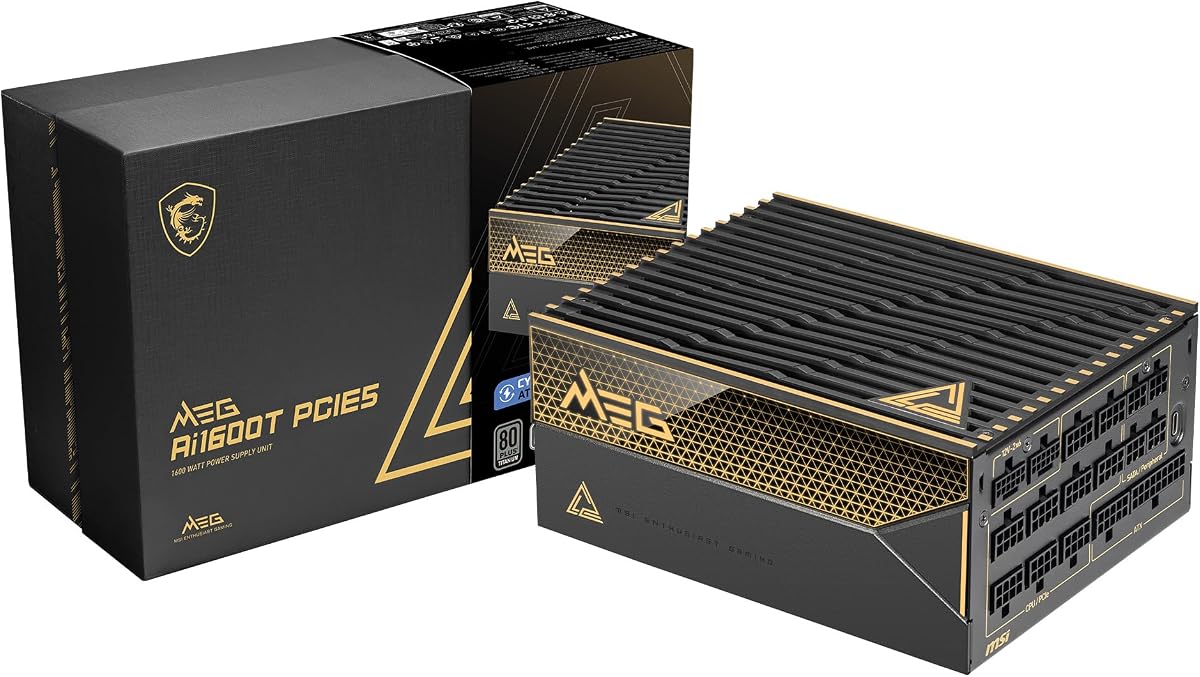
MSI presents a powerful unit with a 4.5 rating for gaming. Its server-grade capacitors ensure exceptional reliability under load. It is fully certified for ATX 3.1 standards.
We may earn a commission when you buy through this link, at no additional cost to you.
Key strengths include industrial-level protection and a 12-year warranty. The tri-certified titanium rating ensures top-tier efficiency. It handles transient spikes with ease.
The trade-off is the high price compared to standard units. While the industrial features are robust, they might not be necessary for all users. But for gaming PCs, it is strong.
Choose this for a premium gaming PSU with long-term protection. It offers excellent reliability and future-proof connectors. A strong contender for high-end gaming rigs.
Server-grade capacitors provide stability during extreme loads.
12-year warranty offers long-term peace of mind.
We may earn a commission when you buy through this link, at no additional cost to you.
Choosing a 1500W PSU involves balancing power output, efficiency, and connectivity standards. This guide covers key factors to consider before making your purchase.
Ensure your system needs the high wattage. A 1500W PSU is ideal for multi-GPU setups or extreme overclocking. Calculate total load to verify capacity.
Select a unit with sufficient headroom to handle transient spikes safely.
ATX 3.1 standards ensure compatibility with PCIe 5.1 GPUs. Look for units that explicitly support this certification for future-proofing.
This certification helps resist power spikes common in modern hardware.
Higher efficiency ratings like Titanium or Platinum save on electricity costs. A 1500W PSU should deliver at least 90% efficiency at typical loads.
Efficiency also reduces heat output, aiding overall system cooling.
Fully modular designs allow you to connect only necessary cables. This improves airflow and makes the build look cleaner inside the case.
Sleeved cables often indicate better quality and easier routing.
Check for 12V-2×6 connectors for modern GPUs. Older units may rely on adapters which can be less safe.
Ensure enough PCIe cables are included for all your graphics cards.
Look for Fluid Dynamic Bearing fans for longevity. Zero RPM modes can ensure silent operation during light tasks.
Noise ratings often correlate with better user experience in quiet rooms.
Japanese capacitors are often found in higher-end units. They offer better stability and lifespan than standard capacitors.
Strong warranty support also reflects manufacturer confidence in durability.
Compare prices against the features offered. Premium models cost more but often justify the price with better components.
Choose a unit that balances your specific needs with your budget.
Install the PSU in a well-ventilated area of your case. Ensure airflow is not blocked by dust filters or tight spaces.
Regularly clean the fan grill with compressed air to maintain efficiency. Dust accumulation can reduce cooling performance over time.
Check cable connections periodically to ensure they are secure. Tight connections help prevent power delivery issues or heat buildup.
A 1500W PSU is best for multi-GPU setups or extreme overclocking. Most gamers can manage with lower wattage units. Consider your hardware needs first before buying.
ATX 3.1 certification ensures the PSU handles PCIe 5.1 power spikes. It guarantees stable power for modern high-end graphics cards. This is essential for next-gen systems.
Japanese capacitors offer better longevity and stability than others. They are common in premium power supplies. Choosing units with these components ensures reliability.
Most modern PSUs are backward compatible with older GPUs. You may need adapters if the connectors do not match. Always check compatibility before purchasing.
Modular cabling improves airflow and looks cleaner in your build. It simplifies installation by letting you use only necessary cables. The convenience usually justifies the price.
A quality PSU can last five to ten years easily. Replace it if you notice unusual noise or power instability. High-quality units often last longer than the system.
Efficiency affects power waste, not direct performance. Higher efficiency means less heat and lower electricity bills. It helps the PSU run cooler and last longer.
Zero RPM mode turns off the fan under light loads. It reduces noise significantly when your PC is idle. This feature enhances user experience during quiet tasks.
We reviewed ten top models ranging from budget-friendly to premium units. The Corsair HX1500i leads with modern features, while ASRock offers great value. Seasonic stands out for silence.
Prioritize ATX 3.1 certification and build quality for future stability. Look at modular options to ensure a clean system layout and better airflow for cooling.
Prices and availability shift frequently so check current offers before buying. Always confirm compatibility with your specific hardware to ensure smooth operation.