
Thermaltake Pure 20 Series
4.5Editor score
High airflow design
Long life sleeve bearing
Anti-vibration mounting
Choosing the right cooling solution is vital for any PC build. A 200mm case fan offers superior airflow compared to smaller sizes, keeping temperatures low while maintaining a quiet operation. Whether you prioritize silence or raw cooling power, the right fan ensures your components run efficiently.
We evaluated ten top-rated models based on airflow performance, noise levels, bearing types, and build quality. Our analysis covers premium brands like Noctua and Thermaltake as well as budget-friendly options. Each product was reviewed for compatibility, ease of installation, and overall value to help you make an informed decision.
Every pick highlights key specifications and ideal use cases for different builders. You will find options for quiet workstations, gaming rigs, and high-performance systems. Keep in mind that prices fluctuate regularly, so check current listings before purchasing to ensure you get the best deal available today.
4.5Editor score
4.8Editor score

4.6Editor score
As an Amazon Associate we earn from qualifying purchases.
The following table provides a side-by-side comparison of all ten products to help you quickly identify which model best fits your specific cooling and aesthetic requirements.


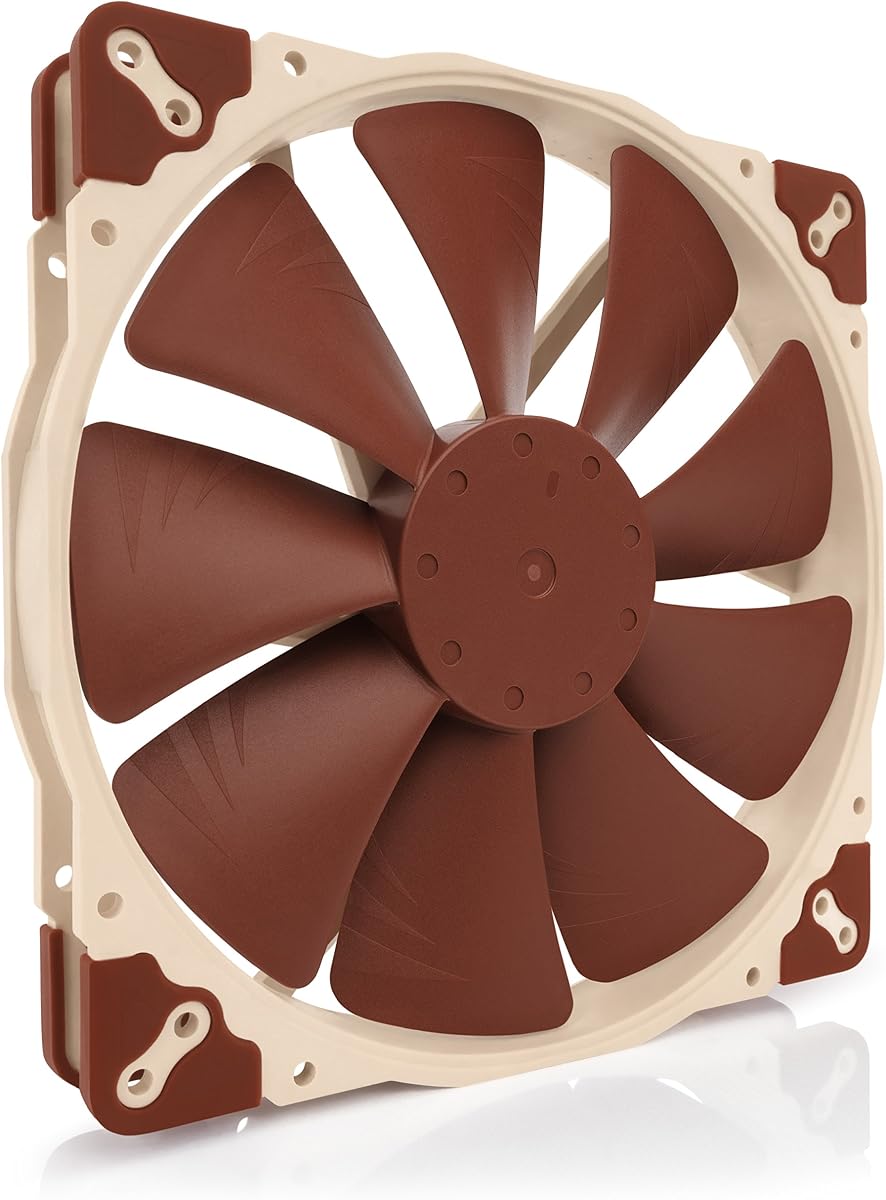
The Noctua NF-A20 PWM stands out as the premier choice for users seeking balanced performance. It earns a high rating of 4.8 due to its exceptional ability to move air quietly. This fan is engineered for those who value silence without compromising on cooling power.
We may earn a commission when you buy through this link, at no additional cost to you.
Its award-winning A-series design features Flow Acceleration Channels that optimize airflow. The Advanced Acoustic Optimisation frame ensures minimal resonance. With a maximum speed of 800 RPM, it delivers high airflow at extremely low noise levels, making it perfect for office PCs or quiet gaming rigs.
While the price is higher than average, the quality justifies the cost. The fan includes anti-vibration mounts and screws for easy setup. You also get a Low-Noise Adaptor and extension cable. These trade-offs are acceptable given the reliability and performance consistency over time.
This fan is ideal for builders prioritizing quiet cooling. It fits cases with 200mm mounts and supports multiple hole patterns. If you want a set it and forget solution that keeps temps low without noise, this is the top recommendation for your system.
The frame design reduces noise while maintaining high airflow efficiency for silent cooling.
With a MTTF of over 150,000 hours, this fan is built to last for years.
We may earn a commission when you buy through this link, at no additional cost to you.
The Thermaltake Pure 20 Series offers excellent value for budget-conscious builders. With a rating of 4.5, it delivers high airflow while keeping noise levels low. This fan is designed to provide a perfect balance of silence, style, and efficiency for any PC case.
We may earn a commission when you buy through this link, at no additional cost to you.
Its 200x30mm thick frame ensures high air pressure and effective cooling. The fan blades are designed to focus airflow and reduce noise. The long life sleeve bearing offers reliable operation. Installation is easy thanks to the shaved frame which allows more flexibility.
While it lacks PWM control, the speed is consistent and quiet. The anti-vibration mounting system helps reduce resonance. Some users may find the bearing life shorter than premium models. However, for the price, it provides solid performance and looks great in a build.
This is a great choice for casual users or budget builds. It works well in cases that need a large fan without breaking the bank. If you need reliable cooling and do not require advanced speed control, this fan is a strong contender.
The thick frame and focused blade design create a torrent of air without excess noise.
The shaved frame allows for more installation options, especially in Thermaltake chassis.
We may earn a commission when you buy through this link, at no additional cost to you.
The Noctua NF-A20 PWM chromax.Black.swap brings a sleek all-black look to high-performance cooling. Rated at 4.6, it combines the trusted A-series performance with a unique customization option. This fan is perfect for users wanting a premium aesthetic without sacrificing quality.
We may earn a commission when you buy through this link, at no additional cost to you.
It features Flow Acceleration Channels for superior quiet cooling. The frame is optimized for low noise levels. With a max speed of 800 RPM, it keeps systems cool. The chromax.black.swap edition allows you to swap anti-vibration pads for different colors.
The price is higher but the customization is rare. The fan runs very quietly and moves significant air. Some may wish for RGB lighting instead of solid colors. However, the ability to match system accents makes it a premium choice for discerning builders.
This fan suits those who prioritize aesthetics and silence. It fits standard 200mm mounts and supports multiple hole patterns. If you want a top-tier quiet fan that matches your build color scheme, this is the best option available today.
Swappable red, black, white, blue, yellow, and green pads allow for color customization.
The A-series design ensures high airflow at extremely low noise levels for quiet cooling.
We may earn a commission when you buy through this link, at no additional cost to you.
The Thermaltake CT200 PWM Fan offers strong performance with its high airflow rating. Rated at 4.3, it moves up to 131.6 CFM of air. This fan is designed to match the existing CT fan lineup for a matching build experience in your case.
We may earn a commission when you buy through this link, at no additional cost to you.
Its nine blades push significant airflow with good static pressure. The hydraulic bearing ensures silent and reliable operation. The PWM control allows speeds between 500 and 900 RPM. Daisy chain connectors make installation quick and reduce cable clutter.
The price is reasonable for the performance. However, the build quality feels standard compared to top-tier brands. Some users may find the frame less rigid. Despite this, it provides a solid upgrade for cases needing more cooling power.
This fan is ideal for gamers needing extra airflow. It fits standard mounts and supports multiple headers easily. If you want a capable fan that keeps temps down without too much noise, this is a great pick for your setup.
The nine-blade design pushes up to 131.6 CFM and 1.92mm-H2O static pressure.
Each fan has daisy chainable 4-Pin PWM connectors for quick and clean installation.
We may earn a commission when you buy through this link, at no additional cost to you.
The Cooler Master SickleFlow 200 delivers high airflow with striking aRGB lighting. Rated at 4.6, it is engineered for cases that support 200mm fans. This fan brings a vibrant visual effect while keeping noise levels reasonable for daily use.
We may earn a commission when you buy through this link, at no additional cost to you.
Its redesigned hybrid frame optimizes airflow and stability. The frosted blade design enhances lighting dispersion. Dynamic PWM control adjusts speed from 0 to 800 RPM. The hybrid frame minimizes noise for quieter performance compared to standard models.
The sealant prevents dust and oil leakage for stability. Some may find the frame less rigid than metal. But the light quality is excellent. If you want style and performance, this fan offers a great balance for modern builds.
This fan is perfect for RGB enthusiasts. It fits standard 200mm mounts and allows customizable lighting. If you want your PC to look great while staying cool, this is a top choice for your system setup.
The frosted blade enhances the dispersion of aRGB lighting for a vibrant luminous effect.
Air Balance Blades and a hybrid frame optimize airflow and stability for quiet operation.
We may earn a commission when you buy through this link, at no additional cost to you.
The Noctua NF-A20 FLX offers a straightforward solution for quiet cooling. Rated at 4.7, it delivers superior performance with a 3-pin connector. This fan is designed for users who prefer simplicity without sacrificing the trusted Noctua quality.
We may earn a commission when you buy through this link, at no additional cost to you.
It features Flow Acceleration Channels and an optimized frame for low noise. The Low-Noise Adaptor sets speeds at 800 or 550 RPM. The anti-vibration mounts reduce resonance. The MTTF of over 150,000 hours ensures long-term reliability.
While it lacks PWM for dynamic control, the fixed speeds are effective. Some motherboards may not support 3-pin directly. However, the adaptor allows direct power supply connection. This makes it a versatile option for simple setups.
This fan is ideal for silent workstations. It fits multiple hole patterns and runs very quietly. If you want a reliable fan that does not require complex headers, this is a great choice for your build.
The Low-Noise Adaptor provides 800/550rpm speed settings for tuning airflow or silence.
It includes an adaptor for powering the fan directly from the power supply for compatibility.
We may earn a commission when you buy through this link, at no additional cost to you.
The Noctua NF-A20 5V PWM is designed for specialized 5V applications. Rated at 4.7, it offers superior quiet cooling. This fan allows connection via USB host ports, making it unique for portable or non-standard setups.
We may earn a commission when you buy through this link, at no additional cost to you.
The flow acceleration channels and frame ensure low noise. The USB power adaptor cable allows running on power banks. OmniJoin adaptor connects to proprietary fan headers. The max speed of 800 RPM keeps things cool and quiet.
While the voltage limits compatibility, the versatility is useful. Some may find the price higher than standard 12V fans. But the ability to run from USB is a key benefit. It suits niche projects and specific cooling needs well.
This fan is best for USB-driven projects. It fits standard mounts but requires 5V power. If you need a reliable quiet fan for unique applications, this is a strong option for your setup.
A USB power adaptor cable allows the fan to run on devices with USB host ports.
The OmniJoin adaptor set allows connection to proprietary fan headers for flexibility.
We may earn a commission when you buy through this link, at no additional cost to you.
The Cooler Master MF200R RGB provides certified lighting at a great value. Rated at 4.4, it works with major RGB ecosystems. This fan combines a hybrid design with silent technology for an efficient intake solution.
We may earn a commission when you buy through this link, at no additional cost to you.
Its jet engine blade design maintains static pressure. Sound absorbing rubber pads reduce noise. A smart sensor protects against jams. It delivers 90 CFM airflow with decent efficiency for the price.
The noise level is reasonable but higher than premium fans. It requires an RGB controller. However, the certification ensures compatibility. If you want good lighting and cooling on a budget, this is a solid choice.
This fan is perfect for budget RGB builds. It fits standard mounts and supports major ecosystems. If you want style and reliability without high costs, this fan meets your needs well.
Compatible with Asus Aura, Rock RGB, Gigabyte Fusion, and MSI RGB for easy integration.
Smart fan sensor protects the motor by automatically stopping if jammed by objects.
We may earn a commission when you buy through this link, at no additional cost to you.
The CHICIRIS 200mm Case Fan offers vibrant lighting with hydraulic stability. Rated at 4.5, it delivers 95 CFM air volume. This fan is designed for maximum airflow and efficient cooling during gaming sessions.
We may earn a commission when you buy through this link, at no additional cost to you.
It features 34 LEDs for uniform illumination. The hydraulic bearing ensures silent operation. Motherboard sync allows customization of effects. The optimized nine blade design helps heat dissipation efficiently.
The thickness is slightly less at 25mm. Some users may need to check fitment. But the airflow is strong for the price. If you want a reliable fan with great looks, this is a good option.
This fan suits those needing affordable RGB. It fits standard mounts and syncs easily. If you want dynamic lighting and solid cooling, this model is a strong candidate for your system.
The translucent nine blade fan design diffuses light for a bright and soft glow.
Designed for maximum airflow with 95 CFM to keep components at optimal temperatures.
We may earn a commission when you buy through this link, at no additional cost to you.
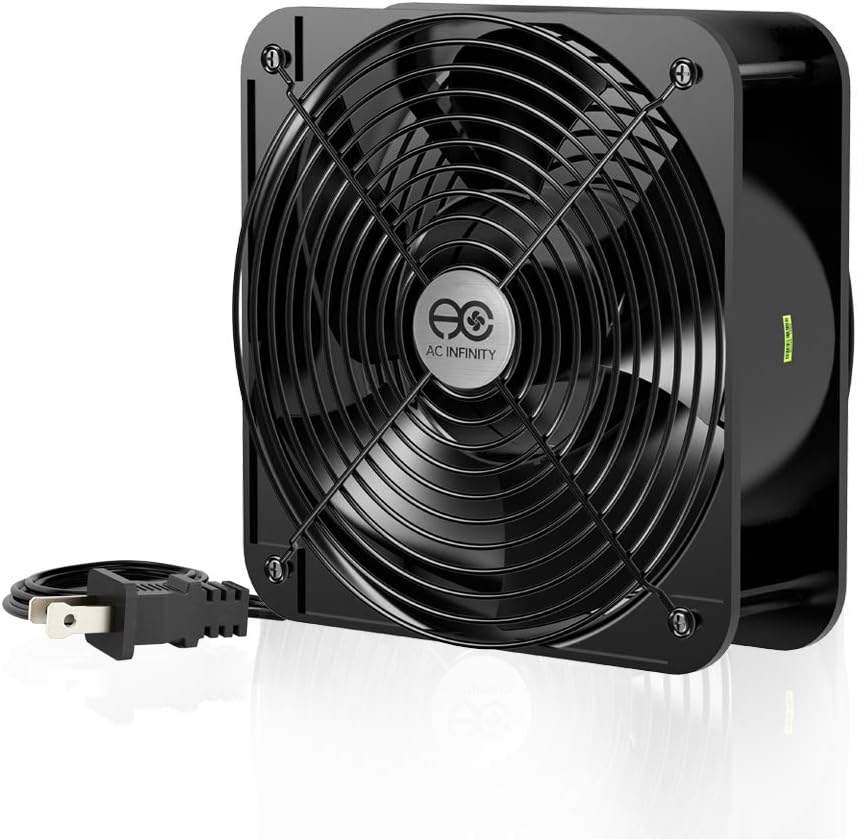
The AC Infinity AXIAL 2060 delivers industrial-grade airflow for special needs. Rated at 4.5, it moves 425 CFM of air. This is a muffin fan designed for projects requiring high cooling or ventilation.
We may earn a commission when you buy through this link, at no additional cost to you.
Its 60mm frame supports dual-ball bearings with 67,000 hour life. The fans can stand upright or lay flat. It requires 120V AC power. While effective, it can be too loud for standard PC use.
The price is higher due to heavy-duty materials. Not all cases fit 60mm thickness. But for industrial setups, the performance is unmatched. If you need extreme airflow, this is a top choice.
This fan is ideal for ventilation projects. It includes guards and screws. If you want maximum cooling power and do not mind the noise, this is a strong option for your project.
The model is designed to maximize airflow with 425 CFM for heavy duty cooling.
Includes heavy-duty aluminum fan with dual-ball bearings and mounting screw set.
We may earn a commission when you buy through this link, at no additional cost to you.
Selecting the right fan requires understanding key factors that impact performance and compatibility.
Airflow is measured in CFM and indicates how much air moves through the fan. Static pressure matters for pushing air through radiators or filters. A high airflow fan works best for open intake spots.
Noise is measured in dB(A). Lower numbers mean quieter operation. If you value silence, look for fans below 20 dB. PWM fans can reduce noise by lowering RPMs.
Sleeve bearings are affordable but wear faster. Hydraulic and dual-ball bearings last longer. MTTF ratings above 150,000 hours show high reliability.
PWM fans allow speed control via motherboard. Molex fans run at fixed speeds. PWM is better for balancing noise and cooling.
Check hole patterns. 200mm fans may have multiple sets. Thicker frames increase pressure but may not fit all cases.
RGB fans add style but need headers. Non-RGB fans are cheaper. Decide based on your build visual needs.
Higher priced fans offer better materials and bearings. Budget fans may lack PWM or have higher noise. Balance cost with expected lifespan.
Reputable brands offer better warranties. Research user feedback for long-term performance. Quality matters for critical cooling components.
Install the fan ensuring correct airflow direction. The intake pushes air into the case while exhaust pulls it out. Align the arrow on the frame with airflow direction.
Secure the fan using anti-vibration mounts. These reduce noise transmission to the case frame. Screws should be tight but not over-tightened.
Regular dust cleaning keeps the fan efficient. Remove the fan to clean blades with compressed air. Dust buildup increases noise and reduces lifespan.
Yes, 200mm fans can move more air at lower speeds. This usually results in quieter operation. They are ideal for large cases where space allows for larger diameters.
Not all cases support 200mm fans. Check your case specs for size compatibility. Some use 200mm mounts with multiple hole patterns. Always verify space before buying.
PWM fans connect via a 4-pin header for speed control. Non-PWM use 3-pin headers for fixed speeds. PWM is preferred for balancing noise and cooling dynamically.
High-quality fans last thousands of hours. Look for MTTF ratings above 150,000 hours. Bearings and build quality heavily influence lifespan. Regular dust cleaning also helps longevity.
Yes, they work for both. Just orient the airflow direction correctly. Intake usually sits at the front bottom. Exhaust sits at the rear top.
They add visual appeal but do not improve cooling. If aesthetics are not a priority, non-RGB fans are cheaper. But RGB can enhance your build theme significantly.
The Noctua NF-A20 PWM leads as our top choice for its balance of silence and performance. For budget builders, the Thermaltake Pure 20 Series offers great value. And for premium aesthetics, the chromax.Black.swap adds customization.
Prioritize airflow needs and noise tolerance when buying. PWM control is worth the investment for quieter operation. Choose a reputable brand to ensure long-term reliability and warranty support.
Prices fluctuate often so check current listings before purchasing. Verify case compatibility to avoid return hassles. With the right choice, your system will stay cool and quiet for years to come.