
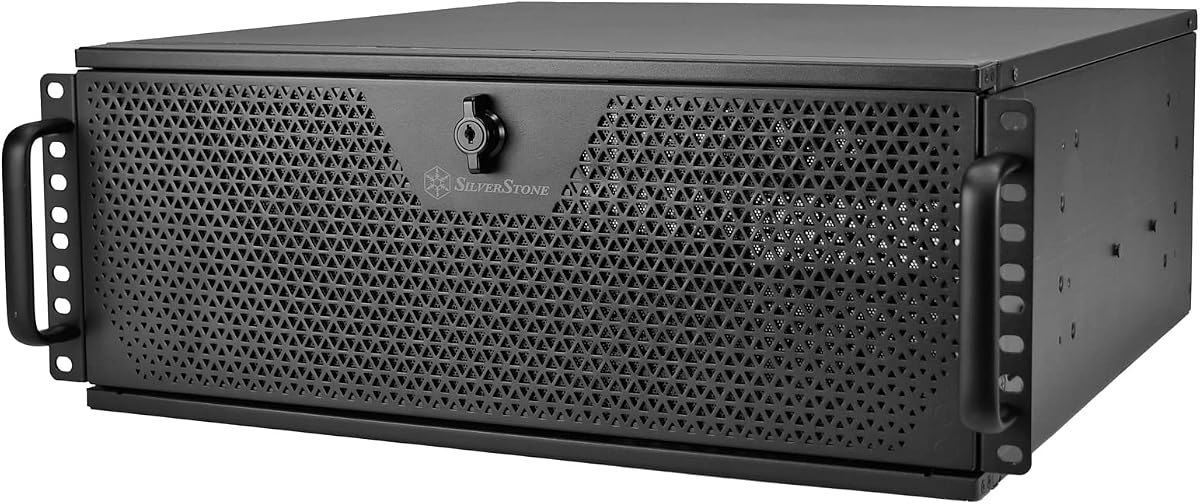
Silverstone Technology RM4A
3.6Editor score
Supports 360mm radiators
SSI-EEB motherboard support
Eight PCI expansion slots
Choosing the right 4U rackmount GPU server chassis is critical for deploying high-performance computing systems in data centers or enterprise environments.
We compared ten leading models based on cooling capabilities, expansion slot counts, motherboard compatibility, and build quality to help you find the best fit.
Each pick highlights key strengths and trade-offs so you can match your workload needs to the hardware, though prices and availability may change over time.
3.6Editor score
4.3Editor score

5.0Editor score
As an Amazon Associate we earn from qualifying purchases.
The following table provides a side-by-side comparison of the ten selected 4U rackmount GPU server chassis, highlighting their key specifications and features.


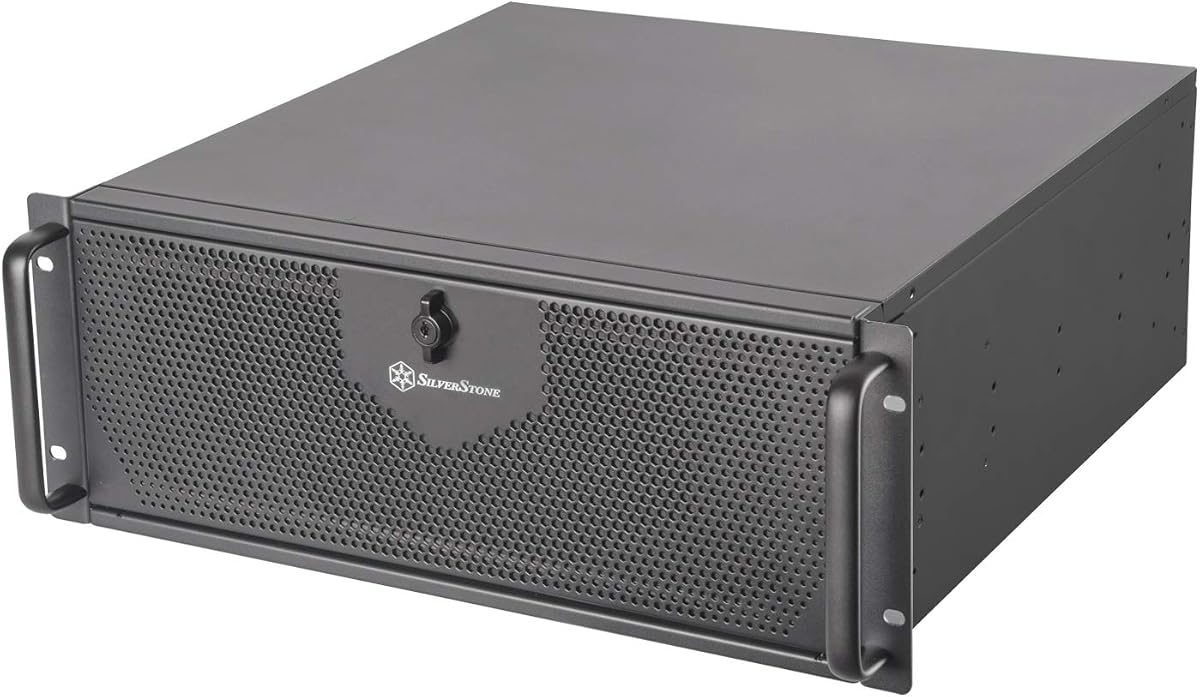
The SilverStone Technology RM44 stands out as a top choice for users needing advanced cooling in a 4U chassis. With support for up to 360mm radiators, it handles high-power GPUs effectively. Its SSI-EEB and Extended ATX support ensures flexibility for various server builds.
We may earn a commission when you buy through this link, at no additional cost to you.
This chassis includes eight PCIe expansion slots, allowing for significant hardware expansion. The inclusion of a USB Type-C interface is a modern touch often missing in server gear. Sliding rail mounting holes make installation into racks quick and straightforward.
While the RM44 is pricier than some alternatives, the enhanced cooling capabilities justify the investment for intensive workloads. Users planning to deploy liquid-cooled GPUs will find this chassis uniquely suited to their needs compared to standard air-cooled designs.
If you need reliable liquid cooling support and robust expansion for GPU servers, the RM44 is the best option. It balances professional features with usability, making it ideal for data centers and high-performance computing environments.
The RM44 supports radiators up to 360mm, enabling efficient thermal management for high-performance GPUs in confined rack spaces.
By supporting SSI-EEB and Extended ATX boards, this chassis offers flexibility for different server architectures and upgrade paths.
We may earn a commission when you buy through this link, at no additional cost to you.
The Silverstone Technology RM4A offers a budget-friendly way to get 4U rackmount capabilities with support for 360mm radiators. It maintains key features like USB Type-C and SSI-EEB compatibility despite its lower cost. This makes it accessible for smaller setups or projects with tight budgets.
We may earn a commission when you buy through this link, at no additional cost to you.
With eight PCI expansion slots and hard drive mounting on the expansion card retainer, the RM4A provides practical flexibility. While its rating is lower than premium options, it remains a solid contender for those prioritizing cost without sacrificing essential GPU server features.
The trade-off is that cooling performance may require additional fan purchases for optimal results. Users should verify thermal requirements before deployment. Still, the inclusion of modern connectivity options adds value compared to older chassis designs at this price point.
Choose the RM4A if you need an affordable 4U chassis that still supports large radiators and modern interfaces. It suits budget-conscious builders looking to assemble reliable GPU servers without overspending on unnecessary features.
Supporting 360mm radiators at a lower price point makes this chassis attractive for budget builds requiring significant thermal management.
Including a USB Type-C interface ensures compatibility with current devices, a feature often missing in budget server chassis.
We may earn a commission when you buy through this link, at no additional cost to you.
The Supermicro CSE-747BTQ-R2K04B is engineered for enterprise-grade GPU deployments, optimized specifically for four double-width GPUs. Its eleven full-height expansion slots provide unmatched flexibility for add-on cards and networking hardware. This makes it ideal for large-scale data center projects.
We may earn a commission when you buy through this link, at no additional cost to you.
Security is a key focus, with features like a front HDD door lock and side panel intrusion switch protecting valuable data. The eight 3.5-inch backplane supports hot-swappable drives for seamless maintenance. Its perfect rating reflects consistent reliability in demanding environments.
The premium price and large footprint may limit use in smaller offices. However, for mission-critical AI or high-performance computing, the investment pays off in stability and performance. Users needing maximum GPU density will find few alternatives that match its design.
If you require enterprise-level reliability and maximum GPU capacity, this Supermicro chassis is the premier choice. It delivers the robustness needed for professional deployments where downtime is not an option.
Optimized for four double-width GPUs, this chassis handles dense configurations efficiently for high-performance computing workloads.
Front HDD door locks and intrusion switches safeguard sensitive data, meeting enterprise security standards for physical assets.
We may earn a commission when you buy through this link, at no additional cost to you.
The Generic ZhenLoong X412 is designed for storage-heavy GPU servers, offering twelve hot-swap bays for SAS, SATA, or U.2 drives. Its inclusion of two 2000W power modules ensures sufficient power for high-end GPUs. This makes it a strong choice for hybrid workloads.
We may earn a commission when you buy through this link, at no additional cost to you.
With eleven PCI slots and EATX motherboard support, the X412 provides ample expansion for specialized hardware. The power board supports stacking and redundancy, adding reliability. Its sturdy alloy steel construction ensures durability in rack environments.
Shipping delays of up to 40 days may be a drawback for urgent projects. Additionally, as a generic brand, after-sales support may vary. Users should weigh these factors against the extensive storage and power capabilities it offers.
Choose the X412 if you need extensive storage options and high power in a 4U chassis. It suits builders prioritizing capacity and flexibility for data-intensive applications without premium brand pricing.
Twelve hot-swap bays support U.2 NVMe, SAS, and SATA drives, accommodating diverse storage needs in a single chassis.
Included dual 2000W CRPS modules with stacking and redundancy options ensure reliable power for GPU-heavy configurations.
We may earn a commission when you buy through this link, at no additional cost to you.
The RackChoice 4U Server chassis is ideal for small and medium businesses needing reliable storage and GPU support. Its eight hot-swappable bays simplify maintenance without downtime. The MiniSAS backplane and included cables make setup straightforward for IT staff.
We may earn a commission when you buy through this link, at no additional cost to you.
Supporting EATX and ATX motherboards, it offers flexibility for various server builds. Three PWM fans ensure effective heat management, while additional rear cooling options extend longevity. This balance of features makes it a practical choice for growing companies.
The chassis lacks dedicated GPU optimization compared to specialized models. However, its robust alloy steel build and user-friendly design support general-purpose GPU servers well. It is a solid option where storage flexibility is key.
Select the RackChoice chassis if you need a reliable, easy-to-install solution for SMB data centers. It provides the essentials for GPU and storage needs without unnecessary complexity or cost.
Eight hot-swap bays allow quick drive replacements, reducing downtime and improving operational efficiency for IT teams.
Compatibility with EATX, ATX, and smaller boards gives users broad options for CPU and GPU configurations.
We may earn a commission when you buy through this link, at no additional cost to you.
The Rosewill 4U Server chassis is explicitly designed to support up to four GPUs, making it suitable for AI and machine learning tasks. Its intelligent storage system includes SGPIO and temperature control for reliable data management. This focus on AI needs distinguishes it from generic models.
We may earn a commission when you buy through this link, at no additional cost to you.
Advanced thermal management features three 120mm PWM fans and two rear fans to maintain stability under heavy workloads. The pre-installed rail kit simplifies deployment into standard 19-inch racks. USB 3.2 Type-C connectivity ensures fast peripheral transfer.
Despite its design strengths, user ratings are lower, suggesting potential quality control or assembly issues. The price point is also higher compared to competitors with similar specs. Buyers should verify compatibility with their specific GPUs.
If AI optimization is a priority, the Rosewill chassis is a strong contender. It offers targeted features for machine learning that can streamline deployment in environments where GPU density matters most.
Designed for up to four GPUs, this chassis targets intensive AI and machine learning workloads with tailored thermal management.
SGPIO and temperature control on storage bays ensure data reliability and performance consistency under heavy computational loads.
We may earn a commission when you buy through this link, at no additional cost to you.
This Supermicro chassis stands out for its optimization for double-width GPUs, enabling dense GPU configurations in a single 4U unit. The eleven full-height expansion slots allow for additional accelerators or networking cards without needing extra servers. It excels in performance density.
We may earn a commission when you buy through this link, at no additional cost to you.
Enterprise-grade security includes front door locks and intrusion detection, protecting critical assets in shared environments. The eight-drive backplane with hot-swap capability ensures minimal disruption during storage maintenance. Its 5.0 rating reflects exceptional reliability.
The investment is significant, and the physical size requires adequate rack space. However, for data centers needing maximum compute in minimal rack units, it provides the best value over time. Downtime reduction offsets the initial cost.
If GPU density is your main requirement, this chassis delivers unmatched performance. It suits organizations that need powerful computing resources without expanding rack footprint or compromising on stability.
Optimized for four double-width GPUs, this chassis maximizes compute per rack unit for high-performance workloads.
Eleven full-height slots allow for multiple GPU configurations and add-on cards, offering unmatched flexibility for customization.
We may earn a commission when you buy through this link, at no additional cost to you.
This Asrock Rack barebone supports up to eight double-slot GPUs, making it suitable for extreme AI and HPC scenarios. The dual-socket Intel Xeon compatibility provides powerful processing paired with 32 DDR5 DIMM slots. This setup delivers exceptional performance potential.
We may earn a commission when you buy through this link, at no additional cost to you.
The chassis features enhanced airflow specifically designed to cool 600W GPUs. Its 2700W redundant power system ensures stable operation even under peak loads. These specifications cater to workloads that demand both processing power and GPU throughput.
The high price and specialized CPU requirements limit accessibility. Users must plan carefully to match components. However, for dedicated GPU clusters, the performance advantages make it a compelling investment over standard server solutions.
If you need maximum GPU and CPU performance for intensive tasks, this Asrock solution is ideal. It supports modern Intel processors and eight GPUs in a single chassis for ultimate scalability.
Supporting eight full-height GPUs, this chassis accommodates extreme GPU density for advanced machine learning training tasks.
Dual Xeon sockets and 32 DDR5 DIMM slots provide the CPU and memory power needed to match GPU processing speed.
We may earn a commission when you buy through this link, at no additional cost to you.
Designed for AMD EPYC processors, this Asrock chassis supports up to eight GPUs with robust cooling for high-TDP accelerators. The dual socket platform and massive memory capacity allow it to feed data to GPUs efficiently. It excels in enterprise GPU tasks.
We may earn a commission when you buy through this link, at no additional cost to you.
Its 3200W redundant power supply ensures the system can handle peak GPU and CPU loads without throttling. The airflow design is optimized to keep temperatures stable. These features make it a powerhouse for AI research and training.
The cost is very high, and finding compatible components may require planning. Still, for organizations invested in AMD ecosystems, it offers superior scalability. The redundancy and power are essential for mission-critical deployments.
If you rely on AMD EPYC for your compute needs, this chassis is unmatched. It combines eight GPU support with the CPU power needed for next-generation AI workloads.
Dual-socket support for EPYC processors ensures the CPU can keep up with eight simultaneous GPUs in demanding tasks.
The 3200W redundant power supply provides headroom for peak GPU loads, ensuring stability during intensive AI training.
We may earn a commission when you buy through this link, at no additional cost to you.
This Asrock chassis handles up to eight GPUs with TDPs of 600W, providing robust cooling for the most powerful accelerators on the market. PCIe 5.0 x16 support ensures bandwidth keeps up with GPU demands. The dual EPYC platform delivers massive processing power.
We may earn a commission when you buy through this link, at no additional cost to you.
With 24 DDR5 DIMM slots and 2700W redundant power, it offers a complete solution for high-end GPU clusters. The airflow design ensures thermal stability even under continuous load. This makes it ideal for enterprise training farms.
The price and specialized nature limit it to large organizations. However, for those needing maximum GPU capacity, it provides future-proof performance. It ensures no GPU is bottlenecked by power or cooling constraints.
If you need to deploy 600W GPUs in a single chassis, this model delivers. It combines AMD EPYC power with eight GPU slots for the ultimate high-performance GPU environment.
Supporting up to 600W TDP, this chassis accommodates the most powerful GPUs available without thermal throttling.
PCIe 5.0 x16 slots ensure GPUs receive maximum data bandwidth, essential for large-scale AI training tasks.
We may earn a commission when you buy through this link, at no additional cost to you.
The RM42-502 Silverstone chassis offers a compact 4U solution with support for 240mm radiators and SSI-EEB motherboards. Its anti-theft lock design adds security often missing in budget options. The USB Type-C interface ensures modern connectivity.
We may earn a commission when you buy through this link, at no additional cost to you.
With a high rating, users praise its reliable build and easy installation. The chassis can be placed upright or horizontal, offering flexibility for non-rack deployments. Its design suits small server rooms or edge computing setups.
While it lacks the storage capacity of larger models, its cooling and security features make it valuable for secure GPU nodes. Users prioritizing physical security will find this chassis appealing for public or shared environments.
Choose the RM42-502 for compact, secure GPU deployments needing liquid cooling. It balances usability and protection for environments where access control matters.
Front anti-theft locks protect sensitive equipment in environments where unauthorized access is a concern.
The chassis can be installed upright or horizontally, adding versatility for edge computing and non-standard racks.
We may earn a commission when you buy through this link, at no additional cost to you.
Selecting the right chassis involves evaluating cooling capacity, expansion slots, and compatibility with your specific hardware components.
GPU workloads generate significant heat, so chassis must support adequate cooling. Look for compatibility with large radiators or multiple high-performance fans. Liquid cooling support is essential for high-TDP GPUs.
The number of PCIe slots determines how many GPUs and add-on cards you can install. Ensure the chassis provides enough full-height slots to meet your GPU count and any additional network or storage cards.
Check that the chassis supports your motherboard form factor, such as SSI-EEB or Extended ATX. This ensures proper fit and access to ports. Incompatibility can lead to installation issues or limited functionality.
If storage is critical, verify the number of hot-swap bays and supported drive types. Some models focus on NVMe while others support SAS/SATA. Match the bay configuration to your data storage and performance needs.
GPU servers require high-wattage redundant power supplies. Ensure the chassis supports CRPS or adequate PSU options. Redundancy prevents downtime and protects components from power failures during intensive operations.
Physical security features like door locks and intrusion switches protect assets in shared environments. Consider these if the server is in a public or accessible location to prevent unauthorized access.
Look for models with included rail kits and clear mounting instructions. Quick installation reduces deployment time. Features like screwless drive trays simplify maintenance and upgrades significantly.
Alloy steel construction ensures durability in data center conditions. Check for robust hinges and panel locking mechanisms. A well-built chassis withstands frequent handling and maintains integrity over years of operation.
Install the chassis rails into the rack first using provided screws or screwless mechanisms. Ensure rails are level to prevent chassis tilt or sliding issues.
Secure the motherboard and GPUs carefully, using provided standoffs and thermal paste. Connect power and data cables according to the chassis manual to avoid loose connections.
Monitor temperatures regularly and clean filters or dust from cooling fans. Replace fans every few years to maintain airflow efficiency and protect your GPU hardware.
A 4U rackmount chassis provides space for multiple high-power GPUs while offering efficient cooling and standard rack compatibility. It ensures stability in professional environments with structured cooling.
No, not all 4U chassis support liquid cooling. Some models offer enhanced radiator support up to 360mm, while others rely solely on air cooling. Verify specifications before purchase if liquid cooling is required.
Most 4U chassis support up to four GPUs, though specialized models can hold eight. The exact number depends on slot availability, GPU width, and internal power supply limits.
4U chassis typically support E-ATX, Extended ATX, and SSI-EEB formats. Always confirm compatibility with your specific motherboard to ensure proper fit and full access to all rear ports.
Redundant power supplies ensure continuous operation if one unit fails. This is critical for GPU workloads to prevent hardware damage or lost computations during training or processing.
Many 4U chassis come with pre-installed or included rail kits, but some require separate purchase. Check product details to ensure you have the necessary hardware for rack installation.
Yes, some 4U chassis can be used as desktop towers, especially models supporting horizontal placement. However, they are designed for rack environments and may require custom stands or desks.
Choose liquid cooling if you plan to use high-TDP GPUs that generate excess heat. For standard GPUs, air cooling is often sufficient and simpler to maintain.
The ten 4U rackmount GPU server chassis reviewed offer diverse options for cooling, storage, and expansion. From budget options to premium enterprise builds, each model suits specific workload and hardware needs.
When selecting, prioritize cooling capacity, GPU support count, and motherboard compatibility to ensure long-term performance. Balance these features with your budget and available rack space for optimal results.
Remember to check current availability and compatibility before buying, as product specs may change. Your specific GPU and motherboard combination will determine the best fit for your server setup.