
Newmen GM326 Mechanical Keyboard
4.4Editor score
Affordable entry price
Hot swappable linear
Multi-function knob
This guide compares the top 75 percent mechanical keyboards for typing and gaming, evaluating features like connectivity, switch types, and build quality.
Choosing the right 75 percent mechanical keyboard can transform your daily computing experience by balancing compact size with essential functionality. These boards retain arrow keys and function rows while saving valuable desk space for larger mouse movements during intense gaming sessions or long work days.
We have carefully evaluated ten standout models based on their build quality, switching experience, connectivity options, and overall value for money. Each product was analyzed for its unique features such as gasket mounting, hot-swappable sockets, and multimedia controls to help you find the perfect match.
Each pick in this list highlights specific strengths and considerations to guide your decision-making process effectively. Please note that prices and availability fluctuate frequently so checking the current listing details is recommended before finalizing your purchase decision today.
4.4Editor score

4.6Editor score

4.6Editor score
The following table provides a side-by-side comparison of all ten selected models to help you quickly identify key specifications and features that matter most to your workflow and budget constraints.




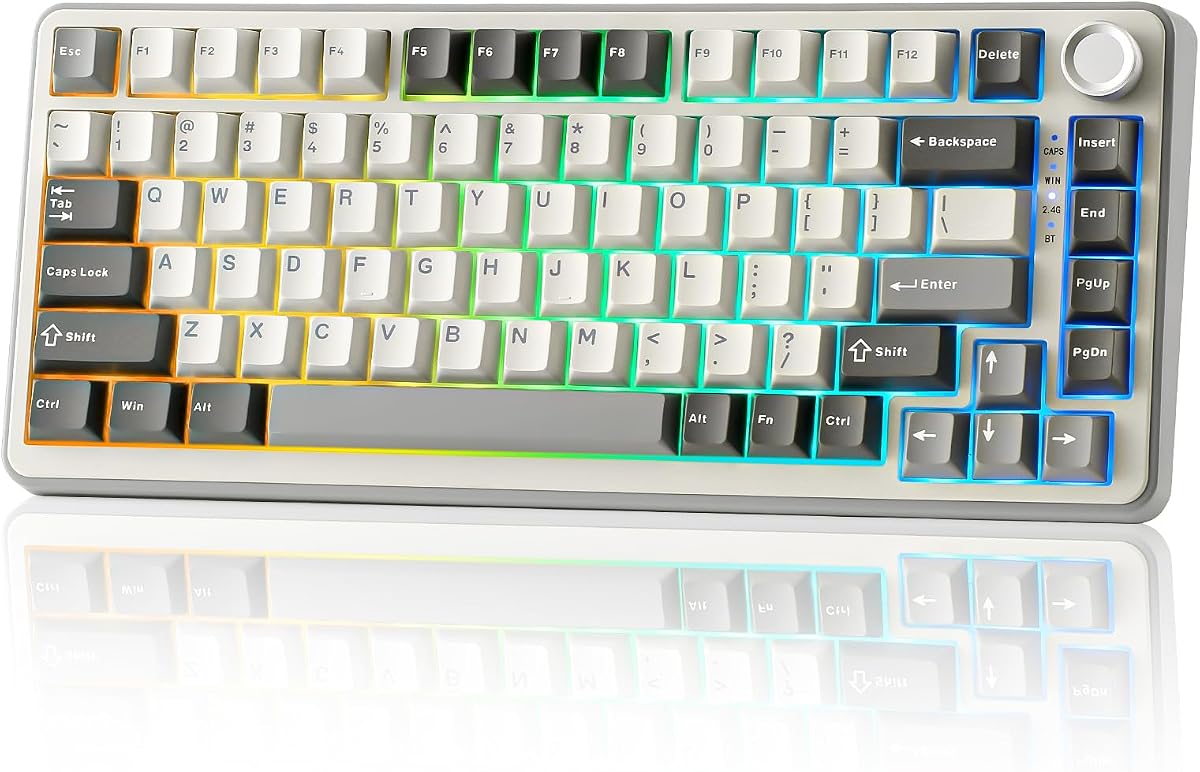

The AULA F75 Pro stands out as a top contender in the crowded 75 percent mechanical keyboard market due to its exceptional blend of features and affordability. With a solid rating from users and comprehensive specs including tri-mode connectivity, it delivers a premium typing experience without breaking the bank.
We may earn a commission when you buy through this link, at no additional cost to you.
Its standout quality lies in the advanced acoustic engineering which utilizes five layers of silencer filling to eliminate cavity noise while providing a thocky heavy feel. The side printed PBT keycaps ensure durability and a soft touch while the hot-swappable PCB allows for easy customization without soldering skills.
Trade-offs include the requirement for specific software to unlock full macro functionality which might inconvenience users seeking plug-and-play simplicity. Additionally the weight of the unit is higher than some competitors which could be a factor for frequent travelers but adds stability to desk setups.
This keyboard is ideal for gamers and typists who want professional-grade sound dampening and flexible connection options. We recommend it for anyone seeking a balance between performance build quality and value in a compact 75 percent form factor.
Five layers of filling material counteract resonance for a solid thocky feel.
Switch between Bluetooth 5.0 2.4GHz and USB-C seamlessly across multiple devices.
We may earn a commission when you buy through this link, at no additional cost to you.
The RK ROYAL KLUDGE R75 focuses heavily on acoustic refinement making it a strong choice for office environments or shared spaces where noise control is paramount. Its gasket mount structure combined with five layers of sound-absorbing material creates a noticeably quieter typing experience than rigid boards.
We may earn a commission when you buy through this link, at no additional cost to you.
Key strengths include the pre-lubed linear switches which offer a smooth and consistent keystroke without harsh feedback. The inclusion of a hot-swappable PCB allows enthusiasts to swap switches easily while the CNC metal knob provides a tactile and durable way to control volume and media functions.
While the battery life is decent it may not last as long as competitors with similar capacity if RGB lighting is kept active continuously. Users who prefer visual customization might also miss an LCD screen but the extensive RGB modes compensate for this lack of visual data display.
This model is best suited for professionals who prioritize a silent typing environment and need reliable wireless connectivity. It is an excellent pick for those who want a gasket mount feel without paying a premium price.
Poron cotton and five layers reduce vibration for a quiet office environment.
CNC metal knob adds robust build quality and precise volume control.
We may earn a commission when you buy through this link, at no additional cost to you.
This retro-styled keyboard offers a unique entry point into gasket-mounted designs without the typical premium price tag. The pre-lubed linear switches and five-layer padding ensure that even budget-conscious buyers can enjoy a soft and quiet typing experience that rivals more expensive models.
We may earn a commission when you buy through this link, at no additional cost to you.
Its main strength lies in the structural design which utilizes a tight fit between components to eliminate rattling and improve overall sound quality. The hot-swap PCB makes it incredibly easy for users to experiment with different switch types to find their preferred tactile or linear feel.
The wired-only connection limits mobility compared to wireless options which might be a downside for users with multiple devices or cluttered desks. RGB lighting is functional but lacks the advanced customization found in higher-end models so visual enthusiasts might find it basic.
We recommend this keyboard for beginners looking to upgrade from membrane boards or those who want a quiet setup for a home office. It is a solid choice for daily work and casual gaming where wired stability is preferred over wireless convenience.
Gasket mount design provides a cushioned feel usually reserved for expensive boards.
Hot-swap support allows easy customization without soldering or technical skills.
We may earn a commission when you buy through this link, at no additional cost to you.
The MageGee 75% Mechanical Gaming Keyboard simplifies the mechanical experience by removing complex features in favor of immediate usability. Its red switches provide a smooth linear action that is comfortable for both typing and gaming without any tactile bump interference.
We may earn a commission when you buy through this link, at no additional cost to you.
Strengths include the full anti-ghosting feature which ensures every key press is registered accurately during intense gaming sessions. The sturdy metal panel adds durability to the unit while the bright blue LED backlight provides clear visibility in low light conditions without being overly flashy.
Lack of hot-swap capability means users are stuck with the pre-installed switches which limits long-term customization. The blue LED is single color which is less versatile than RGB options for those wanting to match specific desk aesthetics or lighting themes.
This keyboard is perfect for users who want a reliable mechanical keyboard without needing software or complicated setup procedures. It is a great choice for students or casual gamers who value simplicity and budget over advanced customization features.
Plug and play design means no drivers or software are required to start typing.
Compact design maximizes space for mouse movement during competitive gameplay.
We may earn a commission when you buy through this link, at no additional cost to you.
This keyboard prioritizes acoustic comfort with its gasket-mounted design and dedicated sound-absorbing pads that significantly reduce typing noise. Users looking for a quiet workspace will appreciate the softer and quieter typing experience that comes with this specialized structural approach.
We may earn a commission when you buy through this link, at no additional cost to you.
Key features include the hot-swap socket which allows for effortless switch changes to customize your typing feel over time. The software support adds value by allowing full control over RGB effects and macro programming making it a versatile tool for power users.
The wired-only connection limits flexibility for users who need to connect multiple devices wirelessly or prefer a clean desk without cables. It requires a USB connection which might be less convenient for laptop users who travel frequently or lack accessible USB ports.
It is ideal for desktop users who spend hours typing and need a comfortable quiet experience. We recommend this model for those who want a dedicated workstation keyboard with strong acoustic properties and room for future upgrades.
Integrated pads dampen sound for a quieter typing experience in shared spaces.
Software support allows full key customization for complex work and gaming tasks.
We may earn a commission when you buy through this link, at no additional cost to you.
The AULA S75 PRO distinguishes itself with a customizable LCD screen that displays vital information like battery status and date at a glance. This premium feature elevates the user experience beyond standard keyboards by providing immediate visual feedback without needing to switch contexts.
We may earn a commission when you buy through this link, at no additional cost to you.
It excels in build quality and sound engineering with an advanced structure that uses single key slotting and filling silencers to create a solid and thocky feel. The tri-mode connectivity ensures you can connect up to five devices and switch between them effortlessly.
The requirement to download software to fully utilize the screen customization might be a barrier for some users who prefer simpler out-of-box experiences. The higher price point also makes it less accessible for budget buyers compared to other options on this list.
This keyboard is perfect for tech enthusiasts and professionals who want a high-tech display and premium typing feel. It is recommended for users who value visual customization and need robust wireless connectivity across multiple platforms.
See battery status and time instantly on the integrated LCD screen panel.
Single key slotting and silencers provide a solid and quiet typing feel.
We may earn a commission when you buy through this link, at no additional cost to you.
The Keychron K2 is a staple for Mac users who need a mechanical keyboard that understands the Mac layout from the start. It includes specific function keys and Mac layout options making it a seamless choice for those using macOS alongside Windows devices.
We may earn a commission when you buy through this link, at no additional cost to you.
Its strengths include a massive battery life that can last weeks on a single charge even with moderate use. The Bluetooth 5.1 chipset provides a stable and responsive connection that is suitable for both office work and light gaming without significant latency.
The lack of RGB lighting might disappoint users who enjoy customizing their desk aesthetics since it only features white LED backlight. Additionally the switches are not hot-swappable so you cannot change the typing feel without buying a different board entirely.
We recommend this keyboard for Mac professionals and students who prioritize connectivity and battery life over flashy lights. It is a reliable tool for daily productivity that integrates well into professional and Apple-centric ecosystems.
Includes specific function keys and legends designed for Mac users and layout.
4000mAh battery allows weeks of usage before needing a recharge.
We may earn a commission when you buy through this link, at no additional cost to you.
The YUNZII B75 PRO delivers an outstanding hot-swap experience with a full-key socket design that allows for extensive customization. The pre-lubed linear and tactile switches offer a creamy typing feel right out of the box which appeals to enthusiasts looking for quality sound.
We may earn a commission when you buy through this link, at no additional cost to you.
Its gasket mount structure provides a comfortable and bouncy typing feel that reduces fatigue during long sessions. The south-facing LEDs ensure that keycaps are illuminated correctly without light bleeding through the side of the switches for a cleaner look.
Some advanced features require driver installation on Windows systems which can be a minor hurdle for immediate setup. Users relying on wireless connectivity for everything should note that driver access often requires a wired connection for initial configuration.
This keyboard is ideal for hobbyists who enjoy customizing their setups and want a solid foundation for building a dream board. It is a great choice for typists who value a smooth creamy sound and reliable wireless performance.
Change switches easily to customize your typing feel and sound signature.
Avoid light bleeding for a cleaner backlight appearance on your keycaps.
We may earn a commission when you buy through this link, at no additional cost to you.
The Newmen GM326 is a standout budget option that brings hot-swap features and a multi-function knob to the market at a very accessible price point. It is an excellent choice for users who want to experiment with mechanical keyboards without a large financial commitment.
We may earn a commission when you buy through this link, at no additional cost to you.
Its main strengths include the ability to change switches easily and the convenience of a dedicated volume knob which adds utility without extra keys. The compact size makes it portable and suitable for travel or smaller desks where space is limited.
The ABS keycaps will likely develop shine over time compared to PBT alternatives but the price reflects this trade-off. Software support is basic compared to premium models meaning advanced customization is limited but sufficient for basic daily needs.
We recommend this keyboard for students and first-time buyers looking to enter the mechanical world affordably. It is a great value pick for casual gaming and typing where cost is a primary factor over long-term durability.
Get hot-swap and multimedia control at a price point very few competitors match.
Volume knob and compact design add practical utility to the workspace.
We may earn a commission when you buy through this link, at no additional cost to you.
The Womier SK80 offers a unique visual experience with a vibrant color multimedia screen that can display GIFs system status and connection modes. This feature allows for deep customization that appeals to users who want their desk setup to be dynamic and expressive.
We may earn a commission when you buy through this link, at no additional cost to you.
It uses a gasket-mounted design with EVA filling to provide a soft and responsive feel that dampens noise effectively. The hot-swappable PCB ensures that you can upgrade the switches later if you want to change the tactile feedback or sound profile.
Fully utilizing the display requires driver installation which can be a hurdle for some users seeking instant setup. The focus on visual features might distract from pure typing performance but it adds significant personality to your workspace.
This keyboard is perfect for streamers and creative professionals who value visual flair and unique desk aesthetics. It is recommended for users who want to stand out with a customizable screen and reliable mechanical performance.
Display custom images and status data to enhance your desk aesthetics.
Synchronize your RGB lighting to music for an immersive entertainment experience.
We may earn a commission when you buy through this link, at no additional cost to you.
Selecting the right 75 percent mechanical keyboard involves understanding various technical and practical factors that impact your daily use. This guide breaks down the most important elements to help you narrow down your choices effectively.
Most models offer either wired or wireless connectivity. Wireless options with Bluetooth and 2.4GHz support provide flexibility for multiple devices but rely on battery life. Wired models are simpler and often more stable for gaming without charging concerns.
Choose wireless if you work with multiple devices or want a clean desk. Go wired for consistent performance and no battery anxiety.
Mechanical switches come in linear tactile and clicky varieties. Linear switches are smooth and quiet making them popular for gaming and office use. Tactile switches have a bump that signals actuation which some typists prefer for feedback.
Linear switches are best for gaming. Tactile switches suit typing. Avoid clicky switches in shared environments due to noise.
The internal structure affects the typing feel and sound. Gasket mounting allows the PCB to sit on soft pads creating a bouncy and quiet experience. Plate-mounted boards are more rigid and louder which might be preferred by some users.
Look for gasket mounting if you want a premium soft feel. Standard mounting is acceptable for rigid and direct feedback.
Hot-swappable PCBs let you change switches without soldering. This feature is valuable if you want to try different switches or fix worn-out ones easily. Non-hot-swappable boards have soldered switches which are permanent.
Prioritize hot-swap sockets if you enjoy customizing your keyboard. It saves money and effort in the long run.
Backlighting ranges from single color LEDs to customizable RGB. RGB allows for personalization and visual effects which can be useful for aesthetics. Some models include multimedia screens that add a layer of visual interaction beyond simple lighting.
Choose RGB for a vibrant look. Standard LEDs are sufficient if you just need visibility in the dark.
Keycaps are usually made of ABS or PBT plastic. PBT keycaps are more durable and resistant to shine while ABS are cheaper and can be double-shot for sharper legends. Over time ABS caps may develop a glossy look from oil buildup.
PBT keycaps are better for longevity. If you prefer smooth legends ABS is acceptable for lower prices.
Wireless keyboards rely on internal batteries. Capacities around 4000mAh are common and can last weeks on low backlight settings. Higher brightness reduces battery life significantly so consider your usage habits.
Check the battery capacity if you use wireless often. 4000mAh is a good baseline for long-term usage.
Software allows you to customize macros lighting and key mappings. Some brands require drivers to unlock full features while others work out of the box. Driver software can sometimes be clunky but adds significant utility.
Look for software if you need macros or complex lighting. Otherwise plug-and-play is easier for simple needs.
To get the most out of your keyboard start by connecting it to your device via the appropriate cable or pairing it through Bluetooth settings. For models with switches use the included software to configure keybindings and lighting to suit your workflow preferences.
Regular maintenance keeps your keyboard functioning smoothly. Use compressed air to blow out dust and debris from between the keys periodically. Wipe the keycaps with a damp cloth if they become dirty to maintain their texture and appearance.
If you have a hot-swappable keyboard you can replace switches easily by pulling them out and pressing new ones into place. Be careful not to force them to avoid bending the pins. Always follow manufacturer instructions when cleaning or modifying the unit.
A 75 percent keyboard retains all the keys of a full-size layout except the numpad. This compact size saves desk space while still providing arrow keys and function rows which are often missing in smaller 60 percent boards.
Modern wireless mechanical keyboards often use 2.4GHz dongles which offer latency comparable to wired connections. However if you want the absolute best performance a wired model is still the safest choice for competitive gaming.
Most keyboards work out of the box without software for basic typing. Software is usually required only for advanced features like macro programming changing RGB lighting profiles or customizing the multimedia functions.
If the keyboard has a hot-swappable PCB you can change the switches without soldering. Check the product specifications to ensure it supports 3-pin or 5-pin switches before attempting to swap them out.
Gasket mounting uses soft pads between the PCB and the case to reduce vibration and noise. This creates a softer and more cushioned typing feel which is often preferred for comfort during long typing sessions.
Turn off the keyboard and remove keycaps if possible. Use compressed air to blow out dust under the switches and wipe the surface with a damp cloth. Ensure the unit is completely dry before reconnecting it to your device.
Mechanical keyboards generally offer better durability and a more satisfying tactile experience compared to membrane keyboards. They are also easier to customize and repair which makes them a better long-term investment for daily use.
Most wireless mechanical keyboards last between two weeks to a month on a single charge depending on backlight usage. Turning off RGB lighting significantly extends battery life making them suitable for occasional wireless use.
We have highlighted ten excellent options ranging from budget-friendly picks to premium models with advanced features. The AULA F75 PRO stands out as our top pick for its balance of sound quality connectivity and durability.
When making your decision prioritize the factors that matter most to your specific use case. Whether it is wireless convenience acoustic comfort or customization potential ensure the model you choose aligns with your daily workflow and preferences.
Prices and availability change frequently so be sure to check the latest listings before buying. We hope this guide helps you find the perfect 75 percent mechanical keyboard to enhance your typing and gaming experience.