
Epson Workforce Pro WF-7310
3.8Editor score
High-speed PrecisionCore technology
500-sheet paper capacity
DURABrite Ultra inks
Compare the top A3 printers for office and creative use. This guide reviews speed, ink costs, and features to help you choose the right wide-format model.
Finding the right A3 printer can transform your workflow whether you manage a small business or pursue creative projects. These wide-format devices handle larger sheets than standard printers, enabling professional documents, photos, and designs with ease and precision.
We evaluated ten leading models based on print quality, speed, connectivity, and overall value. Our analysis considers real-world performance metrics, user feedback, and technical specifications to ensure you receive accurate insights for your specific printing needs and budget constraints.
Each selection highlights key strengths and potential limitations to guide your decision effectively. Please note that product availability and pricing fluctuate frequently so always verify current details before purchasing to ensure you secure the best deal available at the time of buying.
3.8Editor score

4.0Editor score

3.9Editor score
This table provides a quick side-by-side overview of all ten selected A3 printers. Review key specifications like paper capacity, print speed, and unique features to identify which model aligns best with your operational requirements and budget.



The Epson EcoTank Photo ET-8550 stands out as a top choice for creative professionals and photo enthusiasts seeking wide-format capabilities. With a strong rating of 4.0, this device delivers exceptional value by eliminating traditional cartridges in favor of refillable ink bottles that last significantly longer.
We may earn a commission when you buy through this link, at no additional cost to you.
Its standout feature is the 6-color Claria ET Premium ink system which ensures vibrant colors and sharp text suitable for professional graphic design and photography. Users can print up to 6200 color pages on a single set of bottles making it highly cost-effective for high-volume environments where standard ink would be prohibitively expensive.
While the upfront cost is higher than many competitors the long-term savings on ink are substantial. The printer supports borderless printing and offers up to two years of ink in the box reducing maintenance interruptions. Some users note slower speeds compared to laser alternatives but the quality and economy often outweigh this trade-off.
This printer is ideal for small businesses or home studios prioritizing print quality and operational efficiency. It is highly recommended for those producing marketing materials photos or artistic prints regularly. Check current pricing and availability to see if it fits your specific workspace needs.
The cartridge-free system reduces waste and operational costs significantly over time compared to standard inkjet models.
Six-color ink technology ensures accurate color reproduction essential for high-end photographic and design output.
We may earn a commission when you buy through this link, at no additional cost to you.
The Epson Workforce Pro WF-7820 is designed for busy offices needing reliable wide-format output without excessive downtime. Its rating of 3.7 reflects solid performance in heavy workloads though some users report occasional connectivity or ink issues. It remains a strong contender for organizations prioritizing speed and productivity.
We may earn a commission when you buy through this link, at no additional cost to you.
Key strengths include its 25 pages per minute black print speed which helps maintain efficient workflows. The PrecisionCore Heat-Free Technology reduces energy consumption and war-up time while DURABrite Ultra inks provide instant-dry smudge-free results. The 50-sheet ADF and 250-sheet paper tray support multitasking and large document processing needs.
A notable limitation is the dependency on genuine Epson cartridges which can increase long-term costs. However the robust build quality and security features like Secure Data Erase make it suitable for corporate environments. Users appreciate the Smart Panel App for mobile connectivity and remote management tasks.
This model is best for medium-sized offices requiring consistent high-volume printing of reports and presentations. While it may lack the ink economy of tank printers it excels in speed and durability. Verify warranty terms and cartridge costs before purchase to ensure it aligns with your budget constraints.
High-speed duplex printing and scanning reduce manual handling and speed up document processing significantly.
Secure wireless and data erase features protect sensitive information within enterprise network environments.
We may earn a commission when you buy through this link, at no additional cost to you.
The Epson Workforce Pro WF-7310 is engineered for productivity with a 500-sheet paper capacity that minimizes refilling interruptions. It receives a 3.8 rating for its balance of speed and reliability making it a practical choice for offices needing wide-format output without frequent maintenance cycles.
We may earn a commission when you buy through this link, at no additional cost to you.
Features like PrecisionCore Heat-Free Technology enable fast print speeds of 25 pages per minute for black text. The DURABrite Ultra inks ensure vivid colors and sharp text ideal for professional documents. Dual 250-sheet trays and a rear feed provide flexibility for different paper sizes and types during large jobs.
While the 2.4-inch display is smaller than some competitors it remains functional for basic navigation. The Wi-Fi 5 compatibility ensures stable network connections for remote printing tasks. Users find it reliable for heavy workloads though cartridge costs can add up over time compared to tank systems.
Ideal for workgroups with steady printing demands this model offers dependable performance and ease of use. It suits environments where uptime and throughput are critical. Evaluate your monthly volume against ink costs to determine if this remains the most economical option for your team.
Robust construction and multiple paper trays ensure uninterrupted operation during peak printing periods.
Heat-Free technology consumes less power and eliminates warmup delays improving overall efficiency.
We may earn a commission when you buy through this link, at no additional cost to you.
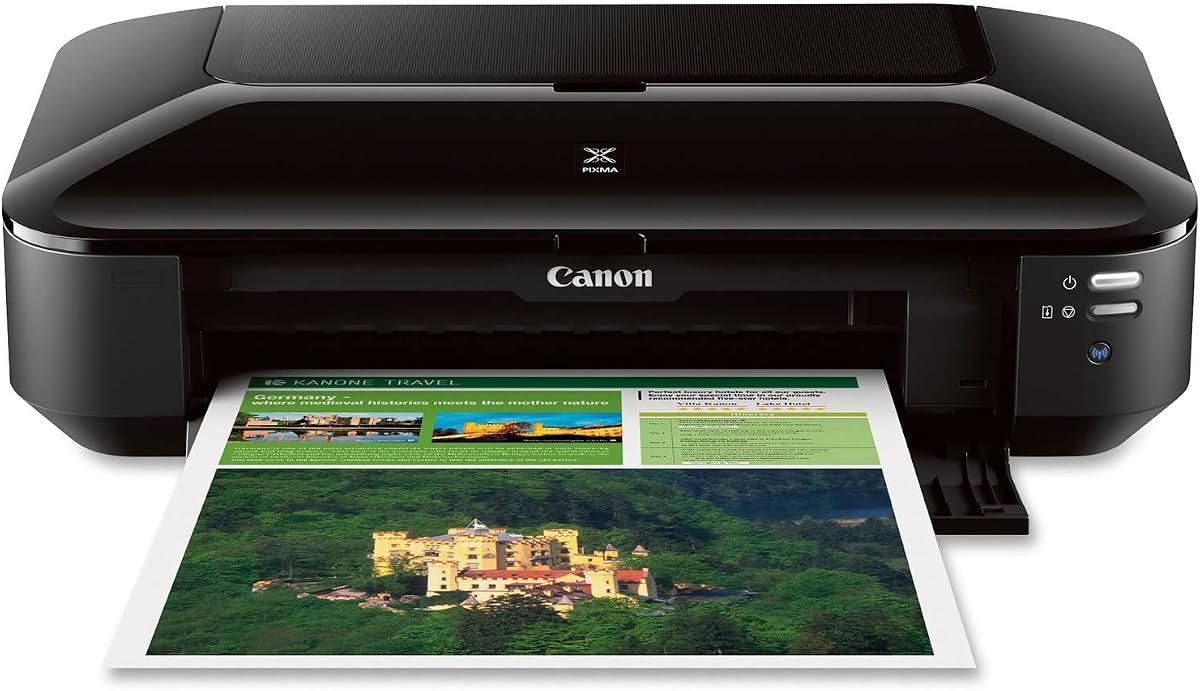
The Canon Pixma iX6820 offers a proven solution for businesses needing wide-format printing with robust cloud integration. With a 4.1 rating it is known for reliable performance and high-resolution output. Its legacy status ensures broad compatibility with older operating systems while still supporting modern mobile protocols.
We may earn a commission when you buy through this link, at no additional cost to you.
Key advantages include the Fine print head technology which delivers sharp text and vivid graphics at up to 9600 x 2400 dpi. The 5 individual ink tank system allows users to replace only depleted colors reducing waste. AirPrint and Google Cloud Print support enable easy mobile printing from various devices without complex driver setups.
Although it has a smaller 150-sheet feeder compared to newer models it suffices for moderate workloads. The build quality is sturdy and setup is straightforward via Wi-Fi. Users appreciate the cost-effectiveness of individual ink cartridges though frequent replacements may be needed for high-volume users.
This printer is suitable for small offices or freelancers who prioritize quality and connectivity over massive volume. It is a great choice if you already rely on cloud services for document management. Check compatibility with your specific OS version to ensure seamless integration before buying.
High dpi settings produce crisp details ideal for brochures and graphic-heavy documents.
Wide range of cloud and wireless options ensures easy access from any device.
We may earn a commission when you buy through this link, at no additional cost to you.
The Epson EcoTank ET-15000 is a powerhouse for high-volume printing needs thanks to its massive ink supply and duty cycle. Rated 4.2 it offers excellent value for offices printing thousands of pages monthly. The Supertank system eliminates cartridges significantly lowering the cost per page for both black and color output.
We may earn a commission when you buy through this link, at no additional cost to you.
It supports up to 33000 pages per month ensuring durability even under heavy workloads. Print speeds reach 17 ppm in black and 9 ppm in color providing decent throughput for wide-format tasks. Connectivity options include USB 2.0 LAN and Wi-Fi allowing flexible integration into various network environments.
While color speeds are slower than black and the resolution of 4800 x 2400 dpi ensures readable professional documents. Some users note its large physical size which requires adequate desk space. However the convenience of not needing frequent cartridge changes makes it a top pick for busy workgroups.
Ideal for medium businesses with consistent wide-format requirements this model balances cost and capacity well. It is recommended for environments where operational efficiency outweighs speed. Verify your workspace dimensions and print volume expectations to confirm it meets your long-term operational goals.
Tank-based ink supply allows for extended printing periods without needing frequent replenishment.
Designed for heavy workloads ensuring reliability during peak operational periods.
We may earn a commission when you buy through this link, at no additional cost to you.
The Epson Workforce Pro WF-7840 is built to handle demanding office environments with its 500-sheet paper capacity and PrecisionCore Heat-Free technology. With a 3.9 rating it delivers reliable wide-format prints up to 13 by 19 inches. The DURABrite Ultra inks ensure quick drying and smudge-free results suitable for client-facing documents.
We may earn a commission when you buy through this link, at no additional cost to you.
Features like Epson Connect Solutions allow productivity on the go via Email Print or Remote Print. The mobile apps for iOS and Android simplify tasks like scanning and copying from smartphones. Built-in wireless and Ethernet options ensure stable network connectivity for shared office use.
Although it uses traditional cartridges which may increase long-term costs the print quality and speed are competitive. Users report consistent performance and minimal downtime. The all-in-one functionality supports printing copying scanning and faxing in one unit saving space and resources.
This model is ideal for businesses requiring durable wide-format output with easy mobile integration. It suits teams that need quick access to printer functions without complex setups. Confirm cartridge availability and pricing before purchasing to maintain accurate operational budget planning.
Epson Connect apps enable remote management and printing from any location effortlessly.
Large trays reduce interruptions allowing continuous operation during busy printing schedules.
We may earn a commission when you buy through this link, at no additional cost to you.
The HP OfficeJet Pro 9135 stands out for its HP AI optimization which ensures web pages and emails print perfectly without awkward layouts. Rated 4.0 it is a strong option for offices valuing intelligent document handling. The 3-month Instant Ink trial offers convenience for users who prefer subscription-based ink delivery.
We may earn a commission when you buy through this link, at no additional cost to you.
It delivers print speeds up to 25 ppm black and 20 ppm color ensuring efficient workflow. Dual-band Wi-Fi provides stable connectivity with automatic issue resolution. Security features like HP Wolf Pro Security protect against cyber threats making it suitable for data-sensitive environments. The design also uses over 40% recycled plastic content.
One limitation is the strict firmware checks that may block non-HP cartridges. However the included trial encourages using HP Instant Ink to maintain compatibility. Users appreciate the 4.3-inch touchscreen for easy navigation and remote printing capabilities via the HP app.
This printer is best for professionals needing quick reliable output with smart features. It suits teams prioritizing security and connectivity. Consider the long-term cost of HP Instant Ink to ensure it aligns with your budget before committing to the system.
HP AI adjusts web and email formats to reduce wasted paper and improve readability.
Advanced protection protocols safeguard sensitive data against unauthorized network access.
We may earn a commission when you buy through this link, at no additional cost to you.
The Brother INKvestment MFC-J6960DW is engineered for speed offering print speeds up to 31 ppm in black and 30 ppm in color. Rated 4.2 it is an excellent choice for businesses needing quick turnaround on large documents. The MAXIDRIVE Technology ensures high performance while maintaining print quality across various media.
We may earn a commission when you buy through this link, at no additional cost to you.
It supports 11×17 inch sheets enabling wide-format output for spreadsheets and designs. The 500-sheet capacity with two trays and 100-sheet multipurpose tray reduces downtime. A 50-page single-pass duplex ADF speeds up scanning and copying tasks efficiently. Connectivity includes Wi-Fi Direct and Ethernet for flexible network integration.
The Brother Mobile Connect app simplifies device management from smartphones. While the Inkvestment system offers extended yield cartridges you may need to consider subscription options for maximum value. Users appreciate the PerfectPrint Auto Detection System for maintaining consistent quality without manual calibration.
This model is ideal for high-volume office environments prioritizing speed and capacity. It fits teams needing rapid output for presentations and reports. Verify current ink pricing and subscription details to understand total cost of ownership before purchase.
High-speed scanning and printing ensure tasks are completed efficiently without waiting.
Wi-Fi Direct and Ethernet support ensure seamless integration into diverse office networks.
We may earn a commission when you buy through this link, at no additional cost to you.
The Epson Workforce WF-7710 is designed for high-end wide-format needs offering borderless prints up to 13 by 19 inches. Rated 4.3 it is a premium choice for professionals requiring detailed and expansive output. PrecisionCore technology ensures sharp text and vibrant colors suitable for professional documents and images.
We may earn a commission when you buy through this link, at no additional cost to you.
The 250-sheet paper tray accommodates standard paper or photo sheets and envelopes. Features like Wi-Fi Direct and Ethernet facilitate easy connectivity for remote printing. Amazon Dash Replenishment allows automatic ordering of ink when supplies run low adding convenience for busy offices.
While priced higher than standard inkjets the quality and borderless capabilities justify the investment for creatives. Users report reliable performance and consistent color output. However maintenance and cartridge costs are considerations compared to tank-based systems.
Ideal for studios and offices needing large detailed prints this model delivers professional results. It suits users prioritizing print fidelity and borderless options. Assess your budget and print needs to determine if the premium features align with your requirements.
Support for borderless wide-format output enhances presentation quality for artistic and professional work.
Dash Replenishment ensures you never run out of ink by automating orders as needed.
We may earn a commission when you buy through this link, at no additional cost to you.
The HP OfficeJet Pro 9730 is a standout for wide-format color accuracy featuring P3 color gamut support to deliver true-to-screen prints. Rated 3.9 it excels in producing professional floor plans and mood boards. With a speed of 22 ppm black and 18 ppm color it balances efficiency and quality for office use.
We may earn a commission when you buy through this link, at no additional cost to you.
Its single-pass 2-sided ADF supports 11×17 inch scanning for large documents. The HP app and AI optimization enhance productivity by formatting content correctly for printing. Dual-band Wi-Fi ensures reliable connection and HP Wolf Pro Security protects against cyber threats effectively.
Sustainable design with 30% recycled plastic aligns with eco-conscious initiatives. While it requires HP chips for cartridges the included Instant Ink trial helps manage costs. Users appreciate the vibrant and accurate color output suitable for professional presentations and spreadsheets.
Best for businesses needing wide-format documents with precise color fidelity this model is a strong contender. It suits design teams and offices prioritizing visual accuracy. Confirm cartridge compatibility and subscription options to maximize value during your operation.
P3 support ensures wider and more accurate color reproduction for visual materials.
HP AI optimizes email and web prints reducing wasted paper and improving layout efficiency.
We may earn a commission when you buy through this link, at no additional cost to you.
Selecting the right A3 printer requires balancing cost features and performance to match your workflow needs. This guide highlights key factors to consider before making a purchase decision.
Print speed is measured in pages per minute (ppm) and affects how quickly you can complete large jobs. For high-volume offices look for models offering 20 ppm or more to maintain efficient workflows without long wait times.
Decide between cartridge-based and tank-based ink systems. Tank printers offer lower cost per page but higher upfront investment while cartridges are cheaper initially but may cost more over time depending on your monthly volume.
Higher paper capacity reduces refilling interruptions. Models with 500 sheets or more are ideal for busy environments where frequent loading is not feasible during peak work hours.
Ensure the printer supports your preferred connection method. Wi-Fi and Ethernet allow flexible remote printing while USB is useful for direct local connections. Check for mobile app support if you print frequently from phones.
Consider the maximum dpi and color gamut if you produce graphic-heavy documents or photos. Higher resolution ensures sharp details and accurate colors for professional presentations and design work.
If you need to digitize documents choose a model with a duplex ADF and wide-format scanning capability. This saves time and improves efficiency in document management tasks.
Evaluate the total cost of ownership including cartridges ink subscriptions and energy usage. Lower upfront prices may lead to higher long-term expenses if ink is expensive or requires frequent replacement.
For businesses security is essential. Look for printers with data encryption secure wireless and secure erase capabilities to protect sensitive information from unauthorized access.
Start by installing the drivers and software provided by the manufacturer to ensure all features function correctly. Connect the printer to your network via Wi-Fi or Ethernet following the on-screen instructions or mobile app guides for easy setup.
Regularly print test pages to prevent nozzle clogging especially if the printer sits idle for extended periods. Clean the print heads using the maintenance menu options if you notice streaks or faded output on your documents.
Store ink bottles and cartridges in a cool dry place away from direct sunlight to maintain their quality. Use genuine manufacturer inks to avoid damaging the print heads and ensure consistent color accuracy across all your projects.
An A3 printer can handle larger sheets of paper which are essential for creating spreadsheets blueprints and marketing materials. This capability allows businesses to print documents without needing to resize content or print multiple pages for later assembly.
Generally A3 printers use specialized cartridges or tanks designed to handle wide-format ink flow. Using non-approved inks may void warranties and cause clogs so always check compatibility before replacing supplies.
Yes tank printers are ideal for high-volume needs due to their lower cost per page and fewer refills. They reduce downtime and expenses compared to cartridge systems which need frequent changing during heavy use.
Most modern A3 printers support mobile printing via apps and Wi-Fi. Check that the model supports AirPrint Mopria or its own mobile app to print directly from smartphones and tablets without using a PC.
Check your network connection and driver settings to ensure they are optimized for performance. Updating firmware and clearing print queues can also resolve lag. Using high-quality paper can sometimes slow speed slightly but improves overall output quality.
Run regular cleaning cycles and print test pages at least once a week. Store paper properly to avoid humidity issues and always use manufacturer-recommended ink to keep nozzles clear and colors vibrant.
Choosing the best A3 printer depends on your specific needs whether it is speed ink costs or color accuracy. The Epson EcoTank Photo ET-8550 remains a top pick for creatives while the Epson Workforce Pro WF-7310 offers excellent value for general office productivity.
Prioritize features like paper capacity connectivity and ink systems that align with your workflow volume. Investing in a model with the right features will save time and money over the long term ensuring your printing tasks are efficient and reliable.
Remember to verify current pricing and availability before buying as deals and stock vary frequently. By weighing these factors carefully you can select an A3 printer that perfectly supports your professional or creative goals.