
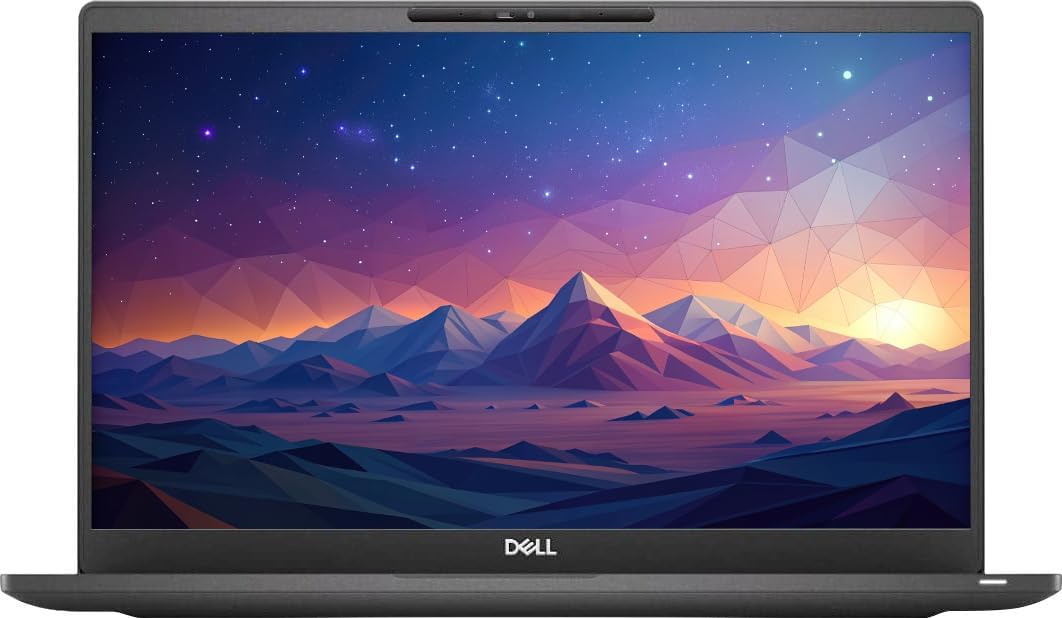
Dell Latitude 5420
3.8Editor score
Intel Core i5-1135G7
8 GB RAM
256 GB SSD
Finding a reliable computer without breaking the bank is a common challenge for students and professionals. Amazon Renewed Laptop options offer a smart way to access premium business hardware at a fraction of the cost while ensuring quality.
We compared ten distinct models based on processor speed, memory capacity, storage type, and overall user ratings. This list covers a range of Dell and Lenovo business laptops certified for performance and durability in everyday tasks.
Each pick below highlights key specs and real-world usability to help you decide quickly. Keep in mind that availability and specific configurations may change, so checking the latest product page details is always recommended.
3.8Editor score

3.9Editor score

3.7Editor score
As an Amazon Associate we earn from qualifying purchases.
This side-by-side comparison highlights the core specifications of each renewed model so you can easily spot differences in processing power, memory, and storage across the ten selected laptops.




This Lenovo ThinkPad L14 stands out as a powerful choice for users needing modern performance in a business chassis. It earns a solid rating for its reliable build quality and capable AMD Ryzen processor that handles multitasking well.
We may earn a commission when you buy through this link, at no additional cost to you.
The AMD Ryzen 5 7530U processor provides six cores and twelve threads, ensuring smooth operation when running multiple applications. Paired with 16GB of RAM, this laptop keeps your workflow fluid whether you are editing documents or browsing heavy web pages.
While the storage is limited to 256GB, the PCIe SSD ensures fast boot times and quick file access. The inclusion of WiFi 6E and modern ports like USB-C and HDMI 2.1 means this device is ready for future network and display needs.
Buyers looking for a durable workhorse with up-to-date internals will find this model compelling. It balances performance and portability effectively, making it a top recommendation for professionals who need reliability without outdated specs.
The six-core Ryzen CPU offers better multithreaded performance than many older quad-core Intel options found in similar budget models.
With HDMI 2.1 and USB-C Gen 2, you can connect to high-resolution monitors and transfer data quickly without adapters.
We may earn a commission when you buy through this link, at no additional cost to you.
The Dell Latitude 7420 represents the premium tier of this list with its carbon fiber construction and high-speed i7 processor. It is ideal for users who need a durable laptop that feels solid and performs well on demanding tasks.
We may earn a commission when you buy through this link, at no additional cost to you.
Equipped with an Intel Core i7-1165G7 and 16GB RAM, this model delivers top-tier speed for office work and light creative tasks. The 512GB SSD provides generous space for storing files without needing external drives immediately.
The display offers a wide viewing angle with anti-glare coating, which is perfect for bright office environments. A backlit keyboard ensures you can type comfortably in low-light conditions, adding to the professional user experience.
Although it comes at a higher price, the build quality and specs justify the investment for power users. This laptop combines business durability with performance features that keep it relevant for years to come.
The carbon fiber chassis makes this laptop lighter and stronger than standard plastic alternatives, reducing wear and tear over time.
The FHD anti-glare screen reduces eye strain during long work sessions while maintaining clear text and image sharpness.
We may earn a commission when you buy through this link, at no additional cost to you.
This Dell Latitude 5420 is an excellent entry-level option for those needing a capable business laptop without spending too much. It balances cost with essential features like a modern processor and Windows 11 Pro out of the box.
We may earn a commission when you buy through this link, at no additional cost to you.
The Intel Core i5-1135G7 provides enough speed for daily tasks like email, spreadsheets, and video calls. While 8GB of RAM is standard, it handles moderate multitasking well, making it suitable for general office use.
The 256GB SSD ensures the system boots quickly and programs load efficiently. The webcam and integrated graphics support video conferencing, which is a critical feature for remote work scenarios in today's market.
Users who need a reliable, affordable laptop for standard tasks will appreciate this model. It is a great choice for students or remote workers who prioritize function and value over high-end specifications.
At this price point, you get a recent generation processor and Windows 11 Pro, which are often expensive in new consumer models.
Standard ports like HDMI and USB-A allow you to connect to projectors and legacy devices easily without dongles.
We may earn a commission when you buy through this link, at no additional cost to you.
This variation of the Dell Latitude 5420 offers a distinct advantage with 16GB of RAM included, which helps with heavy multitasking. It is a reliable choice for professionals who need more memory than the standard 8GB models.
We may earn a commission when you buy through this link, at no additional cost to you.
The Intel Core i5-1145G7 processor ensures responsive performance for business applications and web browsing. The 256GB SSD provides fast access to your operating system and frequently used files, keeping your workflow efficient.
The FHD display delivers clear visuals for reading documents and watching videos. This model is well-suited for users who want a balance of speed and capacity without paying for premium features.
If you need a workable laptop that handles multiple browser tabs and applications simultaneously, this is a strong candidate. The extra RAM makes it more versatile than similar budget laptops in the same category.
Having 16GB RAM allows you to keep many windows open without slowdown, which is rare at this price point.
The 14-inch FHD screen offers sharp text and good color accuracy for general business viewing needs.
We may earn a commission when you buy through this link, at no additional cost to you.
This Dell Latitude 7420 model stands out for its generous storage and memory configuration which provides excellent value for users. It is a robust option for those who need space for large files without slowing down the system.
We may earn a commission when you buy through this link, at no additional cost to you.
With a 512GB SSD and 16GB of RAM, this laptop handles storage and multitasking requirements effectively. The processor is a capable 11th Gen i5 that supports everyday business tasks and light creative work smoothly.
The FHD display ensures that visuals are clear and readable for extended periods. Connectivity options like WiFi and Bluetooth allow for easy pairing with peripherals and network access.
Buyers prioritizing storage space and memory over raw processing speed will find this model highly suitable. It offers a balanced combination of components that supports a wide range of professional activities efficiently.
The 512GB drive means you can store more projects locally without needing cloud subscriptions or external drives immediately.
The higher user rating suggests consistent quality control and satisfaction with performance across different users.
We may earn a commission when you buy through this link, at no additional cost to you.
The Dell 7400 Latitude offers a classic business design with solid specs that remain relevant for many tasks. It is a great choice for users who prefer a familiar layout and proven durability in a work machine.
We may earn a commission when you buy through this link, at no additional cost to you.
While the 8th Gen processor is older, it is still capable of handling web browsing and office suites efficiently. The 16GB of RAM ensures that you can run multiple apps without performance issues.
The inclusion of Type-C and HDMI ports gives you flexibility for connecting to various monitors and docks. The M.2 NVMe SSD ensures that the system remains responsive during day-to-day usage.
This model is ideal for budget-conscious buyers who still need 16GB of RAM and a professional build. It provides a reliable experience for general computing needs without requiring the latest high-end components.
You get HDMI and Type-C which allows you to connect to almost any monitor available in the current market.
Older processors often mean lower prices while still delivering enough power for standard office applications.
We may earn a commission when you buy through this link, at no additional cost to you.
This Dell Latitude 5400 model is recognized for its high user satisfaction and reliable performance in basic business tasks. It serves as a practical option for those needing a straightforward laptop for daily operations.
We may earn a commission when you buy through this link, at no additional cost to you.
The 16GB RAM configuration is a significant plus for a budget machine, allowing for smooth multitasking. The SSD ensures quick boot times and fast application loading, which improves overall productivity throughout the work day.
While the screen is HD rather than FHD, it is sufficient for text-based work and general navigation. The build quality is designed to withstand daily use, making it a durable choice for remote workers.
Users who need a dependable machine for writing and data entry will find this model effective. It offers a high ratio of performance to cost, making it a smart choice for limited budgets.
The high rating indicates that most buyers find this laptop meets their needs for work and basic productivity tasks well.
Having 16GB RAM on a budget model is rare and helps you avoid performance bottlenecks when opening many files.
We may earn a commission when you buy through this link, at no additional cost to you.
This Dell Latitude 5490 offers a strong combination of storage and memory which appeals to users needing space for files. It is a solid choice for those who want a larger SSD without upgrading to a newer model.
We may earn a commission when you buy through this link, at no additional cost to you.
The 512GB SSD provides plenty of room for documents and media while maintaining fast read and write speeds. The 16GB of RAM ensures that system performance remains smooth even with several applications open.
The FHD display provides clear visuals for documents and web content. The design is robust and typical of business laptops that are built to last over a long period of time.
If you need a laptop with ample storage and memory at an affordable price, this is a great pick. It balances older hardware with enough capacity to handle current business workflows effectively.
The 512GB drive is excellent for keeping your work files locally accessible without relying heavily on cloud storage.
FHD resolution ensures that text looks crisp and images are detailed, which helps reduce eye strain.
We may earn a commission when you buy through this link, at no additional cost to you.
This Dell Latitude 5400 is a budget-friendly option that includes a Full HD display and a modern operating system. It is suitable for users who prioritize screen clarity and basic performance over heavy multitasking.
We may earn a commission when you buy through this link, at no additional cost to you.
The 8GB RAM is adequate for light tasks like browsing and typing, but may limit heavy usage. The 256GB SSD ensures the system remains fast and responsive for standard applications and startup.
The FHD screen is a key feature for this model, offering better visual quality than many budget alternatives. It supports clear viewing of documents and media which improves the overall user experience.
For those with a tight budget who still want a decent screen and a recent OS, this is a viable pick. It handles essential computing tasks well and is a good fit for casual business use.
The FHD resolution makes this unit stand out from other budget options that often settle for lower resolution screens.
While not built for heavy loads, the processor handles everyday apps smoothly enough for general office work.
We may earn a commission when you buy through this link, at no additional cost to you.
This Dell 5420 Latitude is the most capable model on the list with its impressive 32GB RAM and i7 processor. It is designed for power users who need significant memory for complex workflows and large datasets.
We may earn a commission when you buy through this link, at no additional cost to you.
The combination of 32GB RAM and a 512GB SSD makes this laptop ideal for running virtual machines or heavy software. The Thunderbolt support ensures high-speed data transfer and versatile connectivity options.
The 11th Gen i7 processor provides the raw speed needed for demanding applications. This unit is perfect for users who cannot compromise on performance and need a desktop replacement in laptop form.
Investors looking for a machine that can handle intensive tasks for years to come should consider this model. It offers a high-end specification set that is rare in the renewed market.
With 32GB of RAM you can run virtually any application simultaneously without worrying about system slowdowns.
Thunderbolt support allows for fast external storage connections and docking capabilities for a desktop setup.
We may earn a commission when you buy through this link, at no additional cost to you.
Selecting the right renewed laptop involves weighing several technical factors to ensure you get value without sacrificing reliability for your specific needs.
The processor is the brain of the laptop and dictates how fast it can run applications. Look for at least an Intel Core i5 or AMD Ryzen 5 from the last few generations to ensure smooth multitasking and future-proofing.
A faster CPU will help you handle video calls and browser tabs without lag, so prioritize newer generation models when possible.
Random Access Memory determines how many programs you can run at once. For general business use, 8GB is the minimum, but 16GB is recommended for heavy multitasking or running multiple browser windows.
More RAM ensures your system remains responsive when switching between tasks, so check this spec before purchasing.
Solid State Drives are standard in modern laptops and provide fast boot times compared to older hard drives. A capacity of 256GB is good for basic users while 512GB is better for those storing many files.
Look for NVMe SSDs as they are faster than SATA SSDs, ensuring quick access to your data and applications.
A high-resolution screen is important for eye comfort and clarity during long work hours. Aim for a Full HD display with an anti-glare finish to reduce strain in bright environments.
Better screens make text sharper and colors more accurate, which is essential for professional document editing and web browsing.
Battery life varies significantly among renewed models, so checking reviews is vital for mobility. A laptop with a battery health over 80% will last longer through your workday without needing a charger.
If you work from different locations, prioritize models known for efficient power management and replaceable batteries.
Ensure the laptop has the ports you need for peripherals and monitors. USB-A, USB-C, and HDMI ports are essential for connecting to projectors and external drives without extra adapters.
Having the right ports saves time and hassle, so verify the input and output options match your workspace setup.
Windows 11 Pro is the standard for business laptops and offers security features and management tools. Make sure the renewed unit comes with a valid license and is updated to the latest version.
A licensed OS ensures you have access to security updates and support, which is critical for business data protection.
Amazon Renewed products typically come with a minimum ninety-day warranty which provides peace of mind. Check if the seller offers tech support or extended warranty options for additional security.
A solid return policy protects you if the device does not meet your expectations or arrives with issues.
Upon receiving your laptop, inspect the device for any physical damage and install necessary software updates immediately. This ensures the system runs efficiently and all security patches are applied for a safe environment.
To extend battery life, adjust your power settings to reduce screen brightness and turn off the display when not in use. Avoid leaving the laptop in hot environments which can degrade battery health and performance over time.
Keep the exterior clean by using a soft, lint-free cloth to wipe down the keyboard and screen regularly. Dust and debris can accumulate in ports so using compressed air periodically will help maintain connectivity and cooling.
Yes, they are inspected and tested by qualified vendors to ensure they meet functional standards. Most come with a warranty that covers hardware defects, providing peace of mind for daily work tasks.
Yes, the renewed models listed include Windows 11 Pro with a valid digital license. This means you can activate the OS and access all features without purchasing a separate key.
Amazon Renewed products typically include a minimum ninety-day warranty from Amazon or the seller. This covers functional issues so you can return the item if it does not work as expected.
Many business models allow for upgrades if you have the right tools and knowledge. Check the specific model documentation to see if the components are accessible for future expansion.
Renewed laptops often come with batteries that are tested to hold a reasonable charge but may not match new capacity. It is common to see battery health around eighty percent or higher on these devices.
The renewed grade usually defines acceptable cosmetic wear such as minor scratches or scuffs. If the damage is more than expected for the grade you purchased you can contact customer service for a replacement.
These business laptops generally have integrated graphics which handle basic games and light design work. For heavy gaming or professional video editing you may need a dedicated GPU model instead.
This guide highlights ten excellent options ranging from budget-friendly models to high-performance business laptops. Whether you need maximum memory or a solid everyday machine there is a choice here to fit your needs.
Prioritize processors and RAM based on your daily tasks to ensure the laptop lasts for years. A model with 16GB RAM and a modern SSD will serve you better than a cheaper one with limited specs.
Always check the latest availability and details before buying to confirm the warranty and condition. Prices and stock can vary so verifying the product page will help you secure the best deal today.