
HDMI to USB-C AR Glasses Adapter
4.3Editor score
Supports 4K 60Hz video
Works with Switch and PS5
Compact and travel friendly
Compare the top ten AR glasses HDMI adapters for 2026 to find the best converter for your Xreal Rokid or RayNeo glasses with 4K support and reliable power.
Finding the right AR glasses HDMI adapter is crucial for immersive entertainment on the go. These devices convert standard HDMI signals into USB-C formats compatible with modern augmented reality headsets. A good adapter ensures stable video output without flickering or signal loss during extended use.
We compared ten top-rated models based on compatibility, video quality, and power delivery. Each product was evaluated for its ability to handle 4K resolution and support major gaming consoles. Our list covers wired and wireless options to suit different user needs and budgets.
Every pick highlights key features, pros, and cons to help you decide quickly. Prices and availability can change frequently on online marketplaces. Always check the latest details before purchasing to ensure you get the best value for your setup.
4.3Editor score

4.6Editor score

4.5Editor score
This side-by-side comparison breaks down the key specifications of the top ten AR glasses HDMI adapters available today. We analyze resolution support, power requirements, and device compatibility to help you make an informed decision.


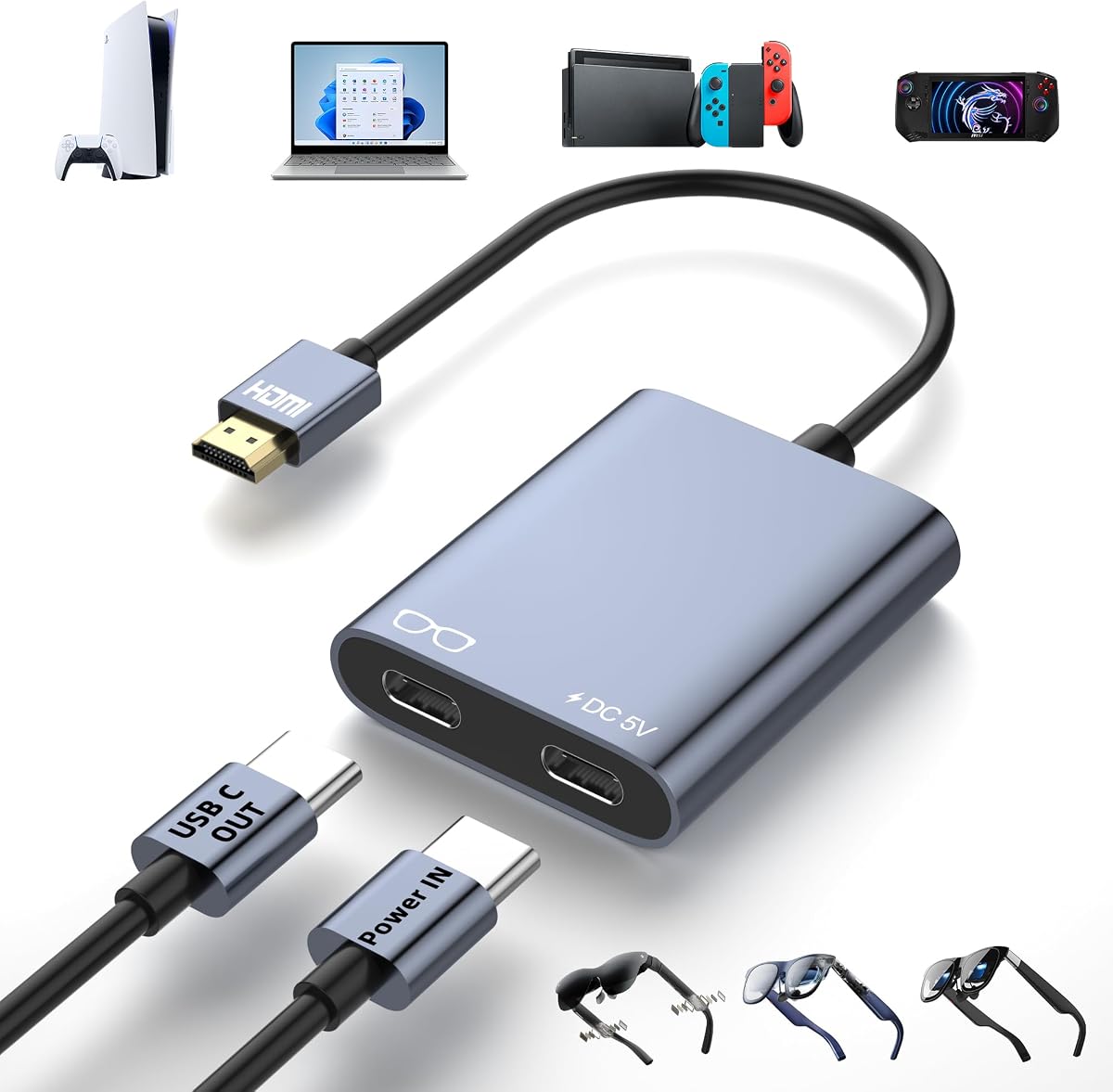


This HDMI to USB-C adapter is an excellent budget option for connecting HDMI sources to AR glasses. With a solid 4.3 rating it delivers reliable 4K 60Hz video output for gaming and movies. The hub is designed to convert HDMI ports into USB-C video output for various use cases.
We may earn a commission when you buy through this link, at no additional cost to you.
It supports connecting devices like the Switch OLED PS4 PS5 and Xbox to USB-C AR glasses. The hub features DP Protocol video output which may require switching Xreal glasses to DP mode. It also has a 10W power output for glasses and displays though source devices need separate charging.
Users should note that it is not compatible with VR headsets or Epson AR Glasses. Stability issues may occur without a portable charger connected to the hub. For higher resolutions ensure both input and output devices support the specifications.
This adapter is ideal for budget conscious gamers who want to use AR glasses with consoles. While it requires careful setup and external power it offers great value for the price. Always check compatibility with your specific glasses model before purchasing.
Connects Switch PS4 PS5 Xbox and laptops to USB-C AR glasses or displays.
Supports resolutions up to 4K 60Hz for smooth and clear visuals.
We may earn a commission when you buy through this link, at no additional cost to you.
The Guermok adapter supports up to 4K 60Hz and 1080P 120Hz for immersive visuals. It includes a 1m full-function USB-C video cable for easy connections. The design is travel friendly and delivers low latency video output for gaming and presentations.
We may earn a commission when you buy through this link, at no additional cost to you.
It works with XREAL RayNeo Rokid and other AR glasses accepting USB-C video. The HDMI source must be a device like PS5 Xbox or Switch. The USB-C end is for display output only and cannot connect to a computer as a source.
Power requirements are critical as the adapter needs 5V 1-1.5A for stable operation. Without external power video output will not work and may cause flickering. The aluminum housing helps dissipate heat during long use sessions.
This adapter is a strong choice for gamers needing reliable low latency connections. Ensure your display supports USB-C video and audio input for best results. Follow power guidelines to avoid signal issues during extended play.
Includes a 1m full-function USB-C cable for flexible and easy connections.
Aluminum alloy housing effectively dissipates heat during extended usage.
We may earn a commission when you buy through this link, at no additional cost to you.
This RayNeo adapter offers HDR10 support for richer contrast and colors. It provides smooth 4K visuals at 30Hz and allows simultaneous charging for long sessions. Designed for RayNeo Air 4 Pro glasses it connects to HDMI devices like Xbox and PS5.
We may earn a commission when you buy through this link, at no additional cost to you.
It also supports Lightning devices up to iPhone 14 with Apple Digital AV Adapter. The cinematic 201-inch virtual display creates a theater-like experience. Built with durable materials it ensures seamless performance during gaming or streaming.
Users should note the specific compatibility with RayNeo glasses and the need for HDR10 sources. The Lightning connectivity requires extra accessories which may add cost. Power delivery is integrated for convenience but check device support.
Ideal for RayNeo owners wanting HDR and charging capabilities. The price is higher but justified by specialized features. Ensure your source supports HDR for the best visual impact.
Enhanced visual performance with HDR10 for more vibrant colors.
Enjoy smooth visuals while keeping your device charged.
We may earn a commission when you buy through this link, at no additional cost to you.
This adapter delivers stunning 4K 60Hz video with ultra-low latency for gaming. The built-in 5V power port supplies power to displays ensuring uninterrupted operation. It supports a wide range of AR glasses and consoles like Switch PS5 Xbox and ROG Ally.
We may earn a commission when you buy through this link, at no additional cost to you.
The design is plug and play with no drivers needed. The aluminum alloy housing helps with heat dissipation and durability. Its compact size makes it easy to carry for mobile setups. A 2-year warranty adds confidence to the purchase.
Note that it is unidirectional so HDMI is source and USB-C is display. External power is mandatory for signal. Studio Display may not support audio without external speakers. Check compatibility before purchase.
This model is a top pick for those needing reliable power and performance. The 5V port prevents battery drain mid-session. Follow troubleshooting steps if no display appears for smooth setup.
Supplies power to connected displays ensuring uninterrupted operation.
100% risk-free purchase with 2-year warranty and 24/7 support.
We may earn a commission when you buy through this link, at no additional cost to you.
AIMIBO offers wireless mirroring directly to AR glasses eliminating HDMI cables. It has both HDMI and USB-C output for flexibility. The 5000mAh battery provides hours of uninterrupted use for travel or work.
We may earn a commission when you buy through this link, at no additional cost to you.
The dual-band 5G streaming ensures stable low latency transmission. It supports iOS Android Windows and macOS devices with AirPlay or Miracast. Package includes wireless adapter and cables. It can expand with a transmitter for more sources.
Users should be aware wireless may have slight latency compared to wired. It is not a replacement for all use cases but ideal for specific setups. Battery life is a key advantage for mobile users without power.
This adapter is best for those prioritizing wireless convenience over absolute lowest latency. The long battery life supports extended sessions. Check device compatibility for optimal casting experience.
No HDMI adapter needed as it mirrors wirelessly directly to glasses.
Built-in 5000mAh battery offers hours of uninterrupted use.
We may earn a commission when you buy through this link, at no additional cost to you.
This adapter delivers crisp 4K 60Hz UHD video with ultra-low latency. It is strictly unidirectional with HDMI to source and USB-C to display. The 5V power port supplies power to glasses for stable operation during use.
We may earn a commission when you buy through this link, at no additional cost to you.
It supports XREAL Rokid RayNeo and other AR glasses with USB-C video. Works with PS5 Xbox Switch 2 and portable monitors. Plug and play design requires no drivers. Ensure USB-C device supports DP Alt Mode for best results.
Without adequate power you may experience black screens or flickering. Check your power source first if issues occur. The aluminum housing aids heat dissipation. Follow connection instructions carefully to avoid signal problems.
This model is a reliable choice for standard gaming setups. The clear instructions help avoid common connection errors. Always connect power before display for stable signal.
Strictly unidirectional design prevents incorrect connections.
5V power port ensures stable operation during use.
We may earn a commission when you buy through this link, at no additional cost to you.
This adapter links HDMI sources to AR glasses with 4K 60Hz clarity. It has an independent 5V 2A power input for stable display. The tiny lightweight body is easy to carry for travel or office use.
We may earn a commission when you buy through this link, at no additional cost to you.
Plug and play operation requires no drivers or software. Power adapter is not included so you need a separate source. Two Type-C ports serve separate functions for video and power. Compatible with Windows and macOS systems.
Users may need to ensure power adapter meets requirements for stability. The design focuses on portability. Check that your AR glasses support the transfer direction for proper operation.
Good for mobile users needing a compact solution. Be aware power adapter must be sourced separately. Verify device compatibility before purchase.
Tiny lightweight body easy to slip into pockets for travel.
Independent power supply port fixes black screen issues.
We may earn a commission when you buy through this link, at no additional cost to you.
This adapter ensures pristine picture with zero delay for immersive experience. It supports up to 4K 60Hz for seamless video and audio. The aluminum construction provides superior heat dissipation for long use.
We may earn a commission when you buy through this link, at no additional cost to you.
Compatible with XREAL VITURE Rokid and RayNeo glasses. Works with PS5 Xbox PC and TV boxes. Plug and play setup requires simple connection steps. Ensure external power for higher power needs.
Note that it cannot power USB-C devices over 5W. XREAL users may need to upgrade firmware for audio. The design is sleek and lightweight for portability. Check compatibility before purchase.
Ideal for those needing zero delay gaming. The aluminum build aids heat management. Follow power guidelines to avoid signal issues.
Ensures seamless video and audio synchronization.
Premium aluminum for superior heat dissipation.
We may earn a commission when you buy through this link, at no additional cost to you.
Enjoy crisp 4K 60Hz resolution for smooth immersive AR experiences. This adapter features a 5V power port for stable operation. Comes with a full-function USB-C cable for flexible connections.
We may earn a commission when you buy through this link, at no additional cost to you.
Compatible with XREAL Rokid RayNeo and VITURE glasses. Works with PS5 Xbox Switch 2 and portable monitors. Plug and play design with low latency for mobile setups. Ensure USB-C device supports HDMI 2.0.
External 5V power is essential for function. Incorrect connection order may result in no display. The aluminum shell aids heat dissipation. Follow compatibility notices before use.
This adapter offers good compatibility for standard setups. The included cable simplifies setup. Always connect power first for stable signal.
Comes with a 1m full-function USB-C cable for easy connection.
5V power port supplies power to connected displays.
We may earn a commission when you buy through this link, at no additional cost to you.
This adapter combines Fire TV Stick power supply with HDMI to USB-C conversion. It has a built-in 5000mAh battery for portable use without extra cables. The 4K 60Hz output ensures stable smooth immersive viewing.
We may earn a commission when you buy through this link, at no additional cost to you.
Compatible with Fire TV Stick Xreal Air and Rokid glasses. The battery offers around 3h40min runtime with devices. The lightweight PC ABS body is easy to carry for travel. Fully charged in about 3 hours.
Users should note specific power adapter requirements. It is ideal for private big-screen entertainment anywhere. The all-in-one design reduces clutter and complexity. Check battery life needs before purchase.
Best for users wanting maximum portability. The battery eliminates need for external power. Ensure compatible power adapter for charging.
Combines Fire TV Stick power supply and HDMI conversion.
Around 3h40min continuous runtime with devices.
We may earn a commission when you buy through this link, at no additional cost to you.
Choosing the right adapter requires understanding your specific display and source needs. This guide breaks down key factors to consider for optimal performance.
Most adapters support 4K 60Hz which is ideal for gaming and movies. Ensure your AR glasses can handle this resolution for the best visual experience. Some models may have limitations at higher refresh rates.
Always verify that both your source device and glasses support the desired resolution before purchasing.
Many adapters require external power for stable operation. Some include built-in batteries or power ports for convenience. Without adequate power you may experience flickering or black screens during use.
Check if the adapter includes a power cable or if you need a separate power source.
Ensure the adapter is compatible with your specific AR glasses model like XREAL or Rokid. Also confirm it supports your HDMI source devices such as PS5 or Switch. Some adapters may not work with VR headsets.
Look for models that list your specific devices to avoid connection issues.
Gaming requires low latency adapters for responsive visuals. Wired adapters typically offer better performance than wireless options. Check for terms like ultra-low latency in product descriptions.
Prioritize performance for gaming applications to ensure smooth play.
If you travel frequently look for compact and lightweight adapters. Aluminum housing can help with heat dissipation during long sessions. Some models include carrying cases for added convenience.
Choose a design that fits easily in your bag for on-the-go use.
Some adapters require specific audio modes like DP Alt Mode for sound. Check if audio is transmitted through the USB-C cable. may may need external speakers for devices like Studio Display.
Verify audio capabilities to ensure a complete viewing experience.
Look for adapters with a warranty for peace of mind. Reliable customer support can help troubleshoot connection issues quickly. Longer warranty periods indicate manufacturer confidence.
Check the warranty terms before finalizing your purchase.
Price varies based on features like battery or advanced video support. Higher cost does not always mean better compatibility for your needs. Balance features with your specific use case.
Consider the total value including included cables and accessories.
Always connect the power source before connecting your AR glasses or display. This ensures stable signal and prevents flickering issues. Follow the order: adapter to power source to HDMI source to display.
Keep the adapter in a cool dry place when not in use. Avoid exposing it to extreme temperatures which may damage internal components. Use a soft cloth to clean the ports if dust accumulates.
Update your AR glasses firmware to the latest version for best compatibility. If issues arise try unplugging and replugging cables to ensure secure connections. Check for any visible damage on the adapter before use.
Most adapters require external power for stable operation especially for AR glasses. Without adequate power you may experience black screens or signal dropouts. Some models include built-in batteries for portable use without extra cables.
No most HDMI to USB-C adapters are not compatible with VR headsets. They are designed specifically for AR glasses and USB-C displays. VR headsets require capture cards or different connection methods.
DP Alt Mode allows USB-C ports to transmit video signals like DisplayPort. Your AR glasses must support this mode to receive video from the adapter. Check device specifications before connecting to ensure compatibility.
Some adapters require switching glasses to DP mode for audio. Check your source device settings for HDMI audio output. Verify that your display supports audio input through the connection.
This adapter is unidirectional designed for HDMI source to USB-C display. It cannot reverse signal from USB-C phone to HDMI TV. You would need a different adapter for that use case.
Check your console's settings to confirm video output resolution. PS5 Xbox Series X and Switch support high resolutions. Ensure your HDMI cable is rated for 4K as well.
We highlighted ten top adapters with diverse features from budget to premium options. The Editor's Choice offers excellent low latency while others provide built-in batteries for portability.
Prioritize power needs and compatibility with your specific glasses model. Look for stable connections and clear instructions to avoid setup frustrations.
Prices change so always check the latest details before buying. Verify current warranty terms for long-term peace of mind.