
ASRock DeskMini X300 2.5G Series
4.2Editor score
Ultra-compact 1.92L design
Supports AM4 Ryzen 5000 series
Triple display output support
This guide compares the top barebone PCs with AMD processors for gaming and work, highlighting performance, ports, and upgrade flexibility for 2026.
Barebone PCs with AMD processors offer a unique blend of compact design and powerful performance. They let you choose your own memory and storage, giving you full control over your system configuration without paying for components you might not need.
We evaluated ten leading models based on CPU architecture, expansion options, thermal management, and connectivity. Our analysis focuses on real-world usability for gaming, content creation, and home server applications across different price points and form factors.
Each pick shows key strengths and trade-offs to help you find the right fit. Remember that availability and pricing can shift quickly, so check current listings before making your final decision on which AMD barebone mini PC suits your needs.
4.2Editor score

4.0Editor score

3.1Editor score
The following table provides a side-by-side comparison of all ten models evaluated. Use this overview to quickly identify which system matches your performance needs, port requirements, and storage expansion goals.





This unit delivers a high-performance foundation with the Ryzen 7 PRO 8845HS and Radeon 780M graphics. It earns our Editor's Choice thanks to its balanced mix of connectivity, including OCuLink and dual USB4, plus robust thermal management.
We may earn a commission when you buy through this link, at no additional cost to you.
The 8-core CPU and flexible memory up to 128GB let you handle intensive workloads smoothly. Dual 2.5G LAN and WiFi 6 keep networking reliable while the recycled aluminum chassis maintains cool temperatures under load.
Though you must add RAM, SSD, and OS separately, this flexibility lets you tailor storage and memory to your exact needs. OCuLink avoids some USB4 bottlenecks for external GPU setups though it requires a shutdown to swap.
It suits power users and gamers who want a small footprint without sacrificing raw processing or expansion. For those comfortable with DIY assembly, this model offers the most capable modern AMD barebone experience available today.
OCuLink provides direct PCIe access with lower latency than USB4, preserving GPU performance for demanding titles and professional graphics workflows without bottlenecking external hardware.
The VC heat spreader and turbo fans keep temperatures stable during heavy tasks, ensuring the CPU maintains high boost clocks for longer without thermal throttling.
We may earn a commission when you buy through this link, at no additional cost to you.
With a 4.5 rating, this GEM12+ offers enterprise-level performance in a compact barebone form. It shines with quad 4K display support and a vapor chamber design that keeps noise low during extended use.
We may earn a commission when you buy through this link, at no additional cost to you.
BIOS modes let you tune performance between Silent, Balanced, or Performance. The independent OCuLink channel avoids sharing M.2 bandwidth, making it ideal for eGPU setups where maximum throughput matters.
While you need to supply your own memory and drives, the two DDR5 slots and dual M.2 PCIe 4.0 slots give plenty of room to scale. It is a solid pick for multitasking and media workstations.
Buyers looking for maximum screen real estate and low-noise operation will find this model compelling. Just plan ahead for power-on before connecting external GPUs due to the non-hot-swappable OCuLink port.
The vapor chamber spreads heat evenly across the sink, lowering overall temps and noise compared to traditional pipe designs under prolonged high loads.
By avoiding M.2 slot sharing, the OCuLink port ensures external GPUs get full bandwidth, reducing bottlenecks for rendering or gaming.
We may earn a commission when you buy through this link, at no additional cost to you.
This PRO variant adds fingerprint unlock and a fully customizable built-in display for real-time hardware monitoring. Those features boost convenience and visibility for enthusiasts who want quick access and detailed system data.
We may earn a commission when you buy through this link, at no additional cost to you.
Under the hood it matches the GEM12+ with Ryzen 7 PRO 8845HS and OCuLink. Vapor Chamber cooling and dual M.2 slots maintain strong performance and storage flexibility for games or large media files.
The DIY display lets you set backgrounds and watch CPU, GPU, and RAM usage live. It is especially handy for headless setups where you still want to glance at health stats without logging in.
If you value secure login and on-device diagnostics, this model stands out. The trade-off is the same need to source memory and storage, plus careful power-off before changing OCuLink hardware.
Fingerprint login simplifies access without passwords, ideal for shared or quick-access workstations where convenience matters.
Monitor real-time CPU and GPU data directly on the device using dedicated software for better insight into performance under load.
We may earn a commission when you buy through this link, at no additional cost to you.
With a 4.8 rating, this DeskMeet offers desktop-like flexibility in a compact 8L case. It supports full AM4 Ryzen CPUs and includes a 500W PSU plus a PCIe x16 slot for discrete GPU upgrades.
We may earn a commission when you buy through this link, at no additional cost to you.
It stands out for users who need desktop-class expandability without building a tower. Dual M.2 NVMe slots and four DIMM slots let you scale memory and storage far beyond typical mini PC limits.
Be aware it lacks integrated graphics, so you must supply a CPU with an iGPU or add a discrete card via PCIe. It is more a barebone SFF desktop than a pure mini PC.
Choose this when you want maximum hardware choices and room for a powerful GPU. It fits builders who prioritize upgradability and performance headroom in a smaller footprint.
A dedicated PCIe 3.0 x16 slot allows discrete GPU addition, turning this system into a capable workstation or gaming rig.
Including a 500W PSU removes the need for external adapters, enabling stable power for higher-performance components.
We may earn a commission when you buy through this link, at no additional cost to you.
This X1 Lite uses a custom Ryzen 7 255 CPU paired with Radeon 780M graphics for a strong balance of performance and efficiency. OCuLink support comes with an included adapter to unlock external GPU connectivity.
We may earn a commission when you buy through this link, at no additional cost to you.
Triple display output via HDMI 2.1, USB4, and DP1.4 suits multi-monitor office or media setups. Wi-Fi 6e and Bluetooth 5.2 keep wireless speeds reliable for large file transfers and video calls.
Thermal design with PCM phase-change material and dedicated fans helps memory and SSD maintain peak speeds during long sessions. It is a solid fit for creative pros and power users.
Buyers should note that using OCuLink requires one M.2 slot and a shutdown to attach or remove. If that flexibility matches your needs, this model offers modern connectivity at a competitive price.
PCM phase-change material absorbs heat from the CPU, helping maintain stable performance during extended high-load tasks.
Wi-Fi 6e provides cleaner spectrum and higher throughput for reduced latency and more reliable wireless connectivity.
We may earn a commission when you buy through this link, at no additional cost to you.
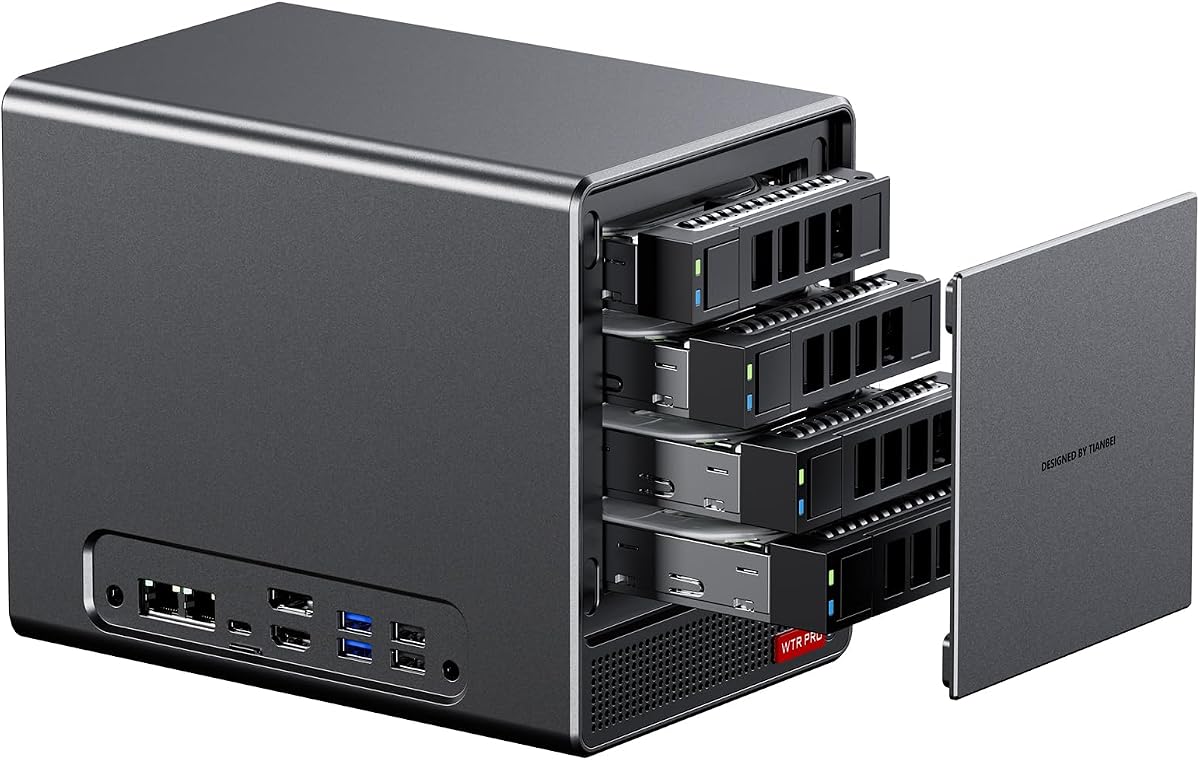
Built for server and NAS duties, this WTR PRO features four 3.5 SATA bays and two M.2 slots for flexible storage. It runs on a Ryzen 7 5825U with low wattage for 24/7 operation.
We may earn a commission when you buy through this link, at no additional cost to you.
Through-the-wall construction and a 12CM fan ensure efficient heat dissipation while staying quiet. Dual 2.5G LAN ports help with network segregation or redundant uplinks for reliable performance.
Be aware that Linux users may need to adjust SATA link power rules to avoid speed drops under load. A udev configuration can lock full 6Gbps performance across all bays.
Choose this when you need a compact, always-on file server or router. Its energy efficiency and expandability make it a practical choice for home labs and small offices.
Four SATA bays plus two M.2 NVMe slots allow up to 96TB of storage in a single compact unit for serious data needs.
Low TDP design keeps electricity costs low while ensuring reliable continuous operation without overheating.
We may earn a commission when you buy through this link, at no additional cost to you.
Awarded Best Budget, this DeskMini delivers an ultra-compact 1.92L design with broad AM4 support. It offers triple display outputs and a 2.5G LAN for solid multi-monitor work and fast networking.
We may earn a commission when you buy through this link, at no additional cost to you.
Dual M.2 slots and two 2.5 drive bays support storage flexibility and RAID setups. DDR4 memory up to 128GB provides headroom for virtualization or heavy multitasking without high costs.
Since it is a barebone kit, you must source CPU, RAM, and OS separately. That trade-off keeps the entry price low while giving you freedom to pick compatible parts.
This model suits budget-focused buyers who still want modern features and small footprint. It is ideal for offices, digital signage, or light gaming when paired with a Ryzen APU.
HDMI, DisplayPort, and D-Sub outputs allow three screens, ideal for productivity or monitoring multiple windows.
Tiny volume and AM4 compatibility keep power use low, making it suitable for always-on tasks like home servers.
We may earn a commission when you buy through this link, at no additional cost to you.
As Best Premium, the PN54 leads with Ryzen AI 300 series processors and Wi-Fi 7 for future-proof performance. Its 0.6L chassis is among the thinnest while still supporting powerful hardware.
We may earn a commission when you buy through this link, at no additional cost to you.
XDNA2 NPU provides up to 50 TOPS for AI workloads like local model inference and smart assistants. Four 4K display support and dual 2.5G LAN make it a versatile workstation for pros.
Toolless design simplifies upgrades without screwdrivers, appealing to enterprises that need rapid maintenance. A three-year warranty adds long-term confidence for high-value deployments.
This model is for organizations needing cutting-edge AI and ultra-slim builds. While pricier, its forward-looking features suit users planning for next-generation computing needs.
Wi-Fi 7 delivers higher throughput and lower latency, essential for high-resolution streaming and dense network environments.
Dedicated NPU handles AI tasks efficiently, freeing the CPU for other operations and improving overall responsiveness.
We may earn a commission when you buy through this link, at no additional cost to you.
This NAS-oriented model offers four 3.5 bays and two M.2 slots, reaching up to 96TB for massive file storage. It runs on a Ryzen 7 5825U with silent cooling and supports Windows or Linux systems.
We may earn a commission when you buy through this link, at no additional cost to you.
Dual 2.5G LAN enables network segmentation and redundant connections for reliable server uptime. Triple 4K display support allows monitoring dashboards or multiple management consoles simultaneously.
Linux users should adjust udev rules to ensure full SATA bandwidth under load. This ensures consistent performance for large transfers or virtual machine storage pools.
Choose this for home labs or small business storage needing high capacity in a quiet chassis. It balances enterprise-grade networking with user-friendly physical expansion for growth.
With four SATA and two M.2 slots, you can build a 96TB array in a compact case for centralized data.
Dual 2.5G LAN ports allow failover or link aggregation, keeping your NAS accessible even during network issues.
We may earn a commission when you buy through this link, at no additional cost to you.
The PN54-S1 brings a slim 34mm chassis with tool-free upgrades and dual 2.5G LAN. It supports AMD Ryzen 200 series CPUs and Radeon 740M graphics for cost-effective multitasking and light visuals.
We may earn a commission when you buy through this link, at no additional cost to you.
Four 4K display support and six USB ports provide solid connectivity for office tasks and media use. The 24/7 reliability focus makes it suitable for digital signage or shared workstations.
While CPU choices are older, the chassis design prioritizes space-saving and quick maintenance. This suits businesses that need multiple units with easy service access and low downtime.
Select this when compact size and serviceability matter more than cutting-edge performance. Its three-year warranty supports long-term enterprise use without frequent replacements.
Access internal components without tools for faster maintenance and fewer interruptions in active environments.
Extremely thin profile fits tight spaces like under monitors or in cabinets where depth is limited.
We may earn a commission when you buy through this link, at no additional cost to you.
Selecting the right AMD barebone PC involves balancing CPU power, storage needs, and expansion options. Use the factors below to match a model to your specific workflows and space constraints.
Newer Zen 4 and AI-series CPUs offer faster cores and integrated graphics compared to older Zen 3 or Ryzen 200 designs. Consider whether you need AI acceleration or high single-thread performance for gaming versus server tasks.
Prioritize recent architectures if you plan to run modern games or heavy multitasking without a discrete GPU.
Check the number of RAM slots and maximum supported capacity to ensure you can scale as your needs grow. M.2 slots should ideally support PCIe 4.0 for faster SSDs and avoid bandwidth bottlenecks.
Look for dual M.2 and SO-DIMM slots to support high-speed memory and large internal storage without needing external drives.
If you plan to add an external GPU, OCuLink offers lower latency than USB4 for better gaming and rendering performance. Confirm whether the port shares M.2 bandwidth or runs independently to avoid throttling.
Choose a model with independent OCuLink if you need maximum performance from an external graphics card.
Multiple HDMI and DisplayPort outputs enable multi-monitor setups for productivity or monitoring. USB4 can also carry video and power, reducing cable clutter and supporting high-resolution displays.
Aim for three or more video outputs if you regularly use dual or triple-screen workspaces.
Dual 2.5G LAN ports help with network segregation and high-speed file transfers while Wi-Fi 6E or Wi-Fi 7 improve wireless throughput and reduce interference in dense environments.
Select systems with modern wireless and wired options to maintain fast, stable connections across your network.
Vapor chamber cooling, PCM materials, and through-wall vents keep temperatures lower and fan noise quieter under load. This is crucial for always-on servers or silent office setups.
Evaluate cooling design if your unit will run continuously or in noise-sensitive spaces.
Some barebone kits include a power supply while others rely on external bricks. Internal PSUs with higher wattage support discrete GPUs or extra components, while external adapters save space.
Ensure the included power solution matches your planned components to avoid instability or insufficient headroom.
Most barebone systems ship without an operating system, so you must source or install one separately. Confirm if Windows keys are provided or if you prefer Linux or other open-source distributions.
Factor in OS licensing costs and compatibility when budgeting your total system cost.
Install compatible RAM, SSDs, and a power adapter before powering on. Follow the manual to align keyways and secure modules to avoid connection issues.
Update the BIOS and GPU drivers after OS setup to enable new features and fix compatibility issues. Periodically check manufacturer sites for firmware improvements.
Dust the vents every few months with compressed air and keep the unit in a ventilated area to maintain stable temperatures and long hardware life.
You will need compatible DDR4 or DDR5 memory modules, one or more M.2 NVMe SSDs or SATA drives, and a licensed operating system. Ensure your chosen CPU matches the socket or includes integrated graphics if no discrete GPU is added.
Yes, models with OCuLink can connect external GPUs with lower latency than USB4. However, OCuLink usually requires powering off the system before connecting or disconnecting the hardware.
Most support Linux well. Some models provide Linux compatibility notes and suggest udev rule adjustments to prevent SATA power management issues under heavy loads.
Yes, newer ASUS models include Wi-Fi 7 and Bluetooth 5.4, offering faster wireless speeds and better performance in crowded network environments compared to Wi-Fi 6E.
Many models support up to 128GB or even 160GB with dual DDR5 SO-DIMM slots. Check the manual for the exact limit since some may vary depending on CPU compatibility.
Use systems with vapor chamber cooling or PCM materials and keep the unit in a well-ventilated space. Ensure airflow paths are not blocked by walls or nearby objects.
Not always. Some include a 500W internal PSU while others rely on an external adapter. Verify the package contents before purchase to avoid unexpected costs.
Yes, models with multiple SATA bays or M.2 slots often support RAID 0 and 1 via BIOS settings. Confirm this in the specifications for your specific model before setup.
Our top picks span a wide range of use cases from powerful gaming rigs to quiet home servers. The AOOSTAR MACO leads with OCuLink and robust connectivity, while budget buyers will appreciate the DeskMini X300's flexibility.
Prioritize CPU architecture and expansion slots based on your workload. If you plan to run an eGPU or manage large media libraries, ensure the system supports independent high-bandwidth links and ample storage.
Check current pricing and availability since components and bundles can shift quickly. With the right choice, an AMD barebone mini PC gives you modern performance and long-term upgrade paths in a compact form.