
2026 Upgraded 3-in-1 Magic Box 3.0 Wireless CarPlay Adapter
5.0Editor score
5G WiFi for smooth streaming
HDMI output for external displays
Compact space-saving design
This guide compares the top ten Carplay Box with Google Play units to help you find the best streaming Android AI box for your wired CarPlay vehicle today.
Transform your factory wired system into a smart hub with a Carplay Box with Google Play. These devices unlock streaming apps and navigation tools directly on your dashboard screen.
We analyzed ten top models based on connectivity speed, app availability, and ease of installation. Each pick balances performance with value to suit different driving needs.
Every review highlights key features and trade-offs to help you decide. Note that prices and availability change frequently so check current listings before purchasing.
5.0Editor score

4.7Editor score

5.0Editor score
This side-by-side comparison table details the core specifications and capabilities of each top ranked Carplay Box with Google Play unit reviewed in this guide.


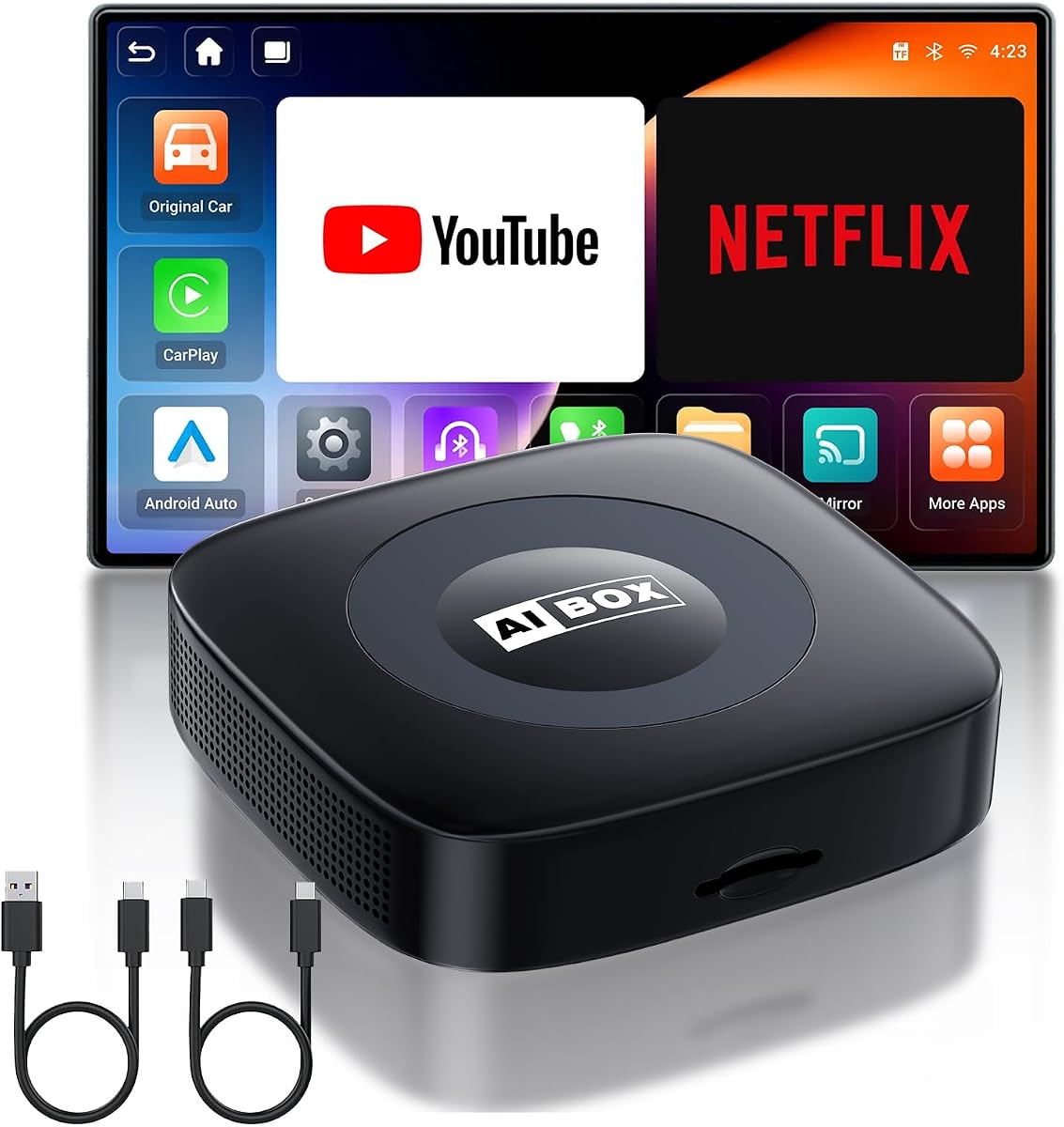

This Magic Box stands out as the top pick due to its seamless integration of the Android Play Store. It turns your wired CarPlay into a fully functional smart device with a 4.7 star rating.
We may earn a commission when you buy through this link, at no additional cost to you.
The ability to download any app directly onto the device is a major strength. You can access YouTube TikTok and other streaming services without relying solely on pre loaded options.
While video playback is restricted to parking to ensure safety the screen mirroring feature compensates by letting you cast phone content easily. This trade-off aligns with legal standards.
It is ideal for drivers who want maximum freedom to customize their in car experience. If you value app selection and ease of use this model is the best choice.
The built-in Play Store allows you to install navigation tools or apps not found in the default CarPlay interface.
Pairing happens quickly via Bluetooth and the device auto reconnects every time you start your engine.
We may earn a commission when you buy through this link, at no additional cost to you.
This AI Box offers a premium experience with Android 13 and an 8-core Qualcomm platform. It achieves a perfect 5.0 rating from users who value advanced features.
We may earn a commission when you buy through this link, at no additional cost to you.
The ScenePilot ecosystem adds unique utilities like SSRadio and trip logging that go beyond standard streaming. You can stay entertained with thousands of online radio stations.
The inclusion of a 4G Nano SIM trial card means you do not need to rely on a phone hotspot for connectivity. This adds a layer of convenience for long trips.
While it is more expensive the hardware and software capabilities justify the cost for power users. It is the best choice if you want the most comprehensive smart car hub.
Integrates privacy features and trip logging into a single dashboard for shared vehicle safety.
The 4G slot lets you use data without tethering to your personal phone.
We may earn a commission when you buy through this link, at no additional cost to you.
This Magic Box 3.0 delivers excellent performance at a budget friendly price. It holds a perfect 5.0 rating from satisfied customers across the US.
We may earn a commission when you buy through this link, at no additional cost to you.
The HDMI output allows you to connect the device to projectors or external screens which is great for camping. It brings video entertainment outdoors without extra cost.
Its compact design ensures it does not clutter your console while the 5G WiFi guarantees smooth streaming for passengers. These features make it highly versatile.
For drivers seeking value this adapter is a strong contender. It covers the basics of streaming and wireless connection without the premium price tag.
Connects to projectors for backyard movie nights or road trip fun.
5G WiFi reduces latency for a smooth video experience.
We may earn a commission when you buy through this link, at no additional cost to you.
This AI Box focuses on build quality and stability with its aluminum alloy housing. It has a solid 4.5 rating reflecting its robust design.
We may earn a commission when you buy through this link, at no additional cost to you.
The unit comes with pre-loaded apps like Netflix and YouTube so you can start watching immediately without downloads. This is convenient for users who prefer simplicity.
Its dual band WiFi ensures that navigation and streaming run simultaneously without dropouts. The aluminum case also helps with heat dissipation during long use.
It is suitable for drivers who want a reliable plug and play experience. The trade-off is the lack of a Play Store but the included apps are sufficient for most.
Aluminum body withstands extreme temperatures and protects internal components.
Advanced WiFi ensures smooth video with no stuttering or audio lag.
We may earn a commission when you buy through this link, at no additional cost to you.
This adapter stands out for its Gemini AI Co-Pilot which can answer questions and plan trips hands-free. It holds a 3.7 rating indicating mixed user feedback.
We may earn a commission when you buy through this link, at no additional cost to you.
The 4GB RAM provides headroom for multitasking so you can switch between apps smoothly. It also allows you to store more media for offline playback.
While the AI features are innovative some users report needing time to configure them correctly. The HDMI output is a nice touch for connecting to external displays.
It is a good pick for tech enthusiasts who want AI integration. However casual users might find the setup less straightforward than other simpler models.
Ask the assistant for real-time info or route planning while keeping hands on the wheel.
4GB RAM helps prevent lag when switching between navigation and music.
We may earn a commission when you buy through this link, at no additional cost to you.
This versatile adapter supports both wireless CarPlay and Android Auto on one device. It earns a 4.4 rating for its flexibility for different phone users.
We may earn a commission when you buy through this link, at no additional cost to you.
The built-in TF card slot allows you to play media offline when no internet is available. This is a practical feature for rural areas with weak signals.
However you can only connect to CarPlay or use streaming services at the same time. This limitation is manageable for most users who switch modes as needed.
It is recommended for families with both iPhone and Android devices. The dual support avoids buying separate adapters for different family members.
Switch seamlessly between iPhone and Android devices without reconfiguration.
Use microSD cards to store movies when you are out of signal.
We may earn a commission when you buy through this link, at no additional cost to you.
This Box uses Android 13 for a refined and upscale travel experience. It has a 4.3 rating from users who appreciate its raw performance.
We may earn a commission when you buy through this link, at no additional cost to you.
The 8-core processor ensures smooth operation when running multiple apps. It supports SIM card insertion for internet access even when your phone is not available.
It integrates well with voice inputs and Bluetooth for safer driving. The 64GB storage gives you plenty of room for downloaded content.
It is ideal for drivers who want a standalone car system. This setup ensures you have a reliable connection even when the phone is disconnected.
Runs on Android 13 for the latest features and security patches.
64GB ROM allows for extensive app and media downloads.
We may earn a commission when you buy through this link, at no additional cost to you.
This adapter combines CarPlay Android Auto and streaming into a single unit. It holds a 4.0 rating with users valuing its versatile functionality.
We may earn a commission when you buy through this link, at no additional cost to you.
The Gemini AI can tell stories and play podcasts to entertain passengers during downtime. It also supports high definition media output for rear headrest displays.
Dual band WiFi helps eliminate lag and buffering so navigation remains smooth. The USB offline playback feature ensures you can enjoy media even without internet.
It is a solid choice for families looking to keep kids entertained. The combination of voice stories and media output makes road trips less stressful.
Gemini tells stories and plays podcasts to keep everyone engaged.
Connect to rear headrest displays for individual movie viewing.
We may earn a commission when you buy through this link, at no additional cost to you.
This model uses WiFi 6 and a H618 quad-core chip for ultra-low latency. It has a perfect 5.0 rating for its reliability and compact design.
We may earn a commission when you buy through this link, at no additional cost to you.
The small body reduces cable clutter and optimizes interior space effectively. It supports over 1200 car models making it widely compatible with modern vehicles.
Although it has 2GB RAM and 16GB ROM its performance is strong enough for daily use. The 3-year warranty provides added peace of mind for buyers.
It is great for drivers with limited console space. The fast and stable connection ensures a smooth experience for both iPhone and Android users.
Advanced WiFi 6 reduces latency for a faster connection.
Compact body ensures the adapter does not clutter the dashboard.
We may earn a commission when you buy through this link, at no additional cost to you.
This device offers a straightforward way to watch Netflix and YouTube in the car. It holds a 3.8 rating indicating functional performance for basic users.
We may earn a commission when you buy through this link, at no additional cost to you.
The TF card slot supports playback up to 256GB for extensive offline media libraries. This ensures entertainment even in areas with no mobile signal.
It supports automatic connection and basic system switching without complex setup. The built-in apps are sufficient for standard streaming needs.
It is a good choice for those who want simplicity. If you do not need extra features this adapter provides a cost-effective solution.
Load a TF card with movies to watch anywhere.
Connect via USB and pair via Bluetooth in seconds.
We may earn a commission when you buy through this link, at no additional cost to you.
Selecting the right AI box requires considering your specific needs and vehicle setup. Use these factors to narrow down the options.
Look for devices running Android 13 or newer. Older versions may struggle with modern app requirements. A full Android system allows you to install apps freely.
Choose a device with full Play Store access for maximum flexibility.
The processor determines how smoothly the device runs multitasking apps. Aim for 8 core chips and at least 4GB RAM for better performance. This prevents lag during navigation.
Higher RAM and core counts ensure a smoother experience for demanding apps.
Check for dual band WiFi support to avoid congestion. Some units offer built-in 4G LTE so you do not rely on a hotspot. Bluetooth 5.0 ensures stable pairing.
Prioritize WiFi 6 or 5G connectivity for reduced latency in streaming.
Decide if you need pre loaded streaming apps or a full store. Some boxes limit you to Netflix and YouTube only. A Play Store allows you to add navigation tools.
Select models with pre-installed apps for immediate access and ease.
All devices restrict video playback while driving to ensure safety. Ensure the model locks video until the car is parked. This complies with legal regulations.
Verify that the box enforces parking only rules for legal compliance.
Consider units with HDMI ports or USB slots for offline media. These allow you to play content stored on physical drives. A TF card slot is useful for rural trips.
Look for HDMI and USB support for versatile media playback options.
Ensure your vehicle has factory wired CarPlay or Android Auto. Most adapters do not work with wireless only units or Tesla systems. Check the manual for your car model.
Confirm your car has a wired CarPlay system before purchasing.
Choose brands that offer reliable technical support and warranties. Look for 12 to 36 months of service options. Good support helps if you face connection issues.
Prioritize products with 24-hour support and long warranty periods.
Plug the adapter into your car's factory USB port to begin. Follow the on screen instructions to pair via Bluetooth. This initial setup takes less than a minute.
Keep the device clean and dry to maintain performance. Avoid placing it near extreme heat or moisture. A soft cloth is sufficient for cleaning the outer casing.
Use a phone hotspot or SIM card to access apps. Download your preferred apps once to use offline later. This minimizes data use and improves speed.
No. Video playback is locked to ensure safety and comply with laws. The device detects when the car is in motion and restricts video apps. You can only watch when parked.
Most units require a mobile hotspot for initial setup and streaming. Some models have built-in 4G so you can use a SIM card instead. Check if your car has a data plan option.
These boxes generally require a factory wired CarPlay or Android Auto system. They do not work with cars that already have wireless support. Verify your vehicle settings first.
Yes. Models with a full Android system allow you to install any app from the Play Store. This includes navigation tools or streaming platforms. Ensure you have a Google account.
It is safe for music and navigation. You should not use video apps while the vehicle is moving. Use voice commands to control features and keep your focus on the road.
Most devices reboot automatically or reset when power is cycled. Simply unplug the adapter and reconnect it after a few seconds. If it persists check your internet connection.
Yes. Most of these units support both Apple CarPlay and Android Auto. You can switch between phone types without reinstalling the device. Just pair your new phone via Bluetooth.
Connect the device to a stable internet connection to update. Some units have over-the-air updates that install automatically. Check the settings menu for update options.
We found the AI Box with Google Play to be the top choice for its balance of features. It offers a complete Android experience with an easy setup.
Choose the premium model if you want advanced AI and LTE connectivity. Budget picks like the Magic Box 3.0 deliver value for casual users.
Always verify your vehicle compatibility before purchasing to avoid issues. Check current prices on Amazon to ensure you get the best deal today.