
Zobirez 420W 10-Port Fast USB Charging Station
4.5Editor score
10 Ports Total
420W Output
Includes Cables
This guide compares the top charging stations for multiple devices to help you organize cables and power phones laptops and tablets efficiently at home or
In today's connected world, keeping numerous devices powered is essential for productivity and daily life. A quality charging station for multiple devices consolidates power sources, reduces clutter, and ensures your tech stays ready whenever you need it most.
We analyzed ten highly rated charging stations based on port count, total wattage, safety features, and build quality. Our comparison highlights models suitable for families, professionals, and travelers who need reliable power for phones, tablets, and laptops.
Each pick below details specific strengths and ideal use cases to help you find the perfect fit for your setup. Please note that product availability and pricing may change over time, so verify current details before making your final purchase decision.
4.5Editor score

4.6Editor score

4.7Editor score
This table provides a side-by-side overview of all ten featured charging stations, highlighting their key specifications to help you quickly identify the model that best matches your power needs and device count.




The Zobirez 420W charging station stands out as an exceptional value proposition for users needing to power many devices simultaneously. With a total output of 420W distributed across ten ports, it efficiently handles laptops, tablets, and phones without significant power loss.
We may earn a commission when you buy through this link, at no additional cost to you.
Its design includes five USB-C ports capable of delivering substantial power to modern devices, ensuring laptops like MacBook series charge at high speeds. The inclusion of eight short mixed cables means you can start charging immediately upon unboxing without needing extra purchases.
While the unit lacks integrated surge protection, its flame-retardant ABS material and multiple safety features like over-voltage protection provide decent security for daily use. The non-slip rubber pads ensure it remains stable on desks or nightstands even when fully loaded with devices.
This station is ideal for families or shared workspaces where keeping cables organized is a priority. It balances cost and performance effectively, making it a top recommendation for anyone seeking a clutter-free charging solution under a moderate budget.
Each port is intelligently managed to prevent power spikes, ensuring safe delivery of 30W to 45W per port depending on device needs.
Constructed from high-quality materials, it resists heat buildup and electrical faults effectively while maintaining durability over years of use.
We may earn a commission when you buy through this link, at no additional cost to you.
For power users requiring high-wattage output, the Zobirez 750W station offers unparalleled flexibility. Its ten ports deliver a combined 750W, enabling simultaneous fast charging for demanding devices like MacBook Pros and gaming consoles without performance throttling.
We may earn a commission when you buy through this link, at no additional cost to you.
The five USB-C ports each support up to 120W, which is rare at this price point. This ensures your laptops charge as quickly as possible even when other devices are plugged in. The sturdy one-piece slots accommodate tablets with thick cases securely.
Safety is prioritized with advanced protection against overheating and overloading, giving users peace of mind. The included cable kit covers various device types, reducing the need for additional accessories. It is a robust solution for busy home offices.
This model excels where power availability is critical. If you frequently need to charge high-performance laptops alongside multiple phones and accessories, this station delivers the necessary capacity to keep everything running smoothly without compromise.
With dedicated high-wattage ports, this unit eliminates the need for multiple bulky laptop adapters, streamlining your workspace significantly.
The single-piece construction prevents fragile dividers from breaking, ensuring the organizer remains functional and safe for years of daily use.
We may earn a commission when you buy through this link, at no additional cost to you.
Anker continues to lead in charging technology with its Prime series, delivering a 200W station that balances power and portability. Designed for desktop use, it features GaN technology to reduce heat and size while maintaining high efficiency for six devices.
We may earn a commission when you buy through this link, at no additional cost to you.
Each USB-C port can provide up to 100W, allowing you to charge two high-demand laptops simultaneously at optimal speeds. The proprietary safety system monitors temperature continuously, protecting expensive electronics from potential damage during long charging sessions.
While it has fewer ports than some competitors, the power quality is superior. Its compact dimensions fit neatly on crowded desks without taking up too much space. The included cord and warranty offer additional value for premium buyers seeking reliability.
Ideal for professionals who prioritize build quality and charging speed over raw port count, this station ensures your critical devices are always ready. It is a solid investment for those willing to pay more for top-tier engineering and brand reputation.
Gallium Nitride components allow for faster charging speeds and cooler operation compared to traditional silicon-based chargers.
Continuous thermal monitoring prevents overheating, extending the lifespan of both the charger and connected devices effectively.
We may earn a commission when you buy through this link, at no additional cost to you.
Designed primarily for mobile devices, this 100W station offers an incredibly compact solution for travelers or those with limited space. Its small footprint allows it to fit in bags easily, while the detachable cord adds flexibility for various outlet positions.
We may earn a commission when you buy through this link, at no additional cost to you.
With six ports combining USB-C and USB-A, it manages daily electronics like phones and earbuds efficiently. The intelligent circuit management ensures safe charging, guarding against over-heating and short circuits. It is ideal for light users who do not need massive power output.
While it cannot handle heavy laptop charging, it excels at keeping accessories powered up. The included 5ft extension cord is a thoughtful addition that reaches behind furniture easily. This makes it a practical choice for dorm rooms or small apartments.
If portability and cost are your main concerns, this unit delivers great value. It keeps essentials charged without bulk, making it a smart addition to any traveler's kit. It is a functional, no-frills option for basic multi-device needs.
The lightweight design and detachable cord make this unit easy to pack and use in various environments.
Works well with most modern smartphones and accessories, ensuring broad usability for everyday tech.
We may earn a commission when you buy through this link, at no additional cost to you.
For iPhone users seeking a clutter-free setup, the Anker MagGo offers a seamless wireless experience. It supports true 15W charging speeds consistent with original MagSafe technology, ensuring your phone charges quickly when placed on the pad.
We may earn a commission when you buy through this link, at no additional cost to you.
The dock includes a dedicated Apple Watch charger certified for fast charging, powering your watch to full capacity quickly. You can adjust the phone angle up to 45 degrees, allowing for comfortable viewing in StandBy mode while charging overnight.
While it is designed specifically for the Apple ecosystem, it integrates beautifully into any modern desk setup. The included adapter and cable are high quality, ensuring a complete package out of the box. It is an elegant solution for dedicated Apple fans.
If you value aesthetics and convenience over raw power, this station is a top choice. It reduces cable mess effectively and delivers reliable performance for your essential devices. It represents a premium approach to organizing nightstand charging.
Harnessing full 15W power ensures your phone reaches usable battery levels faster than standard 5W or 7.5W wireless chargers.
Official certification enables rapid charging for Apple Watch, ensuring it is fully powered by morning.
We may earn a commission when you buy through this link, at no additional cost to you.
This station combines traditional power strip functionality with modern USB charging, offering a versatile solution for mixed devices. The inclusion of three AC outlets means you can plug in lamps or monitors alongside your phones and laptops, reducing outlet hunting.
We may earn a commission when you buy through this link, at no additional cost to you.
Built with a robust safety system, it features 300J surge protection to shield your devices from electrical spikes. The 100W USB-C ports allow for rapid laptop charging, making it a powerful centerpiece for a permanent desk setup.
Its weight provides stability, preventing it from tipping over when multiple heavy cables are attached. It is designed specifically for stationary use, ensuring it remains solid on your desk surface. The combination of AC and USB ports is rare and useful.
If you need a central hub that handles all power types in one unit, this is an excellent choice. It simplifies your power management significantly by replacing multiple strips and adapters. It is a premium upgrade for serious home offices.
Protects sensitive electronics from power surges that could otherwise damage expensive equipment over time.
Three standard outlets allow you to power non-USB accessories like monitors or speakers simultaneously.
We may earn a commission when you buy through this link, at no additional cost to you.
This unit focuses on simplicity and organization, making it ideal for older devices or those primarily using USB-A. The seven included cables cover a wide range of common devices, allowing you to plug in everything immediately without extra purchases.
We may earn a commission when you buy through this link, at no additional cost to you.
Its removable dividers let you customize the space to fit different tablet sizes, even with thick cases. This flexibility is helpful for families with varied tech needs. The smart charging ID adjusts power to ensure safe charging for all connected units.
While it lacks the high speeds of USB-C models, it performs well for standard charging tasks. The design is straightforward, with a simple power switch that provides a visual indicator of activity. It is a functional tool for basic organization.
For users with older phones or limited budgets, this station offers a reliable and affordable option. It cleans up desk clutter effectively and handles daily charging needs with ease. It is a practical solution for small families or dorms.
Includes three types of cables to support iPhone, Android, and older devices in one package.
Removable dividers allow you to customize slot sizes for different device dimensions easily.
We may earn a commission when you buy through this link, at no additional cost to you.
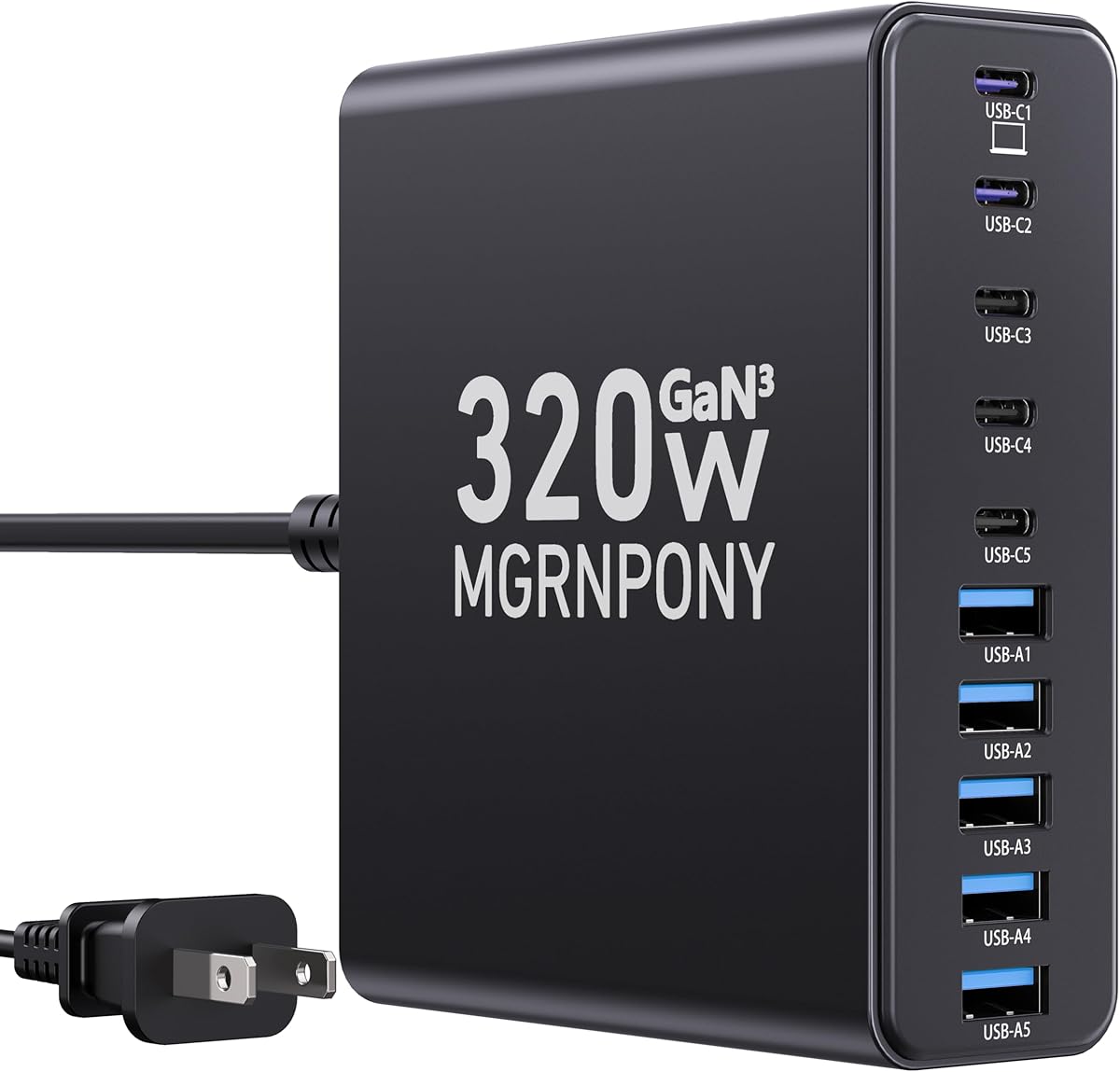
The MGRNPONY station delivers a strong mix of ports and safety features at a competitive price. Its 320W output handles most daily devices efficiently, with dedicated USB-C ports capable of powering laptops and phones fast enough for busy schedules.
We may earn a commission when you buy through this link, at no additional cost to you.
IceShield 3.0 technology provides robust protection against over-voltage and overheating, ensuring reliable long-term performance. The unit supports both horizontal and vertical placement, giving you flexibility to save space on crowded desks or nightstands.
It is a practical choice for those who want GaN efficiency without a premium price tag. The safety monitoring system runs frequent checks to keep power delivery stable. It works well for small offices or home setups needing consistent power.
If you need a reliable workhorse that keeps your devices powered without breaking the bank, this model is a strong contender. It balances cost and performance effectively, making it a sensible choice for users looking for efficiency and organization.
Uses advanced monitoring to detect and prevent electrical faults that could harm your connected electronics.
The ability to stand vertically saves valuable desk space while keeping ports accessible.
We may earn a commission when you buy through this link, at no additional cost to you.
This unique station solves cable clutter by featuring retractable cords that keep your desk tidy. It supports charging for up to eight devices simultaneously, with a maximum output of 105W that handles phones and tablets efficiently without issues.
We may earn a commission when you buy through this link, at no additional cost to you.
The retractable cables extend up to 80cm, giving you enough reach for bedside use without tangling. Integrated GaN technology ensures the unit stays cool even when multiple ports are in use. It is a clever solution for minimalists who hate wire mess.
While the mechanism adds some complexity, it significantly improves organization. The included adapter makes it ready to use right out of the box. It serves as both a dock and an organizer, simplifying your nightly charging routine.
Ideal for those who prioritize a clean setup, this station keeps everything neat and accessible. The balance of speed and design makes it a standout choice for organized desktops. It is a stylish and functional upgrade for modern tech hubs.
Pull cords to use and they retract automatically, eliminating tangled wire problems on your desk.
GaN tech ensures fast charging speeds even when multiple devices are connected simultaneously.
We may earn a commission when you buy through this link, at no additional cost to you.
The Lcssio station offers a powerful 300W output that suits families needing to charge multiple devices at once. Its dual 65W ports allow for rapid laptop charging, while the other ports handle tablets and phones efficiently without bottlenecks.
We may earn a commission when you buy through this link, at no additional cost to you.
Built as a solid unit with no removable dividers, it avoids the fragility of flimsy parts. The extra wide slots accommodate tablets with cases, which is convenient for kids. Anti-slip pads keep it in place on smooth surfaces during heavy use.
Included cables ensure you can start using it immediately. The safety features protect against over-voltage and overheating, providing reliability for daily use. It balances strength and affordability well, making it a great option for household needs.
If you need a robust solution that can handle daily family usage, this model is a solid choice. It keeps devices organized and powered up without excessive complexity. It is a practical and durable addition to any home setup.
Solid build prevents parts from breaking over time, ensuring long-term durability for busy households.
Dual 65W ports provide enough power to keep laptops running at full speed while charging.
We may earn a commission when you buy through this link, at no additional cost to you.
Selecting the right charging station involves evaluating several technical and practical factors. Use this guide to ensure you pick a unit that meets your power needs and safety requirements effectively.
Total wattage determines how much power the station can deliver across all ports. Higher wattage is necessary for laptops which require 60W to 100W, while phones only need 20W to 30W. Ensure the total output matches the combined needs of all devices you plan to charge.
Look for a station with sufficient total wattage to handle your heaviest device plus accessories without throttling speed.
Modern stations mix USB-C and USB-A ports. USB-C supports Power Delivery for fast charging on new phones and laptops, while USB-A is useful for older accessories. Check that the number of USB-C ports meets the needs of your newer tech.
Prioritize models with enough USB-C ports for your high-power devices to ensure they charge at full speed.
Charging stations generate heat, so materials like flame-retardant ABS plastic are essential for safety. Sturdy one-piece designs are more durable than those with fragile removable dividers. A solid build ensures longevity and prevents breakage over time.
Choose units made from high-quality materials to ensure safety and durability during daily use.
Safety features like over-voltage, over-current, and short circuit protection are critical for protecting expensive electronics. Certifications from recognized safety bodies indicate the unit has passed strict testing. These features prevent overheating and potential damage to your devices.
Always verify that the station includes comprehensive safety protections to keep your electronics secure.
Many stations come with included cables, which saves cost and setup time. Check if the cables match your devices and are long enough to reach your outlet. Detachable cords add flexibility for different desk layouts.
Check if the station includes the necessary cables to avoid purchasing extra accessories separately.
Features like anti-slip pads and adjustable slots help keep devices organized and in place. A compact footprint saves space on crowded desks. Consider if the design fits your layout, such as vertical placement for tight spaces.
Look for design features that keep your desk tidy and ensure devices stay secure while charging.
A good warranty indicates manufacturer confidence in product quality. Brands like Anker offer 24-month warranties, while others may offer less. Reliable support helps resolve issues quickly if the unit fails prematurely.
Ensure the product comes with a decent warranty to protect your investment against defects.
Some stations include built-in surge protection, which shields devices from power spikes. This is useful if you use the station in areas with unstable power. If not included, ensure your power strip has surge capabilities.
Prioritize units with surge protection if you are in regions with frequent power fluctuations.
Place your station on a flat, stable surface away from direct sunlight or heat sources to prevent overheating. Ensure the power cord is fully connected to both the outlet and the unit for stable operation.
Plug your devices into the appropriate ports based on their cables. Avoid overloading ports with adapters not meant for high power to prevent damage. Use the included safety features to ensure smooth charging.
Periodically check the cables and slots for wear or damage to prevent electrical hazards. Clean the exterior with a dry cloth to remove dust. If you notice unusual heat, disconnect the unit immediately and check for issues.
Not every USB-C port supports high-wattage laptop charging. You must check the specifications to ensure the port outputs at least 45W to 65W or higher. Many stations have specific ports designated for high-power devices.
Higher total wattage allows more devices to charge simultaneously without slowing down. However, a single phone will only draw as much power as it needs, usually up to 30W. More wattage ensures you can charge a phone and a laptop at full speed.
Yes, GaN technology makes chargers smaller and more efficient by reducing heat. This allows for faster charging and better longevity of the unit. While slightly more expensive, the performance benefits make them a good long-term investment.
USB-C ports are reversible and support faster Power Delivery standards for modern devices. USB-A ports are standard rectangular connectors used by older accessories. Modern stations typically include both to ensure compatibility with all your gadgets.
Most quality stations include protections like over-voltage and overheat protection. These features monitor power flow and stop charging if an issue is detected. Always check product descriptions to confirm specific safety features are present.
Many stations have slots wide enough to accommodate tablets with cases. Look for models with adjustable or extra wide slots to ensure a secure fit. If the case is very thick, it may require a larger slot for proper charging alignment.
We reviewed ten top charging stations ranging from budget-friendly organizers to high-power desktop hubs. Whether you need a simple solution for a few phones or a robust station for laptops, there is a model that fits your needs.
Prioritize total wattage and USB-C support to ensure your devices charge quickly. Safety features and build quality are also critical to protect your investment. Choose a station that aligns with your device count and daily usage habits.
Prices and availability may change over time, so check current listings before purchasing. This guide provides a solid foundation for finding the right charging station to keep your tech organized and powered efficiently.