
10-Device Mobile Charging Station
5.0Editor score
Rolling casters for mobility
Open design for airflow
Fits up to 10 devices
This guide compares the top charging stations for Chromebooks to help schools and offices organize devices safely with efficient power management and durable
Finding the right charging station for Chromebooks is essential for classrooms and offices managing multiple devices. A good solution keeps tablets and laptops organized while ensuring they are charged and ready for use when needed most.
We evaluated ten top-rated models based on capacity, durability, cable management, and safety features. Our comparison includes desktop racks, mobile carts, and multi-port hubs designed specifically for Chromebooks and similar devices.
Each pick highlights key strengths and trade-offs to match your specific needs. Prices and availability change frequently so please check the current listings before making your final purchase decision for your workspace.
5.0Editor score

4.7Editor score

4.8Editor score
The following table provides a side-by-side comparison of all ten selected models highlighting their key specifications and unique selling points to help you find the perfect fit.




This POCHAR station is our top pick for its reliable design and ease of use. It supports up to eight devices and includes a built-in power strip so you do not need extra adapters. The wide slots fit larger Chromebooks and laptops up to fourteen inches comfortably.
We may earn a commission when you buy through this link, at no additional cost to you.
The unit is built with high-quality materials that ensure long-lasting performance in daily environments. It features surge protection to keep your devices safe from voltage spikes. The compact design makes it easy to move between desks or shared workstations whenever needed.
While it is heavier than some basic racks and takes up a bit of desk space the durability justifies the size. The lack of assembly is a huge plus for schools or offices needing immediate use. It balances functionality with convenience better than most competitors.
This model is ideal for classrooms and small offices managing a fleet of Chromebooks. If you want a setup that works right out of the box with safety features included this is the best choice available.
Simply unbox the unit and start using it immediately without any tools or assembly required saving valuable time for IT staff and teachers.
The integrated surge protection safeguards connected devices against voltage spikes ensuring safe and reliable charging over extended periods.
We may earn a commission when you buy through this link, at no additional cost to you.
This station offers a versatile combination of six AC outlets and four USB ports for charging various devices. The vertical design saves space while providing organized storage for up to ten laptops and tablets. It is a strong choice for libraries and reception areas.
We may earn a commission when you buy through this link, at no additional cost to you.
The built-in cable management system helps reduce clutter by routing cords neatly along the frame. Surge protection adds a layer of safety for connected electronics. The open rack design allows quick access to devices without opening cabinet doors.
Some users may find the slots a bit tight for devices in thick protective cases. Assembly might also be needed which could take extra time. However the power flexibility and space-saving design are significant advantages for busy workspaces.
Consider this model if you need both AC and USB charging options in one unit. It works well for environments where quick access to multiple device types is necessary daily.
With six AC outlets and four USB ports you can charge different types of devices without needing extra adapters or wall chargers.
The vertical slot layout maximizes storage capacity while minimizing the overall footprint on your desk or countertop area.
We may earn a commission when you buy through this link, at no additional cost to you.
This rack provides fourteen independent slots allowing you to charge and store more devices than most models. The open-frame design ensures natural ventilation which prevents overheating during long charging sessions. It is constructed from solid steel for long-term durability in high-traffic areas.
We may earn a commission when you buy through this link, at no additional cost to you.
The leveling feet help adapt the rack to uneven surfaces ensuring stability even in older buildings. You can access devices quickly without any obstructions. The design focuses purely on organization and storage efficiency making it a great partner for existing power strips.
Note that this product does not include a power strip so you must plug it into a separate outlet yourself. This means you need to budget extra outlets but the flexibility lets you choose your preferred power setup for the space.
This rack is perfect for schools that need to store many Chromebooks but already have sufficient power sources. The durability and capacity make it a top choice for institutional use.
The open-frame structure enables natural airflow around devices preventing overheating and extending battery life during storage.
Made from solid steel this rack withstands daily high-frequency usage without deforming over time.
We may earn a commission when you buy through this link, at no additional cost to you.
The Workington station focuses on safe storage with padded shelves that protect devices from accidental scratches. It includes a UL approved power strip for peace of mind regarding electrical safety. The open cart design allows students or staff to access devices quickly.
We may earn a commission when you buy through this link, at no additional cost to you.
Plastic dividers can be removed or adjusted to accommodate larger laptops and tablets. Cord clips at the back keep the cables organized and prevent tangling. This model is designed for schools and offices prioritizing device protection.
With only eight slots it may not suit larger classrooms but it is ideal for small teams or labs. The padding is a standout feature that other models often lack. Assembly is required which means you need to set it up before first use.
Choose this station if protecting devices from physical damage is your top priority. It offers a reliable solution for smaller groups needing organized charging.
Soft pads on the shelves prevent accidental scratches and damage to your devices while they are stored and charging.
The included power strip is UL approved ensuring high safety standards for your connected electronics.
We may earn a commission when you buy through this link, at no additional cost to you.
This station offers twenty ports with six hundred watts total output enough to charge even power-hungry laptops efficiently. It includes ten short cables to reduce clutter on your desk or countert.. The design uses physical one-piece slots that are more durable than removable dividers.
We may earn a commission when you buy through this link, at no additional cost to you.
The GaN chip actively protects against overheating and overcharging ensuring safety for you and your devices. It delivers high-speed charging for various devices including MacBooks and Android tablets. The slots are designed to hold devices upright for better airflow.
It lacks built-in AC outlets so you must connect via USB-C or USB-A cables. The included cables might not fit all thick cases perfectly. However the power and included accessories make it a comprehensive charging solution.
This model is best for offices and classrooms that rely mostly on USB-C charging. It simplifies cable management and delivers fast charging speeds for all devices simultaneously.
With two high-speed ports up to sixty five watts you can charge laptops and tablets quickly even when other ports are in use.
Ten short cables of various types are included helping you eliminate the need for multiple wall chargers.
We may earn a commission when you buy through this link, at no additional cost to you.
This mobile cart holds up to twenty devices and allows easy transport between classrooms or offices. The built-in twenty outlet power strip simplifies setup since you do not need to find external outlets. Adjustable dividers let you customize the layout for different device sizes.
We may earn a commission when you buy through this link, at no additional cost to you.
The open-frame design improves airflow to keep devices cool during charging. Locking casters provide stability when the cart is stationary. It is a durable solution designed for high-traffic commercial environments.
The size and weight make it less portable than smaller desktop units and it requires more floor space. However for schools moving devices around daily it offers unmatched convenience. The integrated power ensures everything is ready to go.
Select this cart if you need to move your device fleet between rooms frequently. It is a robust choice for large schools needing centralized charging and storage.
Durable swivel casters with locking mechanisms allow you to move the cart smoothly and securely across different rooms.
A built-in twenty outlet power strip ensures you can charge all devices without needing external power sources.
We may earn a commission when you buy through this link, at no additional cost to you.
This station is built with industrial-strength steel to withstand daily use in high-traffic areas like classrooms and offices. The open-frame structure promotes optimal airflow to reduce overheating risks. It includes a lower storage tray for chargers and accessories keeping everything tidy.
We may earn a commission when you buy through this link, at no additional cost to you.
Cable clips on the back help organize cords and prevent tangles. The unit is designed to securely hold devices up to fourteen inches. The power strip supports compliant charging for schools and hospitals needing safety certification.
The dividers are fixed which might limit the size of devices you can store. Assembly is required and may take some time. However the sturdy build and ventilation features make it a reliable long-term option.
This rack is great for settings needing a durable and safe charging solution. It offers a good balance of storage and organization for ten devices.
The open-frame structure promotes optimal airflow to reduce overheating risks during extended charging sessions.
Built-in cable clips on the back eliminate tangled cords ensuring your workspace stays tidy.
We may earn a commission when you buy through this link, at no additional cost to you.
Belkin is a trusted brand offering reliable charging solutions. This station features wide-angle slots that fit devices in protective cases easily. It includes built-in surge protection for all ten outlets and comes with a fifteen thousand dollar equipment warranty.
We may earn a commission when you buy through this link, at no additional cost to you.
The design is portable and can be mounted to desks or carts for flexibility. It makes keeping student devices organized simple and efficient. The open set up facilitates easy access for syncing and charging.
This model has a higher price point and slightly lower customer rating. It may not fit every budget but the warranty adds value for institutions. The mountable design is useful for wall mounting to save desk space.
If brand reputation and warranty coverage are critical consider this station. It is a solid choice for schools needing reliable device management.
Wide-angle slots accommodate a variety of mobile devices including those in protective cases making it versatile for all tablets.
This station can be mounted to desks or carts providing flexibility for various storage needs.
We may earn a commission when you buy through this link, at no additional cost to you.
This station offers fast charging with five USB-C ports and a total output of four hundred twenty watts. It is built with one-piece slots made from flame-retardant ABS for durability. The non-slip rubber pads keep it secure on any surface.
We may earn a commission when you buy through this link, at no additional cost to you.
It delivers high-speed charging for devices like MacBooks and smartphones. The slots are wide enough to hold devices in protective cases. The compact size fits well on nightstands or small desks.
Since it lacks built-in AC outlets it only works with USB chargers. It may not suit older devices with only USB-A ports. However the price and performance make it an excellent budget option for modern setups.
This is an ideal choice for small offices or homes needing fast USB charging. It offers great value without compromising on build quality.
Top two ports support fast charging up to sixty five watts allowing you to power laptops and tablets quickly.
High-quality one-piece slots are durable and flame-retardant ensuring a longer lifespan than removable dividers.
We may earn a commission when you buy through this link, at no additional cost to you.
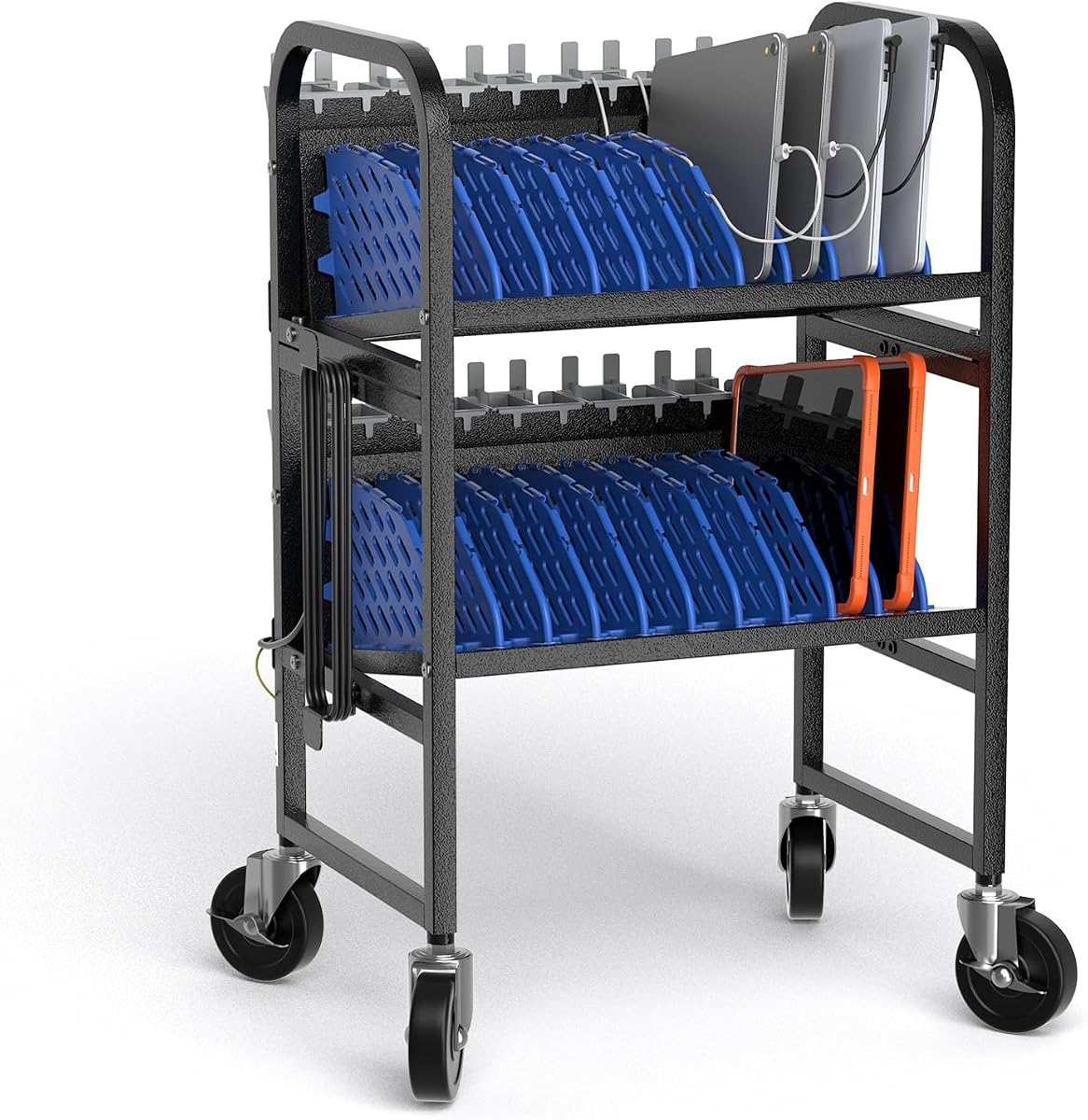
This mobile station is designed to charge and organize ten devices simultaneously. The rolling casters allow you to move it easily between rooms. The open design promotes airflow keeping devices cool during charging sessions.
We may earn a commission when you buy through this link, at no additional cost to you.
Tool-free assembly makes setup quick and easy for schools. The bottom shelf offers extra storage for accessories and power adapters. It is a versatile option for learning environments needing flexible storage.
It does not include a built-in power strip so you need to supply external power. The build is basic compared to premium models but functional. This makes it a great value for tight budgets.
This is the best option for small teams needing a mobile solution without spending much. It delivers solid organization and mobility for schools.
Tool-free assembly allows you to set up the station quickly without any extra tools or complicated steps.
Four smooth-rolling casters with brakes allow you to move the station easily and secure it in place when needed.
We may earn a commission when you buy through this link, at no additional cost to you.
Selecting the right charging station involves considering capacity, mobility, and safety features to match your specific environment needs.
The number of slots determines how many devices you can charge at once. For classrooms you need high capacity units with ten or more slots to avoid overcrowding.
Choose a capacity that matches your total device count plus a few extra slots for future growth.
If you need to move devices between rooms daily consider a cart with lockable casters. Desktop racks are better for permanent stations where mobility is not required.
Mobile carts offer flexibility but take up more floor space than stationary units.
Decide whether you need AC outlets or USB ports. Some stations include both while others rely on USB cables which may be slower for larger laptops.
Ensure the power output matches the charging speed of your Chromebooks to avoid slow charging times.
Look for models built with steel frames or high-quality ABS materials to withstand daily handling. Removable dividers often break faster than one-piece slots.
Sturdy construction ensures the station lasts longer in busy environments like schools.
Effective cable management keeps cords organized and reduces tripping hazards. Built-in clips and routing holes help maintain a tidy workspace.
Proper cable organization protects your devices and extends the life of your charging cables.
Surge protection and overheat prevention are critical for protecting expensive electronics. Look for models with certified safety standards.
Safety features reduce the risk of electrical fires and extend the lifespan of your devices.
Assembly requirements vary from tool-free to needing several screws. Consider the time you have for setup.
Quick assembly and intuitive design help staff get started faster.
Overheating can damage batteries so choose designs with open frames or ventilation holes. Heat dissipation is crucial for long charging periods.
Good airflow keeps devices cool and safe during extended charging cycles.
Always place the station on a flat stable surface to ensure proper airflow and prevent tipping. Make sure the area around the unit has enough space for heat dissipation.
Plug the station into a surge-protected outlet to safeguard devices from voltage spikes. Organize cables neatly using the built-in management clips to reduce clutter.
Regularly inspect the slots and cables for signs of wear. Clean the surface with a damp cloth and keep it dry to maintain hygiene and prevent rust.
Most models support Chromebooks up to 14 to 15 inches. Check the slot dimensions carefully to ensure your specific model fits comfortably without pressure on the hinge or edges.
Yes most have surge protection and overheat prevention. However it is good practice to unplug when not in use or use smart power strips to prevent any potential issues.
Some stations come with cables included while others require you to supply your own. Verify what is included before buying to avoid extra costs.
No these are designed for indoor use only. Exposure to moisture and dust can damage the electronics and void warranties so keep them inside.
Choose models with open frames and ensure they are not covered. Allow space around the unit for airflow and avoid stacking devices on top during charging.
Warranty terms vary by manufacturer so check the listing for details. Some brands offer extended warranties for professional use in schools and offices.
The top picks include the POCHAR 8-Device Universal AC for overall performance and the 10-Device Mobile Charging Station for budget-friendly mobility.
Prioritize capacity and safety features that match your environment. Consider if you need mobility or a stationary desk setup when making your choice.
Always check current availability and pricing as stock changes frequently. Selecting the right model now ensures your Chromebooks are always ready for class.