
RDS – Licensed Nintendo Action Grip NES Classic Controller – Red
4.5Editor score
Textured silicone material
Comfortable grip design
Licensed Nintendo accessory
Discover the top Classic Nes Controller Replacement options for 2026. We compare wired and wireless pads, cables, and adapters to help you choose the right
Finding the right Classic Nes Controller Replacement is essential for enjoying retro gaming without frustration. Whether you need longer cables or wireless freedom, the market offers diverse options to suit every setup and budget.
We analyzed ten top-rated products based on compatibility, build quality, and user feedback. Our comparison covers wired controllers, wireless adapters, and extension bundles to ensure you find a reliable solution for your console.
Each pick highlights key features like button responsiveness and cable length. Prices and availability change frequently, so check current listings before purchasing to secure the best deal for your specific gaming needs.
4.5Editor score

3.7Editor score

4.8Editor score
This side-by-side comparison details the specifications and unique selling points of each controller option to help you make an informed decision for your retro gaming setup.


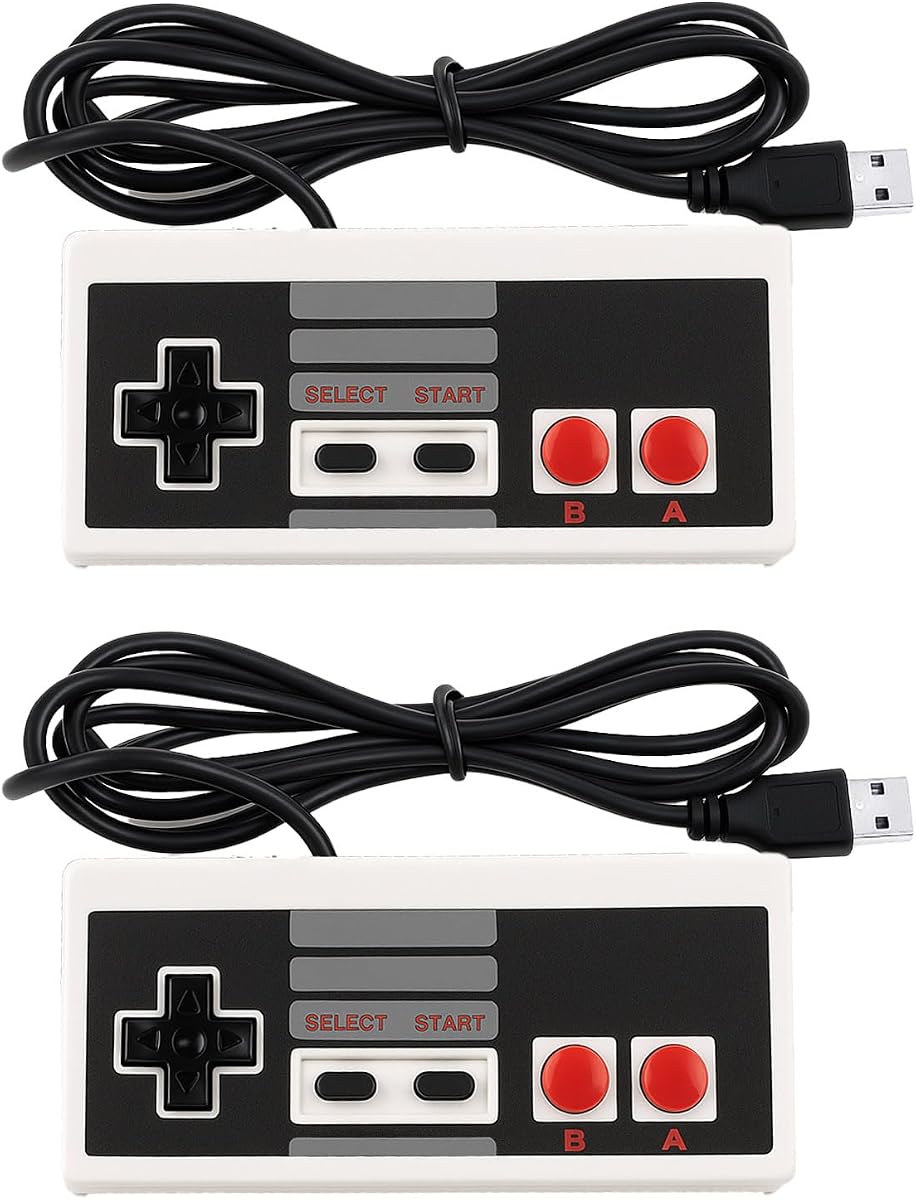


This controller pack offers a significant upgrade in cable length for Classic Edition owners. With a 3.7 rating, it provides a practical solution for users needing more distance from their screen while maintaining standard retro aesthetics.
We may earn a commission when you buy through this link, at no additional cost to you.
The sensitive buttons are designed for precision control without input delay, which is crucial for fast-paced platformers. The 10ft cable allows players to sit comfortably away from the display, reducing eye strain during long gaming sessions.
However, the compatibility is strictly limited to the 2016 HDMI model of the Classic Edition, so owners of older consoles should verify their setup before buying. Additionally, the 3.7 rating suggests some users may experience inconsistencies with button durability over time.
Buyers seeking a straightforward replacement with extended reach will find this pack valuable. It is ideal for casual gamers who prioritize cable length over premium build quality and want to share the console with a friend.
The 10ft cable provides freedom to sit back and enjoy playing at a comfortable distance away from the screen.
Sensitive buttons ensure no delay and super sensitive control for authentic retro gaming to your fingertips.
We may earn a commission when you buy through this link, at no additional cost to you.
The ZAMPAM pack delivers wireless convenience for PC gamers using emulators. With a 4.0 rating, it balances affordability with features like turbo buttons and a rechargeable battery, though it explicitly excludes NES Classic compatibility.
We may earn a commission when you buy through this link, at no additional cost to you.
Its 2.4GHz wireless technology ensures a stable connection up to 10 meters, allowing you to move around freely while playing. The turbo function can be customized for rapid-fire actions, adding an edge to competitive retro titles on your computer.
Users must download joystick mapper software to configure keys on some systems, which adds a step to setup. Also, the incompatibility with Mini NES or Classic consoles means this is strictly a PC or Raspberry Pi solution.
This option is perfect for those who want to play classic games on a modern PC without cables. It offers a high-quality alternative for retro enthusiasts who prioritize wireless functionality and customizable controls over console integration.
Wireless range up to 10 meters provides the freedom to play without being tethered to your gaming device.
Built in rechargeable Lithium Ion battery allows around 100 hours of play time on a single charge.
We may earn a commission when you buy through this link, at no additional cost to you.
The XYAB controller presents a budget-friendly option for PC-based retro gaming. Despite its 1.0 rating indicating significant user dissatisfaction, it aims to deliver a nostalgic feel with a classic D-pad layout for Windows and macOS systems.
We may earn a commission when you buy through this link, at no additional cost to you.
Its ergonomic design promises comfort during long sessions, and the 6-foot cable offers reasonable flexibility for desk setups. The plug-and-play feature means no drivers are needed, allowing immediate access to emulated titles.
The low rating suggests potential issues with build quality or button responsiveness that may not satisfy demanding players. Buyers should approach this purchase with caution and verify return policies if they encounter connectivity or durability problems.
For collectors on a tight budget, this controller might serve as a spare or backup. However, serious gamers may prefer investing in a more reliable brand to ensure consistent performance during their favorite retro titles.
Classic gamepad design provides that nostalgic feel while gaming on modern systems like PC and Mac.
Comfortable ergonomic design features classic D-pad and responsive A/B buttons for precise control.
We may earn a commission when you buy through this link, at no additional cost to you.
This 9-pin controller pack earns a high 4.8 rating for its robust build and advanced features. Designed for AV 620 and HD 821 consoles, it offers a continuous fire function that enhances gameplay for action-heavy retro titles.
We may earn a commission when you buy through this link, at no additional cost to you.
The 9 pin port design ensures a secure connection, and the plug-and-play nature makes it easy to use right out of the box. The continuous fire feature allows for rapid button presses without fatigue, giving players an edge in challenging levels.
While it is a third-party item, the quality assurance measures suggest it functions reliably as a first-party alternative. However, buyers must confirm compatibility with their specific console model to avoid any potential mismatches in connector types.
Ideal for families or collectors with specific retro consoles, this pack provides value and performance. It is a top choice for those who need a durable controller with added functionality like continuous fire for intense gaming sessions.
Continuous fire feature gives you the edge you need for rapid-fire action and pinpoint precision.
Two controllers pack lets you share classic gaming moments and build lasting memories with your kids.
We may earn a commission when you buy through this link, at no additional cost to you.
The ZENANBiBi pack is designed for versatility across various retro gaming systems including Retropie and Raspberry Pi. With a 3.8 rating, it offers a reliable wired experience for those looking to play classic titles on modern platforms without needing extra adapters.
We may earn a commission when you buy through this link, at no additional cost to you.
Its authentic NES feel is replicated through the button layout and 5.6ft cable, allowing comfortable reach on a desk. The plug-and-play feature ensures that you can start playing instantly on Windows, Mac, or Linux without installing drivers.
However, the lack of compatibility with the NES Classic Mini or Wii means users must double-check their system before purchase. Some users have reported varying experiences with button durability, so it may be better for casual use rather than competitive play.
This controller is an excellent fit for builders of retro gaming PCs who want a dedicated set for emulation. It balances price and function well, providing a straightforward solution for multi-player setups on computer-based systems.
Supports Windows Mac OS X Linux Ubuntu and RetroPie systems for versatile gaming options.
Designed to replicate the classic NES controller feel with smooth performance for favorite retro games.
We may earn a commission when you buy through this link, at no additional cost to you.
The MAYFLASH adapter serves as a bridge for using existing NES or SNES controllers on the Classic Edition or Wii systems. With a 3.9 rating, it provides a convenient way to repurpose old hardware without buying entirely new controllers.
We may earn a commission when you buy through this link, at no additional cost to you.
Its built-in turbo feature allows players to customize rapid firing for certain keys, enhancing gameplay dynamics. The adapter supports both D-pad and stick exchanges, adding a layer of customization that standard controllers lack.
Since it is an adapter rather than a controller, it does not include buttons itself but expands the utility of your existing collection. Users should note that it is designed for Wii U and Wii ecosystems primarily, so compatibility checks are essential.
This is a smart buy for collectors who already own quality SNES controllers and want to use them on modern setups. It offers a cost-effective solution for expanding control options while retaining the feel of beloved legacy hardware.
Compatible with NES Classic Edition Controllers and SNES Controllers to play games on Wii U Wii system.
Built in turbo feature allows you to set rapid button presses for competitive gaming advantages.
We may earn a commission when you buy through this link, at no additional cost to you.
This replacement housing brings a classic NES style to modern Switch Joycons, offering a unique twist on retro aesthetics. With a 4.4 rating, it appeals to modders who want an ergonomic D-pad for intensive gaming sessions on handheld devices.
We may earn a commission when you buy through this link, at no additional cost to you.
The soft touch material ensures a comfortable and anti-slip grip even during long play sessions. It includes full buttons and a screwdriver set, allowing users to completely customize the look of their controller to match a vintage theme.
Installation requires moderate electronic experience as the case must be carefully assembled with existing internal parts. Buyers should be prepared to follow detailed guides to ensure proper fit and function of the new D-pad and buttons.
Perfect for Switch owners seeking a personalized touch, this kit enhances the handheld experience with a retro feel. It is a creative solution for those who want to keep their Switch portable while enjoying the nostalgia of 80s gaming designs.
Ergonomic d-pad button can greatly improve your left Joycon function, perfect for d-pad intensive games.
Great smooth grip, soft in hand and feels good; Anti slip, sweat free for a long period game playing.
We may earn a commission when you buy through this link, at no additional cost to you.
This accessory bundle attempts to provide a complete set for Classic Edition owners needing power and cable extensions. With a 2.4 rating, it offers basic utility but may lack the polish found in higher-rated individual components.
We may earn a commission when you buy through this link, at no additional cost to you.
The inclusion of a power supply and two 6ft extension cables makes it a convenient solution for users dealing with limited port access or short original cords. It serves as an all-in-one fix for common setup challenges.
However, the low rating suggests potential quality concerns or inconsistencies with the included controller. Buyers might find better value by purchasing replacement parts separately to ensure higher performance and durability for their system.
Best suited for those needing a quick fix for power and cable issues, this bundle addresses practical needs. It is a straightforward choice for maintaining console connectivity without needing to buy multiple items from different vendors.
Accessory bundle provides 1 controller 1 power supply and 2 Long 6FT Extension Cables in one package.
Includes a power supply and extension cables to ensure stable connectivity and reach for your console.
We may earn a commission when you buy through this link, at no additional cost to you.
RDS Industries offers a licensed grip accessory that enhances the control of standard Classic controllers. With a 4.5 rating, it provides a simple yet effective way to improve comfort and precision during gameplay without replacing the entire unit.
We may earn a commission when you buy through this link, at no additional cost to you.
The textured silicone material ensures a secure hold, preventing slips during intense gaming sessions. Its design extends control by offering a better ergonomic shape, making it easier to hold for extended periods without fatigue.
While it is just a grip and not a full controller, it complements existing hardware well. The red color adds a pop of style, though those looking for standard gray may find the limited options restrictive.
This is an affordable upgrade for anyone wanting more stability with their existing controller. It is ideal for players who need extra traction and comfort but do not want to spend on a completely new controller set.
NES classic Controller creating a comfortable grip that extends your control in gaming providing more precision.
Made with textured silicone Material and superior quality materials as a #1 licensed accessories manufacturer.
We may earn a commission when you buy through this link, at no additional cost to you.
This KIWITATA pack delivers a faithful SNES-style USB controller set for PC and Mac emulation. With a 4.3 rating, it features an ergonomic design that fits naturally in the hand, ensuring comfort during long retro gaming marathons.
We may earn a commission when you buy through this link, at no additional cost to you.
The cross direction key uses a frosted concave design to prevent slipping and absorb sweat, improving accuracy over time. It supports Windows and macOS systems, working seamlessly with most popular retro game emulators.
Users should note that button mapping must be done manually within the emulator software since there is no auto-assignment. This gives flexibility but adds a setup step that some users might find tedious compared to plug-and-play systems.
Ideal for PC gamers who want a comfortable and responsive SNES experience, this pack is a solid investment. It is a great choice for retro collectors looking to relive 16-bit classics with high-quality hardware at a reasonable price.
The shape of the controller is designed to fit the contour of your hands,easy and comfortable to hold.
The cross direction key adopts frosted concave design,anti-sweat and anti-slip for better control.
We may earn a commission when you buy through this link, at no additional cost to you.
Selecting the right replacement controller requires understanding your console model and setup needs. This guide outlines key factors to ensure you get a reliable and compatible gaming accessory.
Always verify whether the controller is designed for the 2016 HDMI Classic Edition, PC, or older retro consoles. Many third-party options work only with emulators or specific ports like 9-pin or USB.
Check the product title and description to ensure it supports your exact device. Buying a controller meant for a PC will not work on a console unit without an adapter.
Decide between wired and wireless options based on your play area. Wired controllers offer zero latency, while wireless ones provide freedom of movement but require battery management.
USB controllers are ideal for PC setups, while proprietary cables are necessary for console models. Ensure the cable length suits your seating distance.
Standard cables may be too short for comfortable play on large TVs. Look for options with extended cables of 6ft or more to sit back and protect your eyes from screen glare.
Long cables allow for better ergonomics and reduce strain on the connection port. This factor is critical for multiplayer setups where distance varies.
Materials like silicone or textured plastic improve grip and durability. High-quality buttons should feel responsive without excessive wear or sticking over time.
Read user reviews to assess longevity. A controller that breaks easily will cost more in the long run despite a lower initial price.
Some replacements offer turbo functions or fire buttons that enhance gameplay. These are useful for action games where rapid input is required.
Ensure these features are easy to activate and cancel. Unwanted turbo modes can ruin gameplay if not properly configured.
Buying a two-pack ensures you can play with a friend immediately. Single controllers are cheaper but require another purchase for split-screen or co-op titles.
Check if the bundle includes all necessary cables and adapters. This avoids extra shipping costs and setup delays.
Plug-and-play controllers save time by requiring no software installation. Some wireless options need key mapping software which adds complexity.
Prioritize products that work immediately out of the box for a seamless experience. This is especially important for casual gamers.
Established brands often provide better customer support and product warranties. Licensed accessories tend to be more durable than generic third-party options.
Review ratings and customer feedback to gauge reliability. High ratings often correlate with better quality control and satisfaction.
Connect your new controller securely to the console port or USB slot. For wireless models, plug the adapter into the USB port and ensure the controllers are charged or have fresh batteries.
Test each button and directional pad to confirm proper response before starting a game session. If using a PC, open your emulator and map the buttons manually if they are not auto-assigned.
Store controllers in a dry, cool place away from direct sunlight to prevent material degradation. Avoid coiling cables tightly to prevent internal wire damage, which can lead to connectivity issues.
Most replacements listed are designed for the 2016 Classic Edition or modern PCs with emulators. Original 1985 consoles require specific 9-pin connectors that are not compatible with USB or HDMI-based models.
Many models feature sensitive buttons designed for precision control. However, wired options typically offer faster response times than wireless ones, which may have slight latency depending on the signal strength.
Most standard USB controllers are not compatible with the NES Classic Mini without a specific adapter. The Mini uses a unique proprietary port, so verify compatibility before purchasing to avoid issues.
A 10ft cable is often recommended for TV setups to allow you to sit far away from the screen. This reduces eye strain and prevents accidental bumps to the console unit during play.
Most USB and console controllers are plug-and-play and do not require additional drivers. However, some PC wireless models might need mapping software to configure keys correctly for your specific emulator.
Turbo buttons automate rapid inputs, which is helpful for games requiring fast continuous presses. This feature is especially useful for classic shooters and action games where repeated tapping can tire your fingers.
We highlighted ten options ranging from budget-friendly wired pads to high-functionality wireless sets. The NGHTMRE pack offers extended cables while the happymaxplus set provides advanced fire features for specific consoles.
Prioritize compatibility with your system model to avoid buying products that will not work. Features like cable length and turbo buttons can significantly enhance your retro gaming experience when chosen correctly.
Prices and availability may change so always check current listings before making your final decision. Investing in the right controller ensures you can enjoy your favorite classics without technical interruptions.