
Logitech MX Keys Mini
4.4Editor score
Smart illumination technology
Multi-device seamless switching
USB-C rechargeable battery
This guide compares the top compact editing keyboards for creators, offering detailed insights on portability, shortcuts, and workflow efficiency for 2026.
Finding the right compact editing keyboard can transform your creative workflow by saving space and speeding up tasks. These devices offer specialized keys and ergonomic designs tailored for editors, designers, and writers who value efficiency.
We evaluated ten leading models based on connectivity, customization options, build quality, and overall usability. Each product was assessed for its ability to integrate seamlessly into modern creative setups across multiple operating systems and devices.
Each pick highlights specific strengths and ideal use cases to help you choose the best tool for your needs. Please note that availability and pricing may fluctuate over time, so verify current details before purchasing.
4.4Editor score

4.7Editor score

4.4Editor score
The following table provides a side-by-side overview of each model key core specifications and unique features to help you quickly identify the best fit for your editing or typing needs.



This specialized keyboard is designed specifically for video editors using DaVinci Resolve. It holds a top rating of 4.7 stars due to its ability to streamline complex editing workflows significantly.
We may earn a commission when you buy through this link, at no additional cost to you.
The built-in search dial allows for rapid timeline navigation, while the keys match specific edit functions for precision. Bundled with DaVinci Resolve Studio, it offers immediate access to professional tools right out of the box.
While the cost is higher than standard keyboards, the time saved during editing sessions justifies the investment for professionals. It does focus heavily on one software suite which limits broader applicability.
Video professionals looking to maximize efficiency should consider this bundle. It stands out as the most capable tool for its specific intended audience in the editing market.
Keys correspond directly to editing commands reducing reliance on mouse navigation for common tasks.
The dial lets you scroll through footage quickly without interrupting your editing flow.
We may earn a commission when you buy through this link, at no additional cost to you.
The MX Keys Mini delivers a premium typing experience in a compact form factor ideal for editors on the go. It earns high praise for its smart features and robust build quality.
We may earn a commission when you buy through this link, at no additional cost to you.
Smart illumination lights up when hands approach and adjusts to lighting conditions. The keys are shaped for fingertips providing comfortable typing during long editing or writing sessions.
Although it lacks deep macro customization, its seamless multi-device switching works flawlessly across computers. The price is steep compared to standard boards but the quality justifies the cost.
If you want a reliable high-performance keyboard that travels well this is a top choice. It balances portability with the comfort needed for professional daily use.
Spherically dished keys match the shape of your fingertips for more precise and comfortable typing.
Switch between up to three devices easily allowing you to work across multiple machines.
We may earn a commission when you buy through this link, at no additional cost to you.
This model offers essential functionality at a very accessible price point making it ideal for those on a tight budget. It provides a simple reliable wireless typing experience without unnecessary bloat.
We may earn a commission when you buy through this link, at no additional cost to you.
It connects via a 2.4G USB dongle ensuring stable performance without Bluetooth pairing hassles. The layout removes the number pad to save desk space while keeping all necessary typing keys.
While it lacks advanced features like backlights or macros, it gets the job done efficiently for standard tasks. The inclusion of batteries means you can start using it immediately after unboxing.
For students or casual users needing a spare compact keyboard this is a solid option. It delivers value and simplicity for basic editing or typing workflows.
The USB dongle ensures a stable connection without draining device batteries like Bluetooth might.
Removing the numpad allows for a more ergonomic mouse position and less desk footprint.
We may earn a commission when you buy through this link, at no additional cost to you.
The XK04 is designed for mobility folding down to fit easily into bags for travel. Its unique design combines protection and portability for users who edit on mobile devices.
We may earn a commission when you buy through this link, at no additional cost to you.
It features a premium PU leather cover that protects the keys when folded and connects to multiple devices via Bluetooth. The rechargeable battery ensures it is ready whenever work moves.
Typing may require adjustment due to the smaller keycaps compared to full size boards. However the convenience of having a physical keyboard on a phone or tablet is unmatched.
Digital nomads or frequent travelers will find this keyboard indispensable. It bridges the gap between mobile convenience and the speed of physical typing.
Folds into a compact form factor that fits in most pockets or small bags.
Specific layout optimizations ensure comfortable typing on phones and tablets.
We may earn a commission when you buy through this link, at no additional cost to you.
This mini keyboard focuses on shortcuts and dials to accelerate creative workflows. It is particularly useful for editors who need quick access to specific tools within applications.
We may earn a commission when you buy through this link, at no additional cost to you.
The rotary dial allows for zoom or brush size adjustments while the keys can be customized to trigger complex commands. Anti-ghosting ensures multiple keys work simultaneously without conflict.
Full customization requires installing the driver which can be a slight hurdle for some users. Without it the keys function as basic shortcuts but still offer utility.
Artists and video editors will appreciate the tailored productivity boost it offers. It complements a main keyboard by handling specific repetitive tasks.
The dial provides tactile feedback for smooth adjustments in software like Photoshop.
Customizable keys let you automate complex tasks with a single press.
We may earn a commission when you buy through this link, at no additional cost to you.
This keyboard blends design and function with a sleek low-profile look that complements any workspace. It prioritizes comfort and ease of use for general editing and typing tasks.
We may earn a commission when you buy through this link, at no additional cost to you.
The expressive input key offers quick access to emojis and symbols which is helpful for social media content creators. Key spacing is optimized for fluid typing reducing fatigue over time.
It supports seamless switching between up to three devices via Bluetooth enhancing workflow flexibility. However the lack of a numeric keypad might limit data entry tasks.
Design-conscious users seeking a reliable daily driver will find this keyboard appealing. It provides a balanced mix of style and utility for modern setups.
Quickly access emojis and symbols without navigating menus to speed up communication.
Strategic spacing reduces accidental key presses and improves typing accuracy.
We may earn a commission when you buy through this link, at no additional cost to you.
The Pebble Keys 2 focuses on sustainability and long-term usability. It offers a familiar typing feel with quiet keys suitable for shared or public environments.
We may earn a commission when you buy through this link, at no additional cost to you.
Made with recycled plastic it allows you to express your vibe while reducing environmental impact. The three-year battery life means you rarely need to change batteries or recharge.
Switching between devices is easy with dedicated buttons allowing you to work across platforms. The only downside is non-rechargeable batteries which some users might prefer to avoid.
Eco-conscious users and those seeking quiet keyboards will appreciate this model. It delivers dependable performance with a responsible design choice.
Quiet keys reduce noise making this suitable for libraries or office spaces.
Constructed with significant recycled plastic to lower environmental footprint.
We may earn a commission when you buy through this link, at no additional cost to you.
This keyboard offers a practical layout including a number pad within a compact frame. It is ideal for users who need data entry capabilities without sacrificing desk space.
We may earn a commission when you buy through this link, at no additional cost to you.
Built with durability in mind it features spill-resistant technology and deep-profile keys for comfort. The battery life is reliable offering a year of daily use on standard batteries.
It lacks modern features like backlights but remains a functional and affordable choice for home offices. The wireless Bluetooth connection ensures a clutter-free setup.
Users needing a numeric pad for spreadsheets or coding will find this valuable. It balances basic utility with cost-effective design.
Design protects the internal components from accidental liquid spills extending lifespan.
Deep profile keys and tilt legs support ergonomic typing positions.
We may earn a commission when you buy through this link, at no additional cost to you.
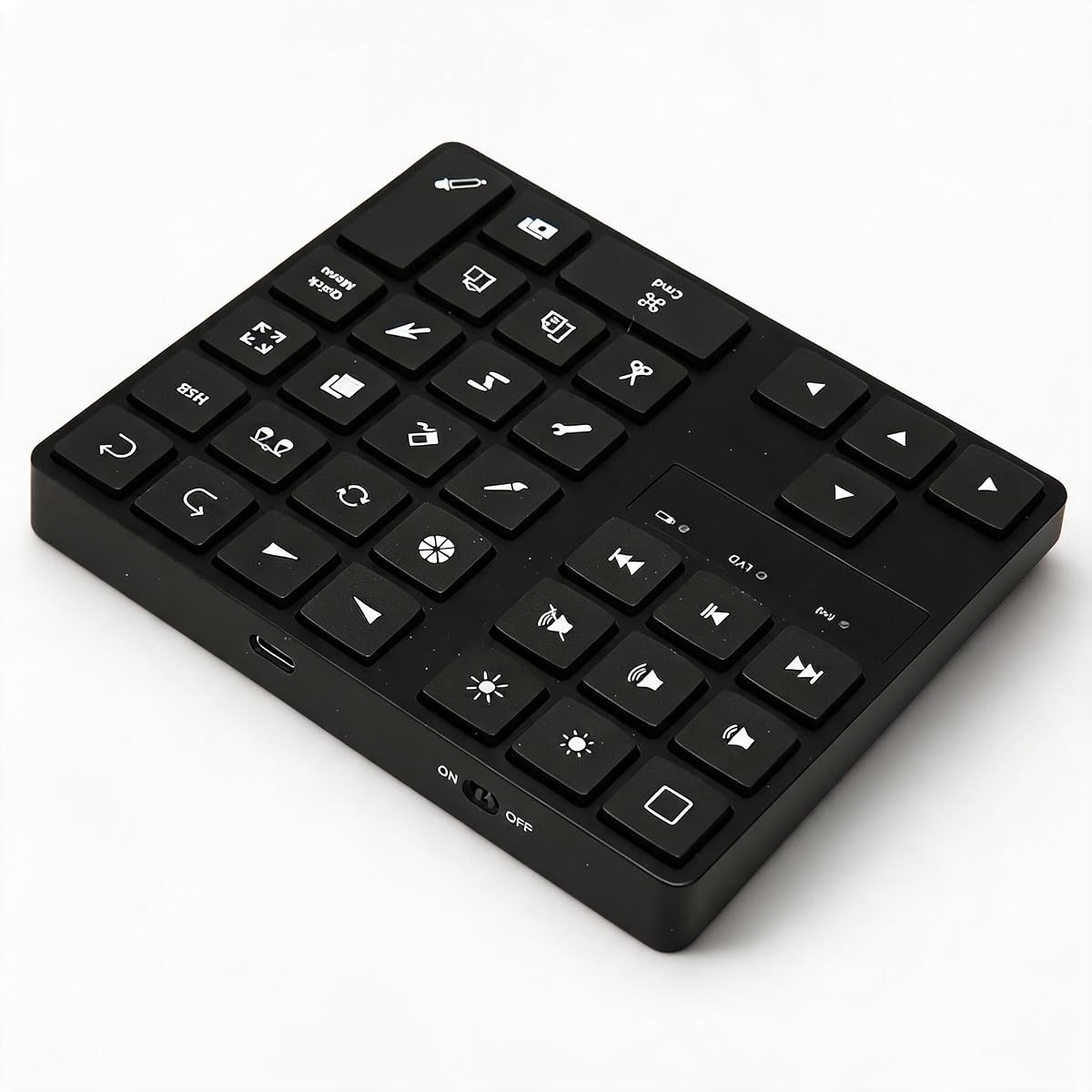
Designed to relieve wrist strain this one-handed keyboard offers customizable shortcuts for artists and designers. It uses a wired connection to ensure zero lag during intensive tasks.
We may earn a commission when you buy through this link, at no additional cost to you.
The ergonomic layout promotes a neutral wrist posture which reduces fatigue during long sessions. You can program up to thirty-five shortcuts to automate complex workflows effectively.
Being one-handed it serves as a companion to a main keyboard rather than a replacement. Setup requires software configuration but the benefits for comfort are significant.
Creators prone to repetitive strain injuries will find this tool helpful. It provides a specialized input solution for specific ergonomic needs.
Sculpted key well positions your hand to reduce muscle fatigue significantly.
Customizable shortcuts eliminate repetitive clicks in design software.
We may earn a commission when you buy through this link, at no additional cost to you.
This wired keyboard offers a reliable and quiet typing experience ideal for shared spaces. It features a compact layout without a number pad to keep the mouse closer to the user.
We may earn a commission when you buy through this link, at no additional cost to you.
The whisper-quiet switches make it suitable for offices where noise can be distracting. A sturdy metal plate and rubberized feet ensure stability during typing.
Because it is wired it does not have battery concerns but limits mobility. However this reliability makes it perfect for fixed workstations.
Users seeking a simple dependable keyboard will appreciate this model. It balances safety certification with practical design.
Keys are designed to operate silently reducing disturbance to others nearby.
Metal plate and rubber feet provide stability to prevent slipping during use.
We may earn a commission when you buy through this link, at no additional cost to you.
Selecting the right keyboard involves considering connectivity, ergonomics, and specific features that match your editing workflow.
Decide between Bluetooth and wired or wireless dongle connections. Bluetooth offers flexibility across devices but drains battery while wired provides stability without power concerns.
Choose a connectivity type that matches your device ports and daily usage patterns for best performance.
Look for programmable keys that allow you to assign macros or shortcuts to specific editing tasks. This can significantly speed up your workflow by reducing mouse usage.
Prioritize keyboards with accessible software for easy configuration to maximize productivity.
Consider the size and weight if you plan to carry your keyboard regularly. Foldable or slim designs fit better in bags while full compact keyboards offer better stability.
Select a form factor that aligns with how mobile your workstation needs to be.
Comfort is critical for long editing sessions. Look for ergonomic designs or key shapes that support natural wrist posture to prevent fatigue.
Prioritize keyboards with adjustable feet or comfortable key travel to maintain health.
Check battery longevity if choosing wireless options. Rechargeable units are convenient while replaceable batteries offer simplicity without needing charging breaks.
Choose a power solution that fits your usage frequency without interrupting work.
Ensure the keyboard works with your operating system and editing applications. Some specialized keyboards may require drivers or specific software to unlock full features.
Verify compatibility before purchasing to avoid setup issues with your tools.
Assess the materials used such as metal plates or spill-resistant features. A durable build ensures the keyboard withstands daily use without wearing out quickly.
Invest in robust construction if you plan to use the keyboard extensively over time.
Consider how loud the keys are especially if you work in shared environments. Quiet switches reduce disturbance and make typing less intrusive to others.
Opt for low-profile or silent key technology in noisy offices or home settings.
Start by connecting your keyboard via Bluetooth or a dongle following the manufacturer's pairing instructions. Ensure your device is on before attempting to pair for a successful connection.
Install any required drivers or software to unlock full features like macros or backlighting. Configure keys to match your most frequent editing actions for optimal efficiency.
Keep the keyboard clean by regularly wiping keys with a soft dry cloth. Avoid spills and store it in a protective case when not in use to extend its lifespan.
Yes many compact keyboards connect via Bluetooth to tablets. Ensure the keyboard supports your tablet's operating system such as iOS or Android for full compatibility.
Absolutely programmable shortcuts can automate repetitive tasks like trimming or transitions. This reduces reliance on the mouse and speeds up your workflow significantly.
Bluetooth connects directly without a dongle while wireless may use a USB receiver. Both offer portability but Bluetooth often has better multi-device switching capabilities.
Most modern compact keyboards are compatible with both Mac and Windows. Check for key layout differences or switch options to ensure smooth operation on your OS.
A dedicated dial provides precise control for timeline scrolling or brush adjustments. It can be faster than using mouse scrolls especially in video editing software.
Enable auto-sleep modes and turn off backlighting when not needed. This reduces power consumption and extends the time between charges or battery changes.
We highlighted ten versatile keyboards ranging from specialized editors to simple compact options. Each model brings unique strengths for different needs and budgets.
Prioritize features that directly improve your workflow such as shortcuts or ergonomics. Investing in a tool that fits your style will enhance your productivity long term.
Prices and availability may change so verify the current status before purchasing. With the right choice you can enjoy a smoother more efficient editing experience.