
NZXT H5 Flow
4.6Editor score
Optimal GPU cooling design
Large 360mm radiator support
Pre-installed 120mm quiet fans
This guide compares the best cooling computer case options for 2026, evaluating airflow design, fan support, and build quality to help you choose the right
Choosing the right cooling computer case is essential for maintaining optimal system performance and extending the lifespan of your components. Modern cases prioritize airflow and thermal management to ensure stable operation under load.
We evaluated ten top models based on fan configuration, ventilation patterns, and component compatibility. Each selection offers unique strengths in heat dissipation and build quality for diverse user needs.
Every pick highlights key features and real-world performance traits. Prices and availability may change, so verify details before purchasing to ensure you get the best value for your setup.
4.6Editor score

4.8Editor score

4.6Editor score
Below is a side-by-side comparison of all ten selected cases. Review key specifications to understand airflow capabilities, fan options, and compatibility across different hardware configurations.


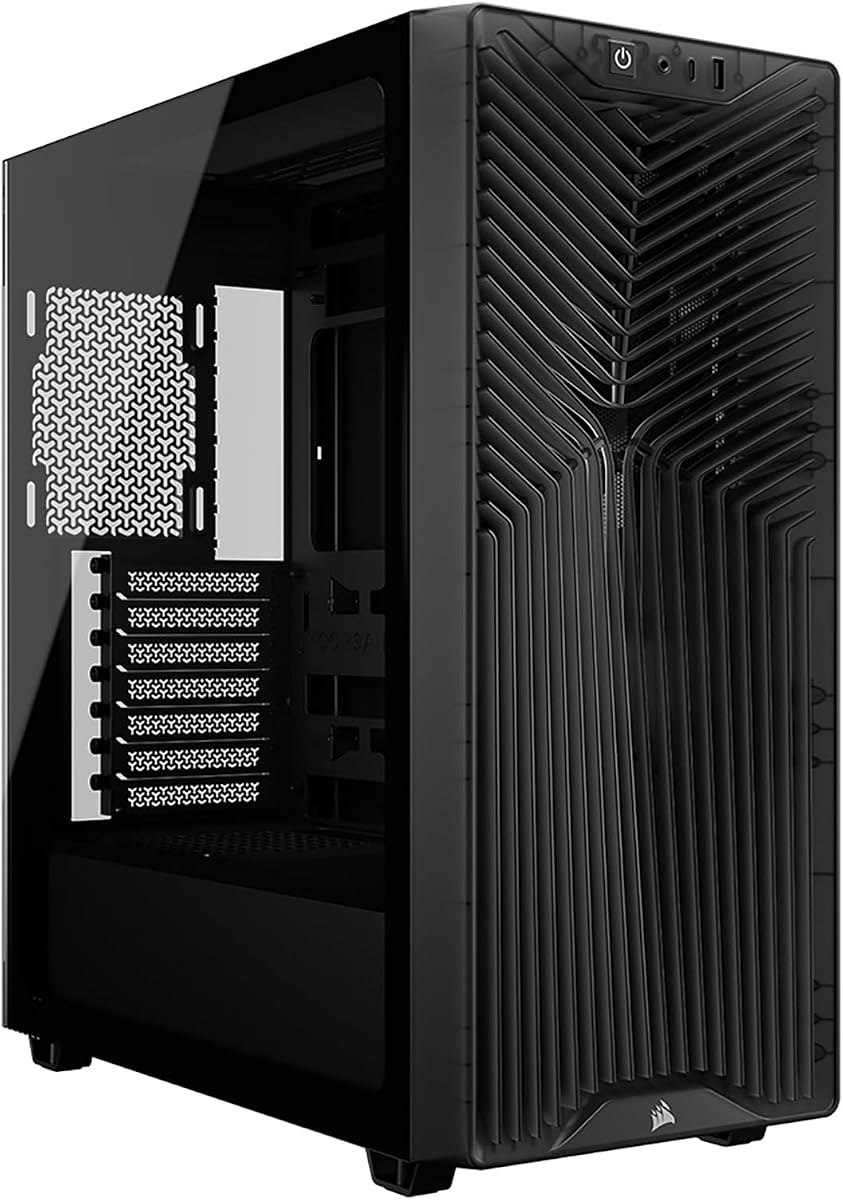


The CORSAIR 4000D RS stands out as a top modular mid-tower case designed for high airflow. Rated 4.7 stars, it features a unique FRAME system that allows customization of the motherboard tray and I/O panels.
We may earn a commission when you buy through this link, at no additional cost to you.
Its InfiniRail mounting system provides unmatched flexibility for positioning fans up to 200mm at the front. The 3D Y-Pattern airflow panel ensures minimal restriction for cool air intake, while pre-installed RS ARGB PWM fans support daisy-chaining for easy control.
While the side cable cover keeps builds tidy, it restricts adding extra side fans. This trade-off is acceptable for those prioritizing clean aesthetics and standard cooling over maximum side ventilation.
Ideal for builders who want future-proof customization, this case supports ASUS BTF and other reverse-connector standards. It balances performance and flexibility effectively for high-end ATX builds.
The FRAME system lets you swap panels and trays to match evolving needs or moods.
The perforated front panel offers low-obstruction paths for better thermal performance.
We may earn a commission when you buy through this link, at no additional cost to you.
The NZXT H5 Flow offers exceptional value with a compact design optimized for airflow. Rated 4.6 stars, it features a perforated PSU shroud enabling optimal air intake from fans below.
We may earn a commission when you buy through this link, at no additional cost to you.
Its ultra-fine mesh covers the top, front, and sides to maximize airflow while filtering dust. Included 120mm Quiet Airflow fans provide solid performance out of the box for solid builds.
The compact footprint may limit drive capacity but supports up to 360mm radiators front. This makes it ideal for small-footprint builds needing strong liquid cooling without bulk.
Cable management is effortless with wide channels and hooks. For budget-conscious users seeking reliable cooling in a smaller footprint, this case is a top contender.
Perforated PSU shroud directs cool air effectively to GPU areas.
Mesh panels on all sides keep interiors cleaner over time.
We may earn a commission when you buy through this link, at no additional cost to you.
The Antec Flux Pro is a premium full-tower case designed for extreme cooling and material aesthetics. Rated 4.7 stars, it combines metal, glass, and wood for a unique texture and high-quality feel.
We may earn a commission when you buy through this link, at no additional cost to you.
It supports up to 12 fans with multi-directional vents and includes six PWM fans. The innovative iShift PSU mount and dual CPU/GPU temperature display enhance monitoring and cooling efficiency.
Removable cooling brackets allow flexible radiator placement. While large, this case fits enthusiasts needing maximum cooling potential and distinctive build aesthetics.
Cable management is supported with wide channels. For users wanting full-tower capacity with premium looks, this model delivers exceptional cooling and design.
Combining metal, glass, and wood creates a distinctive high-quality look.
Removable brackets allow tailored fan placement for optimal thermal paths.
We may earn a commission when you buy through this link, at no additional cost to you.
The Lian Li V100RX offers excellent airflow and convenience with tool-less access. Rated 4.8 stars, it includes four PWM-controlled ARGB fans and a 26-LED strip for customizable lighting.
We may earn a commission when you buy through this link, at no additional cost to you.
Side panels remove easily with tool-less mounting mechanisms for fast component access. It supports ATX to ITX motherboards and back-connect designs for cleaner routing.
Clearance supports 420mm GPUs and 178mm CPU coolers. While RGB control depends on software, the included lighting enhances aesthetics without extra purchases.
Ideal for builders seeking quick access and vibrant looks, this case balances performance with ease of use for modern gaming rigs.
Tool-less mounting makes panel removal easy for component swaps.
Included fans and strip provide full spectrum color sync.
We may earn a commission when you buy through this link, at no additional cost to you.
The Cooler Master HAF II 500 delivers massive airflow with oversized fans. Rated 4.8 stars, it features a Mighty40 system with dual 220mm intake and one 180mm exhaust fan.
We may earn a commission when you buy through this link, at no additional cost to you.
Low airflow resistance design and large ventilation openings improve throughput. The MasterRail system supports multiple fan sizes, and split-level cable management optimizes routing space.
A Dual-Mode GPU holder stabilizes heavy cards. While large, the case is ideal for those prioritizing maximum airflow without noise from high-speed fans.
Cable routing is flexible for PSU variations. For high-performance builds needing superior cooling capacity, this case stands out for its fan design.
Oversized 220mm and 180mm fans ensure high throughput.
MasterRail allows versatile fan configurations to match your needs.
We may earn a commission when you buy through this link, at no additional cost to you.
The MSI MAG Forge 321R is designed for gaming rigs with optimized airflow and ARGB lighting. Rated 4.6 stars, it allows up to 11 fans for stability and ventilation.
We may earn a commission when you buy through this link, at no additional cost to you.
ARGB fans come with a control board for expanded effects. Magnetic filters on the top make cleaning easy, while Mystic Light Sync controls lighting via software.
Vented front panels ensure cool air reaches components. RGB controls may need software setup, but the included features enhance aesthetics and performance.
Ideal for gamers wanting strong airflow and lighting control, this case offers practical design with customizable visual options for builds.
Magnetic top filter simplifies maintenance and dust removal.
Mystic Light Sync unifies lighting control across your PC.
We may earn a commission when you buy through this link, at no additional cost to you.
The CORSAIR 3200D RS supports modern tech with reverse-connector compatibility. Rated 4.6 stars, it holds nine 120mm fans and includes three RS ARGB fans for control.
We may earn a commission when you buy through this link, at no additional cost to you.
Useful DIY features include a built-in shroud and single front connector for easy cable routing. It supports reverse-connector motherboards and includes a GPU stabilizer arm.
Top mounting fits 360mm radiators efficiently. The smoke panel limits visibility but keeps dust down, balancing cooling with a practical design.
Ideal for builders wanting modern features and solid airflow, this case provides flexible cable management and tech support for new PCs.
Supports latest motherboards for cleaner rear cable connections.
Single front connector simplifies I/O wiring.
We may earn a commission when you buy through this link, at no additional cost to you.
The CORSAIR AIR 5400 RS features a unique triple-chamber design for superior cooling. Rated 4.6 stars, it isolates CPU, GPU, and PSU chambers for better thermal separation.
We may earn a commission when you buy through this link, at no additional cost to you.
The CPU chamber holds a 360mm radiator without affecting other parts. The central chamber offers massive vertical airflow, while the PSU chamber handles storage and cables separately.
Ducts on the bottom fan array accelerate airflow without extra noise. While premium priced, this design ensures heat doesn't accumulate in shared spaces.
Ideal for high-end builders needing maximum thermal control, this case excels in component isolation and performance for complex rigs.
Separate front chamber keeps CPU heat from other components.
Ducts accelerate air through channels for efficient cooling.
We may earn a commission when you buy through this link, at no additional cost to you.
The CORSAIR AIR 5400 LX combines panoramic aesthetics with triple-chamber cooling. Rated 4.7 stars, it offers an isolated CPU chamber for 360mm radiators.
We may earn a commission when you buy through this link, at no additional cost to you.
Central chamber airflow cools GPU and motherboard thoroughly before exhaust. A third chamber houses PSU and storage with dedicated intake locations.
Panoramic glass offers stunning views of hardware. While costly, the design ensures efficient separation and velocity with ducts for better cooling.
Ideal for enthusiasts wanting aesthetics and thermal control, this case supports high-end builds with isolated component zones for optimal performance.
Wide glass panels highlight internal components beautifully.
Chamber design prevents cross-heating among critical parts.
We may earn a commission when you buy through this link, at no additional cost to you.
The MONTECH XR Panoramic turns your PC into a showcase with glass and wood accents. Rated 4.7 stars, it includes reverse-blade ARGB fans for a clean interior look.
We may earn a commission when you buy through this link, at no additional cost to you.
Panoramic front and side panels keep GPU and cooling visible. Wood-grain I/O adds warmth while USB-C and USB 3.0 ports keep peripherals accessible.
Reverse fans show illuminated faces inward, reducing visible frames. Magnetic filters at top, side, and bottom simplify cleaning routines.
Ideal for gamers prioritizing visuals, this case balances aesthetics and hardware clearance for high-end builds that deserve to be seen.
Fan blades face inward for unobstructed light display.
Wood-grain I/O adds a unique touch to black chassis.
We may earn a commission when you buy through this link, at no additional cost to you.
Selecting the right case depends on airflow design, fan support, and component fit. Review these factors to find a chassis that matches your cooling goals.
A good cooling computer case prioritizes open front panels and mesh vents for unrestricted air intake. Look for perforated designs that reduce turbulence and ensure consistent airflow to critical components like the GPU and CPU.
Prioritize open front and mesh panels for maximum airflow efficiency.
Check the maximum number and sizes of fans the case supports. High-performance builds may require multiple 140mm or 120mm fans for balanced pressure and cooling potential across the system.
Ensure the case supports your preferred fan count and dimensions for optimal setup.
If using liquid cooling, verify the case supports your radiator size. Look for clearance on top and front panels to mount 240mm, 280mm, or 360mm radiators depending on your cooling needs.
Verify clearance for your desired radiator size to avoid fit issues.
Confirm the case supports your GPU length and CPU cooler height. Oversized components may not fit without careful planning, so check detailed specs for compatibility before purchasing.
Measure your hardware dimensions against case clearance specifications.
Effective cable management keeps airflow unobstructed and builds tidy. Look for wide channels, tie-down points, and shrouds that hide cables from the main viewing area.
Select a case with ample routing space and cable hiding features.
Sturdy materials like steel and tempered glass provide durability and safety. Mixed materials can also enhance aesthetics while maintaining rigidity and heat dissipation capabilities.
Choose cases with durable materials that balance style and protection.
Dust filters on intake areas prevent debris accumulation. Magnetic filters make cleaning easier and help maintain consistent cooling over time without frequent disassembly.
Look for accessible dust filters to maintain airflow efficiency.
Consider modular features or support for new standards like reverse-connector motherboards. These options provide flexibility for upgrades and ensure compatibility with evolving hardware technologies.
Prioritize features that allow for future upgrades and compatibility.
Install fans securely using provided mounts or rails and ensure they face in the correct direction. Intake fans should draw air from outside while exhaust fans expel hot air from inside.
Route cables along designated channels and use tie-downs to minimize obstruction. Proper cable routing improves airflow and reduces dust buildup near sensitive components.
Clean dust filters regularly using a vacuum or soft brush to maintain airflow. Periodically check inside the case to remove debris that may block vents or fans.
Cooling cases feature optimized airflow designs with mesh panels and larger vents. They support more fans and radiators to dissipate heat efficiently for stable performance.
Many quality cases come with two to six pre-installed fans. This provides balanced pressure and reduces costs by avoiding additional purchases.
Tempered glass offers a clear view of components but may restrict airflow. Choose glass if aesthetics are a priority, or mesh if cooling is more important.
It allows cables to connect to the back of the motherboard, reducing front clutter. This feature improves cable routing and airflow inside the case.
Yes, most cases support fan upgrades within clearance limits. Check maximum dimensions before adding larger fans to ensure fit.
Not necessarily. Many budget cases offer excellent airflow. Focus on specs like fan support and vent design rather than price alone.
These ten cases offer diverse solutions for cooling needs from budget to premium. Each model balances airflow, build quality, and features to suit different system requirements.
Prioritize airflow design and component clearance to ensure compatibility and performance. Choose a case that aligns with your hardware and upgrade plans.
Check current availability and pricing before purchasing as these may vary. A well-chosen case ensures your system stays cool and runs smoothly for years.