
Cooling Station and Stand for PS5/Slim/Pro
4.5Editor score
Automatic fan speed adjustment
Nine RGB honeycomb lighting modes
Two point five hour fast charging
This guide compares the top ten cooling stands for PS5 console models to help you choose the best accessory for heat management and controller charging.
Choosing the right cooling stand for PS5 console is essential for maintaining peak performance and extending hardware life during long gaming sessions.
We evaluated ten leading models based on cooling efficiency, controller charging speed, build quality, and compatibility with Slim and Pro variants.
Each pick includes detailed specs and pros to help you decide, but remember that prices and availability can change at any time on retailer sites.
4.5Editor score
4.4Editor score

4.4Editor score
The following table provides a side-by-side overview of key specifications and features for all ten cooling stands evaluated in this comprehensive guide.


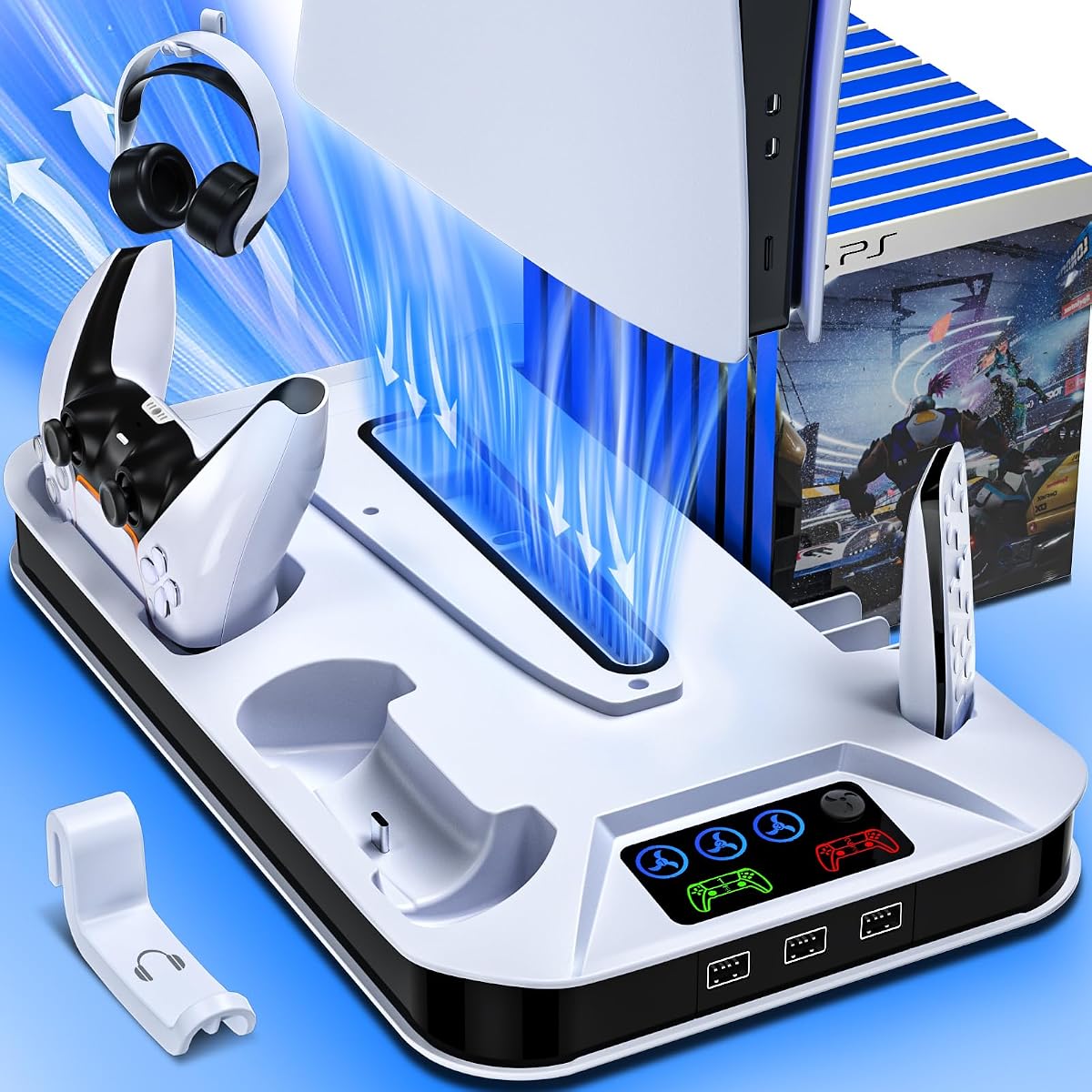
This PS5/Slim/Pro Cooling Station holds the top spot for its balanced mix of performance and features. It achieves a strong user rating by delivering reliable cooling and convenient charging for dual controllers. The turbo fan actively dissipates heat from the bottom of the console, which is crucial for long gaming sessions. Users appreciate the dedicated slots for media remotes and headsets, which helps keep the gaming area tidy.
We may earn a commission when you buy through this link, at no additional cost to you.
The standout quality of this unit is its efficient cooling system combined with a smart charging station. The fan offers three adjustable speeds so you can choose between quiet operation or maximum airflow based on the intensity of your games. The LED indicators clearly show charging status and fan speeds, adding a layer of usability. Safety features like overcharge protection ensure your controllers remain safe even if left plugged in overnight.
While the unit is highly versatile, there are minor trade-offs to consider. It does not support PS5 Edge controllers, which might limit some users who own the premium controller. Additionally, Slim or disc users may need to remove a panel adapter to ensure a perfect fit. These adjustments are simple but require a bit of setup time before first use. Overall, the benefits far outweigh these small inconveniences.
This cooling stand is ideal for gamers who want an all-in-one solution to keep their console cool and controllers charged. If you value organization and heat management, this model provides excellent value. It is a robust replacement for the official stand and offers more utility. We recommend it for standard, slim, and pro console owners seeking a reliable accessory.
The safety screw mechanism ensures the console remains stable on the stand, preventing accidental knocks. The included headset holder is a nice touch for wireless audio users who need quick access. The USB hubs allow for charging other devices like headsets without using extra ports on the console itself. This makes the station a true hub for your gaming setup.
The turbo fan moves air from the bottom of the console to prevent overheating during intense gameplay.
Integrated chips prevent overcharging and overheating to extend the lifespan of your controller batteries.
We may earn a commission when you buy through this link, at no additional cost to you.
This horizontal stand offers a unique alternative for users who prefer their console lying flat. It features a scalable design that adapts to all PS5 models including the newer Slim and Pro versions. The inclusion of EVA foams ensures a snug fit for digital editions. It is a great choice for those who want to keep their setup low profile on a shelf or TV stand.
We may earn a commission when you buy through this link, at no additional cost to you.
The cooling performance is solid with three-speed adjustable fans that let you tailor the airflow. The charging dock is designed to fit both standard and Edge controllers securely, which is a rare feature in this category. The LED indicators provide clear feedback on charging status. Installation is straightforward and requires no tools, making it accessible for everyone.
One trade-off is the charging time which is slightly longer than some vertical alternatives. It relies on the console's power supply which means the console must be in rest mode to charge. This is a standard practice for most charging docks but worth noting. The horizontal design also means it takes up more width on your shelf than vertical models.
This stand is perfect for gamers who prefer horizontal console placement and need Edge controller support. It offers a clean aesthetic that matches the white design of the PS5. If you want a compact solution that keeps your controllers ready to go, this is a strong option. It helps organize your gaming space by combining stand and charger into one unit.
The touch switch on the fan allows for quick adjustments during gameplay. The build quality uses durable materials to ensure stability. The design eliminates the need for a separate charging station which frees up space. This makes it a practical choice for living room setups where desk space is limited.
The scalable design ensures compatibility with every generation of PS5 console from 2020 to 2024.
Unlike many competitors this dock accommodates the unique shape of the PS5 Edge controller.
We may earn a commission when you buy through this link, at no additional cost to you.
The Tokluck cooling station stands out for its intelligent temperature control system. It uses a built-in probe to adjust fan speeds automatically based on real-time console heat. This ensures optimal cooling without manual intervention. The RGB lighting adds a custom aesthetic that many gamers enjoy. It also offers one of the fastest charging times in our comparison.
We may earn a commission when you buy through this link, at no additional cost to you.
The automatic fan control is a premium feature that simplifies usage. It switches between low medium and high speeds depending on whether the console is idle or under load. The USB port is movable which is a clever design choice to fit different controller sizes. The memory function remembers your fan and light settings after power cycles.
Some users might find the RGB lighting too flashy or distracting depending on their setup. The temperature thresholds for auto mode are fixed and cannot be customized. This means you cannot manually set a lower high-speed trigger if desired. However, the convenience of automatic regulation generally compensates for these limitations.
This station is best for tech enthusiasts who value automation and customizable aesthetics. It is a strong choice if you want hands-off cooling and vibrant lighting effects. The fast charging ensures your controllers are ready quickly after a long break. It integrates well with a high-end gaming desk setup.
The adjustable USB port prevents cable strain by allowing you to align it correctly. The LED indicators are clear and provide immediate feedback on status. The build quality feels sturdy and supports the console securely. This model brings a modern touch to the classic vertical stand design.
The built-in probe detects heat changes instantly to modulate fan speed without user input.
Settings for lights and fan speed are saved so you do not have to reconfigure them every day.
We may earn a commission when you buy through this link, at no additional cost to you.
This model offers excellent value by providing premium features at a competitive price. It includes a strong turbo fan that dissipates heat effectively from the console base. The smart chip ensures controllers stop charging at 80 percent to protect battery health. Users appreciate the complete package including headset holder and media remote slot.
We may earn a commission when you buy through this link, at no additional cost to you.
The turbo fan is low noise yet powerful enough to keep the console cool. The LED indicators are clear and easy to read even in dim lighting. The charging speed is fast and reduces waiting time between sessions. The design matches the aesthetic of the PS5 nicely which keeps the look clean.
One limitation is the lack of Edge controller compatibility which affects premium controller owners. The panel adapter may need to be removed for Slim versions which adds a step to setup. Despite these small cons the product delivers high functionality. It is a practical choice for standard console users on a budget.
This stand is ideal for those who want reliable performance without overspending. It handles the essential tasks of cooling and charging with efficiency. The safety screw keeps the console secure and balanced on the stand. It is a smart upgrade from the official Sony stand.
The USB hubs provide extra charging options for headsets and other devices. This reduces cable clutter and keeps everything organized. The build materials are durable and withstand daily use well. The overall design is sleek and modern for any gaming room.
Intelligent circuit chips stop charging at 80 percent to prevent battery degradation from overcharging.
The white design matches the PS5 console perfectly to maintain a unified visual look.
We may earn a commission when you buy through this link, at no additional cost to you.
The Rysker stand is versatile because it supports both standard and Edge controllers. This makes it suitable for owners of the premium Edge controller who often struggle to find compatible docks. It also includes a media remote slot which is a handy feature for streaming enthusiasts. The memory function for fan speeds adds convenience to daily use.
We may earn a commission when you buy through this link, at no additional cost to you.
The three fan speeds are easily adjustable via a simple button. The smart chip prevents overcharging to extend controller lifespan. The safety screw ensures the console does not wobble or shift. It is a functional accessory that focuses on reliability rather than flashy lights.
One downside is the lack of RGB lighting which some users might prefer for atmosphere. The USB ports are standard speed which means they are good for charging but not fast data transfer. However for cooling and charging the unit performs well. It keeps your gaming area neat and functional.
This stand is perfect for households with mixed controller types including Edge models. It offers practical features that improve the daily gaming routine. The build quality is solid and the design is compact. If you value utility over lights this is a great choice.
The headset holder is sturdy and keeps your audio gear within reach. The base is non-slip and stable on most surfaces. The charging dock aligns controllers securely to prevent falling. It is a dependable accessory for the everyday gamer.
The charging docks are shaped to fit the unique Edge controller securely without loose connections.
Includes a dedicated slot for the media remote to make streaming playback easy.
We may earn a commission when you buy through this link, at no additional cost to you.
This budget-friendly stand delivers impressive features without a high price tag. It includes automatic temperature control that adjusts the fan based on console heat. The nine RGB honeycomb lighting modes add a vibrant look to your setup. It also supports Edge controllers which is rare at this price point.
We may earn a commission when you buy through this link, at no additional cost to you.
The auto control ensures cooling is efficient without manual tweaks. The charging time is quick at two and a half hours. The memory function remembers your last fan setting which is convenient. The LED indicators show charging status clearly during use.
One downside is that the lighting cannot be fully disabled by some users. The blue charging indicator differs from the common red green system but remains clear. Despite these minor details the performance is strong. It is an excellent entry-level option for most gamers.
This stand is ideal for budget-conscious shoppers who want quality. It provides essential cooling and charging with added RGB flair. It keeps your console safe and your controllers ready. It offers a high return on investment for the features provided.
The honeycomb pattern on the lights creates a unique visual effect. The base is stable and prevents console movement. The fan is quiet on low speed for casual use. It balances style and function effectively for most households.
This unit offers premium features like auto cooling at a price that fits most budgets.
The honeycomb lighting adds style to your gaming room without needing external LED strips.
We may earn a commission when you buy through this link, at no additional cost to you.
This horizontal stand provides a scalable solution that fits all PS5 models perfectly. It includes a dedicated charging dock that supports standard and Edge controllers. The three-speed cooling fans ensure the console stays cool during intense sessions. Setup is tool-free and takes only minutes to complete.
We may earn a commission when you buy through this link, at no additional cost to you.
The design helps organize accessories and save valuable shelf space. The LED indicators allow you to monitor charging status instantly. The fan switch lets you tailor cooling power based on needs. It is a practical hub for a clutter-free gaming environment.
One limitation is the need for rest mode to charge controllers which limits usage options. The charging time is slightly longer than the fastest models but acceptable. The horizontal footprint is wider which may not fit in tight spaces. These are minor trade-offs for the convenience provided.
This stand is best for those who prefer horizontal console placement. It combines cooling and charging into one compact unit. It keeps your setup organized and your accessories accessible. It is a strong choice for versatile home theater setups.
The EVA foam helps secure digital editions in place securely. The build quality is sturdy and supports the console well. It prevents accidental drops and keeps the console level. It is a reliable upgrade for your console setup.
No complex tools are needed to install this stand which makes it user friendly for everyone.
The docking station fits both standard and Edge controllers securely for easy access and charging.
We may earn a commission when you buy through this link, at no additional cost to you.
This stand is unique for its extensive game card storage which holds up to 14 discs. It also includes a hard drive slot for expanded storage. The auto adjustable turbo fan optimizes cooling based on console temperature. It is a comprehensive solution for collectors with large game libraries.
We may earn a commission when you buy through this link, at no additional cost to you.
The auto fan control saves energy and reduces noise when full speed is not needed. The three USB ports allow charging multiple accessories at once. The fast charging ensures your controllers are ready for the next session. It is a highly functional accessory for serious gamers.
The price is slightly higher than basic models due to the storage features. The fan settings are automated which limits manual customization. These factors are minor considering the utility offered. The build quality is premium and durable for long-term use.
This stand is ideal for game collectors who need a dedicated spot for their discs. It keeps your console cool and your media organized efficiently. It is a great replacement for the official stand. It provides a tidy look for your entertainment center.
The media remote slot is placed for quick access during streaming. The safety screw locks the console securely to the base. The charging dock is stable and aligns controllers easily. It is a well designed station for your gaming needs.
Dedicated slots store up to 14 game cards keeping them tidy and within easy reach.
A built-in slot allows for an extra hard drive to expand your game storage capacity.
We may earn a commission when you buy through this link, at no additional cost to you.
This stand focuses on visual flair with eight vibrant RGB colors to choose from. It features a silent fan that cools the console without noise. The USB hub ports allow for easy charging of multiple devices. It is a great pick for gamers who want to customize their desk aesthetic.
We may earn a commission when you buy through this link, at no additional cost to you.
The fan speeds are adjustable to match your cooling needs. The charging is fast and secure with protection against overheat. The build is sturdy and keeps the console balanced on the desk. The screw locking mechanism ensures safety during use.
The charging indicators are basic and lack advanced color coding. It does not include a hard drive slot or extensive game storage. However for cooling and lighting it performs well. It is a stylish addition to any modern gaming desk.
This stand is perfect for users who prioritize RGB lighting. It keeps your console cool and looks great while doing so. The quiet fan ensures it does not disrupt your gameplay. It is a solid accessory for style conscious gamers.
The headset holder is included to keep your audio gear safe. The USB hubs are easy to reach for peripheral charging. The design is compact and fits on most desks. It provides a neat look for your setup.
The fan operates quietly at all speeds to keep your gaming experience distraction free.
Choose from eight colors and modes to match your room theme or mood.
We may earn a commission when you buy through this link, at no additional cost to you.
This station offers universal compatibility with all PS5 variants and editions. It uses a powerful turbo fan to dissipate heat effectively. The LED indicators provide clear feedback on charging status. It is a reliable all-rounder for most gaming setups.
We may earn a commission when you buy through this link, at no additional cost to you.
The three-stage adjustable speed fan gives you full control over cooling. The charging speed is fast and ensures you can play again quickly. The hub ports and headset holder keep your peripherals organized. It is a sturdy and durable accessory for daily use.
The charging time is standard and not the fastest available. It does not include auto fan features which means manual adjustment is required. Despite this it is a dependable choice. The design is aesthetically pleasing and fits well with the console.
This stand is ideal for anyone seeking a reliable and complete solution. It covers all basic needs from cooling to storage. It keeps your console safe and your accessories tidy. It is a great addition to your console environment.
The included warranty offers peace of mind for your purchase. The screw locks the console securely for stability. The charging dock is robust and prevents controller slipping. It is a high quality accessory for your console.
Works perfectly with standard slim and pro models disc and digital versions alike.
Includes slots and ports for your headset remote and other devices to keep the area tidy.
We may earn a commission when you buy through this link, at no additional cost to you.
Selecting the right cooling stand involves evaluating several key factors to ensure compatibility and performance with your specific console model.
Ensure the stand explicitly lists support for your specific PS5 version whether standard slim or pro. Some units require panel adapters or specific screws for a secure fit.
Check the product details for compatibility with disc and digital editions to avoid purchase errors.
Look for units with turbo fans or adjustable speeds to handle heat during intense gaming. Automatic temperature control can offer hands-off optimization.
Review fan specifications and user feedback to confirm the unit dissipates heat effectively without excessive noise.
Fast charging docks can recharge controllers in under three hours which minimizes downtime. This is crucial for households with multiple players.
Verify the charging time claims in the product description to set realistic expectations for your setup.
Standard docks fit original DualSense controllers but Edge controllers often require specific shapes. Confirm if the dock supports both types if you own an Edge controller.
Choose a model with a flexible or adaptable docking design to ensure a secure connection.
Some stands include slots for media remotes headsets and game cards. These features help keep your gaming area tidy and clutter-free.
Consider if you need extra space for accessories before selecting a compact or spacious model.
Look for sturdy materials and non-slip pads to ensure stability on your desk. Safety screws are important to prevent accidental knocks to the console.
Choose units with smart chips that protect against overcharging to extend battery life.
RGB lighting options add a custom look to your setup but may distract some users. Decide if visual flair is a priority for your gaming environment.
Check if the lighting can be turned off or dimmed to suit different preferences.
Choose a stand that requires minimal tools for assembly to save time. Simple instructions and clear design reduce frustration during installation.
Ensure the design allows easy access to ports and controls for daily use.
Place the stand on a flat and stable surface to prevent tipping. Ensure there is enough clearance around the fan vents for proper airflow.
Connect the stand to your console or power source before placing the console on the dock. Tighten the included screws to secure the console in place.
Regularly clean the fan vents with a soft brush to remove dust buildup. This maintains cooling efficiency and prevents overheating over time.
Most stands in this guide are compatible with the PS5 Pro provided they support the specific dimensions. Always check the product description for explicit mention of the Pro model to ensure a perfect fit.
Not all stands support the unique shape of the Edge controller. Look for units that explicitly state compatibility with Edge controllers in their specifications to avoid connection issues.
Modern cooling stands use low-noise fans designed to be quiet even at high speeds. However noise levels vary by model so check user reviews for specific feedback on decibel levels.
Most stands allow you to turn off the fan via a switch while keeping the charging dock active. This lets you use the stand for organization without extra noise.
Yes most stands listed fit both disc and digital editions but some may require removing an adapter plate. Follow the manufacturer instructions to adjust the stand for your specific version.
Charging times typically range from two and a half to three and a half hours. Faster models can fully charge both controllers simultaneously in under three hours.
Our top picks highlight the best balance of cooling efficiency charging speed and organization for various needs. The Editor's Choice offers reliability while the Budget pick saves money without sacrificing key features.
Prioritize compatibility with your specific console version and controller type before making a purchase. Ensure the unit includes safety features to protect your hardware investment.
Prices and availability can change frequently so verify the current details on the retailer page before buying. This guide remains a trusted resource for your decision.