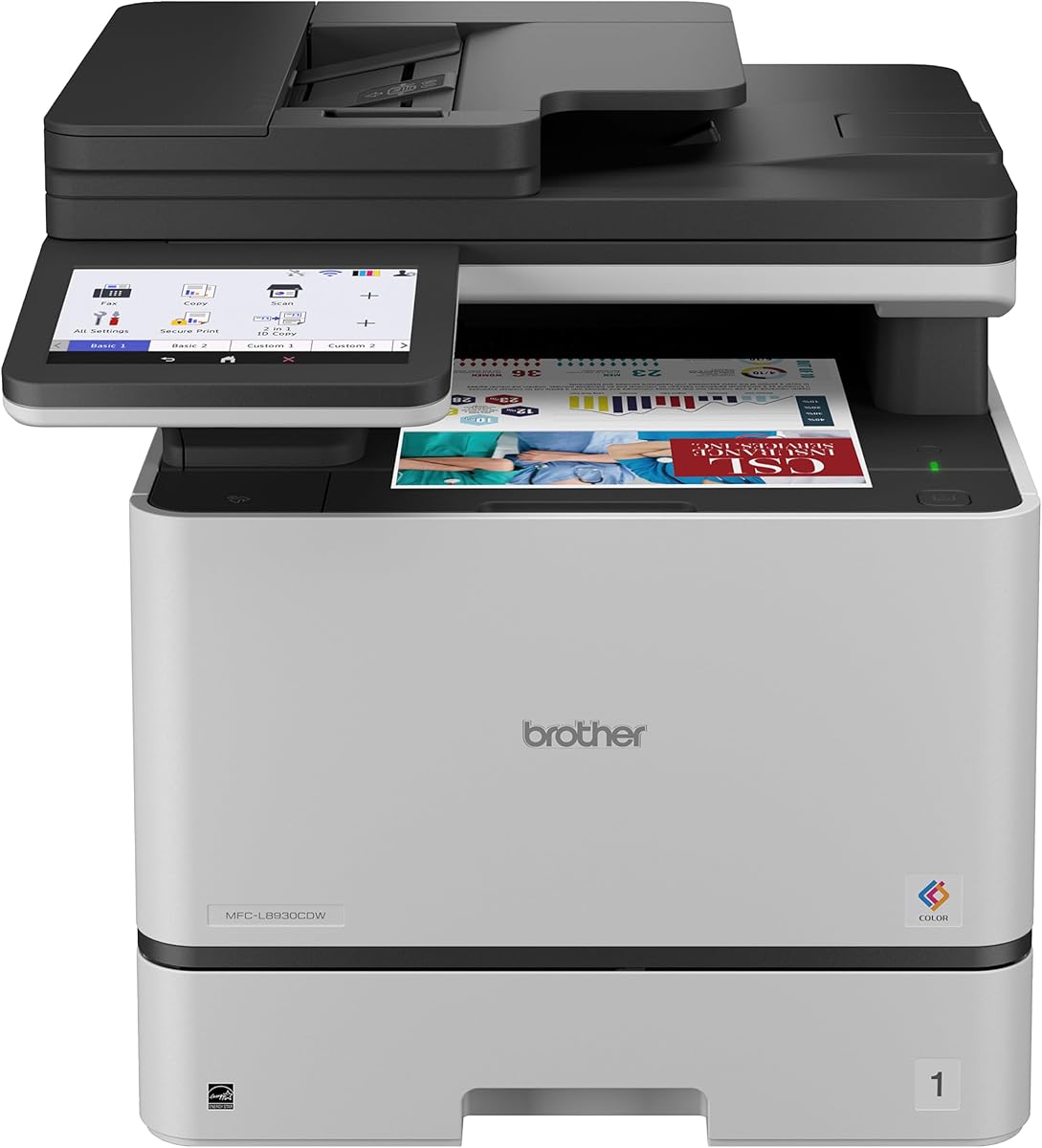
Brother MFC-L8930CDW
4.4Editor score
Color laser output quality
Advanced security features
Large touchscreen interface
This guide compares the best copier machines for business in October 2026 evaluating speed connectivity and reliability to help you find the right office
Finding the right copier machine for business is essential for maintaining productivity and efficiency in any modern office environment. A reliable device ensures that documents are printed scanned and copied with speed and accuracy to support daily operations without interruption.
We evaluated ten top-rated models based on performance features connectivity and user feedback to create this comprehensive list. Our comparison focuses on multifunction capabilities that streamline workflows and reduce the need for multiple separate devices in your workspace.
Each pick highlights specific strengths and ideal use cases to help you match the machine to your team size and printing volume. Keep in mind that availability and pricing can change so always verify the latest details before making your purchase decision.
4.4Editor score

4.1Editor score

4.5Editor score
The following table provides a side-by-side overview of all ten models included in this guide to help you quickly compare key specifications and capabilities.


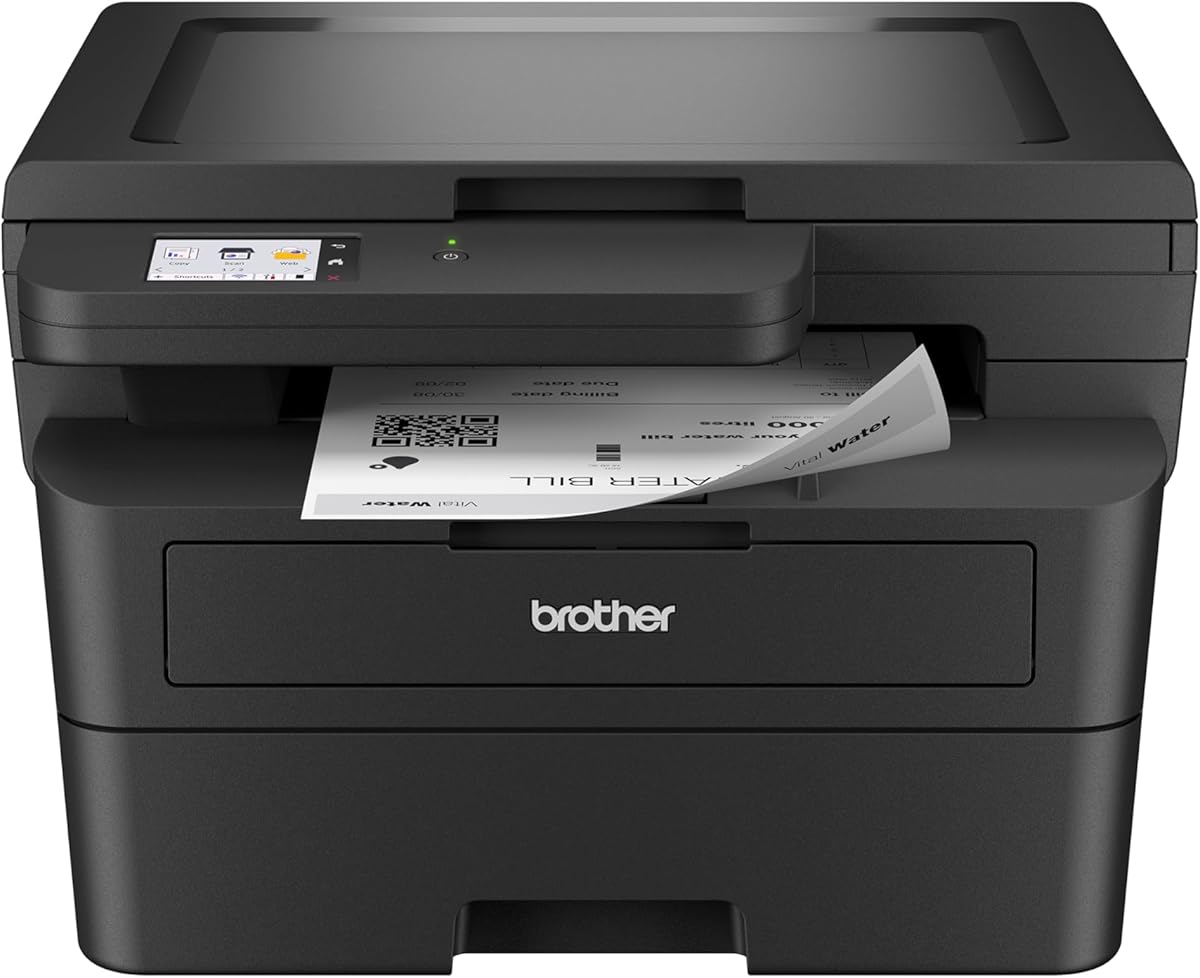
The Brother DCP-L2640DW stands out as a top contender for small businesses needing reliable monochrome output. With a rating of 4.1 stars this model delivers consistent performance for copying scanning and printing tasks in a compact form factor that fits easily into limited office spaces.
We may earn a commission when you buy through this link, at no additional cost to you.
Its standout feature is the combination of speed and connectivity. The device prints up to 36 pages per minute and includes built-in dual-band wireless allowing multiple devices to connect securely without cluttering desks with cables. The Brother Mobile Connect app further enhances flexibility by letting users manage jobs remotely.
While it lacks color capabilities which may be a limitation for marketing materials the trade-off is justified by lower consumable costs and faster black-and-white throughput. The automatic duplex printing also helps reduce paper waste making it an environmentally conscious choice for routine office documentation.
This machine is ideal for teams that prioritize document volume and efficiency over color graphics. If you need a straightforward workhorse for contracts reports and internal memos the DCP-L2640DW offers the reliability and speed required to keep daily operations running smoothly without interruption.
The 50-page auto document feeder streamlines multi-page scanning and copying tasks saving time during high-volume periods.
Built-in security features help protect sensitive business documents from unauthorized access during transmission and storage.
We may earn a commission when you buy through this link, at no additional cost to you.
The Brother MFC-L5915DW is engineered for businesses that demand high-speed output to keep pace with busy schedules. With a 4.4 star rating it consistently meets expectations for rapid document production and reliable performance in professional environments where time is critical.
We may earn a commission when you buy through this link, at no additional cost to you.
Its primary strength lies in its 50 pages per minute print speed which is among the fastest in this category. The 70-page auto document feeder supports single-pass two-sided scanning up to 56 pages per minute ensuring that large batches of documents are processed quickly without manual intervention.
Operating costs are managed through compatibility with ultra high-yield toner cartridges that extend replacement intervals and reduce overall expenditure. However the unit requires more desk space than compact models so it is best suited for offices with dedicated printer areas rather than shared workstations.
Choose this model if your team handles high-volume printing and needs minimal downtime. The robust connectivity options including Gigabit Ethernet ensure stable network performance even when multiple users are sending jobs simultaneously making it a powerful tool for growing businesses.
The large document glass and high ADF capacity allow for efficient processing of legal-sized and bulk scanning tasks.
Dual-band WiFi and Ethernet options provide flexible and stable connectivity to match various office network setups.
We may earn a commission when you buy through this link, at no additional cost to you.
The Brother MFC-L8930CDW represents the premium tier of business copier machines offering color capabilities alongside robust security features. Its 4.4 star rating reflects satisfaction with its professional output quality and advanced functionality that caters to organizations needing more than basic black-and-white printing.
We may earn a commission when you buy through this link, at no additional cost to you.
One of its key advantages is the high-speed two-sided scanning capability that reaches up to 104 pages per minute allowing for rapid digitization of paper records. The 7-inch color touchscreen provides an intuitive interface for navigating menus and creating custom shortcuts for frequently used tasks enhancing user efficiency.
Security is a major focus with Triple Layer Security protecting data in transit and at rest. While the initial investment and toner costs are higher than monochrome models the ability to produce vibrant color documents internally can eliminate the need for external printing services.
This device is perfect for businesses that require professional marketing materials client reports or internal graphics. If you need a secure and versatile all-in-one solution that can handle both color and mono workloads with high speed the MFC-L8930CDW is a top choice.
Sharp color and black printing ensures that all documents meet professional standards for client-facing materials.
Integrated NFC card readers and network safeguards help prevent unauthorized access to sensitive business information.
We may earn a commission when you buy through this link, at no additional cost to you.
The Brother MFC-L3720CDW brings color printing to smaller office spaces without sacrificing essential multifunction capabilities. With a 4.0 star rating it balances performance and size effectively for teams that need professional color output but have limited desk space available for equipment.
We may earn a commission when you buy through this link, at no additional cost to you.
Its connectivity suite is comprehensive including dual-band wireless Wi-Fi Direct and USB interfaces that allow multiple users to print seamlessly from any device. The 3.5-inch color touchscreen offers direct access to popular cloud services like Google Drive and Dropbox making document management more flexible.
While the print speed of 19 pages per minute is modest compared to high-volume models it remains adequate for small teams with moderate printing needs. The inclusion of fax functionality adds an extra layer of utility for businesses that still rely on traditional document transmission methods.
Select this model if you need color versatility in a compact form factor. The smart integration features and mobile command center capabilities ensure that your team can stay productive even when working remotely or accessing the printer from various devices around the office.
Direct integration with cloud storage services allows users to save and retrieve documents without using local computers.
Wi-Fi Direct and mobile app support enable printing from devices even when they are not on the same network.
We may earn a commission when you buy through this link, at no additional cost to you.
The HP LaserJet Pro MFP 3101sdw is a top pick for small teams seeking dependable and efficient black-and-white printing. Boasting a 4.5 star rating this model is praised for its consistent performance and ease of use making it a favorite among businesses that value simplicity and reliability.
We may earn a commission when you buy through this link, at no additional cost to you.
Print speeds reach up to 35 pages per minute ensuring that daily documents are produced quickly without bottlenecks. The upgraded features include auto two-sided printing and a 50-sheet auto document feeder which help streamline routine tasks and reduce manual handling of paper.
Its award-winning reliability means the printer is always ready for the high demands of business ensuring minimal downtime. The intelligent Wi-Fi system automatically seeks the best connection to stay online reducing connectivity issues that can disrupt workflow in busy office environments.
This printer is best suited for small teams that prioritize core printing and scanning functions over advanced features. If you need a straightforward and dependable machine that delivers professional-quality documents without unnecessary complexity the 3101sdw offers excellent value.
Designed for high availability the printer remains ready for use after periods of inactivity or overnight sleep modes.
Dependable Wi-Fi technology ensures a strong connection that adapts to network changes for uninterrupted printing.
We may earn a commission when you buy through this link, at no additional cost to you.
The Canon Color imageCLASS MF753Cdw II combines print scan copy and fax functions into a single color laser device. With a 4.2 star rating it is recognized for providing a complete office solution that supports diverse document needs without requiring separate machines for each function.
We may earn a commission when you buy through this link, at no additional cost to you.
Its duplex printing capability helps reduce paper consumption while maintaining high-quality color output for marketing materials and reports. The wireless network readiness allows users to connect and manage jobs from various devices ensuring that printing tasks can be completed from anywhere within the office.
The inclusion of fax functionality remains a valuable asset for businesses that still need to transmit documents via traditional phone lines. This integration simplifies the office setup by consolidating multiple communication tools into one central hub for all document handling activities.
Choose this printer if you need a versatile color solution with fax support. The balanced feature set makes it suitable for small to medium offices that require professional color output and comprehensive connectivity without sacrificing ease of use or reliability.
The 4-in-1 design streamlines workflows by allowing users to handle all document tasks from a single interface.
Color duplex printing ensures that vibrant graphics and text are produced efficiently with reduced material waste.
We may earn a commission when you buy through this link, at no additional cost to you.
The HP LaserJet Pro MFP 3101fdw is designed for small offices needing a complete black-and-white solution including fax capabilities. With a 4.2 star rating it offers a robust set of features that address both productivity and security concerns for professional environments.
We may earn a commission when you buy through this link, at no additional cost to you.
Print speeds of up to 35 pages per minute ensure that documents are ready quickly and the auto document feeder facilitates fast scanning and copying of multi-page files. Intelligent Wi-Fi works to maintain the best connection and Bluetooth support adds another layer of flexibility for mobile users.
Protection of data is emphasized through HP Wolf Pro Security which allows customizable settings to keep information secure. This focus on security is particularly important for businesses handling sensitive client data or confidential internal communications that require extra safeguards.
This model is ideal for offices of up to seven people that need reliable fax and printing services. If you prioritize security and connectivity alongside standard office tasks the 3101fdw provides the necessary tools to manage documents efficiently and safely.
Customizable security settings help prevent unauthorized access to printer data and secure network communications.
Bluetooth and wireless options ensure that employees can print directly from their personal devices seamlessly.
We may earn a commission when you buy through this link, at no additional cost to you.
The Canon imageCLASS MF462dw II delivers fast monochrome printing with a user-friendly touchscreen interface. With a 4.2 star rating it is appreciated for its speed and ease of use making it a strong choice for businesses that need high-volume black-and-white output.
We may earn a commission when you buy through this link, at no additional cost to you.
Print speeds reach up to 37 pages per minute with a quick first print time of approximately 5 seconds reducing wait times for urgent documents. The 5-inch color touchscreen provides an intuitive application library that offers easy access to the most frequently used features.
Paper capacity can be expanded with an optional cassette allowing the device to grow with your business needs. High-capacity toner options help limit replacement frequency and reduce the time spent on maintenance tasks keeping your team focused on core business activities.
Select this printer if you need speed and flexibility in a monochrome device. The combination of fast output and expandable features makes it suitable for offices that handle large document volumes and require efficient management of printing workflows.
The large color touchscreen simplifies navigation and allows quick access to scanning copying and fax options.
Optional paper trays enable you to increase capacity as printing needs grow without replacing the entire unit.
We may earn a commission when you buy through this link, at no additional cost to you.
The HP LaserJet Pro MFP 4101fdw is built to handle the demands of larger teams with its exceptional print speed and security features. Rated at 4.3 stars it is praised for its blazing fast performance and robust connectivity options that support up to ten users efficiently.
We may earn a commission when you buy through this link, at no additional cost to you.
With speeds up to 42 pages per minute it processes documents quickly and reduces the time employees spend waiting for output. HP Wolf Pro Security ensures that sensitive information remains protected with customizable settings that align with your organization security security policies.
The inclusion of Bluetooth and Ethernet alongside wireless connectivity provides flexible connection options for various device types and network setups. This versatility ensures that everyone in the office can print from their preferred device whether it is a PC tablet or mobile phone.
This printer is ideal for businesses that need high-speed output and strong security. If you manage a larger team and require fast reliable printing with fax capabilities the 4101fdw delivers the performance and protection necessary for a productive office environment.
Fast processing times minimize downtime during peak periods ensuring that workflow remains uninterrupted.
Multiple connection options ensure compatibility with a wide range of devices and network configurations.
We may earn a commission when you buy through this link, at no additional cost to you.
The Brother HL-L2480DW is a compact monochrome printer that brings smart home integration to the office environment. With a 4.5 star rating it is highly regarded for its reliability and innovative features that allow seamless control through voice commands and mobile devices.
We may earn a commission when you buy through this link, at no additional cost to you.
It connects via dual-band wireless Ethernet or USB and prints up to 36 pages per minute. The 2.7-inch touchscreen enables effortless navigation and access to cloud-based apps like Google Drive and Dropbox which simplifies document storage and retrieval for remote workers.
A standout feature is the compatibility with Alexa allowing users to manage print jobs using voice commands. This smart functionality adds a layer of convenience that can streamline workflows especially in offices where hands-free operation is beneficial or preferred.
Choose this printer for small offices or work-from-home setups that value smart connectivity. The combination of compact design high speed and voice control makes it a modern solution for businesses looking to integrate technology into their daily printing routines.
Integration with Alexa enables hands-free management of printing tasks and enhances accessibility for users.
Cloud app support ensures that documents can be accessed and printed from anywhere with an internet connection.
We may earn a commission when you buy through this link, at no additional cost to you.
Selecting the right copier machine involves assessing your specific business needs including volume speed and connectivity requirements.
Consider how many pages your team prints per month and choose a device with a speed that matches your workflow. High-volume offices benefit from faster models that reduce wait times and keep productivity high throughout the day.
Look for print speeds measured in pages per minute that align with your peak usage times to avoid bottlenecks in document processing.
If your business requires marketing materials or color graphics a color laser copier is essential. Monochrome machines are more affordable and faster for text documents but cannot produce vibrant colors.
Assess whether color is a daily necessity or occasional need to determine which type offers the best balance of cost and functionality.
Modern offices need versatile connectivity including Wi-Fi Ethernet and mobile options like Bluetooth. Ensure the device supports the devices used by your team and allows secure network printing.
Choose models with dual-band wireless or Ethernet ports for stable connections especially in environments with multiple users accessing the printer simultaneously.
Protecting sensitive business data is critical. Look for copiers with built-in security features such as encryption secure print and network safeguards to prevent unauthorized access.
Prioritize models that offer customizable security settings to match your organization compliance requirements and protect confidential documents.
Check the standard paper tray capacity and whether it can be expanded. Higher capacity reduces the need for frequent refilling which is useful for busy offices.
Consider models with auto document feeders for scanning multi-page documents quickly to streamline workflow and save staff time.
Evaluate the cost of toner cartridges and their yield. Some devices use high-yield cartridges that lower the cost per page over time reducing overall expenditure.
Subscription services for toner delivery can also help maintain supply levels without interruption and simplify budgeting for office consumables.
All-in-one printers combine printing scanning copying and sometimes faxing into a single unit. This reduces clutter and saves space while centralizing document management tasks.
Ensure the device supports the specific functions your business needs most such as cloud scanning or fax capabilities to maximize utility.
A clear and intuitive touchscreen or control panel helps staff operate the device without extensive training. Look for customizable shortcuts to frequent tasks to speed up daily operations.
Mobile apps and cloud integration also enhance ease of use by allowing remote management and printing from any device.
Set up your printer by following the manufacturer instructions to connect it to your network. Install the necessary drivers or mobile apps on your devices to enable seamless printing from computers and smartphones.
Regularly maintain the device by replacing toner when low and cleaning the glass surface to ensure clear scans. Keeping the area around the printer free of dust helps prevent paper jams and extends the lifespan of the machine.
Utilize features like duplex printing and auto document feeders to optimize efficiency. Train your team on using mobile apps and secure printing options to maintain security and convenience in daily operations.
A typical business copier machine can last between five to ten years depending on usage volume and maintenance. Regular servicing and using genuine supplies help extend the life of the device and ensure consistent performance over time.
Yes color copiers generally have higher consumable costs because they use multiple toner cartridges for cyan magenta yellow and black. However the convenience of in-house color printing can offset these costs by eliminating the need for external printing services.
Secure your copier by changing default passwords and enabling encryption features. Regular firmware updates and network access controls also prevent unauthorized access and protect sensitive data stored on the device.
While some printers may work with third-party toner using genuine cartridges ensures optimal performance and protects your warranty. Non-genuine toner may cause print quality issues or damage the printer components over time.
Duplex printing allows the machine to print on both sides of a sheet automatically. This feature reduces paper usage and costs while creating more professional-looking documents for reports and presentations.
Check that the printer is connected to the same network as your devices and restart the router if needed. Updating the printer firmware and checking firewalls also resolve many common connection problems.
The ten copier machines reviewed here offer a range of features to suit different office sizes and printing requirements. From fast monochrome models to versatile color all-in-ones there is a solution for every business need.
Prioritize speed security and connectivity when selecting a device to ensure it integrates smoothly with your existing workflow. Choosing a machine that matches your volume and feature needs will maximize efficiency and reduce operational costs.
Always check current availability and details before purchasing since product offerings can change. Verify that the model you choose continues to meet your business requirements to make a confident investment.