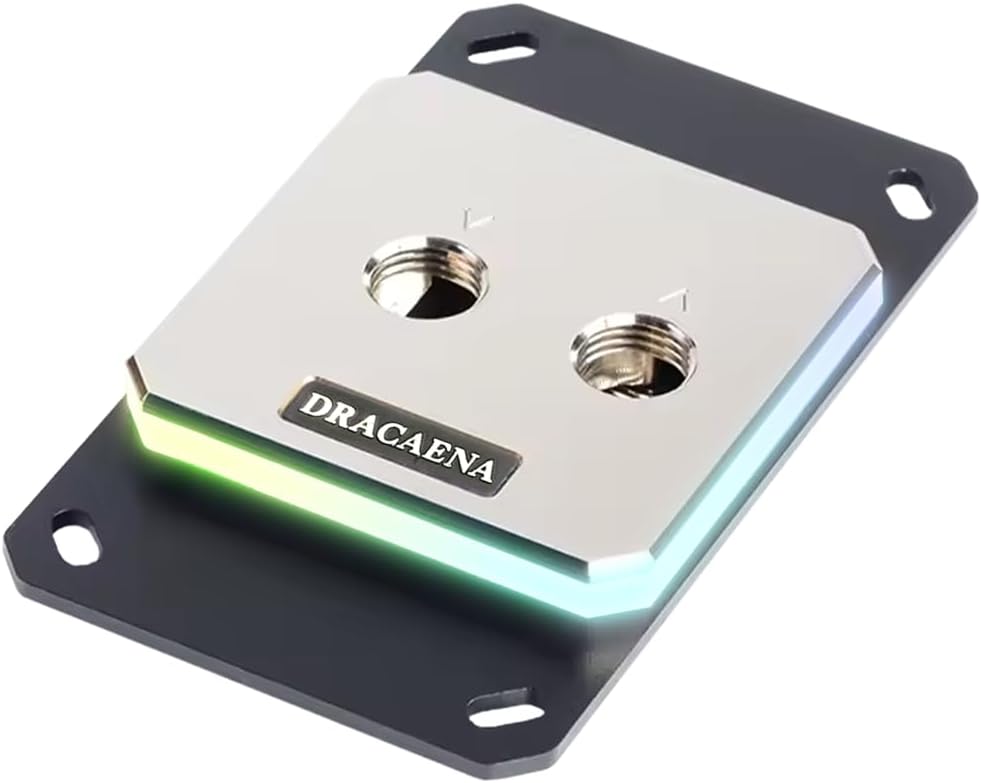
Dracaena.io CPU Water Block for AM5/AM4
4.6Editor score
Broad AMD socket support
All-copper water loop
5V ARGB sync
Finding the right cooling solution is critical for modern processors that push thermal limits during heavy workloads. CPU Water Blocks act as the heart of a custom liquid cooling loop, transferring heat directly from the die to the coolant efficiently.
We analyzed ten leading models based on thermal efficiency, build quality, socket compatibility, and aesthetic features. This list covers options ranging from budget-friendly essentials to premium displays that integrate seamlessly into high-end PC builds.
Each pick highlights key strengths and trade-offs to help you decide based on your specific needs and budget. Please note that product availability and pricing can fluctuate frequently, so verify details before making your final purchase decision today.
4.6Editor score

4.6Editor score

3.6Editor score
As an Amazon Associate we earn from qualifying purchases.
The following comparison table provides a side-by-side overview of the key specifications and features for all ten products selected in this guide. Use this data to quickly identify which model best fits your specific socket type and cooling requirements.




The EKWB EK-Quantum Velocity 3 Water block is a high-performance CPU water block designed for AMD AM5 and Intel LGA 1700/1851 platforms. It has a 4.6 star rating on major retail platforms, indicating strong user satisfaction with its thermal capabilities and build quality.
We may earn a commission when you buy through this link, at no additional cost to you.
Its optimized internal geometry and precise mounting pressure ensure maximum heat transfer efficiency compared to previous generations. Crafted with a nickel-plated copper cold plate for superior thermal conductivity, it achieves up to 2 degrees C improvement in thermal performance over its predecessor.
While it offers top-tier cooling for demanding workloads, the price point is higher than standard models. However, the thermal gains justify the investment for enthusiasts pushing their CPUs to the limit during rendering or gaming sessions.
This block is ideal for users seeking the best possible cooling performance on modern platforms. If you prioritize thermal efficiency and build quality over cost, this model is a strong recommendation for your custom loop setup.
The Velocity 3 achieves up to 2 degrees C improvement in thermal performance, offering top-tier cooling for demanding workloads compared to the Velocity 2.
Crafted with a nickel-plated copper cold plate for superior thermal conductivity to ensure efficient heat transfer from the processor die.
We may earn a commission when you buy through this link, at no additional cost to you.
The CORSAIR XC7 RGB Elite LCD CPU Water Block features a Brilliant IPS LCD Display to showcase your creativity and personalize your build like never before. It holds a 4.1 star rating from users who value aesthetics alongside functional cooling performance.
We may earn a commission when you buy through this link, at no additional cost to you.
The block uses a Hexa-Flow cooling engine that mitigates laminar flow and ensures all CPU cores are more evenly cooled. It includes a real-time CPU temperature display on a custom 30 FPS IPS LCD screen with 480×480 resolution and ultra-bright 600cd/m² backlight.
Installation is streamlined with USB-C Connectivity for easy setup without a separate controller unit. However, fully utilizing the software features requires integration with the Corsair iCUE ecosystem which may limit flexibility for other brand components.
This block is perfect for builders wanting a centralized visual hub for their system. If you are already invested in Corsair hardware or want a unique screen on your CPU, this product delivers a high-end look.
Showcase your creativity with a custom 30 FPS IPS LCD screen displaying real-time CPU temperature, animated GIFs, memes, or your team’s logo.
The Hexa-Flow cooling engine ensures that all CPU cores are more evenly cooled for exceptional performance on multi-chip package CPUs.
We may earn a commission when you buy through this link, at no additional cost to you.
The Dracaena.io CPU Water Block for AM5/AM4 offers BROAD AMD SOCKET SUPPORT for platforms ranging from AM5 to AM2. It has received a 4.6 star rating for providing excellent value and performance without the high price of premium brands.
We may earn a commission when you buy through this link, at no additional cost to you.
It features an ALL-COPPER WATER LOOP with full copper internal water channels and a 0.4mm microfin base plate for maximum thermal conductivity. The precision construction includes an aluminum mounting brackets and crystal-clear acrylic top panel for a sleek look.
The complete installation kit includes a 5V ARGB controller, backplate, and all screws though thermal paste is not included. This makes it a plug-and-play solution for AMD users looking to start a custom loop or upgrade an existing air cooler.
This is the best choice for budget-conscious AMD builders who need compatibility across multiple generations. If you own an AM4 or AM5 system and want reliable cooling without breaking the bank, this block is highly recommended.
Compatible with AM5, AM4, AM3/AM3+, and AM2/AM2+ to cover virtually every AMD platform for the last 15+ years without adapters.
Full copper water loop ensures no aluminum in the water path, providing pure copper contact from inlet to outlet for better cooling.
We may earn a commission when you buy through this link, at no additional cost to you.
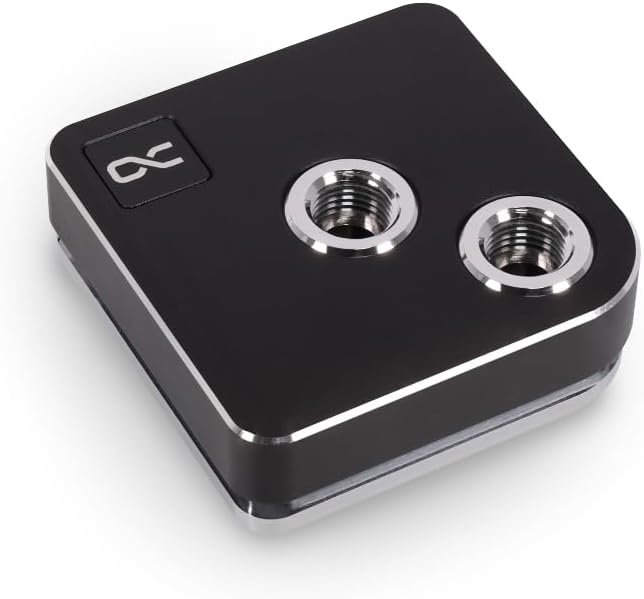
The Alphacool Core 1 CPU Water Block is a reliable CPU water block for Intel and AMD sockets that fits many mainstream build needs. It has a 4.6 star rating reflecting consistent performance and durability in everyday cooling scenarios.
We may earn a commission when you buy through this link, at no additional cost to you.
Compatible with the Intel LGA 1700 and AMD AM4/AM5, this block focuses on essential cooling functions with a black finish. The dimensions of 72 x 72 x 26.5mm allow it to fit easily in most cases without interfering with VRM coolers or RAM.
It lacks RGB or display features but offers solid thermal performance at a competitive price point. This simplicity reduces potential points of failure and keeps the build focused on raw cooling efficiency and stability.
Ideal for users who want a no-nonsense approach to liquid cooling. If you prefer a clean look without flashy lights or screens, this Alphacool model delivers reliable results.
Works with both Intel LGA 1700 and AMD AM4/AM5 sockets to support a wide range of modern processors in one package.
We may earn a commission when you buy through this link, at no additional cost to you.
The Generic 50mm Copper Base Waterblock is an entry-level option for users new to custom loops. It has a 4.2 star rating from those who appreciate basic functionality and low cost over advanced features.
We may earn a commission when you buy through this link, at no additional cost to you.
It has two chrome plate Copper faucets with a 10 mm external diameter and a 5 mm copper base height. The inner water channel is designed with a large water contact area to carry more heat from the CPU quickly.
Support includes AMD 940, AM2, AM3, and Intel 775 through LGA2011 platforms which makes it suitable for older legacy systems. It provides 1 set of accessory screws but lacks modern mounting hardware for new CPUs.
This block is best for hobbyists rebuilding older PCs or learning loop setup. If you need cheap cooling for a non-gaming workstation with older hardware, this product serves its purpose well.
Provides a low-cost solution for cooling older systems without the expense of high-end branded blocks with extra features.
We may earn a commission when you buy through this link, at no additional cost to you.
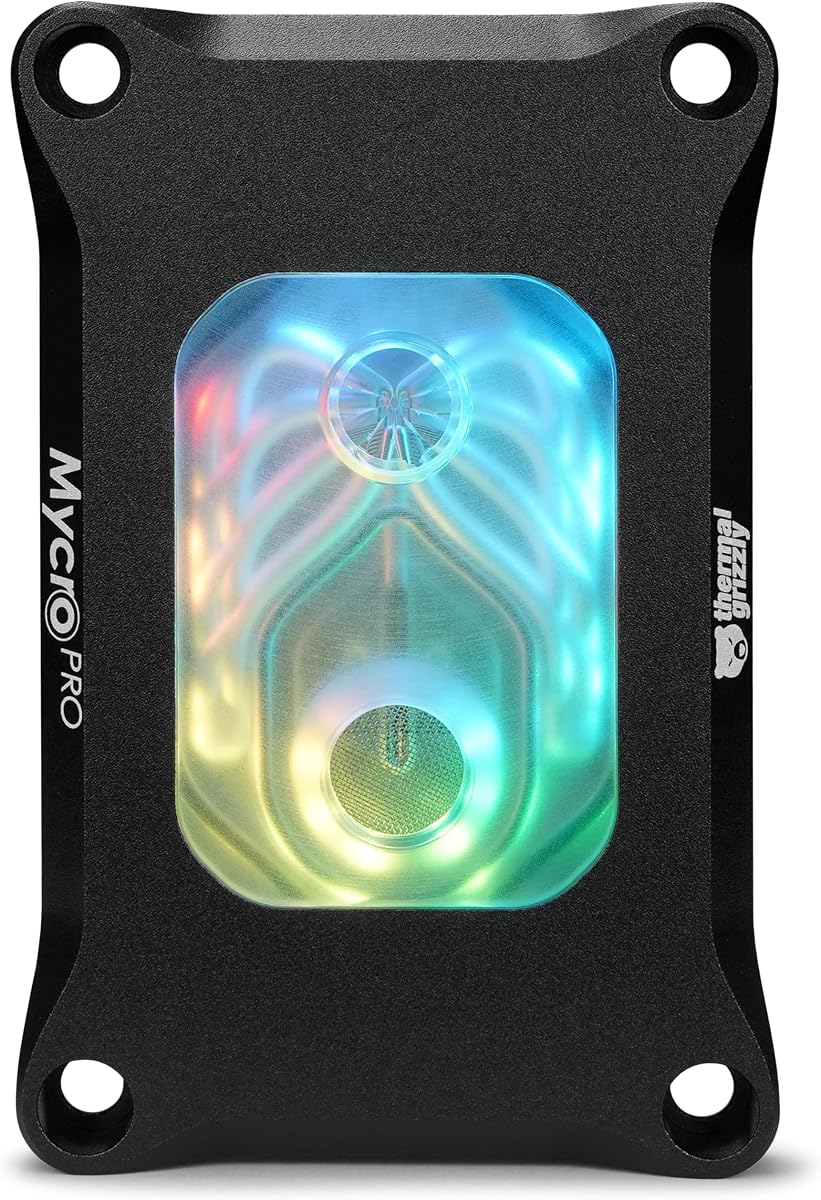
The Thermal Grizzly Mycro Pro RGB is a HIGH-PERFORMANCE CPU WATER BLOCK for custom loops designed for AMD AM5 and compatible with AM4. It has a 4.6 star rating due to its precise engineering and robust cooling capabilities.
We may earn a commission when you buy through this link, at no additional cost to you.
It features 68 MICROFINS WITH 0.2 MM STRUCTURE for MAXIMUM HEAT TRANSFER using a precision-machined nickel-plated copper cold plate. The INLET FILTER helps trap particles to support consistent coolant flow through the microfin structure.
While it supports G1/4 THREADS for EASY LOOP INTEGRATION & ARGB LIGHTING, it is specialized for AMD systems. The use of acrylic, aluminum, and EPDM O-rings provides durability and stability for demanding cooling setups.
Ideal for AMD users seeking maximum heat transfer without a display or RGB controller. If you value microfin density and build quality over flashy features, this block is an excellent choice.
The 0.2 mm microfins structure increases surface area and ensures efficient thermal performance under load for better heat dissipation.
We may earn a commission when you buy through this link, at no additional cost to you.
The TRYX Panorama WB custom loop CPU water block features a curved 6.67 inch 2K AMOLED screen with 60Hz refresh rate. It has a 3.6 star rating as users praise the visual quality while some note the complexity of the software integration.
We may earn a commission when you buy through this link, at no additional cost to you.
TRYX KANALI software provides intuitive screen adjustment with minimal system resource consumption and allows users to access preset anamorphic materials and hardware monitoring data. It supports PNG, JPG, GIF, and MP4 files for personalized upload and editing.
Built on Asetek Gen8 V2 thermal architecture, it includes a built-in 4-Pin PWM VRM fan to deliver targeted airflow to motherboard voltage regulators. However, the software features require a modern Windows environment for full functionality.
This block is best for enthusiasts who want a unique visual centerpiece for their PC. If you love tech demos and want your cooling to stand out, this is the ultimate premium option.
Delivers 372PPI pixel density with vivid color reproduction, creating immersive anamorphic visual effects that set your custom loop apart.
We may earn a commission when you buy through this link, at no additional cost to you.
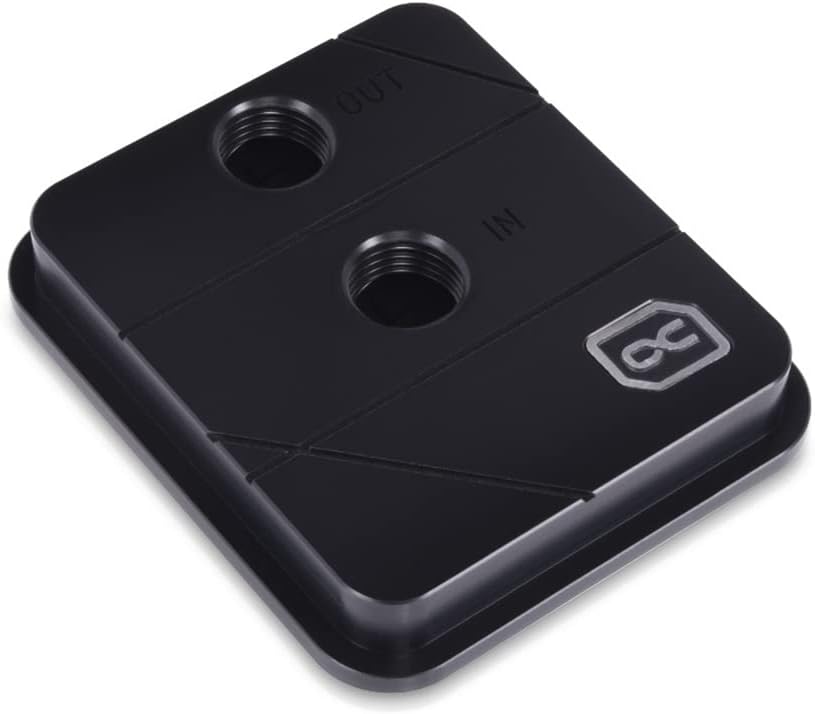
The Alphacool Core XP3 CPU Water Block is a CPU water block for Intel and AMD with a compact design. It has a 4.4 star rating indicating solid performance and reliability in standard liquid cooling setups.
We may earn a commission when you buy through this link, at no additional cost to you.
It has threads of 2 x G1/4" and uses nickel plated copper for the material cooler to ensure efficient heat transfer. The dimensions of 73x63x21mm allow it to fit in smaller cases where larger blocks might not fit.
Its max working temperature is 60 Degree C and the Acetal construction adds to its durability. This block offers a good balance of size and performance for those needing a smaller footprint.
Suitable for users needing a smaller block that still fits standard loops. If you are constrained by case space but want standard threading and reliable performance, this model is a strong candidate.
With dimensions of 73x63x21mm, it fits easily into smaller cases where traditional large water blocks might interfere with other components.
We may earn a commission when you buy through this link, at no additional cost to you.
The CORSAIR iCUE Link XC7 RGB Elite CPU Water Block features a Hexa-Flow Cooling engine to ensure even cooling for all CPU cores. It has a 4.1 star rating from users who value the streamlined cable management capabilities.
We may earn a commission when you buy through this link, at no additional cost to you.
It uses the patent-pending iCUE LINK ecosystem to let you daisy-chain all your components together using universal connectors. This allows you to build faster, reduce cable clutter, and create a more intelligent system setup with the System Hub.
A built-in cold plate temperature sensor allows precise cooling control via iCUE LINK. However, full functionality depends on purchasing the separate System Hub which increases the total system cost.
This is ideal for builders already in the Corsair ecosystem wanting to reduce cable clutter. If you want a clean build with smart control, this block offers a unique advantage.
Build faster and reduce cable clutter by daisy-chaining all components using universal connectors and a central iCUE LINK System Hub.
We may earn a commission when you buy through this link, at no additional cost to you.
The Alphacool Core 1 LT CPU Water Block is a CPU water block for Intel and AMD sockets with digital RGB lighting. It has a 4.1 star rating from users looking for color customization in their cooling loop.
We may earn a commission when you buy through this link, at no additional cost to you.
Compatible with the Intel LGA 1700 and AMD AM4/AM5, this block features an Acrylic design that allows light to pass through easily. The dimensions of 71.80 x 71.80 x 28.05mm provide a standard form factor for most builds.
It offers a balance of style and functionality with its digital RGB features. While it lacks advanced thermal sensors, it provides reliable cooling for everyday gaming and productivity tasks.
Best for users wanting a stylish block with RGB integration. If you want to match your cooling to your case lighting without complex displays, this is a great pick.
Features digital RGB lighting and an Acrylic design that allows for vibrant color customization and light diffusion in your build.
We may earn a commission when you buy through this link, at no additional cost to you.
Selecting the right CPU Water Blocks involves balancing thermal performance with aesthetic and practical constraints. This section breaks down the essential factors to consider for your specific needs.
Ensure the block supports your current motherboard socket such as AM5 or LGA 1700. Some blocks are universal while others target specific families like AMD AM4 or Intel LGA.
Always check the official compatibility list before purchasing to avoid mounting hardware issues.
Copper cold plates offer superior thermal conductivity compared to aluminum or brass. A nickel plating helps prevent corrosion when used with standard coolants.
Look for high-quality nickel-plated copper to ensure long-term durability and heat transfer efficiency.
Blocks with more microfins like 0.2mm structure increase surface area for better heat exchange. However, very high fin density can increase pressure drop.
Choose a balance that matches your pump's flow rate to maintain system stability.
Decide if you want RGB lighting, LCD screens, or a simple acrylic design. High-end blocks often include controllers that may require specific software hubs.
Consider if these features add value beyond the standard cooling performance for your build.
Compare thermal ratings in degrees Celsius against your CPU's thermal design power. High-performance blocks can handle overclocking better than basic models.
Read reviews to understand real-world thermal improvements over standard air cooling solutions.
Check if the block comes with a mounting kit and backplate for your specific motherboard. Some models require separate thermal paste or controllers.
Verify that the G1/4 ports align with your existing tubing setup to avoid extra adapters.
Clean the CPU surface thoroughly with isopropyl alcohol before applying high-quality thermal paste to ensure maximum heat transfer efficiency.
Secure the water block with even mounting pressure following the manufacturer's torque recommendations to prevent leaks or uneven cooling.
Regularly inspect fittings and O-rings for signs of wear and flush the loop annually to prevent biological growth inside the block.
No, they must match your specific socket type. Most high-end blocks support AM5 and LGA 1700 but older sockets may require different hardware.
Yes, it keeps noise levels low and temps stable during long sessions. CPU Water Blocks are key to reducing heat effectively.
Use coolants compatible with the materials in the block. Avoid conductive liquids like straight water which can damage components.
With proper maintenance they can last for many years. However O-rings and seals should be replaced periodically to prevent leaks.
Disassemble the block and soak the copper plate in a descaling solution. Rinse thoroughly with distilled water and dry completely before reinstalling.
Yes, modern blocks use internal sealing to protect electronics. Ensure you have enough power for the display and controller.
Top brands include EKWB, Alphacool, and Corsair. They offer strong warranties and proven performance across many models.
Yes, a water block is part of a loop and needs a pump to circulate fluid. Some kits include a reservoir or pump combo.
We reviewed ten models ranging from budget essentials to premium displays. The EKWB Velocity 3 and Dracaena.io options provide the best balance for most users.
Prioritize socket compatibility and thermal needs over flashy features unless you want the unique look of a screen or RGB display.
Prices and availability change frequently so double-check the listings before you buy to ensure you get the best deal available.