
Zalman CUBIX M-ATX Micro-ATX Compact Desktop PC Case with 80mm Fan
4.5Editor score
Affordable steel construction
Perforated front airflow
Compact 17.1L volume
Explore the top cube shaped PC cases for compact builds. We compare cooling, aesthetics, and compatibility to help you find the perfect compact chassis today.
Cube shaped PC cases offer a unique blend of compact design and striking aesthetics. These units fit powerful hardware into a small footprint while showcasing components through glass panels. Builders seeking a clean desk look often prefer this form factor over traditional towers.
We evaluated ten leading cube cases based on airflow, component support, and build quality. Our analysis considers motherboard compatibility, fan inclusion, and cable management features. This list helps you choose a case that balances performance with visual appeal effectively.
Each pick highlights specific strengths like panoramic views or flexible orientation options. Note that availability and pricing may shift as inventory changes. Check current listings for the most accurate details before finalizing your purchase decision.
4.5Editor score
4.7Editor score

4.7Editor score
This side-by-side comparison highlights key differences across all ten selected cube cases. Use this table to quickly identify which model fits your specific motherboard, GPU, and cooling requirements without scrolling through detailed reviews.



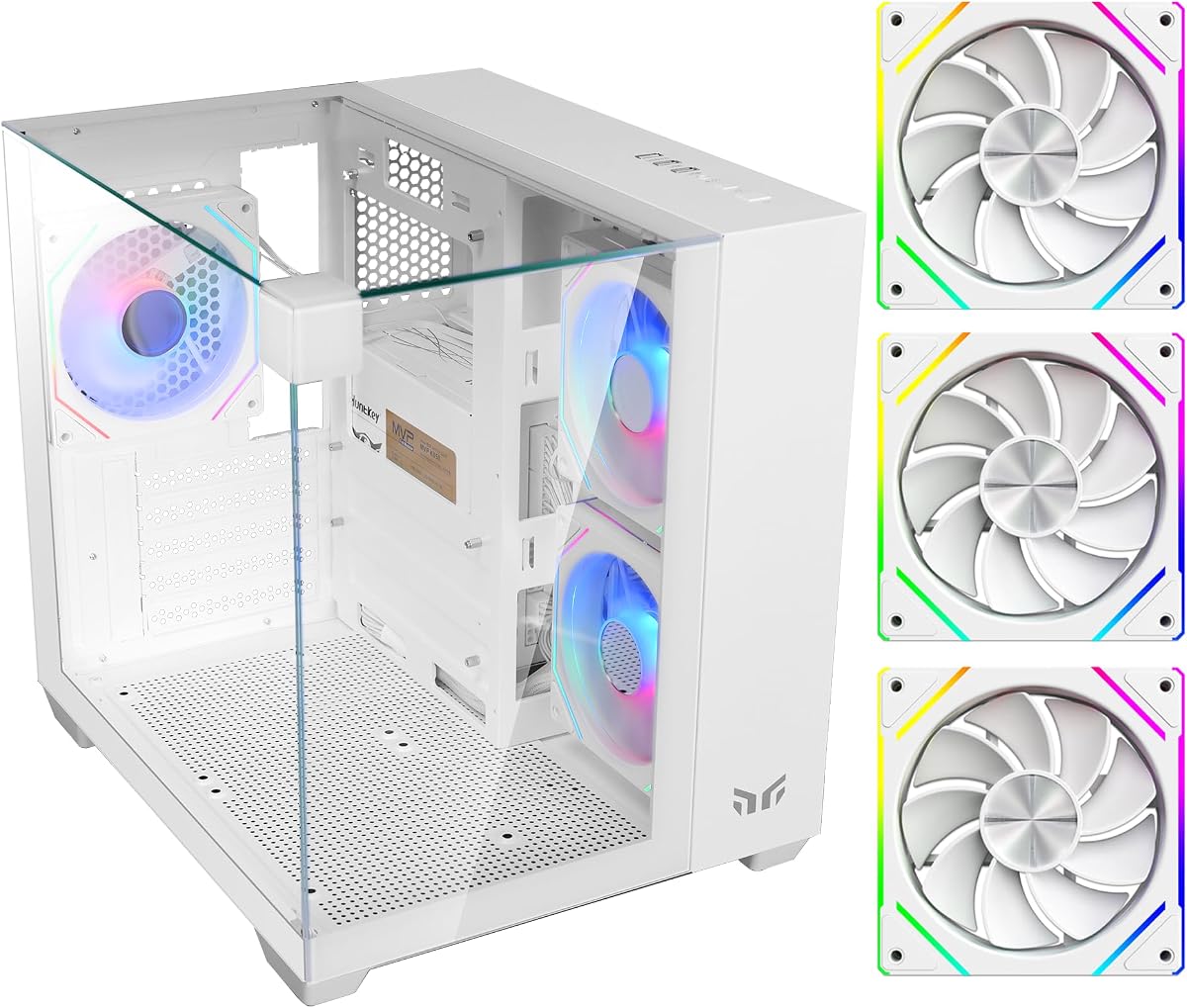
This unit stands out for its panoramic design that showcases your build from multiple angles. With a high user rating, it delivers on both aesthetics and functional cooling. The triple glass setup creates a modern look that fits any gaming setup.
We may earn a commission when you buy through this link, at no additional cost to you.
The internal layout supports Micro-ATX boards and GPUs up to 325mm, ensuring room for powerful hardware. Pre-installed ARGB fans provide immediate visual appeal and airflow without extra purchases. The pillar-less glass design maximizes visibility of your components and lighting effects.
While the glass panels offer great looks, they do require careful handling during assembly. You must ensure your RGB headers match the fans to achieve full sync with your system. These trade-offs are minor given the visual impact and solid build quality.
Buyers seeking a standout desk centerpiece will find this case ideal. It balances style and performance well for small form factor enthusiasts. We recommend checking your motherboard RGB compatibility before installation to maximize the fan effects.
The 270-degree glass design ensures your build looks great from almost any angle without obstruction.
Optimized fan placement and mesh elements help maintain stable temperatures during intensive gaming sessions.
We may earn a commission when you buy through this link, at no additional cost to you.
This case offers a unique flexible orientation design allowing both vertical and horizontal setups. It earns its premium status through robust build quality and extensive feature support for modern components. The airflow design is optimized for high-performance hardware needs.
We may earn a commission when you buy through this link, at no additional cost to you.
Support for GPUs up to 415mm ensures future-proofing for the largest graphics cards. The mesh front panel maximizes ventilation while the included SickleFlow fan aids initial cooling. Connectivity includes modern USB Type-C for fast data transfers on the front panel.
Adjusting the orientation may take time to get the handles and I/O panel right. The cost is higher than basic models but justified by the versatility and cooling performance. These factors make it a solid choice for demanding builds.
Enthusiasts who want versatility in desk placement should consider this model. It handles large components effortlessly and offers great airflow. Prioritize this if you need room for next-gen GPUs and prefer a customizable layout.
Reversible I/O and movable handles let you position the case horizontally or vertically to fit your space.
Clearance up to 415mm allows even the longest graphics cards to fit without compromising airflow.
We may earn a commission when you buy through this link, at no additional cost to you.
This case delivers strong value with a compact design and sturdy steel construction. It scores well for budget builders seeking reliability without sacrificing basic aesthetics. The small volume makes it perfect for tight desk spaces.
We may earn a commission when you buy through this link, at no additional cost to you.
Supporting standard ATX power supplies is a major advantage for upgrade flexibility. The perforated front panel ensures decent airflow despite the small size. At this price, it offers solid protection and functionality for entry-level systems.
GPU clearance limits support to cards up to 260mm which may restrict some gamers. You might need to add more fans for heavy loads since it comes with one 80mm fan. These constraints are expected given the budget pricing.
Ideal for budget-conscious users needing a compact reliable case. It works well for office PCs or light gaming rigs. Choose this if you need durability and small footprint without spending much.
Provides essential features like USB 3.0 and sturdy build at a very competitive price point.
The 17.1-liter volume fits easily on desks where larger towers won't fit.
We may earn a commission when you buy through this link, at no additional cost to you.
This case stands out by including five ARGB fans right out of the box. The dual chamber design helps separate hot components from cables for a cleaner look. It offers a balance of visual flair and practical cable management.
We may earn a commission when you buy through this link, at no additional cost to you.
Users can install graphics cards up to 340mm which accommodates many modern options. The RGB switch on top allows easy lighting control. Magnetic filters on the top panel simplify maintenance and dust removal.
The RGB sync may only work with ARGB compatible motherboards limiting control options. Build materials are functional but lack premium finish. These are acceptable trade-offs considering the included fan count and dual chamber layout.
Buyers wanting instant RGB flair will appreciate the pre-installed fans. It suits gaming builds needing cable separation. Check motherboard headers to ensure full RGB sync before purchasing.
Five pre-installed PWM ARGB fans give you immediate visual customization without extra cost.
Separates PSU and cables from main components for better airflow and cleaner aesthetics.
We may earn a commission when you buy through this link, at no additional cost to you.
This mini tower offers solid build quality for a low price. The fixed RGB fans add color without needing motherboard sync. It fits Micro-ATX boards and supports GPUs up to 280mm comfortably.
We may earn a commission when you buy through this link, at no additional cost to you.
The front panel includes USB Type-C for modern device charging. It supports standard ATX power supplies which increases upgrade flexibility. The compact form factor keeps desk clutter to a minimum.
Fixed RGB means you cannot control fan color via software. This limits customization for users wanting synchronized lighting effects. Otherwise it remains a practical choice for budget gaming builds.
Those wanting simple lighting and small footprint will like this option. It works well for office or casual gaming. Verify GPU length before buying to ensure fit.
Front USB Type-C offers fast connections for newer peripherals without needing rear ports.
Designed to minimize footprint while still housing standard power supplies and coolers.
We may earn a commission when you buy through this link, at no additional cost to you.
This case is a favorite for its modular dual chamber design. It separates power and drives from the main system for improved cooling. The build quality is top tier with premium materials throughout.
We may earn a commission when you buy through this link, at no additional cost to you.
Modular drive trays allow flexibility for storage needs up to eight drives. Airflow is prioritized with removable filters on every intake. It supports water cooling with space for up to four radiators simultaneously.
The size is larger than ultra-compact cubes so measure your desk space. Premium features come at a higher cost than basic models. These trade-offs are worth it for performance and flexibility.
Enthusiasts needing storage and cooling flexibility will love this unit. It suits workstation builds and high-end gaming. Prioritize this if you need modularity and robust airflow.
Adjustable drive cages let you configure storage based on your specific HDD or SSD needs.
Supports multiple radiator placements for advanced liquid cooling setups within a cube form.
We may earn a commission when you buy through this link, at no additional cost to you.
This model includes seven ARGB fans for maximum visual impact and airflow. The dual chamber design keeps components and cables separated effectively. It supports full ATX motherboards for broader hardware compatibility.
We may earn a commission when you buy through this link, at no additional cost to you.
GPU clearance up to 400mm ensures long cards fit without issues. Water cooling support on top and side allows flexible radiator placement. The magnetic dust filters are large and easy to clean.
Having seven fans means potential noise levels may increase without speed control. RGB sync is limited to specific motherboard headers. These factors should be weighed against the visual benefits.
Buyers wanting maximum fans and visual flair will appreciate this choice. It suits large GPU builds needing cooling. Check fan control settings to balance noise and cooling.
Seven PWM fans provide robust cooling options for high-load environments without extra purchase.
Supports large GPUs and water cooling radiators for versatile high-performance builds.
We may earn a commission when you buy through this link, at no additional cost to you.
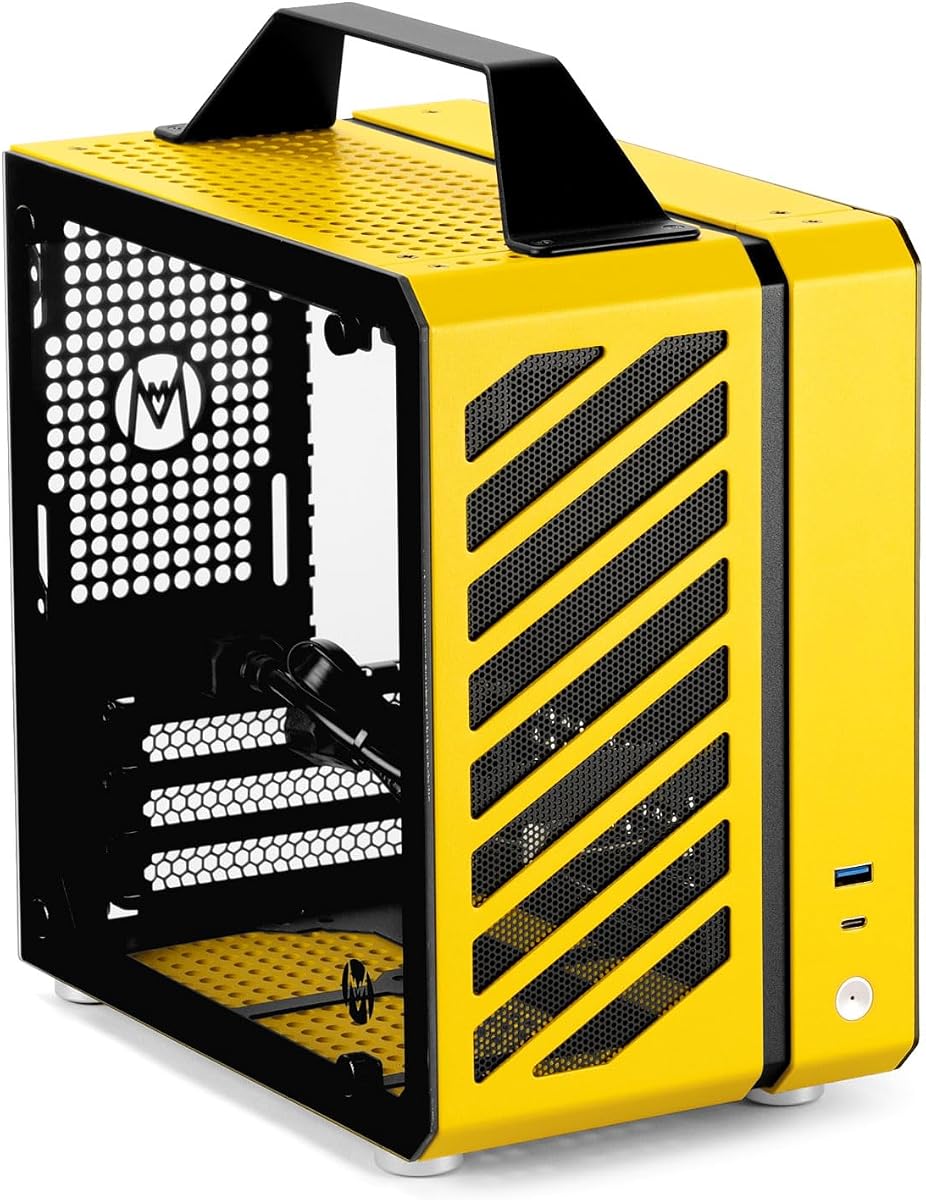
This case is ideal for portable builds needing to move frequently. It includes an aluminum handle for easy carrying and a compact 9.9L footprint. Tool-free design simplifies assembly and maintenance.
We may earn a commission when you buy through this link, at no additional cost to you.
Compatibility with SFX power supplies and DTX boards adds versatility. It supports GPUs like RTX 3060 series for solid performance. The aluminum frame feels premium and durable.
Mini-ITX compatibility limits motherboard options significantly. You need an SFX power supply which costs more than standard units. These constraints are acceptable for true portability needs.
Travelers or LAN party attendees will find this case perfect. It balances portability with quality. Prioritize this if you need a build to take on the go.
An aluminum handle allows you to carry the PC safely to events or different rooms.
Detachable panels enable easy access for upgrades without screwdrivers.
We may earn a commission when you buy through this link, at no additional cost to you.
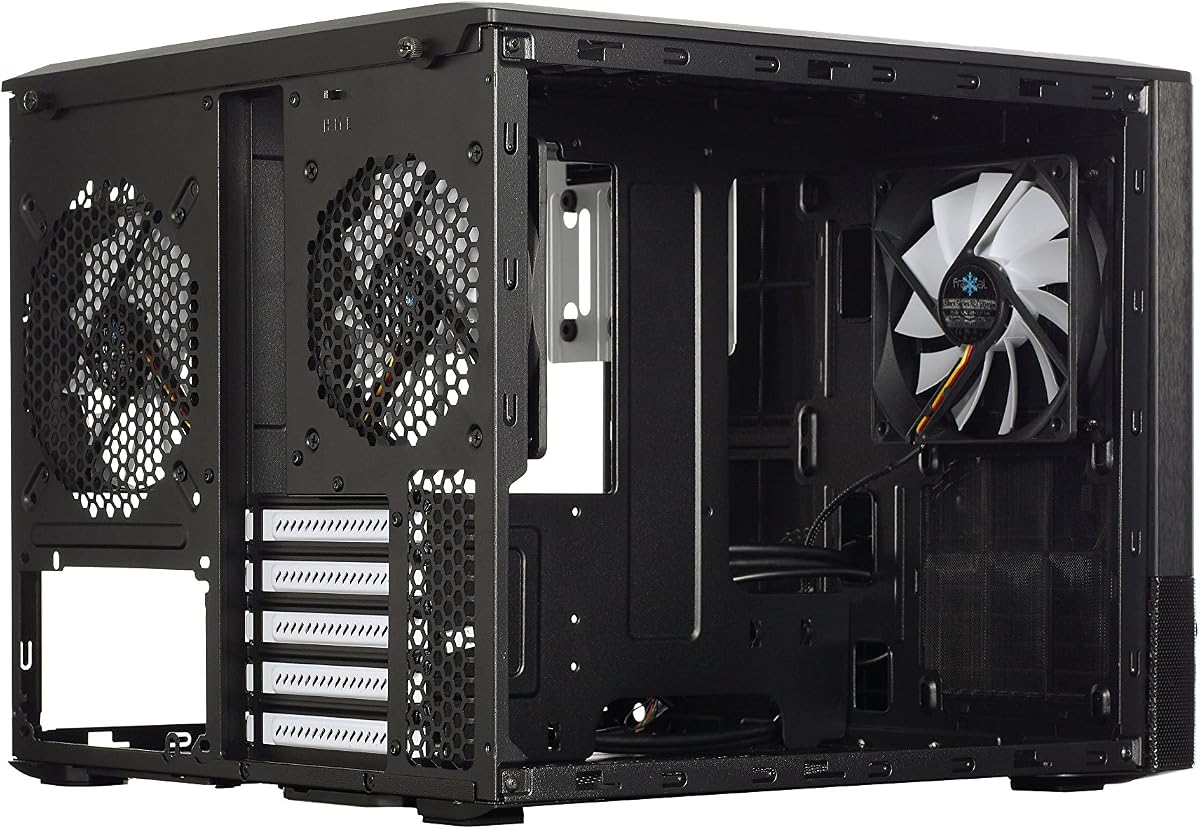
This version of the classic Node 804 focuses on the chassis without a power supply. It offers extensive drive bays for storage heavy builds. The material mix ensures durability and a clean aesthetic.
We may earn a commission when you buy through this link, at no additional cost to you.
The modular interior supports various storage configurations. Airflow remains high despite the compact cube shape. Build quality matches the standard version with excellent finish and structure.
Excluding the power supply may increase total build cost. You must source your own unit which adds to planning time. This suits those who prefer choosing specific PSUs separately.
Users planning heavy storage or needing PSU flexibility will like this option. It works for workstations and gaming. Choose this if you already have a power supply.
Eight 3.5 inch drive bays allow extensive storage setups for servers or media centers.
Timeless black design with aluminum accents fits any professional or gaming setup.
We may earn a commission when you buy through this link, at no additional cost to you.
This model stands out with a unique white finish for a clean look. It offers standard ATX support in a compact footprint. The airflow design matches the black version for cooling performance.
We may earn a commission when you buy through this link, at no additional cost to you.
The aesthetic appeals to those wanting a bright modern build. It fits most ATX components and cooling solutions. High airflow mesh ensures temperatures stay reasonable during load.
White panels show dust more than dark finishes requiring more frequent cleaning. It also carries a slightly higher price than standard options. These are minor issues for those prioritizing looks.
Buyers wanting a bright modern PC will appreciate this variant. It suits setups needing a clean look. Check dust maintenance needs before committing to the white finish.
The moonstone finish adds a unique brightness to your desk setup without needing extra mods.
Supports standard ATX motherboards ensuring broad hardware compatibility for upgrades.
We may earn a commission when you buy through this link, at no additional cost to you.
Choosing the right cube case requires balancing size, cooling, and motherboard compatibility. This guide covers critical factors to help you select a model that fits your build needs.
Cube cases vary in support from Mini-ITX to ATX. Check the case specs to ensure it fits your motherboard size. Micro-ATX offers a good middle ground for most users needing compactness without losing features.
Always verify clearance for your CPU cooler and GPU length before buying to avoid fit issues.
Airflow is critical in compact cases to prevent overheating. Look for mesh panels or fans included to help manage heat. Dual chamber designs help separate heat sources for better air distribution.
Prioritize cases with removable dust filters to maintain airflow over time without clogging.
RGB fans are common in cube cases to enhance aesthetics. Ensure the case supports ARGB or standard RGB to match your motherboard. Some units include switches for easy control without software.
Check if sync features require specific headers to avoid mismatched lighting effects.
Cube cases often limit drive bays due to size. Look for models with modular trays if you need multiple SSDs or HDDs. Dual chamber designs help accommodate storage without cluttering the main compartment.
Confirm the number of 2.5-inch and 3.5-inch drive slots to meet your storage needs.
Materials like steel and aluminum affect durability and noise. Higher quality cases feel sturdier and handle components better. Glass panels offer great looks but require careful handling during transport.
Look for reinforced corners and quality hinges to ensure long-term durability.
Front panel ports like USB-C are becoming standard. Ensure the case provides the connectors you need for modern devices. Audio jacks and USB 3.0 are essentials for daily use.
Verify the number of USB ports to ensure you can connect peripherals easily.
Good cable routing keeps builds looking clean. Look for dedicated channels and space behind the motherboard tray. Dual chambers help hide cables from view improving aesthetics.
Check for rubber grommets to protect cables and improve airflow efficiency.
Cube cases range from budget to premium prices. Decide how many features you need like RGB or dual chambers. Pre-installed fans can save money on buying extras later.
Consider total cost including any missing parts like power supplies.
When installing components, place the case on a stable flat surface. Use an anti-static mat or wrist strap to protect sensitive parts during assembly. Follow your motherboard manual to install the board correctly without bending pins.
Route cables through the back panel to keep the front clean. Use zip ties or velcro straps to secure loose wires. Check your fans are connected to the headers before closing panels.
Clean dust from filters weekly to maintain airflow. Use compressed air for hard to reach areas inside the case. Avoid harsh chemicals on glass panels and use a soft cloth.
Yes many models support powerful GPUs and CPUs if they match compatibility. Look for cases with strong airflow and room for at least a 325mm card. Dual chamber designs help maintain temperatures under load.
Some ultra-compact models require SFX power supplies. Larger cube cases typically support standard ATX units. Always check case specs before buying a power supply to ensure fit.
Use a microfiber cloth to avoid scratching tempered glass. Avoid using chemical cleaners directly on the glass. Clean surrounding vents regularly to prevent dust buildup inside.
Many cube cases support 240mm or 280mm radiators. Check top and side mounting clearance before buying parts. Dual chamber designs often help accommodate liquid cooling better.
Dual chambers separate power supplies from main components improving cooling. They also hide cables effectively for a clean look. This layout is common in high performance cube cases.
Budget models like Zalman cases offer solid durability. For mid range, cases with pre-installed RGB fans save extra costs. Evaluate features against your needs for best value.
Cable management is vital to keep airflow clear in small spaces. Look for cases with dedicated channels to route wires. Poor management can restrict airflow and increase noise.
These ten cube cases offer a range of options from compact to premium. Top picks include the Cube Gaming PC for visuals and Fractal Node 804 for modularity. Each model provides distinct benefits for different users.
Prioritize airflow and motherboard compatibility to ensure smooth builds. RGB features add style but check motherboard headers for sync. Always measure your desk space before selecting a size.
Prices and availability change often so check current listings. Verify warranty details before finalizing your purchase decision. With the right choice you get a clean functional compact setup.