
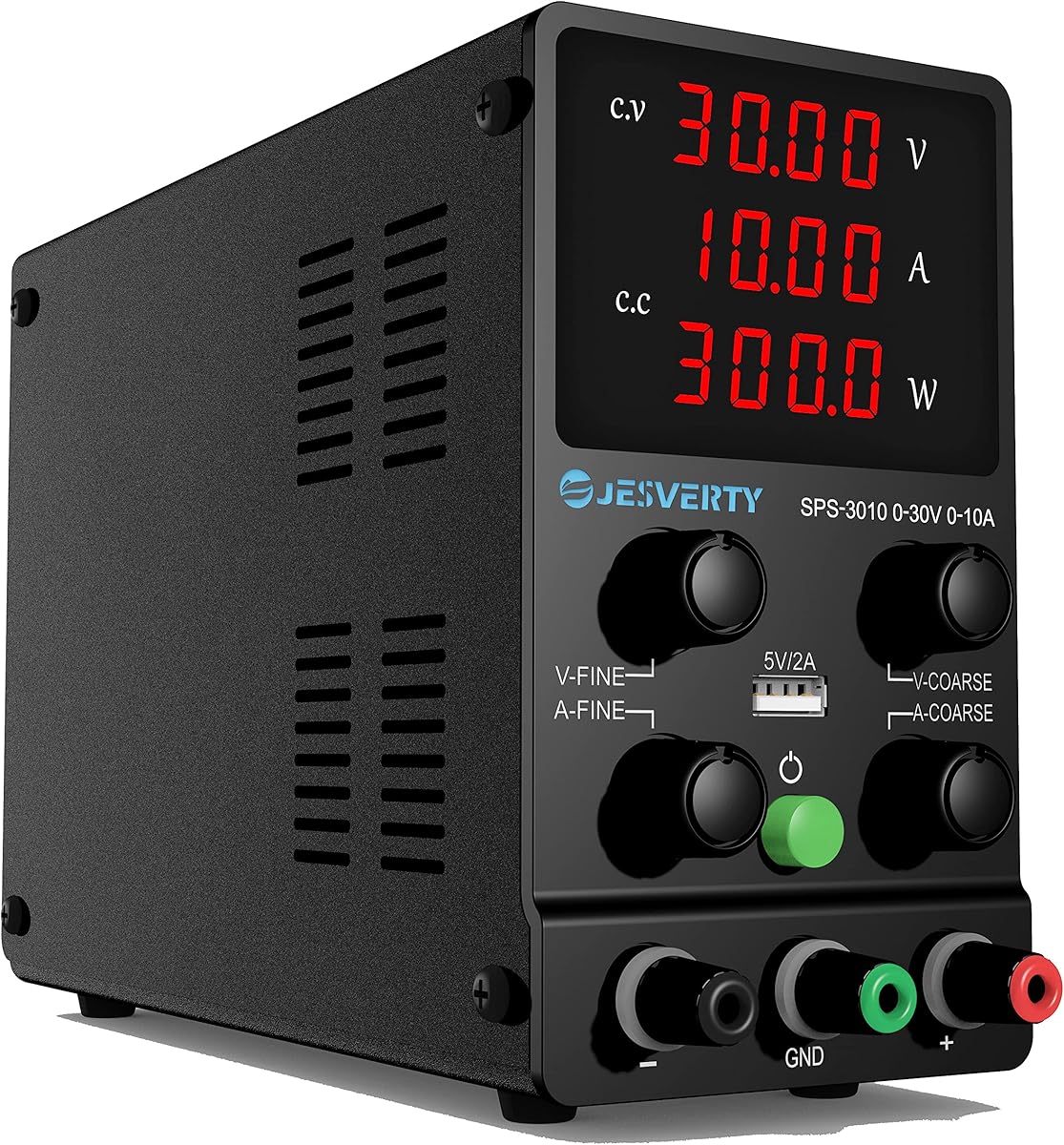
NICE-POWER DC Power Supply Variable 0~30V 0~10A
4.5Editor score
150W power output
Encoder button adjustment
Compact lightweight design
This guide compares the top DC Power Supply for Laptop Repairing models focusing on voltage range, current capacity, safety features, and build quality to help
Choosing the right DC power supply for laptop repairing is essential for anyone working on electronics. A reliable unit provides stable voltage and current to test circuits without damaging delicate components during repair sessions.
We compared ten top-rated bench power supplies based on user ratings, technical specifications, and practical features. This list covers everything from budget-friendly options to advanced programmable units suitable for professional workbenches.
Each pick highlights key strengths like display accuracy, protection modes, and connector versatility. Please note that product prices and availability change frequently, so verify current details before making your final purchase decision.
4.5Editor score

4.6Editor score

4.2Editor score
The following table provides a side-by-side comparison of all ten products to help you quickly identify the model that best fits your specific laptop repair needs and budget constraints.



This DC power supply stands out as the top pick for laptop repair due to its exceptional precision and versatile features. With a rating of 4.6 stars, users praise its ability to deliver stable power for sensitive electronic components.
We may earn a commission when you buy through this link, at no additional cost to you.
The coarse and fine tuning knobs allow for exact voltage setting adjustments, which is critical when testing laptop circuits that require specific power levels. The addition of a USB Type-C port adds significant value by allowing you to charge devices while working.
While the fan can be noticeable under heavy load, it ensures the unit stays cool during extended repair sessions. The automatic voltage detection simplifies setup by adapting to different AC inputs without manual switching.
If you need a reliable bench unit that balances precision with modern convenience, this model is the best choice for professionals and hobbyists alike working on laptops and other electronics.
The dual encoder knobs provide granular control over voltage and current, ensuring you never overshoot settings on fragile motherboard components.
A dedicated Type-C port offers quick charging capabilities for phones and tablets, keeping your workspace efficient without needing extra outlets.
We may earn a commission when you buy through this link, at no additional cost to you.
The NICE-POWER DC power supply offers incredible value for beginners or those on a tight budget. With a 4.5-star rating, it delivers solid performance for basic laptop repair tasks without breaking the bank.
We may earn a commission when you buy through this link, at no additional cost to you.
Its compact design makes it easy to fit on crowded workbenches, and the encoder buttons allow for quick voltage changes. The wide input voltage range ensures it works safely in most regions without extra adapters.
The main trade-off is the lack of advanced features like memory presets, but for simple on-and-off testing, this unit is more than capable. It is an excellent starter tool for DIY repairs.
Choose this model if you prioritize cost-efficiency and portability over advanced programming capabilities for your laptop repair toolkit.
This unit provides essential power regulation at a fraction of the cost of premium models, ideal for hobbyists learning to repair electronics.
Its ultra-small size allows you to bring the power supply to the work area easily, saving valuable space on your desk.
We may earn a commission when you buy through this link, at no additional cost to you.
The X-Tronic PX-70 is designed for professionals who need reliability and advanced features. Despite a slightly lower average rating, it offers robust construction and specific tools for complex repair workflows.
We may earn a commission when you buy through this link, at no additional cost to you.
Memory recall presets allow you to save common voltage settings for different laptop models, speeding up your workflow significantly. The inclusion of multiple lead sets ensures you have the right connectors for any job.
It is heavier than switching units due to its linear design, but this contributes to lower noise and better stability. The lock function prevents accidental setting changes during long testing periods.
If you run a repair shop or need a durable unit for daily heavy use, this premium model justifies its cost with efficiency and longevity.
Memory recall buttons let you jump between saved configurations instantly, reducing setup time for repetitive laptop testing tasks.
Three sets of leads are included in the box, saving you the hassle of buying compatible connectors separately for different projects.
We may earn a commission when you buy through this link, at no additional cost to you.
This bench power supply emphasizes safety and convenience with features like a dedicated output enable button. Users appreciate the ability to control current flow independently from power settings.
We may earn a commission when you buy through this link, at no additional cost to you.
The short circuit alarm provides immediate feedback if something goes wrong, preventing damage to your board. The encoder knob ensures you can set precise values without drifting.
While the casing is mostly plastic, it handles heat well thanks to internal cooling. The USB port adds utility for charging devices during repairs.
Choose this unit if protecting your expensive laptop components from accidental shorts is your top priority while maintaining a simple interface.
The audible alarm alerts you instantly to shorts, giving you a critical safety net when working on unshielded electronics.
An enable button lets you cut power to the load without changing your settings, making testing cycles faster and safer.
We may earn a commission when you buy through this link, at no additional cost to you.
The high-precision 4-digit LED display on this unit makes it easy to read exact values at a distance. This clarity is helpful when adjusting settings from different angles during repairs.
We may earn a commission when you buy through this link, at no additional cost to you.
It automatically switches between constant voltage and constant current modes, simplifying the process of powering different laptop circuits. The compact body saves space on your bench.
The included test leads are somewhat short, so you may need to buy longer ones for some tasks. However, the core performance remains strong for the price point.
If readability and automatic safety modes are key factors for your workflow, this model provides excellent value with reliable digital feedback.
The bright 4-digit display shows voltage and current clearly, allowing you to monitor values without leaning in close to the screen.
Automatic switching between CV and CC modes ensures safe power delivery regardless of load changes, reducing user error risk.
We may earn a commission when you buy through this link, at no additional cost to you.
This programmable unit offers modern connectivity via USB-C to control parameters directly from your laptop. It bridges the gap between traditional bench tools and digital automation.
We may earn a commission when you buy through this link, at no additional cost to you.
You can log real-time parameters and run automated test sequences, which is ideal for quality assurance on multiple units. The dual display shows set values against real outputs clearly.
Using PC control requires some setup but offers powerful efficiency for batch repairs. The one-key OCP protection adds an extra layer of safety during automated runs.
Tech-savvy users who want to automate their testing process will find this model uniquely useful for scaling laptop repair workflows efficiently.
USB-C control lets you script repetitive voltage checks, saving time when testing many devices for consistent performance.
Track exact power data over time on your PC to identify intermittent failures that might not appear on the unit itself.
We may earn a commission when you buy through this link, at no additional cost to you.
The YIHUA 305D-IV stands out with its fanless cooling design which reduces noise significantly. This makes it perfect for quiet workshops where fan hum is distracting.
We may earn a commission when you buy through this link, at no additional cost to you.
It includes alligator clips for quick connections, saving you time on setup. The low noise circuitry ensures stable readings for sensitive measurements on motherboards.
Current capacity is capped at 5A which is sufficient for most laptops. The lack of USB output is a trade-off for the silent operation.
If you work in a shared space or prefer silent equipment, this unit delivers quiet performance and solid stability for standard laptop repairs.
The absence of a cooling fan means zero noise during operation, ideal for noise-sensitive environments or detailed focused work.
Included alligator clips provide immediate connectivity without needing to buy separate accessories, getting you started faster.
We may earn a commission when you buy through this link, at no additional cost to you.
The FNIRSI DPS-150 features a vibrant IPS color screen that flips for better visibility from different angles. This visual clarity enhances the user experience significantly.
We may earn a commission when you buy through this link, at no additional cost to you.
PC programmability allows you to save six groups of parameters for different devices. The low ripple output protects sensitive electronics from voltage fluctuations during testing.
When charging batteries, you should add external protection to avoid damage. The curve display mode offers a unique way to visualize power delivery trends.
Choose this unit if you prefer modern visual feedback and want a versatile display system for tracking power data during repairs.
The color IPS screen offers clear graphical data and adjustable angles, improving readability and workflow comfort.
Store six parameter groups to quickly access settings for different laptop models without manual re-entry each time.
We may earn a commission when you buy through this link, at no additional cost to you.
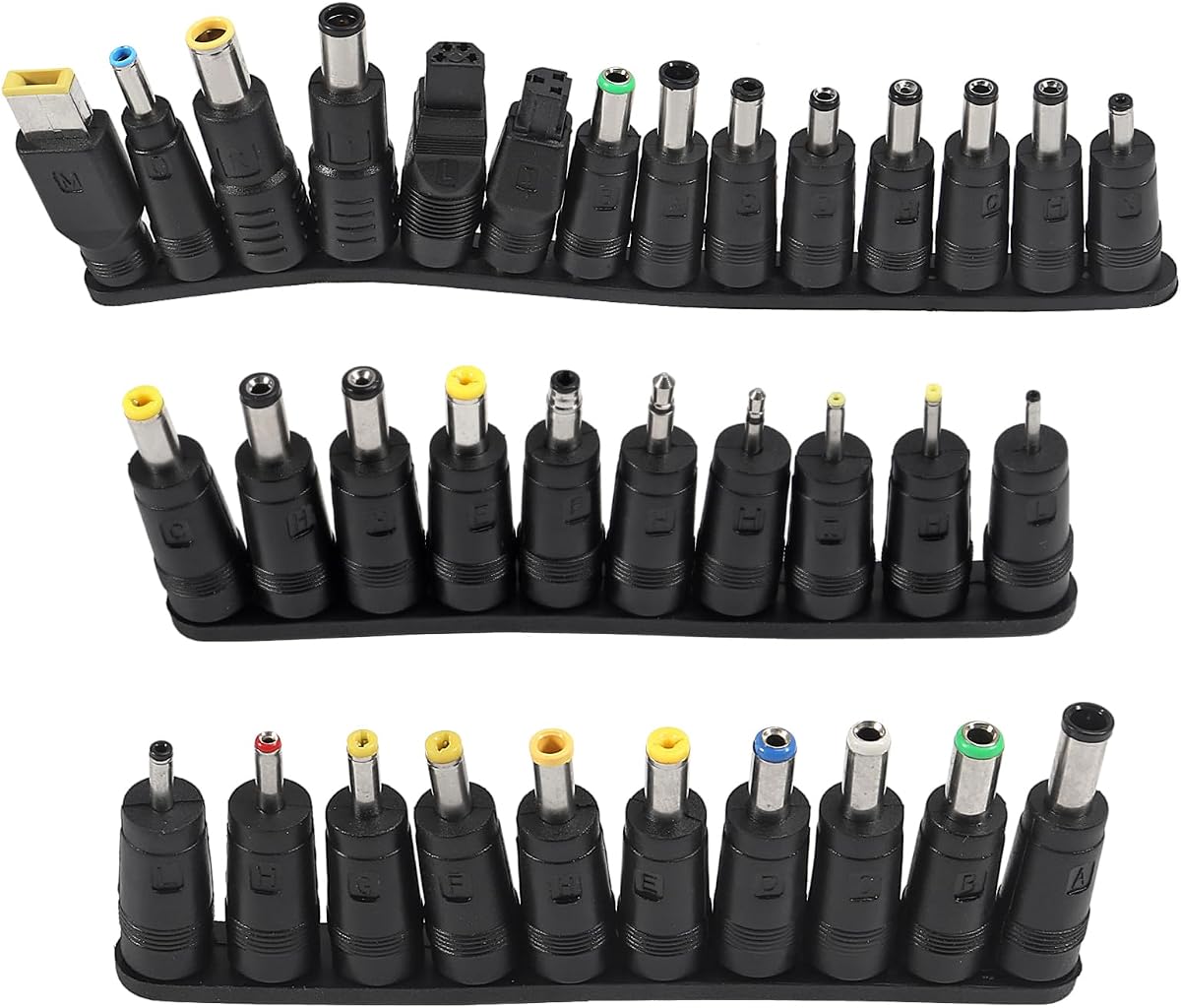
This universal connector kit complements your power supply by providing a vast range of adapters for different laptop models. With 34 pieces, it covers most common DC jack sizes.
We may earn a commission when you buy through this link, at no additional cost to you.
Tips include specialized shapes for Lenovo, Dell, and HP devices ensuring you can connect to various hardware. It simplifies the process of testing unknown devices.
Make sure to check pin compatibility before use to avoid damage. It is an essential addition to any repair kit that pairs well with bench power.
If you work on mixed laptop models, this kit saves you from buying multiple adapters and ensures you have the right connection ready.
With 34 tips, this kit ensures you can connect to virtually any laptop power port without needing multiple supplies.
Includes specialized tips for major brands like Lenovo and Dell, streamlining repairs for these common models.
We may earn a commission when you buy through this link, at no additional cost to you.
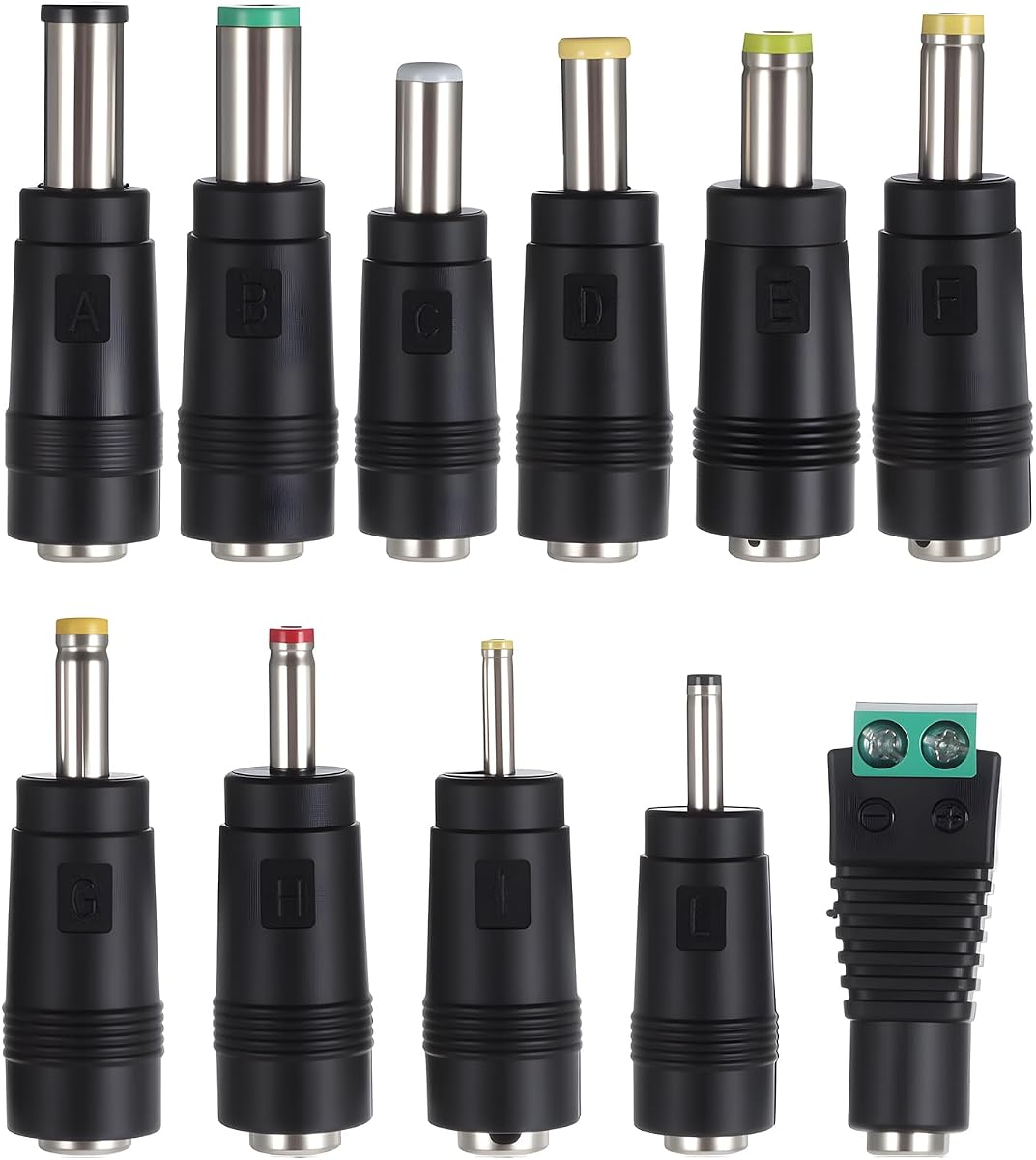
This compact kit offers a simpler set of connectors ideal for quick repairs on the go. It includes a female base to plug into standard adapters for easy swapping.
We may earn a commission when you buy through this link, at no additional cost to you.
Portable design makes it easy to keep in a toolbox for field service. It covers the most common sizes found in laptops and small electronics.
While it has fewer tips than larger kits, it is lightweight and convenient for immediate needs. Always check the device size before connecting.
Choose this accessory for its portability if you travel with your tools and need a quick way to adapt your power source.
Its small size fits easily in a repair kit, ensuring you have connections available when working away from the bench.
The female base design allows you to switch plugs quickly without extra tools, speeding up field repairs.
We may earn a commission when you buy through this link, at no additional cost to you.
Selecting the right unit requires understanding key specifications that impact repair safety and accuracy. This guide breaks down the essential factors to consider.
Ensure the unit covers the voltage range of your devices, typically 0 to 30 volts for most electronics. Current capacity should support the peak draw of the components you test.
Look for units offering at least 5A to 10A to handle power-hungry components without overloading the supply.
Precision displays are vital for setting exact parameters. Look for high resolution like 0.01V and 0.001A to ensure you are not guessing.
Clear digital readouts help you monitor changes in real time during complex testing procedures.
Overcurrent and short circuit protection are non-negotiable. These features prevent accidental damage to expensive components if a connection error occurs.
Units with OCP and OVP safeguards give you peace of mind during long repair sessions.
Encoder knobs offer more precise control than traditional potentiometers. They allow you to set values quickly without drift issues.
A mix of coarse and fine knobs helps you fine-tune settings efficiently.
Universal kits and various plug sizes make it easier to test different laptops. Standard banana jacks provide secure connections for your custom cables.
Having a variety of adapters ensures you can work on diverse models without compatibility issues.
Automatic voltage detection simplifies setup by adapting to different AC inputs. This is useful if you work in different regions.
Check that the input range matches your local power grid to avoid needing transformers.
Memory recall allows you to save settings for specific devices. This feature is a significant time saver for professional repair shops.
Units with preset buttons streamline your workflow by reducing manual entry.
Consider the size and weight if you move between workstations. Compact units save space but ensure they have adequate cooling.
Fanless designs are quieter but may be less robust for continuous high-load use.
Start by setting the voltage and current limits below the laptop's rated specifications. This prevents accidental burns to sensitive circuits during the initial connection.
Always connect the output leads to the device before turning on the power. Reversing this order can cause sparks and damage your equipment.
Clean the unit regularly and ensure the vents are not blocked by dust. Proper ventilation extends the life of the internal components.
Yes, a bench power supply is generally safer because it allows you to limit current and detect shorts. It provides better control than a fixed charger during repair.
Most laptops operate between 5V and 20V. A 30V supply gives you enough headroom to test various models safely.
You can test USB-C pins if you use specific adapters. Ensure you do not apply high voltage directly to sensitive data lines.
CV stands for Constant Voltage where voltage stays fixed. CC stands for Constant Current where current is limited to prevent overheating.
It is best practice to turn off the output first. This prevents sparks and ensures the device does not get a sudden power surge.
Check accuracy annually or if readings seem off. Use a multimeter to verify output against the display settings.
Wear anti-static wristbands to protect components. Ensure the workspace is dry and clear of conductive materials.
Yes, units with USB ports can charge phones safely. Use the correct voltage settings to avoid battery damage.
The best power supply depends on whether you prioritize budget, precision, or advanced features. The top three picks offer excellent options for different repair needs.
For professionals, investing in a unit with memory presets and safety modes pays off. For beginners, simple models with protection features are sufficient.
Always check current pricing and availability before buying. Selecting the right tool ensures your repairs are safe and efficient.