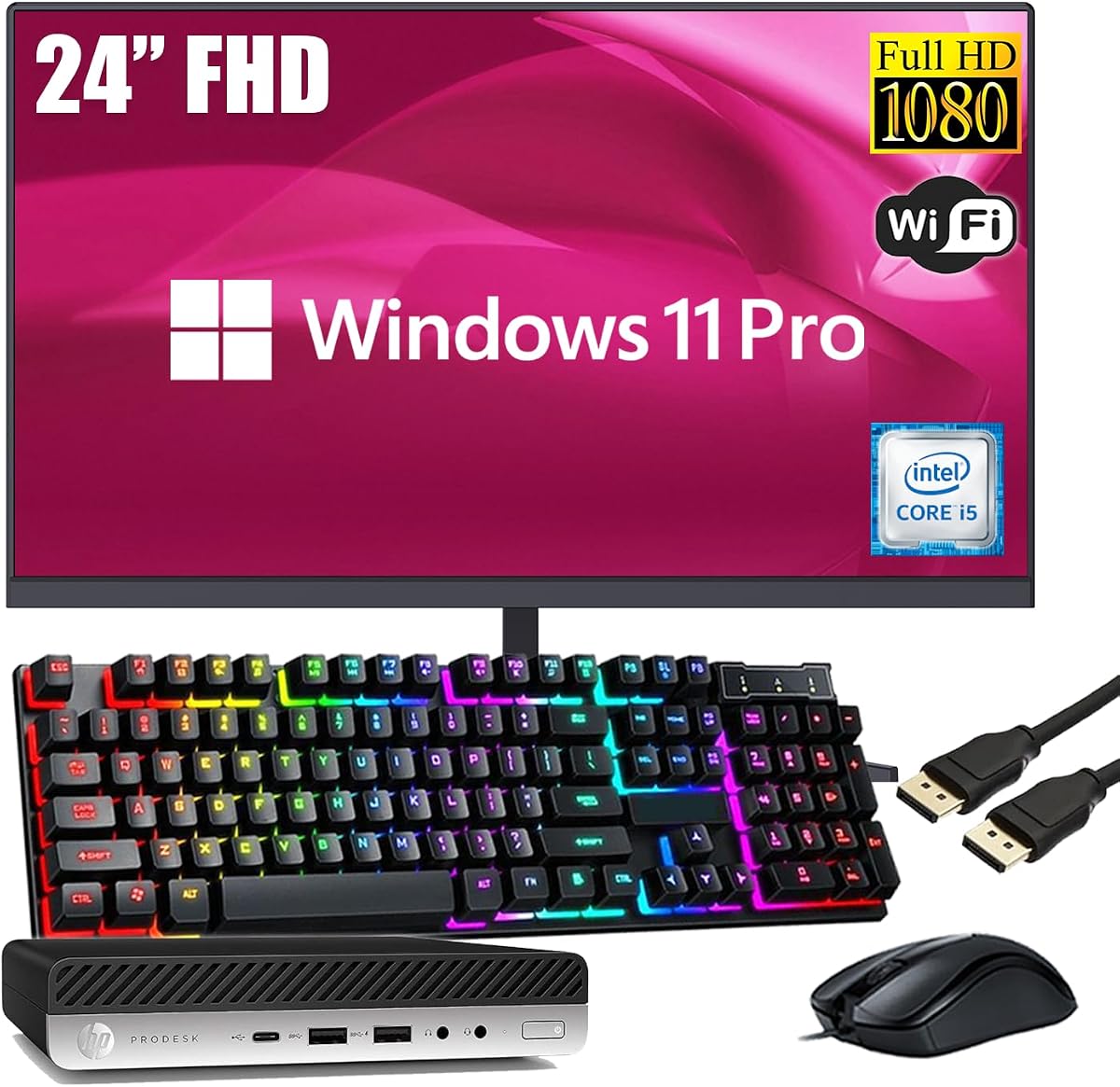
HP ProDesk 600 G4 Mini Desktop Computer
4.2Editor score
Compact Mini Tower Design
24 inch LCD Monitor Included
Windows 11 Pro Pre-installed
Finding the right desktop computer for kids requires balancing performance, durability, and ease of use. Young learners need machines that handle homework, creative projects, and educational games without lagging or breaking down easily over time.
We evaluated ten highly rated desktop systems based on processor speed, memory capacity, storage options, and included peripherals. Our comparison highlights models that offer Windows 11 compatibility, reliable connectivity, and sturdy designs suitable for household use.
Each pick showcases specific strengths like screen quality, RAM size, or bundled accessories to help you decide. Note that prices and availability may change frequently so check current listings before finalizing your purchase decision.
4.2Editor score

4.5Editor score

4.3Editor score
As an Amazon Associate we earn from qualifying purchases.
The following table presents a side-by-side comparison of all ten models analyzed in this guide. Review key specifications like processor type, memory amount, storage capacity, and display size to identify the best fit for your needs.


This HP All-in-One desktop stands out as a top contender for families needing a clean setup. With a 4.5 rating, it offers solid performance for daily tasks thanks to its Intel N100 processor and 8GB of RAM.
We may earn a commission when you buy through this link, at no additional cost to you.
The 21.5 inch display provides clear visuals for reading and videos while the anti-glare VA panel reduces eye strain. Users benefit from the included keyboard mouse and the versatile 8-in-1 docking hub that expands connectivity options easily.
While the internal storage is modest the included SD card slot offers a practical way to expand capacity. The adjustable stand ensures comfortable viewing angles though the 8GB RAM limit may restrict heavy multitasking compared to higher-end models.
This model is ideal for students and home offices where space is at a premium. Its blend of aesthetics functionality and ease of use makes it a strong recommendation for general computing needs.
The all-in-one structure eliminates cable clutter and saves valuable desk space while keeping everything functional and accessible.
The included docking station adds multiple ports allowing easy connection to printers drives and other peripherals without extra adapters.
We may earn a commission when you buy through this link, at no additional cost to you.
This HP ProDesk Mini offers a complete desktop solution at an attractive price point. Rated 4.2 stars it delivers reliable performance with an Intel Core i5 processor and the speed benefits of a 256GB SSD.
We may earn a commission when you buy through this link, at no additional cost to you.
The package includes a 24 inch LCD monitor so there is no need to buy separate peripherals. This convenience is perfect for setting up a student workstation quickly without extra shipping costs or compatibility worries.
While the 8GB of RAM is standard for this budget range it handles everyday apps and browsing well. The renewed status means inspection standards are met but buyers should expect generic packaging rather than retail boxes.
This system is best suited for users who want a straightforward plug-and-play experience on a budget. The SSD ensures quick boot times making it efficient for school tasks and web browsing daily.
All necessary components arrive in one box simplifying setup and reducing the need for additional purchases or complex assembly.
Solid state storage provides faster data access compared to traditional hard drives improving overall system responsiveness significantly.
We may earn a commission when you buy through this link, at no additional cost to you.
This Lenovo All-in-One stands out with its robust specs designed for demanding tasks. With a 4.3 rating it features an Octa-Core processor and 16GB of RAM ensuring smooth multitasking for content creation or complex projects.
We may earn a commission when you buy through this link, at no additional cost to you.
The 512GB SSD provides generous space for files and applications while the 23.8 inch borderless display offers an immersive viewing experience. The sleek design integrates all components into one unit reducing desk clutter effectively.
Although it comes at a higher price the performance gains are significant for families needing reliability over time. The lack of a touchscreen is a minor trade-off given the sharpness and color accuracy of the IPS panel.
This model is ideal for households requiring a powerful machine for both education and creative work. Its premium features justify the cost for those who prioritize speed and storage capacity above all.
The Octa-Core CPU and 16GB RAM handle multiple applications simultaneously without lag ensuring productivity remains high.
The borderless design and IPS technology deliver vibrant colors and wide viewing angles enhancing media consumption and work.
We may earn a commission when you buy through this link, at no additional cost to you.
This Dell Optiplex model offers a solid foundation for everyday computing tasks. Rated 3.6 stars it features a reliable quad-core processor and includes a 20 inch monitor to make it ready for immediate use.
We may earn a commission when you buy through this link, at no additional cost to you.
The inclusion of Windows 11 Pro adds value with enhanced security features compared to Home editions. The productivity bundle ensures you have essential peripherals to start working right away without hunting for extra gear.
However the use of older DDR3 RAM and a mechanical hard drive may result in slower boot times compared to modern SSD systems. Users should expect reliable performance for standard apps but not for heavy multitasking.
This desktop is best for users seeking a no-frills reliable machine for basic office work. Its business heritage means it is built to withstand daily use while remaining affordable for families on a budget.
Windows 11 Pro provides advanced management tools and security options that help keep family devices safe and efficient.
The included monitor and peripherals simplify setup reducing the time and effort needed to get the system running.
We may earn a commission when you buy through this link, at no additional cost to you.
This HP Elite desktop stands out for its generous memory and storage options. With a 3.5 rating it offers 16GB of RAM which allows for smooth multitasking when running several programs or browser tabs at once.
We may earn a commission when you buy through this link, at no additional cost to you.
The 1TB hard drive provides ample room for storing photos documents and media files. A new 22 inch LED monitor is included ensuring you have a quality display for your work or learning needs.
The included RGB keyboard and speaker add a touch of style to the setup though these features are secondary to performance. As a renewed product it comes with a warranty but may arrive in generic packaging.
This system suits users who prioritize capacity over speed. The high RAM count makes it excellent for handling multiple applications while the large storage ensures you rarely run out of space.
Having 16GB of RAM ensures that background tasks do not slow down your main applications improving overall system fluidity.
A 1TB drive means you can store extensive media libraries and project files without needing external hard drives quickly.
We may earn a commission when you buy through this link, at no additional cost to you.
This Dell OptiPlex model offers one of the highest storage capacities in the roundup. With a 3.6 rating it provides 2TB of hard drive space which is excellent for families with large media libraries or archives.
We may earn a commission when you buy through this link, at no additional cost to you.
The 16GB of RAM supports smooth operation of multiple applications ensuring you can switch between tasks easily. A new 22 inch LED monitor comes with the system so everything is ready for use right out of the box.
While the processor is from an earlier generation it remains capable for standard computing tasks. The Windows 11 Pro upgrade ensures compatibility with modern software though the hard drive may be slower than an SSD.
This system is best for users who need lots of storage without breaking the bank. Its combination of memory and space makes it a solid choice for data-heavy workloads and general use.
With 2TB available you can store years of photos and videos locally without worrying about cloud storage limits.
The pairing of 16GB RAM with substantial storage ensures the system remains responsive even as your data grows.
We may earn a commission when you buy through this link, at no additional cost to you.
This HP desktop combines speed and capacity effectively for a competitive price. With a 3.8 rating it features a 500GB SSD which provides much faster boot times than traditional hard drives found in similar models.
We may earn a commission when you buy through this link, at no additional cost to you.
The inclusion of 16GB of DDR4 RAM ensures smooth multitasking while the 24 inch LCD offers a larger viewing area than smaller monitors. WiFi 6 and Bluetooth connectivity make connecting to modern networks effortless.
The bundle includes an RGB keyboard mouse and webcam so you have everything needed for video calls and daily tasks. While the SSD is smaller than some options it is still ample for most users.
This machine is ideal for students or home offices needing quick performance. The SSD ensures responsiveness for applications and updates making it a reliable choice for modern computing needs.
Solid state storage significantly reduces load times for the operating system and apps improving daily efficiency.
Built-in WiFi 6 ensures you can connect to fast networks without needing extra wireless adapters or routers.
We may earn a commission when you buy through this link, at no additional cost to you.
This Lenovo All-in-One brings business-grade features to the home environment. With a 4.2 rating it includes 16GB of RAM and a fast PCIe SSD ensuring responsive performance for daily productivity tasks.
We may earn a commission when you buy through this link, at no additional cost to you.
The 23.8 inch IPS display offers excellent color accuracy and viewing angles ideal for media consumption and work. It also includes wireless keyboard and mouse plus strong connectivity options like HDMI and Ethernet.
While storage is limited to 256GB the speed of the PCIe SSD compensates for the smaller capacity. The processor handles web browsing and office apps well though heavy gaming may struggle.
This system is best for professionals or students needing a reliable workspace. The premium build quality and professional OS make it a solid choice for serious computing tasks.
Multiple ports and Wi-Fi 6 ensure you can connect to various devices and networks seamlessly and efficiently.
The IPS panel provides consistent colors and brightness making it comfortable to use for long periods.
We may earn a commission when you buy through this link, at no additional cost to you.
This Dell package offers a budget-friendly entry into desktop computing. With a 3.8 rating it features a reliable quad-core processor and includes a 19 inch monitor to make it a complete solution out of the box.
We may earn a commission when you buy through this link, at no additional cost to you.
The inclusion of a DVD drive is a plus for users who still need to read physical media. Windows 11 Pro ensures access to latest features and security while the keyboard and mouse are ready for use.
The smaller screen size and older architecture mean it may not handle modern high-definition tasks as well as newer models. However for basic tasks like browsing and word processing it remains efficient.
This system is best for users with basic needs and tight budgets. Its completeness and reliability make it a practical choice for secondary setups or simpler household requirements.
The built-in DVD drive allows you to access physical media without needing external optical drives.
Having a monitor and peripherals included saves money compared to buying components separately.
We may earn a commission when you buy through this link, at no additional cost to you.
This Lenovo IdeaCentre offers a practical all-in-one design for modern homes. With a 4.3 rating it combines a sleek look with a spacious 512GB SSD ensuring plenty of fast storage for files and apps.
We may earn a commission when you buy through this link, at no additional cost to you.
The 23.8 inch Full HD display provides sharp visuals for work and entertainment. Its slim footprint saves desk space while the wireless keyboard and mouse ensure a clean organized setup for users.
While 8GB of RAM is modest for heavy multitasking the SSD performance compensates by speeding up system responsiveness. The processor is adequate for browsing and streaming though not for demanding gaming tasks.
This model is best for general home use where space saving is a priority. Its balance of storage and design makes it a strong choice for families needing a reliable and tidy computer setup.
The large SSD ensures applications launch quickly and files are saved efficiently without slowing down the system.
The integrated design reduces clutter and improves the overall look of your workspace or study area.
We may earn a commission when you buy through this link, at no additional cost to you.
Selecting the right desktop requires understanding your specific needs. Below are key factors to consider before making a purchase.
The processor is the brain of the computer and dictates how fast tasks are completed. For kids doing homework and browsing the web a quad-core or newer low-power processor is sufficient. High-speed multi-core CPUs are needed for video editing or heavy multitasking.
Look for Intel Core i5 or N100 series for balanced performance in 2026.
Random Access Memory determines how many programs can run at once without slowing down. 8GB is the minimum for basic tasks while 16GB allows for smoother multitasking with many browser tabs or applications open.
Choose at least 8GB for general use but opt for 16GB if the child uses heavy software.
Storage type impacts boot speeds and application loading times. Solid State Drives (SSD) are significantly faster than traditional Hard Disk Drives (HDD). A 512GB SSD provides plenty of space for files and quick performance.
Prioritize SSDs over HDDs for better responsiveness in daily tasks.
The screen is what the child interacts with most so clarity and size matter. A 21.5 to 24-inch Full HD display is ideal for reducing eye strain. IPS panels offer better color accuracy and viewing angles.
Ensure the monitor has anti-glare features to protect eyes during long sessions.
Modern desktops need WiFi and Bluetooth for peripherals and internet access. USB-C and USB-A ports are necessary for external drives and accessories. An Ethernet port adds stability for stable connections.
Check for WiFi 6 and Bluetooth 5.0 or newer for future-proofing.
Windows 11 is the current standard offering updated security and features. Ensure the system comes with a genuine license and latest updates pre-installed. This avoids compatibility issues with modern school software.
Verify Windows 11 Home or Pro installation before purchasing.
Durability is key for family devices. Look for sturdy cases and stands that can withstand daily use. All-in-One designs reduce cable clutter but separate towers allow for easier repairs or upgrades.
Consider the environment where the PC will sit to ensure physical longevity.
Many bundles include keyboards, mice, and sometimes speakers. This saves time and money on buying extras separately. RGB peripherals add fun for kids but standard ergonomic ones may be better for focus.
Check what is included to avoid hidden costs of additional gear.
Place the computer in a well-ventilated area to prevent overheating. Keep the monitor at eye level to reduce neck strain and ensure cables are secured to avoid tripping hazards around the desk.
Regularly update the operating system and antivirus software to keep the device secure against threats. Clear temporary files and unused programs to maintain speed and storage space for important school projects.
Clean the screen with a soft microfiber cloth and mild cleaner designed for electronics. Dust the ports and vents periodically to ensure airflow remains unrestricted and the internal components stay cool.
For children under 10 a model with simple controls and durable build is best. Look for options with 8GB RAM and standard processing power to handle educational games and basic tasks. An All-in-One design reduces clutter and is easier for small hands to manage safely.
Yes typically mini desktops do not include monitors so you must buy one separately. Ensure compatibility by checking the output ports like HDMI or DisplayPort. Bundles that include monitors save effort and ensure correct pairing for immediate use.
Windows 11 Pro is not strictly necessary but offers advanced security and management tools. Home edition is often sufficient for families who want simplicity. Choose Pro if you need specific business features or enhanced privacy controls.
Most kids will be fine with 512GB of storage which holds plenty of photos and apps. If they store large video files or games consider models with 1TB or higher capacity. Using cloud storage can also supplement physical drive space easily.
Yes Amazon Renewed products undergo testing to ensure they work like new. They come with warranties and technical support for peace of mind. Inspect the item upon arrival and contact support if any issues arise within the coverage period.
Many desktop models allow upgrades for RAM and storage but All-in-Ones are harder to modify. Check the specifications for available slots before buying. Mini PCs offer a good balance of upgradability and space-saving design for future needs.
If a 19 or 20 inch screen feels limiting look for models with 24 inch displays or larger. External monitors can also be connected to desktops via HDMI to expand the workspace. This allows for better multitasking and viewing comfort.
Use spill-resistant keyboards and keep drinks away from the tower and monitor. Consider a desk mat to protect the surface from scratches and heat. For younger children an All-in-One with fewer cables might reduce accidental connection damage risks.
In this guide we explored ten solid options ranging from budget-friendly bundles to premium All-in-One systems. Each model offers distinct advantages in terms of performance design and storage capacity.
Prioritize speed and storage if your child engages in heavy multitasking or creative work. For general use focus on ease of use and compact designs that save space.
Prices and availability fluctuate so check current listings before finalizing your choice. We hope this comparison helps you find the perfect computing solution for your family needs.