
MAYFLASH Arcade Stick F700
4.5Editor score
Wireless Bluetooth connection
Compatible with Switch and PC
Supports Sanwa components
This guide compares the top arcade sticks for PS5 including HORI Nacon and Mayflash to help you choose the best fight stick for your setup.
Finding the right arcade stick for PS5 can transform your fighting game experience completely. A quality controller offers precision and speed that standard gamepads simply cannot match during intense matches.
We evaluated ten top rated models based on build quality component reliability and compatibility with modern fighting titles. Each product was assessed for comfort customization options and overall performance in competitive environments.
Every pick below highlights key strengths and potential drawbacks to guide your decision making process. Keep in mind that pricing fluctuates regularly so verify current offers before finalizing your purchase today.
4.5Editor score

4.6Editor score

4.2Editor score
The following table provides a side-by-side overview of all ten contenders. It highlights core specifications and compatibility details to help you quickly identify which model fits your specific gaming needs and budget constraints.




The HORI PlayStation 5 Fighting Stick Alpha stands out as a top tier choice for serious players seeking reliability and performance. With a solid rating from users and professional endorsement it delivers consistent input response during competitive matches.
We may earn a commission when you buy through this link, at no additional cost to you.
Its standout qualities include the proprietary Hayabusa buttons and joystick which offer crisp tactile feedback and longevity. The unit opens easily for maintenance allowing users to swap components or artwork without specialized tools or technical expertise.
While the price is higher than budget options the durability and official licensing justify the investment for most enthusiasts. The main trade-off involves the need for occasional upkeep to maintain peak condition over years of regular use.
This fight stick is ideal for gamers who want a polished console experience without worrying about compatibility issues. We recommend it for anyone prioritizing build quality and official support from Sony and the fighting game community.
The Hayabusa buttons and joystick provide a distinct feel that many pros prefer for precise inputs and rapid combos.
Being officially licensed by Sony ensures seamless integration with PS5 games and eliminates compatibility concerns during setup.
We may earn a commission when you buy through this link, at no additional cost to you.
The Nacon Daija Arcade Fight Stick offers a rich feature set tailored for players who want deep customization and premium components out of the box. Its high rating reflects satisfaction with build quality and included accessories.
We may earn a commission when you buy through this link, at no additional cost to you.
Key strengths include the inclusion of Sanwa joystick and action buttons which are industry standards for competitive play. The software allows full button mapping letting you create game profiles easily on PC or Mac for tailored controls.
On the trade-off side the software interface may require some learning for new users and the unit is physically heavier than others. These factors are acceptable given the flexibility and comfort features like the textured palm rest and included tools.
This model suits gamers who value extensive customization and premium build materials over simplicity. We recommend it for those willing to invest time in setup for a highly personalized fighting experience.
Sanwa components are renowned for durability and precision making this stick a strong contender for tournament play at home.
The package includes two joystick heads and customization tools so you can adapt the stick to your preference immediately.
We may earn a commission when you buy through this link, at no additional cost to you.
The MAYFLASH Arcade Stick F700 delivers exceptional value by combining broad compatibility with wireless connectivity options. Users appreciate its versatility across multiple consoles and devices which makes it a flexible choice for mixed gaming setups.
We may earn a commission when you buy through this link, at no additional cost to you.
Key strengths include wireless Bluetooth support and the hidden compartment for the 2.4g receiver which keeps your desk tidy. It is compatible with Sanwa components so you can upgrade the joystick or buttons later if you prefer different feels.
Trade-offs involve potential wireless latency and incompatibility with Xbox Series consoles which limits its scope for some gamers. These are acceptable given the low price point and robust feature set that covers most major platforms effectively.
This stick is perfect for gamers who want one controller for many systems without breaking the bank. We recommend it for those prioritizing versatility and wireless convenience over raw tournament grade specifications.
Bluetooth and 2.4G options give you freedom from cables while maintaining stable connections for most fighting games.
From PS5 to Switch to PC this controller adapts easily to different systems with minimal setup or configuration steps.
We may earn a commission when you buy through this link, at no additional cost to you.
The Qanba N3 Drone 2 provides a straightforward and reliable wired solution for PlayStation fighters. It balances performance and accessibility with features that appeal to both casual and competitive players seeking a clean setup.
We may earn a commission when you buy through this link, at no additional cost to you.
Key strengths include the official Sony licensing and Qanba brand quality which ensure compatibility and durability. The full control panel with touch pad adds functionality that enhances navigation and input options during gameplay.
Trade-offs include the lack of wireless support and limited customization compared to higher end models. These limitations are acceptable for users who prioritize plug and play simplicity over advanced tuning capabilities or mobility.
This stick is best for gamers who want a solid wired controller without unnecessary complexity. We recommend it for those who value brand trust and straightforward operation for their fighting games.
As an officially licensed product it guarantees seamless operation with PS5 and PS4 titles without driver issues.
The full control panel layout with touch pad provides intuitive access to functions and menu navigation during play.
We may earn a commission when you buy through this link, at no additional cost to you.
The MAYFLASH Arcade Stick F700 Elite builds on the popular F700 design by adding premium Sanwa components and improved features. Its strong rating indicates high satisfaction with the enhanced build quality and functional upgrades.
We may earn a commission when you buy through this link, at no additional cost to you.
Key strengths include the premium Sanwa buttons and joystick which offer superior response and durability. The included anti-slip rubber mat keeps the stick stable during intense sessions while turbo functions allow for customizable input speed settings.
Trade-offs involve a slightly higher price than the base model and the need for firmware updates to support new devices. These are minor issues given the performance boost and broad compatibility with modern fighting titles.
This stick is ideal for players who want near-tournament specs without the premium price tag. We recommend it for those seeking a balance of performance convenience and long term reliability.
Sanwa components ensure high precision and durability making this elite model a strong upgrade for serious players.
The anti-slip mat ensures the stick stays put during rapid inputs preventing unwanted movement on any surface.
We may earn a commission when you buy through this link, at no additional cost to you.
The MAYFLASH F500 Arcade FightStick offers broad console compatibility that covers almost every major platform. Its bundle includes Magic Boots for PS5 and PS4 which simplifies setup significantly for new users entering the fight stick market.
We may earn a commission when you buy through this link, at no additional cost to you.
Key strengths include compatibility with Xbox and Switch systems allowing one controller for multiple setups. The headset support and turbo functions add practical value for both chat and gameplay customization during extended sessions.
Trade-offs include the need for a wired Xbox controller for older Xbox models and a basic design that lacks premium flair. These are acceptable given the versatility and cost effectiveness compared to specialized single platform options.
This stick is best for gamers who play across many systems and want a single controller. We recommend it for budget conscious players seeking maximum compatibility without extra adapters or cables.
The included Magic Boots adapters remove the need for a controller plugged in on PS4 and PS5 for easier use.
From Xbox to Switch to PC this model supports a wide range of systems making it highly versatile for households.
We may earn a commission when you buy through this link, at no additional cost to you.
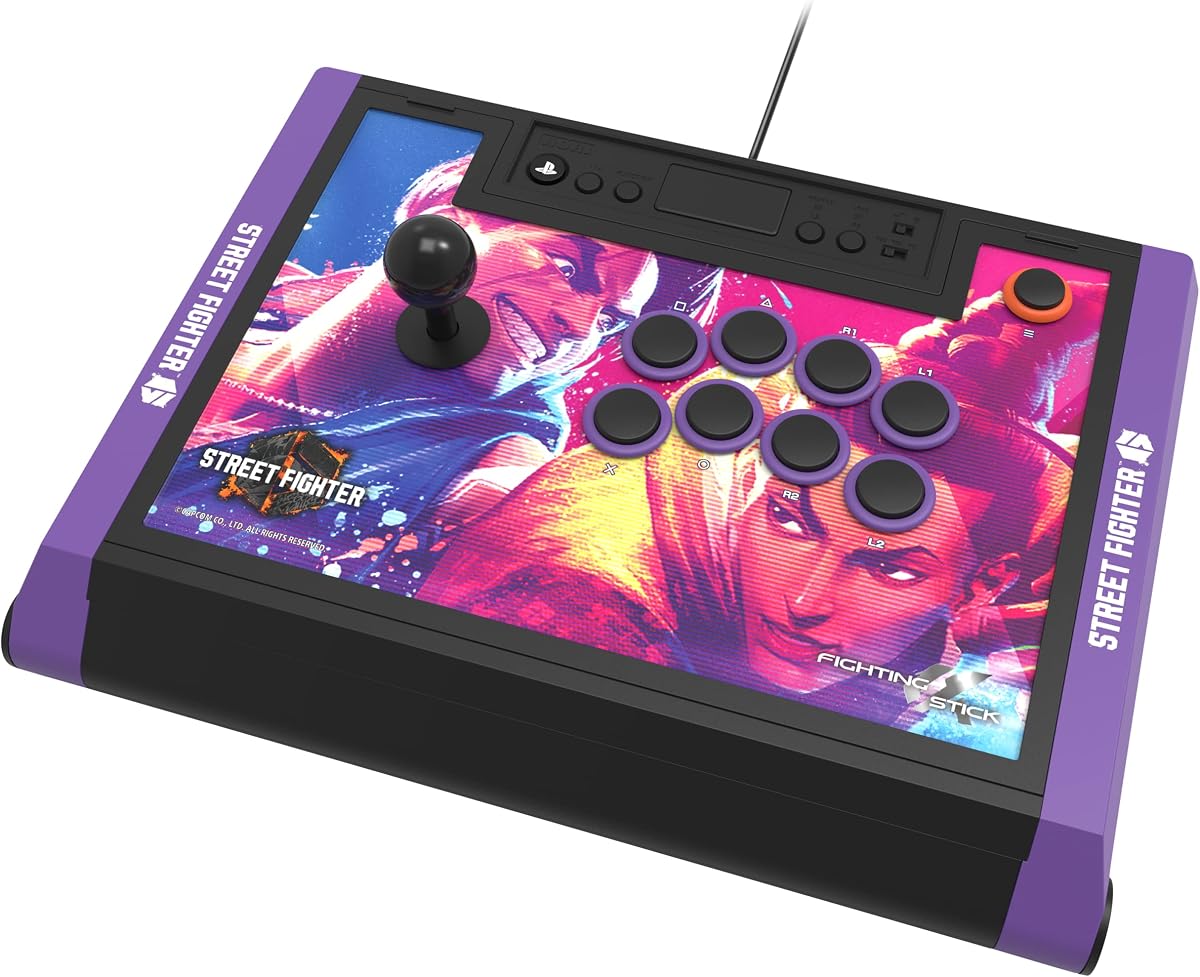
The HORI PlayStation 5 Fighting Stick Alpha Street Fighter 6 Edition delivers the same robust performance as the standard model with added visual flair. Fans of the franchise will appreciate the themed artwork that celebrates the game's release.
We may earn a commission when you buy through this link, at no additional cost to you.
Key strengths include the internal Hayabusa components which ensure high performance and the official licensing from both Sony and Capcom. The top panel can be swapped allowing you to display alternate art or customize the look over time.
Trade-offs involve the higher cost and niche appeal which may not justify the price for players focused on other titles. These are minor for fans who value the thematic design and collectibility alongside quality construction.
This stick is perfect for Street Fighter enthusiasts who want a premium controller with character inspired visuals. We recommend it for those seeking both performance and style in their gaming setup.
The Street Fighter 6 artwork adds personality and visual appeal for fans of the series who play on PS5.
Dual licensing ensures compatibility and authenticity while supporting the official release of the fighting title.
We may earn a commission when you buy through this link, at no additional cost to you.
The Qanba Q7 Obsidian 2 is a versatile wired stick that simplifies switching between different systems using an onboard switch. Its design emphasizes usability and brand reliability for PlayStation users who prefer a stable connection.
We may earn a commission when you buy through this link, at no additional cost to you.
Key strengths include the official Sony licensing and swappable Sanwa joystick tops which allow for customization without opening the case. The full control panel with touch pad enhances navigation and input flexibility during matches.
Trade-offs involve the lack of wireless support and limited console compatibility compared to more universal models. These are acceptable for users who prioritize build quality and official support over broad cross platform capabilities.
This stick is best for PlayStation focused gamers who want a reliable wired option with some customization. We recommend it for those who value ease of use and brand trust in their controller choice.
The included switch lets you toggle between PS5 PS4 and PC modes quickly without reconfiguring settings each time.
Swappable Sanwa tops allow you to adjust the stick's feel to suit your personal preference easily.
We may earn a commission when you buy through this link, at no additional cost to you.
The HORI PlayStation 5 Fighting Stick Alpha TEKKEN 8 Edition offers the same performance as the standard model with themed visuals for TEKKEN fans. It combines tournament grade build quality with exclusive artwork that celebrates the latest installment.
We may earn a commission when you buy through this link, at no additional cost to you.
Key strengths include the proprietary Hayabusa components which ensure high precision and durability. The official licensing from Bandai Namco and Sony ensures compatibility and adds collectible value for fans of the series.
Trade-offs involve the higher cost and specific theme which may not appeal to players who prefer other fighting games. These are minor for enthusiasts who want both top tier performance and visual flair on their desk.
This stick is ideal for TEKKEN players who want a premium controller that honors their favorite franchise. We recommend it for those seeking a blend of quality performance and thematic design.
The TEKKEN 8 artwork adds visual appeal and celebrates the game's release for dedicated fans.
Licensing from Bandai Namco ensures authenticity and supports the official release of the fighting title.
We may earn a commission when you buy through this link, at no additional cost to you.
The GuileKeys GK-18 Leverless Arcade Stick introduces a unique all-button layout that replaces the traditional joystick with four movement keys. This design reduces input errors and offers precise control for players willing to adapt their technique.
We may earn a commission when you buy through this link, at no additional cost to you.
Key strengths include ultra-low latency, customizable RGB lighting, and an OLED screen that displays current input modes. The hot-swappable switches let you replace keycaps or switches without soldering allowing for deep customization.
Trade-offs involve the steep learning curve for leverless play and the need for an adapter for PS5 compatibility. These are acceptable for competitive gamers seeking innovative control schemes and advanced lighting features.
This stick is best for tech-savvy players who want a modern alternative to traditional fight sticks. We recommend it for those interested in leverless mechanics and extensive customization options.
The all-button design reduces physical input errors and can lead to faster and more accurate directional inputs.
RGB lighting and hot-swappable switches allow you to personalize both aesthetics and tactile feel easily.
We may earn a commission when you buy through this link, at no additional cost to you.
Choosing the right arcade stick involves understanding key features and how they affect your gameplay experience. This guide explains the most important factors to consider before making a purchase.
Ensure the stick supports PS5 and any other systems you own. Some models work across consoles while others are exclusive. Check for official licensing to avoid connection issues.
Verify compatibility with PS5 and your other platforms before buying to ensure smooth setup.
Look for high quality joysticks and buttons from brands like Sanwa or Hayabusa. These parts withstand intense use and provide better tactile feedback. Durability directly impacts long term satisfaction.
Prioritize sticks with premium components to ensure longevity and consistent performance.
Wired sticks offer zero latency but limit mobility. Wireless options provide convenience but may have input lag. Choose based on your preference for stability versus flexibility.
Decide if you need wireless freedom or prefer the stability of a wired connection.
Some sticks allow panel swaps or part replacements. Customization lets you personalize the look and feel. Check if tools or spare parts are included.
Look for customization features if you plan to personalize your controller later.
A heavy stick with rubber feet stays put during play. Lightweight models may slide around. Stability is crucial for maintaining control during intense matches.
Choose a model with sufficient weight and grip to prevent sliding.
Budget sticks offer basic functionality while premium ones include better components. Balance cost with features you need. Higher price often means better longevity.
Set a budget and compare features to find the best value.
Advanced users may want software to remap buttons. This allows for game-specific profiles. Check if the manufacturer provides a reliable utility.
Ensure the stick supports button mapping if you want tailored controls.
Design matters for many gamers. Themed editions celebrate popular games. Choose a look that fits your setup and personal style.
Pick a design that matches your gaming room's style.
Connect the stick to your PS5 using the USB cable. Ensure the system recognizes it as a controller. Test inputs in a game to verify all buttons and the joystick work correctly.
Keep the stick clean by wiping the surface with a dry cloth. Avoid spills and dust accumulation inside the casing. Regular maintenance prevents stick drift and button failures over time.
Store the controller in a safe place when not in use. If it has a detachable cable coil it neatly. Proper storage extends the life of the components and protects against damage.
Arcade sticks work primarily with fighting games on PS5. Most other genres may not support them. Check game compatibility lists before purchase to ensure it fits your needs.
Sanwa components are industry standards known for durability and feel. They offer consistent performance for competitive play. Most pros prefer them over generic alternatives for reliability.
Many sticks allow button customization through software or physical swapping. Check if the model supports full remapping. Some require opening the case to replace parts.
Wireless can introduce slight latency compared to wired connections. For competitive play wired is recommended. Bluetooth improvements have reduced lag but wired remains safest for tournaments.
No you do not need a separate controller for PS5 with most modern sticks. Ensure the stick supports PS5 natively. Some bundles include adapters for easier setup.
Use a soft brush or cloth to remove dust from the joystick. Avoid liquids near internal parts. Regular cleaning prevents buildup that could affect movement and performance.
Beginners benefit from affordable sticks with solid build quality. Models like the MAYFLASH F700 offer good value. Start with a budget option before upgrading to premium models.
We have reviewed ten top arcade sticks for PS5 ranging from budget friendly to premium tournament ready models. The HORI Fighting Stick Alpha and MAYFLASH F700 offer standout value for different player needs.
Prioritize component quality and compatibility when selecting a controller. Build materials and connection types directly affect performance and longevity. Choose a model that aligns with your specific gaming goals.
Prices and availability change frequently so check current listings before buying. Verify the latest firmware updates and compatibility details to ensure the best experience on your PS5 today.